What Is a Client Server Network
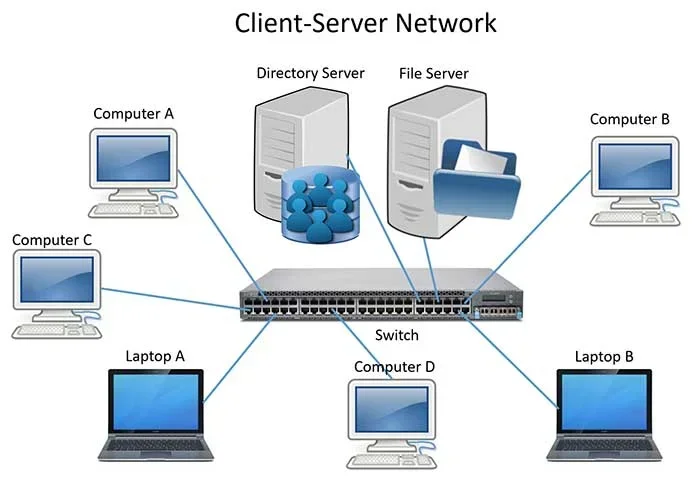
The client server network is the backbone of modern computing, dividing tasks between clients and servers. It powers everything from websites and emails to cloud apps and mobile networks. Understanding this model helps you grasp how data flows across the internet.
The client server network is the backbone of modern computing. It is a model where one computer, the client, asks for a service, and another computer, the server, provides it. You use this model every time you open a website, send an email, or stream a video. The client server network divides tasks so that devices specialize. Clients handle the user interface, while servers handle data storage and processing. This separation makes the internet fast, reliable, and scalable.
Think of a restaurant. You are the client. You look at a menu and place an order. The kitchen is the server. It prepares your food and sends it back. The waiter is the network protocol, carrying your request and the response. This simple analogy shows how the client-server model works. It is the foundation of nearly all digital services today.
In this guide, we will explore what a client server network is, how it works, and why it matters. We will look at the key components, different types of servers, and how this model compares to peer-to-peer networks. You will also see real-world examples and learn about the benefits and challenges. By the end, you will understand why this architecture powers the internet.
Key Takeaways
- A client server network splits work between requesting devices (clients) and providing devices (servers).
- This model powers almost every online service you use daily, from web browsing to email.
- Centralized servers make management, security, and updates easier for businesses.
- Client-server architecture differs from peer-to-peer networks in control and scalability.
- Common server types include web servers, database servers, and file servers.
- Even mobile network codes like 0931 rely on client-server communication behind the scenes.
- Cloud computing and SaaS environments are built on the client-server model.
📑 Table of Contents
How a Client Server Network Works
The client server network operates on a request-response pattern. The client sends a request. The server receives it, processes it, and sends back a response. This exchange happens over a network using protocols like TCP/IP. The process is fast and invisible to most users.
The Client Role
A client is any device that requests a service. It can be a laptop, a smartphone, or a tablet. The client runs application software that sends requests. It also displays the results to the user. For example, your web browser is a client. When you type a URL, the browser sends a request to a web server. The server sends back the webpage, and your browser displays it.
The Server Role
A server is a powerful computer that provides services. It listens for incoming requests and processes them. Servers store data, run applications, and manage resources. They are usually housed in data centers with strong cooling and backup power. A single server can handle thousands of client requests at once. The server hardware is designed for reliability and speed.
The Network Communication
Network communication ties clients and servers together. Protocols define the rules for data transmission. TCP/IP is the most common protocol suite. It breaks data into packets, sends them across the network, and reassembles them at the destination. This ensures that every request and response reaches the right place. Without these rules, the client-server architecture would not work.
Key Components of a Client Server Network
A client server network has several important parts. Each part plays a specific role in making the system work smoothly.
Hardware and Software
The hardware layer includes client devices like laptops and phones. It also includes the server machines that store and process data. Network hardware such as routers and switches directs traffic between them. The software layer includes the operating systems and applications. Servers often run specialized operating systems like Windows Server or Linux. Clients run desktop or mobile operating systems with user-friendly apps.
Centralized Server
One of the main features of this model is centralization. All data and services live on the server. Clients do not store the data locally. This makes it easy to update information. If a company needs to change a database, they update the server once. Every client sees the new data the next time they connect. This central control improves consistency and security.
Service Provider and Network Protocol
A service provider hosts the servers and manages the network. They ensure the servers are always available. Network protocols like HTTP, FTP, and SMTP define how clients and servers talk. HTTP is for web pages. FTP is for file transfers. SMTP is for email. Each protocol handles a specific type of network communication.
Types of Servers in a Client Server Network
Servers come in many forms. Each type handles a specific job within the client server network.
Web Servers
A web server hosts websites. When you type a URL, the web server sends the webpage to your browser. Popular web servers include Apache and Nginx. They handle millions of requests per day. Web servers store HTML, CSS, JavaScript, and images.
Database Servers
A database server stores and manages data. Applications send queries to the database server to retrieve or save information. Examples include MySQL, PostgreSQL, and Microsoft SQL Server. Database servers are essential for apps, online banking, and e-commerce.
File Servers
A file server stores files that users can access over the network. Companies use file servers to share documents. Employees can save work to a central location. This makes backup and collaboration easier. File servers rely on protocols like SMB and NFS.
Application Servers
An application server runs business logic and applications. It processes complex tasks that go beyond simple data storage. Many modern apps use application servers to handle user requests. They often work closely with database servers to deliver dynamic content.
Client Server vs Peer-to-Peer Network
Not all networks use the client-server model. Another common model is the peer-to-peer network. Understanding the difference helps you see why the client server network is so popular.
Key Differences
In a peer-to-peer network, every device can act as both a client and a server. There is no central authority. In a client-server architecture, the server is the central authority. The table below highlights the main differences.
| Feature | Client Server Network | Peer-to-Peer Network |
|---|---|---|
| Control | Centralized on the server | Distributed among all devices |
| Scalability | Easy to scale by adding more servers | Difficult to scale as the network grows |
| Security | Strong, centralized security policies | Weaker, each device manages its own security |
| Cost | Higher upfront cost for server hardware | Lower cost, uses existing devices |
| Management | Easier to manage and update | Harder to manage many individual devices |
Most businesses choose the client server network model. It offers better control and reliability. Peer-to-peer is common in small home networks or file-sharing applications. However, even peer-to-peer systems often use a central server for discovery or indexing.
Benefits and Drawbacks of the Client Server Model
Like any architecture, the client server network has pros and cons. Understanding them helps you make informed decisions.
Why Businesses Love It
- Centralized management: Updates and security patches are applied in one place.
- Scalability: You can add more servers to handle growing demand.
- Security: Data is protected in a central location with access controls.
- Reliability: Servers are built for uptime and redundancy.
- Performance: Dedicated servers handle heavy workloads without slowing down clients.
- Better user experience: Clients receive fast, consistent responses.
Potential Challenges
- Cost: Server hardware and maintenance can be expensive.
- Single point of failure: If the server goes down, clients lose access.
- Complexity: Setting up and managing a server network requires expertise.
- Network dependency: Clients need a stable network connection to reach the server.
- Server maintenance: Skilled staff are needed for regular updates and troubleshooting.
- Latency: Distance between client and server can slow response times.
Despite these challenges, the benefits often outweigh the drawbacks. Many organizations use cloud services to reduce the cost and complexity of managing their own servers.
Real-World Examples of Client Server Networks
The client server network is everywhere. You interact with it daily, often without realizing it.
Everyday Uses
- Web browsing: Your browser (client) requests pages from a web server.
- Email: Your email app (client) sends and receives messages through a mail server.
- Online banking: Your banking app (client) connects to a bank server to check balances.
- Streaming services: Apps like Netflix (client) fetch video from content delivery servers.
- Cloud storage: Services like Google Drive use a server to store and sync your files.
Cloud Computing and SaaS
Cloud computing is a prime example of the client server model. Users access applications and data over the internet. A SaaS environment relies entirely on this architecture. The provider hosts the application on a server, and users access it through a client browser or app. Understanding the cost of sales for a SaaS product shows how efficient this model can be, because the provider handles all the heavy lifting.
Even mobile networks use this model. When you look up what 0931 network refers to, your phone sends a request to a carrier server, which responds with the network information. The same request-response pattern powers the entire mobile internet.
Online Gaming and Social Media
Online gaming uses client server networks. Game clients send player actions to a game server. The server calculates the game state and sends updates back. This keeps the game fair and consistent for all players. Social media platforms are another example. Your phone is the client. It sends requests to load posts, photos, and messages. The social media server processes these and delivers a personalized feed.
Smart Home Devices
Smart home devices also rely on this model. A smart thermostat (client) sends temperature data to a cloud server. The server analyzes the data and sends back adjustments. This keeps your home comfortable and energy-efficient.
Common Mistakes and Expert Tips
Setting up a client server network can be tricky. Avoid these common mistakes.
Common Mistakes
- Underestimating server capacity: Plan for growth. A server that is too small will slow down all clients.
- Ignoring security: Always use firewalls, encryption, and strong passwords.
- Skipping backups: Regular backups protect against data loss.
- Using outdated protocols: Stick to modern, secure protocols like HTTPS and SFTP.
- Failing to plan for traffic spikes: Sudden surges can crash an unprepared server.
- Neglecting documentation: Good records make troubleshooting faster.
Quick Tips
- Monitor server performance regularly.
- Use load balancers to distribute traffic evenly.
- Keep client and server software up to date.
- Document your network setup for easy troubleshooting.
- Use content delivery networks (CDNs) for faster global access.
Expert Insights
According to network engineers, the key to a successful client server network is planning. Start with a clear map of what each client needs. Choose server hardware that can handle peak loads. Use redundant connections to avoid a single point of failure. Network segmentation can improve security and performance. Regular testing ensures the network stays fast and secure.
Conclusion
The client server network is the foundation of modern digital life. It separates the user side from the service side, making the internet fast, secure, and scalable. From web browsing to cloud apps, this model powers almost everything you do online. Understanding how it works gives you a clearer picture of the technology you use every day.
Whether you are a business owner or a curious user, the client-server model is worth knowing. It helps you make better decisions about software, services, and network design. As technology grows, the client server network will remain a core concept in computing. Edge computing and IoT are changing how clients and servers interact, but the core request-response model remains the same. Embrace it, and you will see the digital world in a whole new light.
Frequently Asked Questions
What is a client server network in simple terms?
A client server network is a setup where client devices request services and server devices provide them. The client asks for data or a service, and the server responds. This model is the backbone of the internet and most business networks.
How does a client server network differ from peer-to-peer?
In a client server network, a central server handles all requests and manages resources. In a peer-to-peer network, every device can act as both a client and a server. Client server networks offer better control and security, while peer-to-peer networks are simpler for small setups.
What are the main types of servers in a client server network?
Common types include web servers, database servers, file servers, and application servers. Each type handles a specific job. Web servers host websites, database servers manage data, file servers store shared files, and application servers run business logic.
Why is the client server model so popular?
The model is popular because it offers centralized management, strong security, and easy scalability. Businesses can update data in one place and control access. It also allows servers to be optimized for performance and reliability.
Can a laptop be a client in a client server network?
Yes, any device that requests a service is a client. Laptops, smartphones, tablets, and desktop computers can all act as clients. They run applications that send requests to servers over the network.
What protocol is used in a client server network?
The most common protocol suite is TCP/IP. Specific protocols like HTTP, FTP, and SMTP handle different types of communication. HTTP is for web traffic, FTP for file transfers, and SMTP for email delivery.