What Is an Electronic Filing System
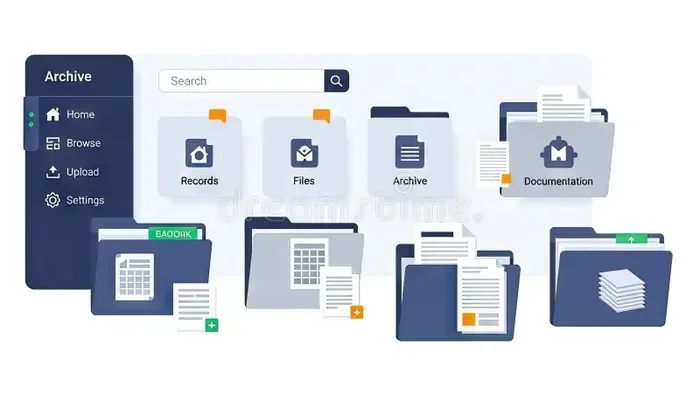
An electronic filing system is a digital way to organize, store, and retrieve documents without using paper. It replaces bulky filing cabinets with software or cloud platforms that make document management faster and simpler. Whether you are a small business or a busy professional, a digital filing setup saves time, reduces clutter, and improves productivity.
Have you ever spent twenty minutes looking for a single document? Maybe it was buried under a stack of papers on your desk, or tucked away in a dusty filing cabinet. If this sounds familiar, you are not alone. Millions of people and businesses waste hours every week searching for documents they need. That is where an electronic filing system comes in.
An electronic filing system is a digital method for organizing, storing, and retrieving documents. Instead of paper folders and physical cabinets, you use software or cloud platforms to manage your files. Think of it as a virtual filing cabinet that never runs out of space and never gets messy. In this article, we will walk you through everything you need to know about electronic filing systems. You will learn how they work, why they matter, and how to set one up for yourself.
The shift from paper to digital has been happening for years, but many people still do not understand the full power of a digital filing system. Whether you are a freelancer managing invoices, a student organizing research, or a business handling thousands of records, an electronic approach can change the way you work. Let us dive in and explore this topic in depth.
Key Takeaways
- Digital Organization: An electronic filing system lets you store and find documents instantly without paper.
- Time Savings: Searching for files takes seconds instead of minutes or hours.
- Cost Reduction: You save money on paper, printing, and physical storage space.
- Better Security: Digital files can be encrypted, backed up, and access-controlled.
- Remote Access: Cloud-based systems let you access documents from anywhere.
- Eco-Friendly: Going paperless reduces waste and supports sustainability goals.
📑 Table of Contents
- What Is an Electronic Filing System?
- How Does an Electronic Filing System Work?
- Benefits of Using an Electronic Filing System
- Key Features to Look For in an Electronic Filing System
- Electronic Filing System vs. Traditional Filing
- How to Set Up Your Own Electronic Filing System
- Common Mistakes to Avoid
- Expert Insights on Electronic Filing
- Conclusion
What Is an Electronic Filing System?
An electronic filing system is a software-based solution that allows users to digitize, organize, and manage documents in a structured way. Instead of creating physical folders and storing paper inside them, you create digital folders and store files like PDFs, images, and spreadsheets inside them. These systems often include features like search, tagging, indexing, and version control.
The core idea is simple. You take a document, convert it into a digital format, and then save it in a logical folder structure. From there, you can search for it, share it, or edit it whenever you need. Some systems are installed on your computer, while others run in the cloud, meaning you can access them from any device with an internet connection.
How Does It Differ from a Traditional Filing System?
A traditional filing system relies on physical paper, folders, and cabinets. You have to physically walk to the cabinet, pull out the right folder, and flip through papers to find what you need. An electronic filing system removes all of that. You type a keyword into a search bar, and the system finds the document in seconds. It is like the difference between asking someone to hand you a book from a library shelf versus searching for that book in a digital catalog.
How Does an Electronic Filing System Work?
Understanding how an electronic filing system works helps you appreciate its value. The process usually involves a few key steps: scanning or creating digital files, organizing them into folders, tagging or labeling them for easy search, and then retrieving them when needed.
Step 1: Digitizing Documents
The first step is converting paper documents into digital files. You can use a scanner to turn physical papers into PDFs. Many modern printers have built-in scanners that make this easy. Some people even use their smartphone cameras to capture documents and save them as images or PDFs. Once a document is digital, it is ready to be filed.
Step 2: Organizing and Categorizing
Next, you organize your digital files into a logical structure. This might mean creating folders by category, date, or project. For example, you might have a folder called “Invoices,” another called “Contracts,” and another called “Tax Documents.” Good organization is the backbone of any effective electronic filing system. Without it, even a digital system becomes chaotic.
Step 3: Tagging and Indexing
Most electronic filing systems allow you to add tags or metadata to documents. Tags are like labels that help you find files faster. For instance, you might tag a document with “2024,” “Tax,” and “Q1.” When you search for “Tax” later, the system pulls up all documents with that tag. Indexing is the behind-the-scenes process that makes search fast and accurate.
Step 4: Retrieval and Sharing
The final step is retrieval. When you need a document, you simply search for it by name, tag, or keyword. You can also share documents with colleagues or clients through links or secure file-sharing features. This is where an electronic system really shines compared to paper filing.
Benefits of Using an Electronic Filing System
Switching to a digital filing system offers many advantages. Let us look at the biggest ones.
Saves Time
Time is one of the most valuable resources you have. An electronic filing system saves you time in two big ways. First, finding documents takes seconds instead of minutes. Second, you do not have to physically handle, sort, or file paper anymore. Over weeks and months, those saved minutes add up to hours of productivity.
Reduces Costs
Running a paper-based system costs money. You need paper, ink, printers, filing cabinets, and physical storage space. An electronic system eliminates most of these costs. You also save on the labor cost of manually sorting and retrieving documents. For businesses, these savings can be significant over time.
Improves Security
Paper documents can be lost, damaged by fire or water, or accessed by unauthorized people. An electronic filing system offers much better protection. You can encrypt files, set passwords, control who has access, and back up data to multiple locations. Many systems also keep audit trails that show who viewed or edited a document and when.
Supports Remote Work
More people are working remotely than ever before. A cloud-based electronic filing system lets you access your documents from home, the office, or anywhere in the world. You do not need to be physically present at a specific location to find or share a file. This flexibility is a major reason many businesses have made the switch.
Helps the Environment
Going paperless is better for the planet. Less paper means fewer trees cut down, less water used in paper production, and less waste in landfills. An electronic filing system supports your sustainability goals while also making your life easier. It is a win-win situation.
Key Features to Look For in an Electronic Filing System
Not all electronic filing systems are created equal. When you are evaluating options, here are the features you should prioritize.
Search Functionality
The search feature is the heart of any electronic filing system. You want a system that lets you find documents quickly using keywords, tags, dates, or file types. Advanced systems even use optical character recognition (OCR) to search the text inside scanned documents.
Cloud Storage and Accessibility
Cloud-based systems are becoming the standard. They let you access your files from any device and collaborate with others in real time. If you are considering a cloud solution, you might also want to understand what a SaaS environment is, since many electronic filing platforms operate as software-as-a-service products. This means you access the software through your browser without installing anything on your computer.
Version Control
Version control tracks changes to documents over time. If someone edits a file, the system keeps the old version too. This is incredibly useful for teams that work on the same documents. You can always go back to a previous version if needed.
Security and Permissions
Look for systems that offer role-based access control, encryption, and two-factor authentication. These features ensure that sensitive documents stay safe and only authorized people can view or edit them.
Integration with Other Tools
A good electronic filing system should work well with the tools you already use. Whether it is your email client, calendar, or project management software, integrations make your workflow smoother and more efficient.
Electronic Filing System vs. Traditional Filing
Let us compare the two approaches side by side so you can see the difference clearly.
| Feature | Traditional Filing | Electronic Filing System |
|---|---|---|
| Storage Space | Requires physical cabinets and rooms | Stored digitally; uses minimal physical space |
| Search Speed | Minutes to hours | Seconds |
| Security | Vulnerable to theft, fire, water damage | Encrypted, password-protected, backed up |
| Accessibility | Must be physically present | Accessible from anywhere with internet |
| Cost Over Time | High (paper, ink, cabinets, space) | Low (software subscription or free tools) |
| Collaboration | Difficult; requires physical handoff | Easy; real-time sharing and editing |
| Environmental Impact | High paper usage | Paperless; eco-friendly |
The comparison makes it clear why so many people and businesses are making the switch. An electronic filing system outperforms traditional filing in nearly every category. The only thing paper filing has going for it is that it does not require technology or an internet connection. But for most people today, that is not a dealbreaker.
How to Set Up Your Own Electronic Filing System
Setting up an electronic filing system does not have to be complicated. Here is a simple step-by-step guide you can follow.
Step 1: Choose Your Platform
Start by picking a tool that fits your needs. Some popular options include Google Drive, Dropbox, Microsoft OneDrive, and dedicated document management systems like Evernote or Notion. If you want to understand more about building digital tools for your workflow, learning what Webflow is can also help if you are considering custom web-based solutions for managing documents.
Step 2: Create a Folder Structure
Plan your folder hierarchy before you start moving files. A good structure might look like this:
- Personal
- Tax Documents
- Medical Records
- Insurance
- Work
- Projects
- Invoices
- Contracts
Keep your structure simple and consistent. If you can not remember where you filed something, your structure might be too complicated.
Step 3: Digitize Existing Paper Files
Go through your current paper files and scan them into digital format. You do not need to do this all at once. Start with the most important or frequently used documents and work your way through the rest over time.
Step 4: Establish Naming Conventions
Create a consistent naming convention for your files. For example, use the format “YYYY-MM-DD_DocumentName_Version.” This makes sorting and searching much easier. Good naming habits are a small effort that pay off big time in an electronic filing system.
Step 5: Tag and Index
Add tags and metadata to your documents as you file them. This extra step takes a few seconds now but saves you significant time later when you need to find something quickly.
Step 6: Back Up Your Files
Always back up your digital files. Use cloud storage, an external hard drive, or both. A good backup strategy ensures you never lose important documents, even if your computer fails.
Common Mistakes to Avoid
Setting up an electronic filing system is straightforward, but people often make a few common mistakes. Here is what to watch out for.
- Skipping the planning phase: Without a clear folder structure and naming convention, your digital files will quickly become just as messy as paper ones.
- Not scanning everything: If you leave some documents in paper form, you create a split system that is harder to manage.
- Ignoring backups: Digital files can be lost just like paper ones. Always have a backup plan in place.
- Overcomplicating tags: Use a simple tagging system. Too many tags make search harder, not easier.
- Forgetting to update: An electronic filing system needs regular maintenance. Delete old files, update tags, and keep your folder structure tidy.
Expert Insights on Electronic Filing
Organization experts agree that an electronic filing system is one of the best investments you can make for your personal or professional life. The key is to start simple and build good habits from day one. Do not try to create a perfect system right away. Instead, start with a basic folder structure and refine it as you go. The goal is progress, not perfection.
Many professionals also recommend setting aside time each week to file new documents. This small habit prevents the buildup of digital clutter and keeps your system running smoothly. Think of it like tidying your desk at the end of each day. A few minutes of effort now saves you from a major cleanup later.
Conclusion
An electronic filing system is one of the simplest yet most powerful tools you can use to organize your digital life. It saves time, reduces costs, improves security, and supports remote work. Whether you are a student, a freelancer, or a business owner, making the switch from paper to digital is a decision you will not regret. Start small, stay consistent, and watch how much easier document management becomes. The future of filing is digital, and there is no better time to make the change than right now.
Frequently Asked Questions
What is an electronic filing system used for?
An electronic filing system is used to digitize, organize, store, and retrieve documents digitally. It replaces paper-based filing with software or cloud platforms that make document management faster, more secure, and more efficient. People use it for everything from storing invoices and contracts to organizing research and personal records.
Is an electronic filing system safe?
Yes, most electronic filing systems are very safe. They use encryption, password protection, and access controls to keep your documents secure. Many also offer automatic backups, so your files are protected even if your device fails. Choosing a reputable system and following good security practices, like using strong passwords, keeps your data safe.
Can I set up an electronic filing system for free?
Absolutely. Many cloud storage services like Google Drive and Dropbox offer free tiers that work well as basic electronic filing systems. You can create folders, upload documents, and search for files without paying anything. Paid plans usually offer more storage and advanced features, but the free options are a great place to start.
How is an electronic filing system different from a document management system?
An electronic filing system is a simpler tool for organizing and storing digital files. A document management system (DMS) is more advanced and often includes features like workflow automation, collaboration tools, and detailed audit trails. You can think of an electronic filing system as a basic version of a full document management system.
What types of documents can I store in an electronic filing system?
You can store almost any type of document in an electronic filing system. This includes PDFs, images, spreadsheets, word processing files, scanned paper documents, and even emails. As long as you can save it as a digital file, it can go into your electronic system. This flexibility makes it useful for personal, academic, and business needs alike.
How long does it take to set up an electronic filing system?
Setting up a basic electronic filing system can take as little as an hour. You need to choose a platform, create a folder structure, and move your first batch of files over. The more documents you have to digitize, the longer it will take. But you can spread the process over several days and still see great results quickly.