What Happens When You Fry a Motherboard
When you fry a motherboard, the board suffers irreversible electrical damage that can kill your entire PC instantly. You will notice warning signs like a burning smell, no power, or visible scorch marks. Understanding what goes wrong helps you act fast and decide whether to repair or replace the board.
So your computer just died. You hit the power button, and nothing happens. No fans spinning. No lights. No beeps. Just silence. If you have ever been in this situation, you know how terrifying it can be. One minute your PC is fine, and the next minute it is completely dead. The culprit might be a fried motherboard.
A fried motherboard is one of the worst things that can happen to a computer. The motherboard is the backbone of your entire system. Every other component connects to it. When it fails, your whole PC goes down with it. In this article, we will walk through exactly what happens when a motherboard fries, why it happens, and what you can do about it.
Whether you are a gamer, a remote worker, or someone who just uses a laptop for browsing, this guide will help you understand motherboard failure. We will cover the signs, the causes, the repair options, and most importantly, how to prevent it from happening to you.
Key Takeaways
- A fried motherboard means permanent electrical damage that stops your PC from working.
- Power surges, overheating, and short circuits are the top causes of motherboard failure.
- Warning signs include no power, beeping codes, burning smells, and visible burn marks.
- Repairing a fried motherboard is often expensive and sometimes not worth the cost.
- Using a surge protector and keeping your PC cool can prevent most motherboard failures.
- A dead motherboard can damage other components like your GPU or RAM if not addressed quickly.
📑 Table of Contents
What Does It Mean to Fry a Motherboard?
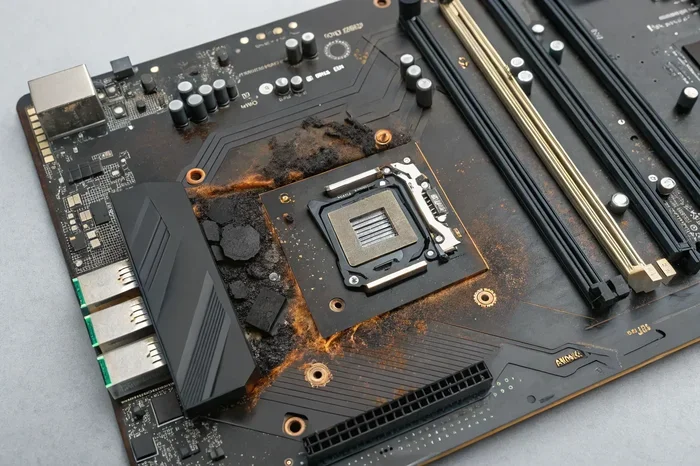
When we say a motherboard is “fried,” we mean the circuits on the board have suffered irreversible electrical damage. The traces, chips, and capacitors on the board get burned out or short-circuited. Once this happens, the motherboard can no longer send or receive signals properly.
Think of the motherboard like a highway system for your computer. Every component is a destination, and the motherboard is the road network. When a highway gets destroyed, nothing can reach its destination. That is exactly what happens when a motherboard fries. The data pathways are physically damaged.
A fried motherboard does not always mean the board is completely destroyed. Sometimes only certain sections get damaged. For example, the power delivery section might fry while the CPU slots remain intact. But in most cases, a fried motherboard means your computer will not turn on or function at all.
If you are dealing with a situation where what happens if an NVMe SSD disconnects from a damaged board, the data on your drive might still be safe even if the motherboard is dead. But more on that later.
How Does a Motherboard Get Fried?
There are several ways a motherboard can fry. The most common causes include:
- Power surges: A sudden spike in electricity can push too much voltage through the board’s circuits.
- Overheating: When the board gets too hot, the solder joints and components can melt or warp.
- Short circuits: Something conductive touching the wrong parts of the board can cause a direct short.
- Liquid damage: Water or other liquids can cause corrosion and short circuits on the board.
- Aging and wear: Over time, capacitors and other components degrade and can fail unexpectedly.
Common Causes of a Fried Motherboard
Understanding the causes of motherboard failure is the first step in preventing it. Most motherboard failures happen because of something that could have been avoided. Let us look at the top causes in detail.
Power Surges and Electrical Spikes
The number one killer of motherboards is power surges. These happen when there is a sudden spike in voltage coming from your wall outlet or power supply. A lightning strike nearby, a power grid fluctuation, or even a faulty power strip can send a deadly surge through your PC.
Your motherboard is designed to handle a specific voltage range. When that range gets exceeded, the delicate circuits cannot handle the extra power. They burn out almost instantly. This is why using a surge protector is so important. A good surge protector absorbs extra voltage and keeps it from reaching your components.
Interestingly, power issues can also affect other parts of your system. For instance, if you are curious about how much power a laptop uses when plugged in, you can see how power management matters across all devices. A surge that fries a desktop motherboard can also damage a laptop’s internal components.
Overheating and Poor Cooling
Heat is the enemy of electronics. Your motherboard generates heat during normal use, but it also relies on cooling systems to stay within safe temperatures. When cooling fails, the board can overheat and suffer permanent damage.
Overheating can come from several sources:
- Clogged air vents: Dust buildup blocks airflow and traps heat inside the case.
- Failed fans: If a case fan or CPU cooler stops working, heat builds up fast.
- Thermal paste degradation: Over time, the paste between the CPU and cooler dries out and loses effectiveness.
- Overclocking without proper cooling: Pushing your components beyond their limits generates extra heat.
Keeping your PC cool is one of the simplest ways to protect your motherboard. Make sure your fans are working and that dust is not building up inside your case. If you want to monitor your system temperatures, checking your good idle GPU temperature is a great starting point for overall thermal health.
Liquid Damage and Short Circuits
Spilling a drink on your desktop or dropping your laptop in water can instantly fry a motherboard. Liquids conduct electricity, and when they bridge connections on the board, they create short circuits. These shorts can burn out components in seconds.
Even if you dry the board quickly, mineral deposits from the liquid can remain and continue to cause corrosion over time. This is why liquid damage is so dangerous and often leads to a completely dead motherboard.
Signs That Your Motherboard Has Fried
How do you know if your motherboard is fried? There are several warning signs that can point to motherboard failure. Some are obvious, and others are subtle.
Your PC Will Not Turn On
The most obvious sign of a fried motherboard is when your PC refuses to power on at all. You press the power button, and nothing happens. No fans spin. No lights come on. No beep codes. If this happens, the motherboard is a prime suspect.
However, a PC that will not turn on does not always mean the motherboard is fried. It could be a dead power supply, a faulty power button, or a dead wall outlet. Before you conclude the motherboard is dead, you should rule out these simpler causes first.
Burning Smell or Visible Scorch Marks
If you smell something burning when you try to turn on your PC, stop immediately. A burning smell from your computer is never a good sign. It usually means a component has overheated or burned out. Open up your case and look at the motherboard. If you see scorch marks, bulging capacitors, or discolored areas, your motherboard has likely fried.
Do not try to power on the PC again if you see these signs. Doing so can cause further damage to other components.
Random Freezes and Blue Screens
Sometimes a motherboard does not fry all at once. Instead, it starts to fail gradually. You might notice your PC freezing randomly, blue screen errors, or programs crashing unexpectedly. These can all be signs of a failing motherboard.
These symptoms can also be caused by other issues like bad RAM or a failing hard drive. But if you have ruled out those causes, the motherboard should be next on your list.
USB Ports and Peripherals Stop Working
A fried motherboard can also show up as specific ports or features that stop working. If your USB ports suddenly become unresponsive, your audio jack stops producing sound, or your Ethernet port fails, the motherboard could be the cause.
These targeted failures happen because the traces or controllers for those specific functions have burned out. The rest of the board might still work, but the damaged section is a dead zone.
What Actually Happens Inside the Board When It Frys
Let us get a little technical for a moment. Understanding what happens inside a motherboard when it fries can help you understand why the damage is so severe.
A motherboard is made up of several layers of fiberglass and copper traces. These traces carry electrical signals between components. On top of the board, you have chips like the CPU socket, RAM slots, PCIe slots, and voltage regulators. Below the surface, there are even more layers of connections.
When a motherboard fries, several things can happen:
- Traces burn out: The copper pathways that carry electricity can melt or vaporize, breaking the connection.
- Capacitors explode: Capacitors store and release electrical energy. When they fail, they can bulge, leak, or even explode.
- VRMs burn: The voltage regulator modules control the power going to the CPU and other components. When they fry, they stop delivering power properly.
- Solder joints crack: Extreme heat can cause solder joints to crack and separate, creating open circuits.
- Chipsets fail: The main chipset that coordinates all board functions can burn out completely.
Each of these failures can happen independently or together. A single power surge can fry multiple components at once. And once a trace or chip is burned out, it cannot be repaired easily. You are usually looking at a full motherboard replacement.
Interestingly, when a motherboard fries, it can sometimes damage other components too. If the power delivery section fails, it can send incorrect voltage to your CPU or RAM. This means a fried motherboard can take down your processor, memory, and even storage drives along with it. This is why it is important to disconnect your PC from power the moment you suspect a motherboard failure.
Can You Fix a Fried Motherboard?
This is the question everyone wants to know the answer to. Can you fix a fried motherboard? The short answer is: it depends.
In most cases, a fried motherboard cannot be repaired at home. The damage is usually too severe and too widespread. Professional board-level repair might be an option, but it is often expensive and time-consuming.
When Repair Is Possible
Repair might be possible if:
- Only one component failed, like a single capacitor.
- The damage is limited to a small section of the board.
- The board is still under warranty or has insurance coverage.
- The motherboard is a high-end model where replacement costs are very high.
A professional repair technician can sometimes replace individual components like capacitors or voltage regulators. This requires specialized equipment like a hot air rework station and soldering skills. But even professional repairs are not always successful.
When Replacement Is the Better Option
In most real-world situations, replacing the motherboard is the better option. Here is why:
- Cost: Professional board-level repair can cost as much as a new motherboard.
- Time: Repairs take days or even weeks, depending on parts availability.
- Reliability: A repaired board might fail again in the future because the underlying cause was not fixed.
- Warranty: If your board is still under warranty, a replacement is usually free.
Before you decide to replace, check if your motherboard is still under warranty. Many manufacturers offer warranties of three to five years. If your board is within that window, contact the manufacturer for a replacement. This can save you a lot of money.
What About the Data?
One of the biggest concerns when a motherboard fries is data loss. The good news is that a fried motherboard usually does not erase your data. Your hard drive or SSD stores data independently of the motherboard.
So if your motherboard dies, you can often remove your storage drive and connect it to another computer to recover your files. This is similar to what happens when an NVMe SSD falls out of its slot. The drive itself is usually fine, but the connection to the motherboard is lost.
However, if the power surge that fried the motherboard also damaged your storage drive, you could lose data. This is why backing up your data regularly is so important. No one wants to learn this lesson the hard way.
How to Protect Your Motherboard from Damage
The best way to deal with a fried motherboard is to prevent it from happening in the first place. Here are some practical steps you can take to protect your motherboard and extend your PC’s lifespan.
Use a Surge Protector
A surge protector is the simplest and most effective way to protect your motherboard from power surges. Do not plug your PC directly into a wall outlet. Always use a surge protector or a UPS (uninterruptible power supply). A UPS provides even better protection because it regulates the power supply and provides battery backup during outages.
Keep Your PC Clean and Cool
Dust is a major enemy of computer components. It builds up over time and blocks airflow, causing heat to build up inside your case. Clean your PC regularly by:
- Using compressed air to blow out dust from fans and vents.
- Cleaning or replacing air filters if your case has them.
- Making sure fans are spinning properly.
- Replacing thermal paste on your CPU every few years.
Avoid Overclocking Without Proper Cooling
Overclocking can push your motherboard and other components beyond their rated limits. If you do overclock, make sure you have adequate cooling and a quality power supply. Overclocking without proper cooling is one of the fastest ways to fry a motherboard.
Handle Your PC With Care
Physical damage can also fry a motherboard. Avoid moving your PC while it is running, as this can cause components to shift and create short circuits. If you are a laptop user, keep your device on a hard, flat surface and avoid placing anything conductive on top of it.
Keep Liquids Away
This one seems obvious, but it is worth repeating. Keep drinks, water bottles, and other liquids far away from your computer. One accidental spill can cause thousands of dollars in damage. If you work near liquids, consider using a spill-proof keyboard or keeping your laptop on a tray.
Replace Old Components Before They Fail
Motherboards, like all electronics, have a lifespan. Capacitors degrade over time, and older boards are more prone to failure. If your motherboard is more than five to seven years old, consider upgrading to a newer model. The cost of a new board is much less than the cost of recovering from a sudden failure.
Conclusion
A fried motherboard is a serious problem that can shut down your entire computer in an instant. Whether it is caused by a power surge, overheating, liquid damage, or simple wear and tear, the result is the same: your PC stops working. The good news is that you can take steps to prevent it from happening. Use a surge protector, keep your PC cool, and handle your components with care.
If your motherboard does fry, do not panic. First, check your warranty. Then, assess whether repair or replacement makes more sense. And remember, your data is probably safe on your storage drive, even if the motherboard is dead.
Taking care of your motherboard means taking care of your entire computer. A little prevention goes a long way toward keeping your system running smoothly for years to come.
Frequently Asked Questions
Can a fried motherboard be repaired?
In some cases, yes. Professional technicians can replace individual components like capacitors or VRMs. However, most repairs are expensive and not always reliable. Replacement is often the better option, especially if the board is out of warranty.
How much does it cost to replace a fried motherboard?
The cost varies widely depending on your PC type. A budget desktop motherboard might cost $80 to $150. A high-end gaming board can cost $300 or more. Laptop motherboards are often more expensive, ranging from $150 to $500 or more.
Will a fried motherboard damage other components?
Yes, it can. If the power delivery section fries, it can send incorrect voltage to your CPU, RAM, and storage drives. This is why you should unplug your PC immediately if you suspect a motherboard failure to prevent cascading damage.
Can you recover data from a PC with a fried motherboard?
Usually yes. Your hard drive or SSD stores data independently of the motherboard. You can remove the drive and connect it to another computer to access your files. Just make sure the storage drive itself was not damaged by the same event that fried the board.
How long does a motherboard last before it might fry?
A well-maintained motherboard typically lasts 5 to 10 years. However, power surges, overheating, or physical damage can cause premature failure at any time. Regular maintenance and protection can help extend its lifespan significantly.
What is the difference between a fried motherboard and a dead power supply?
A dead power supply means your PC will not turn on, but the motherboard itself might be fine. A fried motherboard means the board itself is damaged. You can often tell the difference by checking if the motherboard has visible burn marks or if the power supply fan spins when you turn on the PC.