Soldered Ram Explained Everything You Need to Know
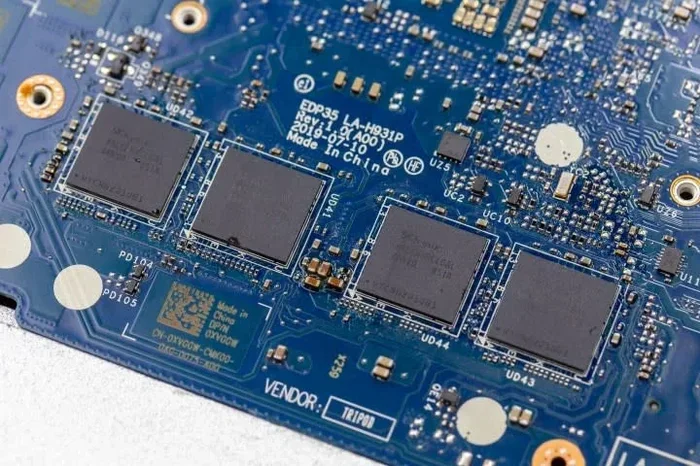
Soldered RAM is memory permanently attached to a laptop or device motherboard. You cannot remove or upgrade it like traditional RAM sticks. Many modern thin laptops use soldered RAM to save space and improve performance, but it limits your ability to boost memory later.
Soldered RAM is memory that is permanently attached to a laptop or computer motherboard. Unlike traditional RAM sticks that you can pop in and out, soldered RAM is fixed in place. It gets its name because the memory chip is soldered directly onto the board during manufacturing.
This design has become very common in modern laptops, especially thin and light models. If you are shopping for a new laptop or trying to understand your current machine, knowing about soldered RAM matters a lot. Soldered RAM affects upgrade options, performance, and even how hot your device runs.
In this guide, we will cover everything you need to know. We will explain what soldered RAM is, why manufacturers use it, and how it compares to removable memory. You will also learn about upgrade limitations, thermal concerns, and what to look for when buying a new device.
Key Takeaways
- Soldered RAM is fixed memory: It is glued directly onto the motherboard and cannot be swapped out or upgraded.
- It saves space and improves efficiency: Soldered RAM allows manufacturers to build thinner, lighter devices with better memory performance.
- Upgrade options are limited: If your laptop has soldered RAM, you cannot add more memory after purchase.
- DDR4 and DDR5 are common types: Both are used in soldered configurations depending on the device generation.
- Thermal management matters: Soldered RAM can run hotter since it lacks the airflow that removable modules get.
- Check before you buy: Always verify whether a laptop uses soldered or removable RAM before making a purchase decision.
📑 Table of Contents
- What Is Soldered RAM?
- Pros and Cons of Soldered RAM
- Does Soldered RAM Affect Performance?
- How to Know If Your Laptop Has Soldered RAM
- Can You Upgrade Soldered RAM?
- Thermal Considerations for Soldered RAM
- Soldered RAM in Different Device Types
- Common Mistakes People Make With Soldered RAM
- Expert Tips for Buying a Laptop With Soldered RAM
- Conclusion
What Is Soldered RAM?
Soldered RAM is exactly what it sounds like. The memory chips are soldered, or permanently bonded, to the motherboard. You cannot take them out or replace them like you would with a standard DDR4 or DDR5 stick.
This type of memory is also called onboard RAM or embedded memory. It comes in small form factors like SODIMM chips that are directly mounted to the board. Many modern laptops use this approach because it saves physical space inside the device.
How Does Soldered RAM Differ From Regular RAM?
Regular RAM comes in sticks or modules that plug into slots on the motherboard. You can remove these sticks and replace them with larger ones. With soldered RAM, the memory is part of the motherboard itself. There is no slot to access it.
Here is a quick comparison:
- Removable RAM: Comes in sticks, plugs into slots, easy to upgrade.
- Soldered RAM: Fixed to the board, no upgrade path, saves space.
Both types of memory work the same way from a performance standpoint. The difference is purely physical. Soldered RAM uses the same DDR4 or DDR5 technology as removable sticks. The speed and capacity depend on the specific chips used.
Why Do Manufacturers Use Soldered RAM?
There are several good reasons why laptop makers choose soldered memory. The biggest reason is space. Modern laptops are getting thinner every year. Traditional RAM slots and sticks take up valuable room inside the chassis.
By soldering the memory directly to the board, manufacturers can make devices much slimmer. This is why most ultrabooks and thin laptops use soldered RAM. The design allows for better airflow and a cleaner internal layout.
Another reason is performance. Soldered RAM can have shorter signal paths on the motherboard. This can lead to slightly better memory speeds and lower latency. Some high-end devices like laptop with i9 processor and 32gb ram configurations rely on soldered memory to hit their performance targets.
Cost is also a factor. Using soldered memory reduces the number of parts and assembly steps. This can lower manufacturing costs, though the savings are not always passed on to the consumer.
Pros and Cons of Soldered RAM
Soldered RAM has clear advantages and disadvantages. Understanding both sides helps you make a smart buying decision.
The Advantages
- Space savings: Soldered RAM takes up less room, allowing thinner and lighter designs.
- Better performance: Shorter signal paths can improve memory speed and stability.
- Cleaner design: No loose modules means fewer points of failure inside the device.
- Power efficiency: Soldered memory can use slightly less power than removable modules.
- Durability: Since it cannot be accidentally dislodged, soldered RAM is more physically secure.
The Disadvantages
- No upgrade path: You cannot add more memory after purchase. What you get is what you have.
- Higher repair costs: If the memory fails, replacing the motherboard is expensive.
- Limited flexibility: You must choose the right memory configuration at the time of purchase.
- Thermal challenges: Soldered chips can run hotter without proper cooling solutions.
The biggest drawback for most users is the inability to upgrade. If you buy a laptop with 8GB of soldered RAM, you are stuck with 8GB unless you replace the entire motherboard. This makes choosing the right amount of memory upfront very important.
Does Soldered RAM Affect Performance?
Many people wonder if soldered RAM is slower or less capable than removable memory. The short answer is no. Soldered RAM uses the same DDR4 or DDR5 standards as regular sticks. The performance difference is negligible in most real-world tasks.
However, there are some nuances to consider. Soldered RAM often runs at the exact speed rated for the device. Manufacturers tune the memory controller on the CPU to work with the specific soldered chips. This can actually result in very stable and efficient memory performance.
For tasks like video editing, machine learning, or gaming, the amount of RAM matters more than whether it is soldered or removable. If you are doing heavy work, having enough memory is key. Check guides like is 16gb ram enough for architecture or is 12gb ram enough for video editing to understand what capacity you need.
Can You Overclock Soldered RAM?
Overclocking soldered RAM is generally not possible for regular users. The memory is configured at the factory and locked into specific speed and timing settings. Unlike removable RAM, where you can adjust XMP profiles in the BIOS, soldered RAM does not offer this flexibility.
Some enthusiasts wonder if overclocking RAM makes a difference in frame rates. While it can help with removable modules, soldered RAM stays at its rated speed. This is another reason why choosing the right memory configuration from the start matters.
How to Know If Your Laptop Has Soldered RAM
Figuring out whether your laptop uses soldered RAM is not always obvious. Here are some ways to check.
Check the Device Specifications
Start by looking at the official specs from the manufacturer. If the laptop lists a fixed memory amount with no upgrade options mentioned, it likely uses soldered RAM. Many brands explicitly state “memory not upgradeable” in their specifications.
Use System Information Tools
On Windows, you can use built-in tools to check your memory details. Open the Task Manager and go to the Performance tab. Click on Memory to see your total RAM and speed. You can also use tools like CPU-Z to get detailed information about your memory modules.
If the tool shows no removable slots or lists memory as “Onboard,” your laptop has soldered RAM. You can also check how to find your RAM DDR type using system utilities to understand what kind of soldered memory you have.
Physical Inspection
If you are comfortable opening your laptop, you can physically inspect the motherboard. Soldered RAM chips are small and directly attached to the board. There will be no RAM sticks in any accessible slots. However, we recommend letting a professional handle this if you are not experienced.
Can You Upgrade Soldered RAM?
The honest answer is no. Soldered RAM cannot be upgraded in the traditional sense. The memory is permanently attached to the motherboard, so there is no way to swap it out or add more chips.
This is a major consideration when buying a laptop. If you think you might need more memory in the future, you should buy a device with the highest capacity you can afford right now.
What About External RAM Solutions?
Some users look for external workarounds. You cannot add external RAM in the same way you add an external hard drive. However, you can use virtual memory or a swap file to supplement your physical memory. This is much slower than having more real RAM, but it can help in a pinch.
For laptops with expandable RAM up to 64GB, you still have options. These devices use a mix of soldered and removable memory, giving you some flexibility. Always check the specific model before assuming a laptop is fully soldered.
When Should You Replace a Laptop With Soldered RAM?
If your laptop has soldered RAM and you are running out of memory, replacement might be the only real option. Before doing that, consider whether your needs have changed. A laptop with 32GB of soldered RAM will serve most users well for years.
Upgrading to a new device is expensive but sometimes necessary. If you are looking for a new machine, consider options like laptops with the most RAM or laptops with 64GB RAM to future-proof your purchase.
Thermal Considerations for Soldered RAM
Heat management is an important topic when it comes to soldered memory. Because soldered RAM is directly on the motherboard, it shares thermal space with other components like the CPU and GPU.
Unlike removable RAM sticks that have their own heat spreaders and benefit from airflow inside the case, soldered RAM relies on the laptop’s cooling system to keep temperatures in check. In thin laptops, this can be a challenge.
Good thermal design is essential. Laptops with proper heat pipes, vapor chambers, and efficient fans will keep soldered RAM running at safe temperatures. If your laptop runs hot during heavy tasks, the memory performance can actually drop due to thermal throttling.
Using a cooling pad or keeping your laptop on a hard surface can help. For more on RAM cooling in general, check out our guide on does RAM need cooling to understand best practices for keeping your memory running cool.
Does Heat Affect Soldered RAM Lifespan?
Prolonged exposure to high temperatures can reduce the lifespan of any memory, including soldered RAM. Modern devices are designed to handle normal operating temperatures. But if you regularly push your laptop to its limits, heat can become a concern.
Keeping your laptop clean and ensuring good ventilation will help extend the life of your soldered memory. Avoid using your laptop on soft surfaces like beds or couches that can block air vents.
Soldered RAM in Different Device Types
Soldered RAM is not just found in laptops. Many different devices use this approach to memory.
Ultrabooks and Thin Laptops
These devices almost always use soldered RAM. The slim design leaves no room for traditional RAM slots. Models like the Lenovo laptop with 16GB RAM or various Dell laptops with soldered memory follow this trend.
All-in-One Desktop Computers
All-in-one PCs also commonly use soldered memory. Since the design integrates the monitor and computer into one unit, space is limited and soldered RAM makes sense.
Tablets and 2-in-1 Devices
Most tablets and convertibles use soldered RAM. These devices prioritize portability and battery life, and fixed memory helps achieve both goals.
Gaming Laptops
Some gaming laptops use soldered RAM while others still offer upgradeable slots. High-performance models like those with RTX 4080 laptop 64GB RAM configurations may use a mix of both. Always check the specific model before buying.
Common Mistakes People Make With Soldered RAM
There are several mistakes that buyers make when dealing with soldered memory. Avoiding these can save you money and frustration.
- Assuming all laptops can be upgraded: Many modern laptops have soldered RAM. Always check before you buy if upgradeability matters to you.
- Buying too little memory: Since you cannot add more later, buy as much as your budget allows. 16GB is the sweet spot for most users today.
- Ignoring thermal design: A thin laptop with soldered RAM needs good cooling. Poor thermal design leads to performance drops.
- Confusing soldered RAM with defective RAM: If your laptop has fixed memory, that is by design, not a defect.
- Not checking compatibility before purchase: Make sure the RAM type matches your device needs. Use guides to find your RAM DDR type and verify compatibility.
Expert Tips for Buying a Laptop With Soldered RAM
When shopping for a laptop with soldered memory, keep these expert tips in mind.
- Max out your RAM at purchase: Since you cannot upgrade later, always choose the highest capacity you can afford.
- Check for dual-channel configuration: Even with soldered RAM, dual-channel setup improves performance significantly.
- Look for DDR5 support: DDR5 offers better speed and efficiency than DDR4. Choose a device with the latest memory standard when possible.
- Read reviews carefully: Look for real-world performance tests that mention memory speeds and thermal behavior.
- Consider your use case: If you do light tasks, 8GB may be enough. For creative work or gaming, aim for 16GB or more.
For gaming specifically, check our guide on do I need 32GB RAM for gaming to understand what capacity works best for your needs. Similarly, if you are working with creative tools, look into whether 16GB RAM is enough for architecture or other demanding workflows.
Conclusion
Soldered RAM is a key part of modern laptop and device design. It offers benefits like space savings, better performance, and improved durability. However, it comes with the significant limitation of being non-upgradeable.
If you are buying a new laptop, take the time to understand your memory needs. Choose the right capacity and type of soldered RAM from the start. This will save you from frustration later and ensure your device performs well for years to come.
Whether you are a student, a professional, or a gamer, understanding soldered RAM helps you make smarter purchasing decisions. Keep the tips and insights from this guide in mind, and you will find the perfect device for your needs.
Frequently Asked Questions
Can you upgrade soldered RAM in a laptop?
No, soldered RAM is permanently attached to the motherboard. You cannot remove or replace it. If you need more memory, you must replace the entire laptop or use external solutions like virtual memory.
Is soldered RAM slower than removable RAM?
No, soldered RAM uses the same DDR4 or DDR5 standards as removable RAM. The performance difference is negligible. In some cases, soldered RAM can even perform slightly better due to optimized signal paths on the motherboard.
Why do modern laptops use soldered RAM?
Laptops use soldered RAM to save space, improve thermal efficiency, and create thinner designs. It also reduces the number of internal components, which can lower manufacturing costs and improve reliability.
Does soldered RAM affect gaming performance?
Not directly. The type and amount of RAM matter more than whether it is soldered or removable. For gaming, having enough RAM and a fast DDR5 connection is more important than the physical installation method.
How can I tell if my laptop has soldered RAM?
Check your laptop specifications from the manufacturer. Use tools like CPU-Z or Task Manager to see if memory is listed as onboard. If there are no removable RAM slots, your laptop uses soldered memory.
Can soldered RAM be repaired if it fails?
Soldered RAM failure usually requires replacing the entire motherboard. This can be expensive. Proper thermal management and avoiding physical damage can help extend the life of your soldered memory.