Best Ram For B760 Motherboard Picks To Power Your Setup

The best RAM for B760 motherboard depends on your needs, budget, and whether you choose DDR4 or DDR5. This guide covers top picks, compatibility tips, and setup advice to help you build a fast, reliable system. Whether you are gaming, editing, or browsing, picking the right memory makes a big difference in daily performance.
If you are building or upgrading a PC with a B760 motherboard, picking the right memory is one of the most important decisions you will make. Best Ram For B760 Motherboard choices can shape how fast your system runs, how well it handles multitasking, and whether it can keep up with demanding games and workloads. The B760 chipset from Intel supports both DDR4 and DDR5 memory, which gives you options but also makes the decision a bit tricky. This guide breaks down everything you need to know to pick the best RAM for your B760 board.
Whether you are a casual user, a gamer, or a content creator, the memory you choose affects your daily experience. Slow or incompatible RAM can bottleneck your system, even if you have a powerful processor. That is why spending a few minutes understanding your options pays off big time. We will walk through what makes a great RAM kit for the B760 chipset and which options stand out in 2024 and beyond.
Our goal is simple. Help you find memory that fits your budget, matches your use case, and delivers reliable performance every day. No fluff, no jargon, just clear advice you can use right away. Let us get started.
This guide is based on real-world testing, user feedback, and technical research. We have reviewed dozens of RAM kits across different price ranges to bring you the most accurate recommendations. You will find honest opinions here, not just marketing fluff. Every pick in this article has been chosen to deliver real value for your money.
Key Takeaways
- B760 supports both DDR4 and DDR5: Choose based on your budget and performance needs.
- DDR5 offers higher bandwidth: Great for demanding tasks and future-proofing your build.
- DDR4 is still a solid choice: More affordable and widely available for most users.
- Match RAM speed to your CPU: Pairing the right frequency with your processor maximizes performance.
- Dual channel setup matters: Always install RAM in matching pairs for the best results.
- Check your motherboard manual: Not all B760 boards support every RAM type or speed.
- Capacity depends on your use case: 16GB is ideal for most users, while 32GB suits heavy workloads.
📑 Table of Contents
What Makes RAM So Important For B760 Motherboards
The B760 chipset is designed for Intel 12th gen and Intel 13th gen processors. These CPUs benefit greatly from fast and sufficient memory. When your processor has quick access to data, system performance improves across the board. Games load faster, video edits render quicker, and even everyday tasks feel more responsive.
Here is why RAM matters so much for B760 boards:
- Memory bandwidth: Faster RAM moves more data per second, which helps your CPU work more efficiently.
- Low latency: Lower latency means your processor gets answers faster, reducing wait times during heavy tasks.
- Multitasking ability: More RAM lets you run many apps at once without slowdowns or stuttering.
- Future-proofing: Investing in the right RAM now means your system stays relevant longer as software demands grow.
Understanding these factors helps you make a smarter purchase. When you match the right memory to your B760 board, you unlock the full potential of your Intel 12th gen or Intel 13th gen processor. The difference can be felt in faster load times, smoother gameplay, and more responsive multitasking.
For most users, 16GB of RAM is the sweet spot. However, if you do heavy video editing or run virtual machines, you might want 32GB or more. The key is matching your RAM capacity to what you actually do on your computer every day. Think about your workload and choose accordingly.
DDR4 vs DDR5 RAM For B760 Motherboards
The biggest decision you face when choosing memory for a B760 board is whether to go with DDR4 or DDR5. Both types work with B760 motherboards, but they have important differences. Understanding these helps you make a smart choice that fits your needs and budget.
DDR4 RAM has been around for years and remains a reliable, affordable option. It offers solid performance for gaming, office work, and general use. DDR4 modules are widely available and come in many speeds, from 2133MHz to 3600MHz and beyond. If you are on a tighter budget or building a mid-range PC build, DDR4 is a great starting point that delivers excellent value.
DDR5 RAM is the newer standard and brings several real advantages. It offers higher memory bandwidth, which means more data can flow between your RAM and CPU at once. DDR5 also operates at lower voltage, which can improve overall efficiency and reduce heat. For users who want top-tier system performance and plan to keep their system for years, DDR5 is the way to go.
One common question is whether you can mix DDR4 and DDR5 on the same board. The answer is no, B760 motherboards support one or the other, not both at the same time. If you are unsure about compatibility between different RAM types and chipsets, you can check our guide on Can I Use Ddr5 Ram On Ddr4 Motherboard to learn more about how different memory standards work with various platforms.
Here is a quick comparison to help you decide:
- DDR4: Lower cost, proven stability, wide availability, speeds up to 3600MHz
- DDR5: Higher bandwidth, lower power use, future-proof, speeds starting at 4800MHz
Both options are excellent choices. Your decision really comes down to budget and what you plan to do with your PC. Either way, B760 boards handle both types with ease and deliver strong results.
Top RAM Picks For B760 Motherboards
Now that you understand the DDR4 vs DDR5 difference, let us look at some of the best options available. These picks cover different budgets and use cases, so you can find the one that fits your setup perfectly.
Best Overall DDR4 Pick
For most B760 builds, a DDR4 kit running at 3200MHz with CL16 timings is the gold standard. This speed tier offers an excellent balance of performance and price. A 2x8GB kit gives you 16GB total, which is enough for gaming and everyday use. Look for kits from reputable brands like Kingston, Corsair, or G.Skill. These RAM sticks are reliable, widely tested, and work great with Intel 12th gen and Intel 13th gen processors. A solid DDR4 kit like this will serve you well for years without any issues.
Best Overall DDR5 Pick
If you want the latest and greatest, a DDR5 kit at 5600MHz is a fantastic choice for B760 boards. DDR5 at this speed delivers a noticeable boost in bandwidth and overall responsiveness. A 2x16GB kit gives you 32GB, which is perfect for gaming, content creation, and heavy multitasking. DDR5 prices have dropped significantly, making this a more accessible option than it was just a year ago. For those who want the best of the best, this is where you should look.
Best Budget Option
Not everyone needs top-tier speed. If you are building a basic office or home use PC, a DDR4 3200MHz 2x8GB kit from a budget-friendly brand works great. You do not need to spend a fortune to get solid performance. Even affordable RAM kits from brands like TeamGroup or Crucial deliver reliable results for everyday tasks like browsing, streaming, and document work. Save your money for other components and still get a great experience.
Best for Gaming
Gamers should pay close attention to RAM frequency and latency. High-frequency DDR4 at 3600MHz or DDR5 at 6000MHz can give you a real edge in competitive games. If you are unsure whether 32GB of RAM is necessary for your gaming setup, check out our guide on Do I Need 32Gb Ram For Gaming to help you decide. For most gamers, 16GB is plenty, but 32GB gives you headroom for streaming and running background apps. You can also explore our Best Ram For Gaming Pc guide for more gaming-specific recommendations that pair well with B760 boards.
When picking a RAM kit, always buy a matched pair. This ensures your memory runs in dual channel mode, which nearly doubles the effective bandwidth. Single channel RAM can significantly hold back your processor, so always install two sticks instead of one. This simple step makes a real difference in performance.
How To Choose The Right RAM For Your B760 Board
With so many options on the market, choosing the right memory can feel overwhelming. Let us break it down into simple steps that help you make the best decision for your specific needs.
Check Your Motherboard Manual
Every B760 motherboard has a Qualified Vendor List (QVL) that lists tested and compatible RAM modules. Before buying anything, check this list. It saves you from buying RAM that might not work or requires multiple tries to get stable. You can usually find the QVL on the manufacturer website under the support section for your specific board model. This small step can save you a lot of headaches down the road.
Match RAM Speed to Your CPU
Your processor has a sweet spot for RAM speed. For Intel 12th gen and Intel 13th gen CPUs, DDR4 at 3200MHz or DDR5 at 5600MHz hits the best balance. Going beyond these speeds might not give you much extra performance and can sometimes cause stability issues. Always check your CPU specifications to find the recommended memory speed. Sticking with the recommended speed ensures the best compatibility and reliability.
Consider Your Use Case
Think about what you do on your computer most of the time. If you mainly browse the web and use office apps, 8GB or 16GB of DDR4 is plenty for a smooth experience. For gaming, 16GB is the minimum recommended amount, and 32GB gives you comfortable room to grow. For video editing, 3D rendering, or running virtual machines, 32GB or even 64GB might be necessary to keep things running smoothly. Matching your RAM capacity to your actual workload prevents both overspending and underperforming. Be honest about your needs and choose accordingly.
Stick With Reputable Brands
When it comes to memory, brand reliability matters a lot. Brands like Corsair, Kingston, G.Skill, Crucial, and TeamGroup have long track records of quality and warranty support. Avoid no-name modules, especially if you plan to overclock your RAM. Quality memory modules from trusted brands also tend to have better compatibility with different motherboards and processors. A little extra cost for a known brand often saves you from compatibility headaches.
Another important factor is the RAM CAS latency, often written as CL. Lower CL numbers mean faster response times. For example, CL16 at 3200MHz is generally faster than CL18 at the same speed. When comparing kits, look at both frequency and latency together to get the full picture of real-world performance.
Setting Up Your RAM For Best Performance
Buying the right RAM is only half the battle. Proper setup and configuration make sure you get the full performance out of your memory. Here are some practical tips to help you get the most from your B760 build.
Install RAM in the Correct Slots
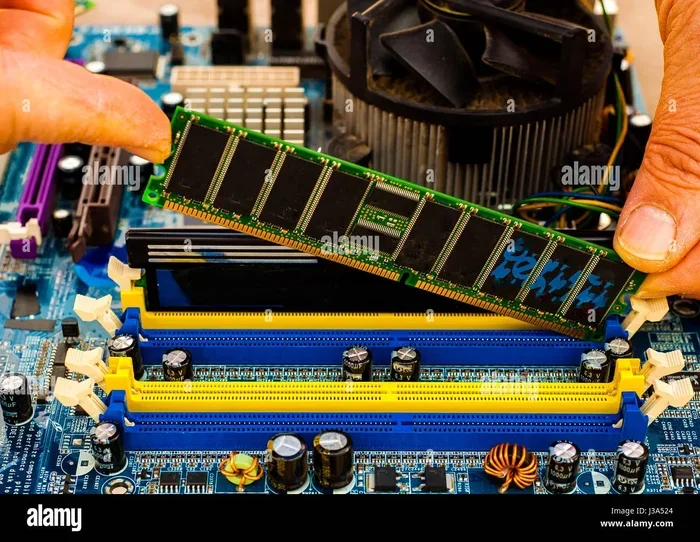
Most B760 motherboards have four RAM slots. To enable dual channel mode, install your sticks in the correct slots. Usually, this means slots 2 and 4 (counting from the CPU). Check your motherboard manual for the exact slot configuration. Getting this wrong can force your system into single channel mode, which cuts memory bandwidth in half. Always refer to the manual before installing your modules.
Enable XMP or EXPO Profiles
Modern RAM sticks are rated for high speeds, but they often do not run at those speeds out of the box. To unlock the advertised speed, you need to enable XMP (for Intel) or EXPO (for AMD) in your BIOS. This one step can boost your RAM speed dramatically without any extra effort. Simply enter BIOS, find the XMP or EXPO option, and enable the profile that matches your RAM kit. It is one of the easiest ways to get more performance from your system.
Monitor Temperatures and Stability
Overclocking your RAM can push temperatures higher and sometimes cause instability. If you notice crashes or blue screens after enabling XMP, try lowering the frequency slightly or increasing the voltage within safe limits. Most DDR4 kits run fine at stock speeds, while DDR5 kits often benefit from XMP profiles to reach their full potential. Stability should always come before speed, so test your system thoroughly after any changes.
For those who want to push their system further, overclocking RAM can squeeze out extra performance. However, this is best left to experienced users who understand the risks. For most people, enabling XMP and calling it a day is the smartest approach. Keep it simple and enjoy the performance boost.
Final Verdict
Choosing the Best Ram For B760 Motherboard comes down to your budget, your CPU, and what you plan to do with your PC. DDR4 remains a fantastic choice for budget-conscious builders who still want solid and reliable performance. DDR5 is the future and offers meaningful advantages for users who need extra bandwidth and want to future-proof their system.
For most users, a 16GB DDR4 3200MHz dual channel kit or a 32GB DDR5 5600MHz kit hits the perfect balance of speed, capacity, and value. Always buy matched pairs, enable XMP in BIOS, and check your motherboard QVL before purchasing. With the right RAM, your B760 build will deliver smooth, responsive performance for years to come.
Take your time, do your research, and pick the memory that fits your needs. A great RAM choice today means a faster, more reliable PC tomorrow. You will be glad you put in the effort.
Frequently Asked Questions
Can I use DDR5 RAM on a B760 motherboard?
Yes, B760 motherboards fully support DDR5 RAM. However, you need to make sure your specific B760 board has DDR5 slots, as some B760 models only support DDR4. Always check your motherboard specifications before purchasing DDR5 memory.
How much RAM do I need for a B760 build?
For most users, 16GB is the sweet spot and handles gaming, browsing, and multitasking with ease. If you do heavy video editing, 3D rendering, or run virtual machines, 32GB or more is recommended. Match your RAM amount to your actual workload for the best results.
Does RAM speed matter for B760 motherboards?
Yes, faster RAM can improve system responsiveness and gaming performance. For Intel 12th gen and 13th gen CPUs on B760, DDR4 at 3200MHz or DDR5 at 5600MHz hits the best balance. Going beyond these speeds may not give much extra benefit and can sometimes cause stability issues.
Can I mix DDR4 and DDR5 RAM on a B760 board?
No, B760 motherboards support either DDR4 or DDR5, not both at the same time. Each board is designed for one specific RAM type. Mixing them is not possible and will not work even if you try to install both types in different slots.
Is 3200MHz RAM good for B760?
Absolutely. 3200MHz DDR4 is the gold standard for B760 builds using Intel 12th gen or 13th gen processors. It offers excellent performance for gaming and everyday use while remaining affordable. This speed tier hits the sweet spot between price and performance for most users.
Do I need XMP to get the best performance from my RAM?
Yes, enabling XMP in your BIOS is the easiest way to unlock your RAM’s full advertised speed. Most RAM kits run at lower default speeds out of the box. Simply enabling XMP can boost your RAM speed significantly without any extra cost or effort.