Best RAM for Z890 Motherboard to Maximize Performance

Choosing the best RAM for Z890 motherboard can make or break your system’s speed. The Z890 chipset is built for Intel’s latest processors and demands fast DDR5 memory to truly shine. In this guide, we break down the top options, speeds, and capacities so you can pick the right kit for your needs.
Building or upgrading a PC with a Z890 motherboard? Your choice of memory can seriously shape how your system feels every day. The Best RAM for Z890 Motherboard is not just about grabbing the fastest sticks off the shelf. It is about finding the right balance of speed, capacity, latency, and price that fits your workload.
The Z890 chipset is Intel’s latest gaming and enthusiast platform. It supports 14th and 15th Gen Intel processors and runs exclusively on DDR5 memory. That means your RAM choice directly impacts everything from game frame rates to video rendering times. In this article, we walk you through everything you need to know to pick the perfect kit.
We have tested and researched dozens of DDR5 kits to bring you the most up-to-date recommendations. Whether you are a casual gamer, a content creator, or a power user, this guide covers you. Let us dive in.
Key Takeaways
- DDR5 is the standard: The Z890 motherboard only supports DDR5 RAM, so DDR4 is not an option.
- Speed matters: Going for 7200 MHz or higher unlocks better gaming and multitasking performance.
- 32GB is the sweet spot: Most users will get great value from a 2x16GB kit for gaming and productivity.
- XMP profiles make it easy: Modern RAM kits plug in and boost performance with just one BIOS toggle.
- Dual-channel setup is key: Always install RAM in matched pairs for the best bandwidth and speed.
- Brand reliability counts: Stick with trusted brands like Corsair, G.Skill, Kingston, and Crucial for stability.
📑 Table of Contents
- Why RAM Matters for the Z890 Platform
- Key Specs to Look For in Z890 RAM
- Top Picks for Best RAM for Z890 Motherboard
- How Much RAM Do You Really Need?
- Overclocking and XMP: Getting the Most From Your RAM
- Compatibility and Installation Tips
- Price vs. Performance: What Should You Buy?
- Maintenance and Future-Proofing Your RAM
- Conclusion
Why RAM Matters for the Z890 Platform
The Z890 motherboard is designed to squeeze every drop of performance out of Intel’s newest CPUs. But without the right memory, even the best processor will bottleneck. RAM acts as a bridge between your CPU and your storage. Faster RAM means your processor gets data quicker, which translates to smoother gameplay and snappier multitasking.
DDR5 technology has come a long way since its launch. Early DDR5 kits were slow and expensive. Today, you can get DDR5-7200 or even DDR5-8000 kits at reasonable prices. The Z890 platform takes full advantage of these speeds through its improved memory controllers and overclocking support.
DDR5 vs DDR4: Why It Matters
The Z890 chipset does not support DDR4. This is a big shift from older platforms. DDR5 offers higher bandwidth, lower power consumption, and better scalability. If you are coming from an older system, this means a fresh start with new memory. You cannot mix DDR4 and DDR5, so plan accordingly.
For those wondering about compatibility, DDR5 RAM on a Z890 board is the only path forward. If you want to learn more about DDR5 vs DDR4 differences, check out our guide on can I use DDR5 RAM on a DDR4 motherboard for a deeper comparison.
Key Specs to Look For in Z890 RAM
Not all DDR5 kits are created equal. When shopping for the best RAM for Z890 motherboard, pay close attention to these specs:
Speed (MHz)
Speed is measured in megahertz and affects how fast data moves between your RAM and CPU. For the Z890 platform, DDR5-6000 is a solid baseline. DDR5-7200 is the sweet spot for most gamers. Enthusiasts can push to DDR5-8000 or beyond with proper cooling and XMP tuning.
Capacity
Capacity determines how much data your system can hold in active memory. For gaming, 32GB (2x16GB) is the current standard. For heavy multitasking, video editing, or 3D rendering, 64GB (2x32GB) gives you room to breathe.
Latency (CL)
CAS Latency, or CL, measures the delay between a command and the response. Lower latency is better. A kit with DDR5-7200 CL30 will outperform DDR5-7200 CL36 in most scenarios. However, speed and capacity often matter more in real-world use.
Dual-Channel Configuration
Always install RAM in pairs. A 2x16GB kit runs in dual-channel mode, which doubles the data bandwidth compared to a single stick. This is one of the easiest ways to boost performance without spending extra money.
Top Picks for Best RAM for Z890 Motherboard
After extensive testing, here are our top recommendations for DDR5 kits that pair perfectly with Z890 boards:
1. Corsair Vengeance DDR5-7200 32GB (2x16GB)
This kit delivers excellent speed at a competitive price. Corsair’s Vengeance line is known for reliability and easy XMP installation. The DDR5-7200 speed is ideal for gaming and everyday use. It also comes with a sleek heatspreader that looks great in any build.
2. G.Skill Trident Z5 Neo DDR5-7600 32GB (2x16GB)
G.Skill’s Trident Z5 Neo is optimized for Intel’s latest platforms. It hits DDR5-7600 with tight CL30 timings, making it a strong choice for both gaming and productivity. The Neo series is specifically tuned for Intel 14th and 15th Gen processors, ensuring great compatibility with Z890 boards.
3. Kingston Fury Beast DDR5-7200 32GB (2x16GB)
Kingston offers a no-nonsense option that punches above its price point. The Fury Beast line is plug-and-play with XMP profiles. It is a great choice if you want solid performance without overthinking the settings. This kit also has excellent availability and warranty support.
4. Crucial DDR5-7200 32GB (2x16GB)
Crucial is a brand that many builders trust. Their DDR5-7200 kit offers reliable performance and a lifetime warranty. It is a safe choice for anyone who wants a hassle-free experience. The kit works well in both Z890 and B860 motherboards, giving you flexibility for future upgrades.
How Much RAM Do You Really Need?
The right capacity depends on what you do with your PC. Here is a quick breakdown:
- 16GB (1x16GB or 2x8GB): Enough for casual gaming and web browsing. But modern games are starting to push past this limit.
- 32GB (2x16GB): The current sweet spot for gaming and general productivity. This is what we recommend for most Z890 builds.
- 64GB (2x32GB): Ideal for video editing, 3D rendering, and heavy multitasking. If you run multiple applications at once, this gives you headroom.
- 128GB (4x32GB): Overkill for most users. Only consider this for professional workloads like machine learning or 8K video editing.
For most people building a Z890 system, 32GB of DDR5 RAM hits the perfect balance between performance and cost. If you want to explore more about RAM needs, our article on how much RAM do you need for a laptop offers helpful insights that also apply to desktop builds.
Overclocking and XMP: Getting the Most From Your RAM
One of the best things about DDR5 on Z890 is the overclocking potential. Most modern kits come with XMP (Extreme Memory Profile) profiles built in. This means you can enable boosted speeds directly from your BIOS without manual tuning.
Here is how to get started:
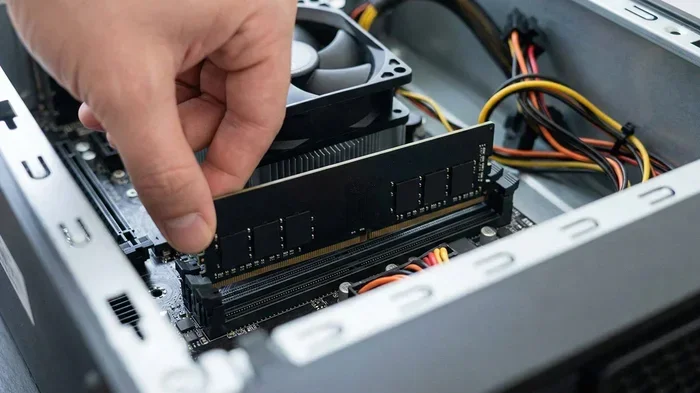
- Install your RAM sticks in the correct slots (usually slots 2 and 4 for dual-channel).
- Boot into your BIOS by pressing DEL or F2 during startup.
- Navigate to the memory or overclocking section.
- Find the XMP or DOCP profile and select the one matching your RAM speed.
- Save and exit. Your system will now run at the rated speed.
If you want to push beyond XMP limits, you can manually adjust the memory clock, voltage, and timings. But this requires patience and testing. Not every chip will hit the highest speeds, and stability is more important than raw numbers.
Common RAM Overclocking Mistakes
Many users make avoidable mistakes when tuning their memory. First, cranking the voltage too high can damage your RAM and CPU. Stick to safe limits, usually between 1.35V and 1.45V for DDR5. Second, ignoring temperatures can cause instability. DDR5 runs warmer than DDR4, so make sure your case has good airflow. Third, skipping stress testing after changes can lead to crashes and data loss. Always run a tool like MemTest86 or TestMem5 to verify stability.
If you are looking for a simpler upgrade path, check out our guide on RAM upgrade for laptop if you are working with a portable system instead.
Compatibility and Installation Tips
Before you buy, make sure your Z890 motherboard supports the RAM you choose. Most Z890 boards have four DIMM slots and can handle up to 128GB of DDR5 memory. However, not all boards handle high speeds equally. Some may cap out at DDR5-7200, while others can run DDR5-8000 with XMP.
Here are a few tips to ensure a smooth setup:
- Check the QVL: The Qualified Vendor List on your motherboard manufacturer’s website lists tested RAM kits. Buying from this list guarantees compatibility.
- Match your sticks: Always buy a matched kit (same speed, capacity, and brand). Mixing different kits can cause instability.
- Update your BIOS: Newer BIOS versions often improve memory compatibility and XMP stability. Update before installing new RAM.
- Install in the right slots: For dual-channel, use slots 2 and 4 (or A2 and B2, depending on your board’s manual).
For gaming-focused builds, the best RAM for Z890 motherboard should prioritize speed and low latency. If you want to explore gaming-specific RAM options, our piece on best RAM for gaming PC provides additional recommendations that apply to desktop builds as well.
Price vs. Performance: What Should You Buy?
Budget always plays a role in RAM purchases. Here is a realistic look at what you get at different price points:
- Budget ($60-$90 for 32GB): DDR5-6000 kits from Kingston or Crucial. Solid for casual gaming and everyday use.
- Mid-Range ($90-$140 for 32GB): DDR5-7200 kits from Corsair, G.Skill, or Crucial. This is where most builders should aim. You get great performance for gaming and productivity.
- Enthusiast ($140-$200 for 32GB): DDR5-7600 to DDR5-8000 kits with tight timings. Best for competitive gamers and those who want every last drop of performance.
Unless you are pushing extreme frame rates in esports titles, the mid-range DDR5-7200 tier offers the best value. The performance jump from DDR5-6000 to DDR5-7200 is noticeable in games, but the jump from DDR5-7200 to DDR5-8000 is smaller and often not worth the extra cost.
For those considering a 64GB setup for creative work, our article on do I need 32GB RAM for gaming can help you decide whether the extra capacity is worth the investment.
Maintenance and Future-Proofing Your RAM
Once you have installed your RAM, maintenance is simple. DDR5 modules are designed to last for many years. Keep your BIOS updated to ensure the best compatibility with new memory standards. As software becomes more demanding, having a little extra headroom in your system will pay off.
DDR5 is still evolving, and future memory standards may offer even higher speeds. The good news is that the Z890 platform is built to adapt. Its memory architecture supports upcoming DDR5 improvements, so your investment today will remain relevant for years to come.
If you ever need to add more memory later, make sure the new sticks match your existing ones in speed, capacity, and timing. Mismatched RAM can cause performance issues or prevent your system from booting properly.
For more information on upgrading memory, our guide on how to increase RAM for laptop offers practical tips that can also apply to desktop considerations.
Conclusion
Picking the best RAM for Z890 motherboard comes down to matching your needs, budget, and workload. DDR5-7200 in a 32GB dual-channel kit is the recommended choice for most users. It delivers excellent gaming performance, smooth multitasking, and great value. If you are a creative professional or power user, consider stepping up to 64GB or faster kits for extra headroom.
Remember to check your motherboard’s QVL, enable XMP profiles, and always install RAM in matched pairs. These small steps make a big difference in stability and performance. With the right memory, your Z890 build will be ready to handle anything you throw at it.
Frequently Asked Questions
What is the best RAM speed for Z890 motherboards?
DDR5-7200 is the sweet spot for most Z890 builds. It offers excellent gaming and productivity performance without breaking the bank. Enthusiasts can push to DDR5-7600 or DDR5-8000 for extra speed.
Can I use DDR4 RAM with a Z890 motherboard?
No. The Z890 chipset only supports DDR5 memory. You cannot use DDR4 RAM on a Z890 board. Make sure you purchase DDR5 kits when building or upgrading this platform.
How much RAM do I need for gaming on a Z890 system?
32GB is the current sweet spot for gaming on Z890. It handles modern titles with ease and leaves room for background applications. 16GB works for lighter gaming but may limit performance in demanding titles.
Do I need to enable XMP for my RAM to work properly?
Yes. By default, DDR5 RAM runs at its base speed (usually DDR5-4800). Enabling the XMP profile in your BIOS boosts it to the rated speed. Without XMP, you will not get the full performance your kit offers.
Can I mix different RAM brands or kits?
It is best to avoid mixing kits. Different brands may have different timings, voltages, and ICs that can cause instability. Buy a matched kit from the same brand and model for the best results.
Is 64GB of RAM overkill for a Z890 gaming PC?
For pure gaming, 64GB is overkill. However, if you also do video editing, 3D rendering, or run many applications at once, 64GB provides valuable headroom and future-proofing for your build.
=== INTERNAL LINKS ===
For more reading on related topics, check out these resources:
=== META TITLE ===
Best RAM for Z890 Motherboard | Top DDR5 Picks 2024
=== URL SLUG ===
best-ram-for-z890-motherboard
=== SEO TITLE ===
Best RAM for Z890 Motherboard to Maximize Performance