Server Ram Buying Guide for Faster and Better Servers
Choosing the right server RAM can dramatically boost performance, reliability, and scalability for any business. This guide covers DDR4 and DDR5 options, ECC vs non-ECC memory, capacity planning, speed ratings, and compatibility checks. You will learn how to match RAM to your workload, avoid common mistakes, and get the best value for your server investment.
Building or upgrading a server is one of the most important decisions you can make for your business or project. And at the heart of that decision sits one component that often gets overlooked: server RAM. Memory is where your server stores data it needs right now, and the faster and smarter that memory is, the better your entire system performs.
Whether you are running a small business website, a heavy database, or a virtualization host, picking the right server RAM can mean the difference between a smooth experience and constant frustration. This server RAM buying guide walks you through everything you need to know. We will cover types of memory, capacity planning, speed ratings, compatibility, and practical tips to help you make a confident choice.
The goal here is simple. Give you the knowledge to buy the right memory the first time, avoid costly mistakes, and get the best performance for your money. Let us dive in.
Key Takeaways
- ECC RAM is essential for servers: It detects and corrects memory errors, preventing data corruption and crashes in critical environments.
- DDR5 is the future, but DDR4 still has a place: DDR5 offers higher bandwidth and lower power consumption, while DDR4 remains cost-effective for many workloads.
- Capacity depends on your workload: Light tasks need 16GB to 32GB, while heavy databases and virtualization demand 64GB to 128GB or more.
- Speed and latency matter together: Higher MHz helps, but lower CAS latency can deliver better real-world performance for server applications.
- Always check motherboard compatibility: Not every RAM module fits every server board. Verify DDR type, slot count, and maximum supported capacity before buying.
- Cooling and placement affect stability: Server RAM generates heat, especially in dense configurations. Proper airflow and slot placement keep your system running smoothly.
📑 Table of Contents
- Understanding Server RAM Basics
- DDR4 vs DDR5: Which Type Should You Choose?
- How Much Server RAM Do You Really Need?
- Speed, Latency, and Performance
- Compatibility and What to Check Before Buying
- Server Cooling and RAM Heat Management
- Common Mistakes to Avoid When Buying Server RAM
- Final Thoughts and Recommendations
- FAQs
Understanding Server RAM Basics
Before you spend a single dollar, it helps to understand what server RAM actually is and why it differs from the memory in your personal computer. Server RAM, also called server memory, is designed to handle continuous, heavy workloads with maximum reliability. Your home laptop might use standard desktop memory, but servers need something more robust and error-resistant.
What Makes Server RAM Different
The biggest difference is error correction. Most server memory uses a technology called ECC, which stands for Error-Correcting Code. ECC memory can detect and fix single-bit errors on the fly. This means your server almost never crashes because of a memory glitch. In a data center or business environment, that kind of reliability is non-negotiable.
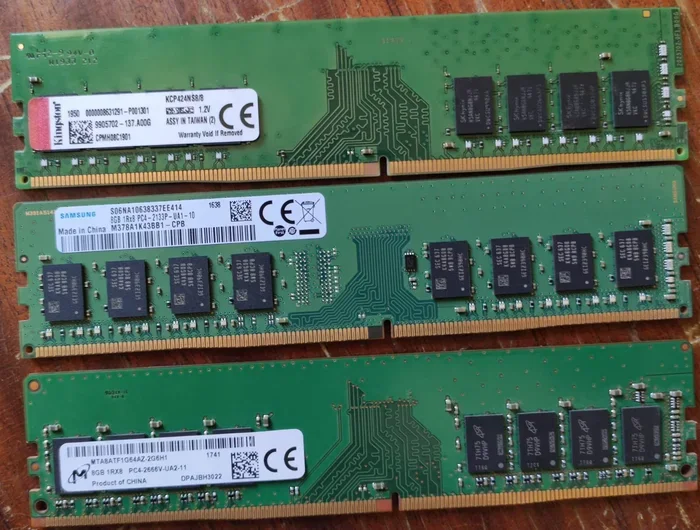
Another key distinction is the physical design. Server RAM modules, often called DIMMs, are built differently from desktop sticks. They are typically larger and have more pins. They also come in registered and unbuffered varieties, which affect how the memory controller communicates with the modules.
Registered vs Unbuffered RAM
Registered RAM, also called buffered RAM, places a register between the memory controller and the DRAM chips. This reduces the electrical load on the controller and allows servers to use much more memory. Most servers with 32GB or more use registered DIMMs.
Unbuffered RAM connects directly to the memory controller. It is faster in theory but far less stable at high capacities. You will mostly find unbuffered memory in workstations and small servers with lighter workloads.
Single Rank vs Dual Rank
You may also see terms like single rank and dual rank when shopping for server memory. A rank refers to a set of memory chips on a module. Dual rank modules have two sets, which allows the memory controller to access one rank while the other is refreshing. This can improve performance in memory-intensive tasks. However, dual rank modules may also have slightly higher latency in some scenarios.
DDR4 vs DDR5: Which Type Should You Choose?
The type of DDR memory your server supports is one of the first decisions you must make. Right now, two main generations dominate the market: DDR4 and DDR5. Each has its strengths, and the right choice depends on your budget, workload, and server motherboard.
DDR4 Server RAM
DDR4 has been the standard for servers for several years and remains a solid choice. It offers reliable performance, wide availability, and competitive pricing. DDR4 server RAM typically runs at speeds between 2133MHz and 3200MHz, with some modules reaching even higher. For most business workloads, including web hosting, email servers, and moderate databases, DDR4 delivers excellent results.
One of the biggest advantages of DDR4 is compatibility. A wide range of older and current server motherboards support it. If you are upgrading an existing server, DDR4 is often the safest and most affordable path forward.
DDR5 Server RAM
DDR5 is the newer generation, and it brings meaningful improvements. DDR5 modules start at higher base speeds, typically 4800MHz, and can go well beyond 6000MHz with overclocking. They also offer higher memory bandwidth, which directly benefits data-heavy applications like analytics, machine learning, and large-scale virtualization.
DDR5 also operates at a lower voltage than DDR4, which means less heat generation. This is a big plus for servers that run 24/7 in tight spaces. However, DDR5 server RAM is still more expensive, and not all server motherboards support it yet.
DDR4 vs DDR5 Comparison
| Feature | DDR4 | DDR5 |
|---|---|---|
| Base Speed | 2133MHz – 3200MHz | 4800MHz+ |
| Voltage | 1.2V | 1.1V |
| Max Capacity per Module | Up to 64GB | Up to 128GB+ |
| Bandwidth | Good | Excellent |
| Price | Lower | Higher |
| Motherboard Support | Widely Available | Growing |
For most current server builds, DDR4 remains the practical choice. But if you are building a new server from scratch and your budget allows, DDR5 is the way forward. The performance gains are real, and prices are dropping as adoption grows.
How Much Server RAM Do You Really Need?
Capacity is one of the most critical factors when choosing server RAM. Too little memory and your server struggles under load. Too much and you waste money. The right amount depends entirely on what your server does.
Light Workloads (8GB – 32GB)
If your server handles light tasks like file sharing, a small website, or a basic email server, 8GB to 32GB is usually sufficient. A simple Windows Server or Linux setup running a few services can do well with 16GB. For a small business with fewer than 20 users, 32GB provides a comfortable buffer.
Medium Workloads (32GB – 64GB)
Medium workloads include virtualization, moderate databases, and application servers. If you are running multiple virtual machines or hosting a growing business application, 32GB to 64GB is a sweet spot. This range handles most small to mid-sized business environments with room to grow.
Heavy Workloads (64GB – 128GB+)
Heavy workloads like large databases, data analytics, machine learning, and high-traffic web applications demand serious memory. Servers running machine learning tasks, for example, often need 64GB or more to handle training datasets efficiently. Video rendering servers and 3D rendering farms also fall into this category, where memory bandwidth and capacity directly impact output speed.
If you are unsure about your needs, start with 32GB or 64GB and monitor usage over a few weeks. Most server operating systems and management tools show real-time memory utilization, so you can make an informed decision about whether to add more.
Speed, Latency, and Performance
When people talk about RAM speed, they usually refer to the frequency measured in MHz. A higher frequency means the memory can transfer more data per second. But speed is not the whole story. CAS latency, often written as CL, measures how many clock cycles the memory takes to respond to a request. Lower latency is better, but it is a balancing act with frequency.
Why Speed Matters for Servers
Faster memory improves how quickly your server can read and write data. For a database server handling thousands of queries per second, even small improvements in memory speed can translate to noticeably faster response times. Similarly, servers that handle large files or run memory-intensive applications benefit greatly from higher-frequency RAM.
However, speed gains come with diminishing returns. Going from 2133MHz to 2666MHz is a meaningful upgrade. Going from 3200MHz to 3600MHz is less dramatic. Focus on the sweet spot where the price increase justifies the performance gain.
Understanding CAS Latency
CAS latency is a number like CL16 or CL18 that tells you the delay between a command and the data being available. A module with CL16 at 3200MHz will generally perform better than one with CL22 at the same speed. When comparing modules, always look at both frequency and latency together.
Memory Channels and Bandwidth
Most servers support dual-channel or even quad-channel memory configurations. This means the memory controller can access two or four modules simultaneously, effectively doubling or quadrupling the bandwidth. To take full advantage of this, always install RAM in matched pairs or sets of four, and place them in the correct slots as your server manual specifies.
Proper RAM placement matters more than many people realize. Filling the wrong slots can force your server to run in single-channel mode, cutting bandwidth in half. Always consult your server or motherboard documentation before installing memory.
Compatibility and What to Check Before Buying
One of the most common mistakes when buying server RAM is assuming any module will work. Server memory has strict compatibility requirements, and getting it wrong can lead to instability or even prevent your server from booting.
Check Your Motherboard and CPU
Your server motherboard determines which DDR type it supports, how many slots it has, and the maximum capacity per module and in total. Your CPU also plays a role, as the memory controller is built into the processor. Before purchasing any RAM, check the specifications for both your motherboard and CPU.
For example, if your motherboard only supports DDR4, you cannot use DDR5 modules no matter how fast they are. Similarly, if your CPU supports a maximum of 256GB of RAM, buying 512GB worth of modules is a waste.
Match RAM Kits Together
Always try to buy RAM in matching kits. A kit of four 16GB modules is tested and validated to work together. Mixing different brands, speeds, or capacities can cause compatibility issues. If you must mix, at least match the DDR type, frequency, and CAS latency as closely as possible.
Consider Your Server Brand
Some server brands like Dell, HP, and Lenovo use proprietary memory configurations. They may require registered or load-reduced DIMMs that differ from standard server memory. Always verify the exact memory type supported by your specific server model before ordering.
When in doubt, check the server RAM compatibility list on the manufacturer’s website. This list tells you exactly which modules have been tested and approved for your system.
Server Cooling and RAM Heat Management
Server RAM generates heat, especially in high-density configurations with many modules installed. While RAM does not produce as much heat as a CPU or GPU, sustained high temperatures can reduce stability and shorten the lifespan of your memory modules.
Good server airflow is essential. Make sure your server case or rack has adequate fan coverage around the memory slots. Some high-performance servers come with dedicated memory heatsinks that help dissipate heat from the modules. If you are running your server in a warm environment or pushing it hard with demanding workloads, consider investing in active cooling for the memory area.
Proper server cooling does not just protect your RAM. It protects every component. A well-cooled server runs more stable, lasts longer, and performs better under sustained loads.
Common Mistakes to Avoid When Buying Server RAM
Even experienced IT professionals sometimes make avoidable mistakes when purchasing server memory. Here are the most common ones to watch out for.
- Buying the cheapest option without checking compatibility: Incompatible RAM will not work, period. Always verify the DDR type, form factor, and maximum supported capacity before buying.
- Ignoring ECC requirements: If your server needs ECC memory and you install non-ECC modules, you risk data corruption and unexpected crashes. Always match your RAM type to your server’s requirements.
- Mixing old and new RAM: Combining DDR4 modules with different speeds or timings can force all modules to run at the slowest common speed. This wastes the potential of your faster modules.
- Overlooking capacity headroom: Buying exactly the amount you need today leaves no room for growth. Servers often need more memory as workloads increase over time. Plan for at least 25% extra capacity.
- Skipping the server manual: Every server has specific RAM slot configurations and maximum capacity limits. Skipping the manual is the fastest way to run into problems.
Final Thoughts and Recommendations
Choosing the right server RAM does not have to be overwhelming. Start by understanding your workload requirements. Identify the DDR type your server supports. Decide on the capacity you need based on current and future demands. Then pick the right speed and latency for your budget.
For most business servers, 32GB to 64GB of DDR4 ECC registered memory is a reliable and cost-effective starting point. If you are building a new high-performance server or pushing the boundaries with data analytics and virtualization, consider DDR5 for its speed and efficiency advantages.
Always prioritize compatibility. Match your RAM to your motherboard, CPU, and server specifications. Install memory in the correct slots and in matched kits. And do not forget about cooling and airflow, which play a surprisingly important role in long-term memory reliability.
With the right server RAM in place, your server will run faster, stay stable, and handle growing workloads with confidence. Take your time, do your research, and invest in memory that truly fits your needs.
Remember that memory is not a place to cut corners. Reliable, well-chosen RAM is the foundation of a stable and performant server. Whether you are a small business owner setting up your first server or an IT professional managing a data center, the principles in this guide will help you make the best decision every time.
FAQs
What is the difference between ECC and non-ECC server RAM?
ECC RAM includes error-correcting code that detects and fixes single-bit memory errors automatically. Non-ECC RAM does not have this capability. For any server handling critical data or running 24/7, ECC memory is strongly recommended to prevent crashes and data corruption.
Can I mix DDR4 and DDR5 RAM in the same server?
No, you cannot mix DDR4 and DDR5 RAM. They are physically and electrically different. The server motherboard will only support one DDR type. Always use the same DDR generation across all memory modules in a server.
How do I know if my server needs registered or unbuffered RAM?
Most servers with 32GB or more of RAM use registered or load-reduced DIMMs. Check your server or motherboard manual to confirm the required memory type. Using the wrong type will prevent the server from booting or functioning properly.
Does more RAM always mean better server performance?
Not necessarily. If your server already has enough memory for its workload, adding more RAM will not improve performance. The extra memory will simply sit unused. Always monitor your server’s memory usage first and upgrade only when utilization consistently exceeds 80%.
What is the best server RAM speed for most business workloads?
For most business workloads, DDR4 memory running at 2666MHz to 3200MHz provides an excellent balance of performance and cost. DDR5 starting at 4800MHz is ideal for more demanding applications like data analytics, virtualization, and machine learning.
How often should I upgrade my server RAM?
There is no fixed schedule. Upgrade your server RAM when your workload demands more memory than what is currently installed. Signs that you need an upgrade include slow performance, high memory usage alerts, and frequent out-of-memory errors in your applications.