Ram For Gaming Guide How To Boost Your PC Performance
RAM for gaming is one of the most important parts of your setup. This guide covers everything you need to know, from choosing the right amount of memory to picking the best speed and type. You will learn how RAM affects your frame rates, loading times, and overall gaming experience.
RAM is the short-term memory your computer uses to handle everything happening right now. When you open a game, your system loads textures, maps, and physics data into this memory. Without enough of it, your PC slows down, stutters, or even crashes mid-game.
If you are building or upgrading a gaming PC, getting the right RAM is essential. This RAM for gaming guide walks you through everything you need to know. We will cover how much memory you need, which type to buy, and how to get the most out of your setup.
Whether you are a casual player or a hardcore competitor, this guide has practical tips that will help you make smarter choices. Let us dive in and boost your PC performance.
Key Takeaways
- More RAM helps: Having enough system memory prevents stuttering and keeps your games running smoothly.
- 16GB is the sweet spot: Most modern games run great with 16GB of memory for a balanced setup.
- Speed matters too: Faster RAM can improve frame rates and reduce lag in competitive games.
- Dual channel setup boosts performance: Using two sticks instead of one can increase your memory bandwidth.
- DDR5 is the future: Newer memory standards offer better speed and efficiency than older DDR4 modules.
- Upgrading is easy: Adding or swapping RAM sticks is one of the simplest ways to improve your PC.
📑 Table of Contents
- What Does RAM Do for Gaming?
- How Much RAM Do You Need for Gaming?
- Types of RAM: DDR4 vs DDR5
- RAM Speed and Latency Explained
- Dual Channel vs Single Channel
- How to Upgrade Your RAM for Better Gaming
- Common RAM Mistakes Gamers Make
- Quick Tips to Maximize Your RAM Performance
- Expert Insights on RAM and Gaming
- Conclusion
What Does RAM Do for Gaming?
RAM acts as a bridge between your processor and your storage drive. When you launch a game, your hard drive or SSD loads the game files. Then your system copies the active data into RAM so your CPU can access it quickly.
Without enough system memory, your PC has to keep swapping data back and forth to your storage drive. This causes delays, lower frame rates, and longer game loading times. With the right amount of memory, your games run smoother and respond faster.
RAM and Frame Rates
Your RAM does not directly control your frame rate the way your GPU does. However, it plays a big supporting role. When your memory is full, your system has to work harder to manage data. This can cause frame drops and stuttering, especially in open-world games with large environments.
Faster RAM speed can also give you a small but noticeable boost in competitive games. Games like Fortnite, Valorant, and Call of Duty benefit from lower latency and higher bandwidth that fast memory modules provide.
RAM and Multitasking
Many gamers like to have Discord, Spotify, a browser, and their game running all at once. This is called multitasking, and it eats up memory fast. If you do not have enough RAM, your PC will struggle to keep everything running at the same time.
Having extra memory means you can switch between apps without any lag. This is especially important for streamers and content creators who run games alongside recording software.
How Much RAM Do You Need for Gaming?
The right amount of memory depends on what games you play and what else you do on your PC. Here is a simple breakdown of common memory sizes and what they are good for.
8GB of RAM
8GB is the minimum for basic gaming. Older games and esports titles like League of Legends or Minecraft run fine with 8GB. But modern AAA titles like Cyberpunk 2077 or Hogwarts Legacy will struggle. You may experience stuttering and long loading times.
If you only play lighter games or older titles, 8GB can still work. But for a better experience, you should plan to upgrade soon.
16GB of RAM
16GB is the current sweet spot for gaming. Most modern games run great with 16GB, and you have enough memory left over for background apps. This is the amount we recommend for most gamers.
If you are looking for a 16GB RAM for gaming laptop or a pre-built desktop, this is the best starting point. It gives you a smooth experience without wasting money on memory you do not need yet.
32GB of RAM
32GB is great for gamers who also stream, edit videos, or do other heavy tasks. It is also a smart choice if you want your PC to stay future-proof for years. Some newer games are starting to recommend 32GB for the best performance.
If you are building a high-end setup, a 32GB RAM laptop for gaming or a desktop with 32GB ensures you will not hit any memory bottlenecks. It gives you room to grow and run demanding workloads alongside your games.
Types of RAM: DDR4 vs DDR5
Not all RAM is the same. The two main types you will see today are DDR4 and DDR5. Each has its own strengths, and your choice depends on your budget and motherboard.
DDR4 RAM
DDR4 has been the standard for several years. It is reliable, widely available, and affordable. Most gaming PCs built in the last few years use DDR4 memory. It works great for gaming and offers solid performance at a reasonable price.
If you already have a DDR4 motherboard, there is no need to switch. You can find fast DDR4 kits that deliver excellent gaming performance without spending extra.
DDR5 RAM
DDR5 is the newest standard. It offers higher speeds, better bandwidth, and improved efficiency compared to DDR4. Games that use a lot of memory can benefit from DDR5’s faster data transfer rates.
However, DDR5 is still newer and can be more expensive. If you are building a brand-new PC from scratch, DDR5 is a great choice for the long term. As more games start to take advantage of faster memory, DDR5 will become even more valuable.
RAM Speed and Latency Explained
When shopping for RAM, you will see numbers like 3200MHz, 3600MHz, or 6000MHz. These numbers refer to the speed of the memory. But speed is not the only thing that matters.
MHz and Bandwidth
The MHz number tells you how fast your RAM can transfer data. Higher MHz means more bandwidth, which helps your processor get data faster. For gaming, 3200MHz to 3600MHz DDR4 is a great range. For DDR5, 5200MHz to 6000MHz is a solid starting point.
CAS Latency
CAS latency (or CL) measures how many clock cycles your RAM takes to respond to a request. Lower latency is better. A kit with 3200MHz CL16 will feel snappier than one with 3200MHz CL22.
For most gamers, the difference between low and high latency is small. But in competitive games where every millisecond counts, faster memory with lower latency can give you a slight edge.
Dual Channel vs Single Channel
Your motherboard supports different memory configurations. The two most common are single channel and dual channel.
Single channel means you have one stick of RAM. Dual channel means you have two sticks working together. Dual channel setups can nearly double your memory bandwidth, which leads to better performance in games.
Always try to use two matching sticks instead of one. For example, two 8GB sticks are better than one 16GB stick. This applies whether you are building a desktop or looking at a gaming laptop 16GB RAM configuration.
How to Upgrade Your RAM for Better Gaming
Upgrading your memory is one of the easiest and most affordable ways to improve your gaming PC. Here is a step-by-step guide to help you through the process.
Step 1: Check Your Current Setup
Before buying new RAM, check how much memory you currently have and what type it is. You can do this by going to your system settings or using a free tool like CPU-Z. Note down the type (DDR4 or DDR5), speed, and how many slots are available.
Step 2: Find Compatible RAM
Make sure any new memory matches your motherboard’s requirements. Check your motherboard manual for supported types, speeds, and maximum capacity. Buying the wrong type of RAM will not work.
Step 3: Install the New RAM
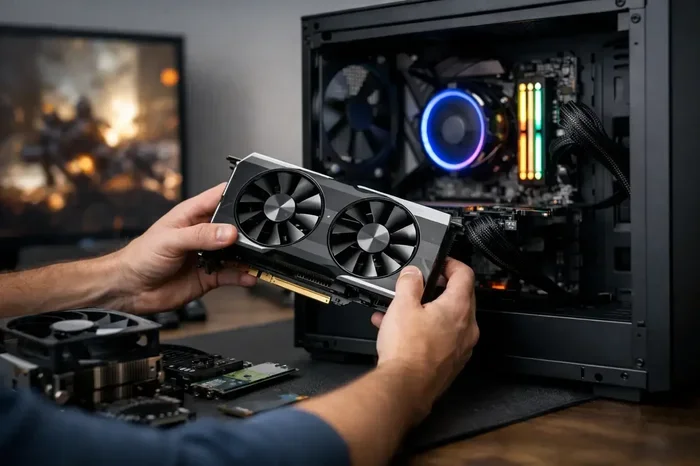
Installing RAM sticks is simple. Open your PC case, locate the memory slots, and press the new sticks in at an angle until they click into place. If you are replacing old sticks, gently remove them by pressing the side clips.
If you are not comfortable opening your PC, you can also look into a RAM upgrade for laptop or seek help from a professional. Many gaming laptops have accessible memory slots that make upgrades easy.
Step 4: Test Your Performance
After installing new RAM, restart your PC and check that it is recognized correctly. Run a game and pay attention to loading times and frame consistency. You should notice smoother performance, especially if you upgraded from 8GB to 16GB or more.
Common RAM Mistakes Gamers Make
Avoid these common mistakes to get the most out of your memory and keep your gaming setup running at its best.
- Buying mismatched sticks: Using two different RAM kits can cause compatibility issues and prevent dual channel mode from working properly.
- Ignoring motherboard limits: Not all motherboards support the fastest RAM speeds. Check your board’s specs before buying high-speed kits.
- Overbuying memory: 64GB of RAM is overkill for most gamers. Stick to 16GB or 32GB depending on your needs.
- Skipping the BIOS update: After installing new RAM, update your motherboard BIOS to ensure the best compatibility and performance.
- Forgetting about cooling: High-speed RAM can run hot. Make sure your case has good airflow, especially if you are using XMP or DOCP profiles.
Quick Tips to Maximize Your RAM Performance
Here are some quick and easy tips to squeeze every bit of performance out of your memory.
- Enable XMP or DOCP profiles in your BIOS to run your RAM at its rated speed instead of the default lower speed.
- Close background apps you are not using to free up memory for your game.
- Use two matching sticks to take advantage of dual channel mode.
- Keep your drivers updated to ensure your system handles memory efficiently.
- Monitor your memory usage with Task Manager to see if you are running low during games.
Expert Insights on RAM and Gaming
According to hardware experts, the biggest mistake most gamers make is not having enough memory. Many people build a powerful CPU and GPU but skimp on RAM. This creates a bottleneck where your other components cannot reach their full potential.
Another expert tip is to think about your entire gaming setup as a system. RAM works together with your processor, graphics card, and storage. A balanced build with 16GB of fast DDR4 or DDR5 memory, a solid GPU, and a good SSD will give you the best overall experience.
If you are unsure about your current setup, check out our article on how much RAM for a gaming laptop to find the right configuration for your needs. For those looking at pre-built options, our guide on gaming laptops with 32GB RAM covers some excellent high-memory options.
Also, if you are planning a future upgrade, consider reading our piece on RAM upgrade for your laptop to understand your options and make the right choice.
Conclusion
Getting the right RAM for gaming is one of the simplest ways to boost your PC performance. Whether you choose 16GB or 32GB, DDR4 or DDR5, the key is to match your memory to your gaming needs and motherboard.
Start with 16GB if you are a typical gamer. Go for 32GB if you stream, edit videos, or want future-proofing. Always use two matching sticks for dual channel mode, and pick memory with fast speeds and low latency for the best results.
Your system memory is the foundation of a smooth gaming experience. Take the time to get it right, and your games will thank you with better frame rates, faster loading times, and zero stuttering.
Frequently Asked Questions
Is 8GB of RAM enough for gaming in 2024?
8GB is the bare minimum and works for older or lighter games. However, most modern AAA titles recommend at least 16GB for smooth performance. If you only play esports titles, 8GB can still be functional, but you will likely need an upgrade soon.
Does RAM speed really matter for gaming?
RAM speed has a modest impact on gaming performance. Faster memory can improve frame rates slightly, especially in CPU-bound games. The difference is more noticeable in competitive titles where every millisecond counts. For most casual gamers, the capacity matters more than the speed.
Can I mix different RAM sticks together?
You can mix RAM sticks, but it is not ideal. Different speeds, sizes, or timings can cause compatibility issues and prevent dual channel mode from working properly. Always try to use matching sticks from the same kit for the best results.
What is the difference between DDR4 and DDR5 RAM?
DDR5 is the newer standard that offers higher speeds and better bandwidth than DDR4. It also uses less power. DDR4 is still widely used and performs well for gaming. DDR5 is the better choice for new builds but comes at a higher price point.
How do I know if my RAM is bottlenecking my gaming PC?
If your frame rates drop randomly or your game stutters during intense scenes, low RAM could be the cause. Open Task Manager while gaming and check if your memory usage is above 90%. If it is, you likely need more memory to keep things running smoothly.
Should I upgrade my RAM or my GPU first?
Your GPU has the biggest impact on gaming performance, so upgrading it first usually gives the best results. However, if you have less than 16GB of RAM, adding memory first can make a noticeable difference. A balanced approach where both components are strong will give you the best experience.