Corsair vs Kingston vs Gskill Ram Comparison Guide
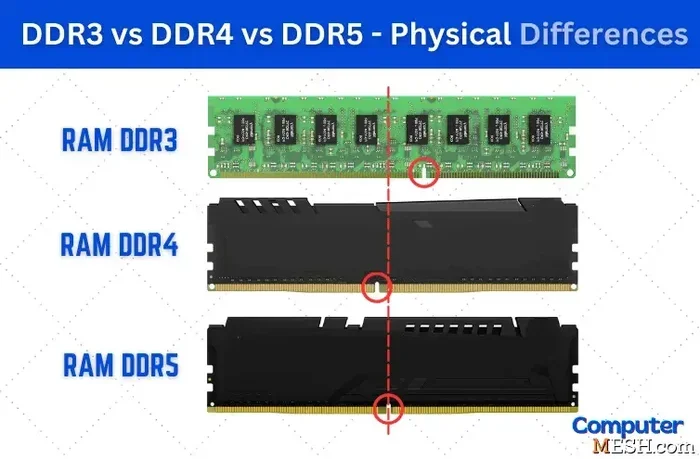
Corsair, Kingston, and Gskill are the three biggest names in PC memory. Each brand offers unique strengths in speed, price, and features. This guide compares them across key categories like DDR4 vs DDR5 support, latency, overclocking potential, and value for money. You will learn which RAM suits gaming, workstations, and budget builds best. By the end, you will know exactly which brand to choose for your next upgrade.
When you are building or upgrading a PC, choosing the right memory can make or break your experience. The three brands everyone talks about are Corsair, Kingston, and Gskill. Each one has a loyal fanbase and a long history of producing quality memory modules. But which one is actually the best choice for you?
Corsair vs Kingston vs Gskill Ram is a debate that comes up constantly in PC building communities. Some people swear by Corsair’s flashy RGB designs. Others trust Kingston’s rock-solid reliability. And then there are the Gskill fans who chase the highest MHz numbers on the market.
The truth is that all three brands make excellent RAM. The real question is which one fits your needs, budget, and motherboard. In this guide, we break down each brand across speed, latency, price, compatibility, and real-world performance. We also compare DDR4 vs DDR5 options so you can make an informed decision no matter what generation you are building with.
Key Takeaways
- Corsair Vengeance leads in RGB lighting, aesthetics, and gaming-focused kits with strong overclocking headroom.
- Kingston Fury offers excellent value with competitive pricing and reliable DDR5 performance for budget-conscious builders.
- Gskill Trident Z dominates in raw speed and low latency, making it a favorite among enthusiasts and overclockers.
- All three brands support DDR4 and DDR5, but their feature sets and target audiences differ significantly.
- Compatibility matters most — always check your motherboard QVL before purchasing any RAM kit.
- Price-to-performance ratios vary, so choosing the right brand depends on your specific use case.
- Cooling solutions like heatsinks play a bigger role in high-speed kits from all three manufacturers.
📑 Table of Contents
Why RAM Brand Matters in a PC Build
You might wonder if RAM brand really makes a difference. The short answer is yes. Different manufacturers use different memory chips, PCB designs, and cooling solutions. These small differences add up to noticeable performance gaps at high speeds.
Brand also affects warranty support, BIOS compatibility, and availability. When you are shopping for laptop RAM upgrade or desktop memory, the brand tells you something about quality control and long-term reliability. A Ram Upgrade For My Laptop or desktop build should always start with a trusted manufacturer.
Another important factor is RAM compatibility with your motherboard. Some brands work better with certain chipsets. For example, AMD Ryzen systems tend to favor kits with tight timings. Intel platforms often prefer higher MHz kits. Knowing your platform helps narrow down the best brand for your specific setup.
Corsair RAM: Features and Performance
Corsair is one of the most recognizable names in PC components. Their Vengeance and Dominator lines are industry staples. Corsair RAM is known for its sleek heatsinks, RGB lighting options, and solid overclocking performance.
Corsair Vengeance RGB and Pro Series
The Vengeance RGB series is a popular choice for gamers who want style and substance. These kits come with addressable RGB strips built into the heatsinks. You can sync the lighting with Corsair iCUE software or other ecosystems like ASUS Aura Sync.
The Vengeance Pro series strips away the RGB for a cleaner look. It focuses on raw performance with low-profile heatsinks that fit under most CPU coolers. Both series offer DDR4 and DDR5 options, making them versatile for different builds.
Overclocking and XMP Profiles
Corsair RAM supports XMP profiles out of the box. This means you can hit rated speeds with just a BIOS toggle. For users who want to push beyond stock speeds, Corsair kits have decent overclocking headroom. The Dominator Platinum line is specifically designed for enthusiasts who want maximum control.
Corsair also offers some of the best customer support in the industry. If you run into compatibility issues, their team is responsive and helpful. This matters a lot when you are troubleshooting RAM performance problems after a build.
Kingston Fury RAM: Value and Reliability
Kingston has been making memory for decades. Their Fury Beast and Fury Renegade lines target different segments of the market. Kingston Fury RAM is often praised for offering strong performance at a lower price point than competitors.
Kingston Fury Beast DDR5
The Fury Beast DDR5 lineup is a great entry point for DDR5 memory. These kits offer solid speeds starting at 5200 MT/s and going up to 6400 MT/s. The heatsinks are functional without being overly bulky. Kingston Fury also provides a lifetime warranty, which gives buyers peace of mind.
If you are looking for a Kingston Fury DDR5 Laptop RAM option, Kingston has you covered there too. Their laptop memory lineup is just as reliable as their desktop offerings. For users who need a quick 8GB RAM vs 16GB RAM Laptop comparison, Kingston Fury makes both configurations readily available.
Kingston Fury Renegade: The Performance Pick
The Renegade series takes Kingston’s performance up a notch. These kits feature faster speeds and tighter timings than the Beast line. The Renegade is designed for users who want DDR5 performance without paying the premium price of top-tier brands.
One thing to note is that Kingston Fury RAM works well with both Intel and AMD platforms. The company invests heavily in RAM compatibility testing across motherboard vendors. This reduces the chances of running into issues after purchase.
Gskill RAM: Speed Enthusiast’s Choice
Gskill is the brand that memory enthusiasts love. Their Trident Z Neo and Trident Z5 lines are built for speed. Gskill consistently pushes the boundaries of what DDR4 and DDR5 memory can achieve in terms of frequency and latency.
Gskill Trident Z and Trident Z5
The Trident Z series has been a favorite among overclockers for years. It features ultra-low latency timings and speeds that regularly break records. The Trident Z5 is the DDR5 successor, offering speeds from 6000 MT/s all the way up to 8000 MT/s and beyond.
Gskill’s heatsinks are designed for thermal efficiency at extreme speeds. When you push memory to 7000 MHz or higher, heat becomes a real concern. Gskill addresses this with large aluminum heatsinks that dissipate heat effectively. If you are curious about whether high-speed RAM needs active cooling, check out our guide on does RAM need cooling for more details.
Gskill’s Impact on Gaming and Productivity
Gskill RAM shines in gaming scenarios where every millisecond counts. Lower latency means faster frame times and smoother gameplay. The does overclocking RAM increase FPS question often comes up, and Gskill kits are among the best platforms for exploring that.
For creative professionals, Gskill offers kits optimized for tasks like video editing and 3D rendering. The does RAM affect 3D rendering speed topic is relevant here, and high-speed Gskill kits can provide measurable improvements in render times.
Head-to-Head Comparison
Let us put Corsair, Kingston, and Gskill side by side. This comparison covers the most important factors for everyday users and enthusiasts alike.
Speed and Frequency Comparison
Gskill generally leads in maximum frequency. Their Trident Z5 kits regularly reach speeds that other brands have not yet matched. Corsair sits in the middle with solid DDR5 options up to 6400 MT/s for most consumer kits. Kingston Fury offers competitive speeds at a more accessible price point.
Latency and Timings
Latency is where Gskill truly excels. Their kits often feature CAS latencies that are significantly tighter than competitors. Corsair offers competitive timings in its higher-end Vengeance Pro lineup. Kingston Fury provides decent timings that are more than adequate for most users.
Price and Value
Kingston Fury wins on pure value. You get reliable DDR5 performance for less money per gigabyte. Corsair sits in the mid-range, with pricing justified by its RGB features and brand reputation. Gskill commands a premium price, but enthusiasts argue that the speed and latency gains are worth it.
Design and Aesthetics
Corsair is the clear winner in aesthetics. The RGB lighting on Vengeance kits is vibrant and easy to customize. Gskill’s Trident Z design is sleek and aggressive. Kingston Fury keeps things simple with functional, understated heatsinks that look clean in any build.
Compatibility and Support
All three brands maintain extensive QVL (Qualified Vendor List) databases. Corsair and Kingston offer the best customer support experiences. Gskill’s support is adequate but can be slower during peak product launch periods. For laptop RAM vs desktop RAM compatibility questions, all three brands have dedicated resources.
Which Brand Should You Choose?
The right choice depends on what you are building and your budget. Here is a quick breakdown to help you decide.
Choose Corsair if you want a gaming-focused build with RGB lighting and strong all-around performance. Corsair is perfect for users who value aesthetics alongside functionality. Their Vengeance line offers the best balance of looks and speed for most gaming PCs.
Choose Kingston if you are on a budget or building a reliable workhorse PC. Kingston Fury delivers solid performance without breaking the bank. It is an excellent choice for students, office users, and casual gamers who need dependable memory without spending extra on RGB.
Choose Gskill if you are an enthusiast who wants maximum speed and the lowest possible latency. Gskill is ideal for competitive gamers, overclockers, and professionals who need every ounce of performance from their system.
One final tip: always check your motherboard’s QVL list before buying. This list confirms which RAM kits have been tested and certified for your specific board. Using a kit on the QVL dramatically reduces the risk of compatibility issues. Whether you are looking at Corsair, Kingston, or Gskill, this simple step saves time and frustration.
Also consider your overall system balance. If you have a powerful GPU and fast storage like the Kingston NV3 PCIe 4.0 NVMe SSD or Corsair MP700 Pro PCIe Gen5 X4 NVMe 2.0 M.2 SSD, you want RAM that can keep up. Pairing slow memory with fast components creates a bottleneck that hurts overall performance.
For users wondering about is 16GB RAM enough for architecture work or is 12GB RAM enough for video editing, the answer depends on your specific workflow. Most modern tasks benefit from 16GB as a minimum, with 32GB becoming the new standard for professional work. Brands like Kingston and Corsair offer easy upgrade paths from 16GB to 32GB kits.
Conclusion
The Corsair vs Kingston vs Gskill RAM debate does not have a single winner. Each brand excels in different areas and serves different types of users. Corsair brings style and gaming features to the table. Kingston delivers outstanding value and reliability. Gskill pushes the limits of speed and performance for enthusiasts.
Your best choice depends on your budget, your motherboard, and what you plan to do with your PC. Take the time to compare specific kits rather than just brand names. Read reviews, check compatibility lists, and think about your long-term upgrade path. With the right RAM from any of these three brands, your PC will run smoothly and efficiently for years to come.
Frequently Asked Questions
Is Corsair RAM better than Kingston?
It depends on your needs. Corsair offers better RGB features and aesthetics, while Kingston provides stronger value and reliability. For pure performance at a lower price, Kingston Fury is hard to beat. For gaming builds where looks matter, Corsair Vengeance is the top pick.
Can I mix Corsair, Kingston, and Gskill RAM together?
Technically you can, but it is not recommended. Mixing brands can cause compatibility issues, instability, and reduced performance. All modules should ideally match in speed, latency, and capacity. Stick to one brand and one kit for the best results.
Which brand has the fastest DDR5 RAM?
Gskill currently leads in maximum DDR5 speeds with their Trident Z5 series reaching 8000 MT/s and beyond. Corsair and Kingston offer competitive DDR5 options but generally at lower top-end frequencies. For most users, the speed differences between brands are minor in everyday use.
Does Gskill RAM have a good warranty?
Yes, Gskill offers a limited lifetime warranty on most of their RAM kits. This is standard among the top three brands. Corsair also provides lifetime warranty support, and Kingston Fury extends a lifetime warranty on their Fury line as well.
Is Kingston Fury RAM good for gaming?
Absolutely. Kingston Fury Beast and Renegade DDR5 kits deliver excellent gaming performance at competitive prices. They may not reach the extreme speeds of Gskill, but for most gamers, the difference is negligible. Kingston Fury is a smart choice for budget-friendly gaming builds.
How do I know which RAM is compatible with my motherboard?
Check your motherboard manufacturer’s QVL (Qualified Vendor List). This list includes tested and approved RAM kits for your specific model. You can also use tools like Crucial’s scanner or CPU-Z to identify compatible memory. Always verify DDR4 vs DDR5 support before purchasing.