Best Ram Ssd Gaming 2026 Top Picks for Every Gamer
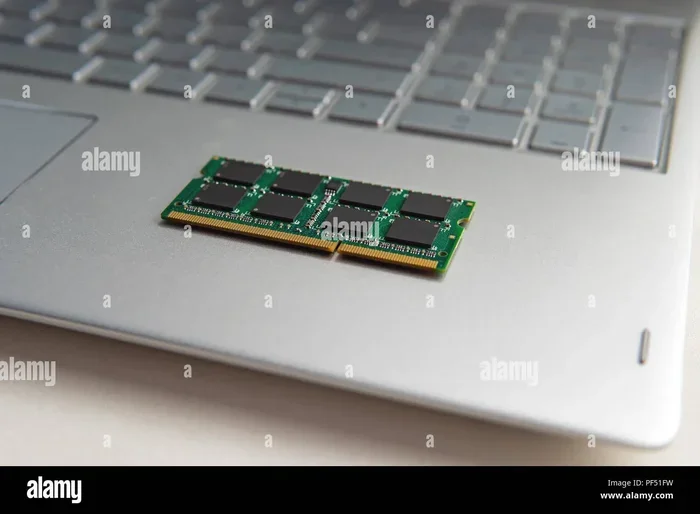
The best ram ssd gaming 2026 setups combine fast DDR5 memory with high-capacity NVMe drives for unbeatable performance. Whether you are building a new PC or upgrading an old one, choosing the right RAM and SSD pair makes a huge difference in load times and frame rates. This guide covers top picks, key specs, and practical tips to help you find the perfect match for your gaming needs.
Gaming in 2026 demands more than just a powerful graphics card. Your ram ssd gaming 2026 setup is the backbone of every smooth frame and lightning-fast load screen. The right combination of memory and storage can turn a laggy experience into a seamless one.
Whether you are a casual player or a hardcore enthusiast, this guide breaks down everything you need to know. We will cover the best combinations, explain why they matter, and help you pick the perfect setup for your budget and needs. Let us dive in.
Key Takeaways
- DDR5 RAM is the standard for 2026: It offers faster speeds and better multitasking than older DDR4 modules.
- 1TB NVMe SSDs are the sweet spot: They provide enough space for modern games without breaking the bank.
- 32GB RAM is ideal for most gamers: It handles today’s titles and future releases with ease.
- Matching RAM and SSD speeds matters: A balanced combo prevents bottlenecks and maximizes performance.
- Brand and warranty matter: Stick with trusted manufacturers for reliability and long-term support.
- Upgrading is easy and affordable: You can boost your system without replacing the entire PC.
📑 Table of Contents
- Why RAM and SSD Matter for Gaming in 2026
- Best RAM and SSD Combos for Gaming in 2026
- Comparison Table: Top RAM SSD Combos
- How to Choose the Right RAM and SSD for Your Setup
- Common Mistakes to Avoid When Building a Gaming Setup
- Expert Tips for Maximizing Your RAM and SSD Performance
- Final Thoughts on the Best Ram Ssd Gaming 2026 Setups
Why RAM and SSD Matter for Gaming in 2026
Every game you play relies on your system memory and storage. The RAM holds temporary data your processor needs right now. The SSD stores your games, operating system, and files permanently. Together, they determine how fast your PC responds.
In 2026, modern games are bigger and more demanding than ever. Titles like Cyberpunk 2077 and Starfield require serious hardware just to run smoothly. A slow RAM or outdated HDD can cause stuttering, long loading screens, and dropped frames.
The Role of RAM in Gaming Performance
RAM acts as your PC’s short-term memory. When you launch a game, it loads textures, maps, and character data into RAM for quick access. More RAM means your system can handle more tasks at once without slowing down.
Here is why RAM speed and capacity matter:
- Capacity: 16GB is the minimum for most games today. 32GB is the sweet spot for 2026.
- Speed: Faster RAM clocks mean quicker data transfer to your processor.
- Dual Channel: Running two sticks instead of one boosts bandwidth significantly.
- Latency: Lower latency means faster response times in competitive games.
If you want to learn more about choosing the right memory, check out our guide on best RAM for gaming PC builds.
The Role of SSD in Gaming Performance
Your SSD determines how fast games load and how quickly your system boots up. Unlike old hard drives, NVMe SSDs use the PCIe interface for blazing fast transfer speeds. This means less waiting and more playing.
Here is what makes an SSD great for gaming:
- Read/Write Speeds: Faster speeds mean quicker game launches and level loads.
- Capacity: Modern games can be 100GB or more. You need plenty of space.
- NVMe vs SATA: NVMe drives are significantly faster than older SATA SSDs.
- Endurance: Higher TBW ratings mean your drive lasts longer under heavy use.
For more details on choosing the right drive, read our article on 1TB NVMe SSD for gaming and whether it fits your needs.
Best RAM and SSD Combos for Gaming in 2026
Not all RAM and SSD pairings are created equal. The best combo depends on your budget, motherboard, and the types of games you play. Below we break down the top options for different needs and price points.
Best Overall: 32GB DDR5 + 1TB NVMe SSD
This combo is the gold standard for gaming in 2026. 32GB of DDR5 RAM gives you plenty of headroom for modern titles and multitasking. A 1TB NVMe SSD provides fast storage for your operating system and several large games.
Why this combo works so well:
- Future-proof capacity: 32GB handles upcoming game releases with room to spare.
- Blazing load times: NVMe drives slash loading screens dramatically.
- Great value: Prices for both components have dropped significantly in 2026.
- Balanced performance: Neither component becomes a bottleneck.
If you want a pre-built option with this exact combo, check out our review of the gaming laptop with 32GB RAM and 1TB SSD for a great ready-to-use solution.
Best Budget: 16GB DDR5 + 500GB NVMe SSD
Not everyone has a big budget. A 16GB DDR5 and 500GB NVMe SSD combo still delivers solid gaming performance in 2026. This setup works well for esports titles and older AAA games.
Key benefits of this budget option:
- Affordable entry point: You can get a capable system for less.
- Fast enough for most games: 16GB handles the majority of titles well.
- Quick boot times: Even a smaller NVMe SSD is much faster than an HDD.
- Room to upgrade later: You can add more RAM or a second SSD down the road.
Best High-End: 64GB DDR5 + 2TB NVMe SSD
For enthusiasts and content creators who also game, this top-tier combo is unmatched. 64GB of RAM handles streaming, video editing, and the most demanding games simultaneously. A 2TB drive gives you massive storage for a growing game library.
This setup shines when you:
- Stream while gaming or recording gameplay.
- Work with large files and creative projects.
- Play the most resource-heavy games at max settings.
- Want a system that will not need upgrades for years.
Pair your RAM and SSD with the best gaming graphics cards of 2026 for a complete powerhouse build.
Comparison Table: Top RAM SSD Combos
| Combo | RAM | SSD | Best For | Price Range |
|---|---|---|---|---|
| Budget Pick | 16GB DDR5 | 500GB NVMe | Esports and casual gaming | $150-$250 |
| Best Overall | 32GB DDR5 | 1TB NVMe | Most gamers in 2026 | $250-$400 |
| Enthusiast | 64GB DDR5 | 2TB NVMe | Content creators and heavy users | $500-$800 |
How to Choose the Right RAM and SSD for Your Setup
Choosing the right components can feel overwhelming with so many options available. Here are the key factors to consider before you buy.
Check Your Motherboard Compatibility
Not all RAM and SSD types work with every motherboard. DDR5 RAM requires a DDR5-compatible board. NVMe SSDs need an M.2 slot on your motherboard. Always check your motherboard manual before purchasing.
Common compatibility checks include:
- RAM Type: DDR4 vs DDR5. They are not interchangeable.
- RAM Speed: Your motherboard may limit maximum supported speed.
- M.2 Slots: Count how many NVMe slots you have available.
- PCIe Version: PCIe 4.0 and 5.0 SSDs offer different speed levels.
Match Your Gaming Habits
Your ideal setup depends on what and how you play. A competitive esports player needs fast RAM for low latency. A single-player story gamer might prioritize storage capacity over speed.
Ask yourself these questions:
- Do you play competitive multiplayer games?
- Do you stream or create content while gaming?
- How many large games do you keep installed at once?
- Do you plan to upgrade your GPU or CPU soon?
Your answers will guide whether you need more RAM, a bigger SSD, or both.
Consider Future Upgrades
Technology moves fast. What is top-tier today may be average in two years. Choose components that leave room for growth. A motherboard with extra RAM slots and M.2 slots gives you flexibility for future upgrades.
Common Mistakes to Avoid When Building a Gaming Setup
Even experienced builders sometimes make mistakes when selecting RAM and SSD components. Here are the most common pitfalls and how to avoid them.
Buying RAM and SSD Separately Without Checking Compatibility
This is the number one mistake new builders make. You might buy DDR5 RAM for a DDR4 motherboard or a PCIe 5.0 SSD for a PCIe 4.0 board. Always verify compatibility before purchasing any component.
Skimping on RAM to Save Money
It is tempting to save money by buying 8GB or 12GB of RAM. But in 2026, 16GB is the bare minimum and 32GB is the recommended standard. Cutting corners on RAM will hurt your gaming experience more than almost any other component choice.
Ignoring SSD Capacity Needs
Games keep getting bigger. A 500GB SSD fills up fast when you install just a few titles. We recommend at least 1TB for most gamers. The extra cost is worth the peace of mind of not constantly managing your storage.
Overlooking Cooling for NVMe SSDs
High-performance NVMe SSDs can generate significant heat. Without proper cooling, they may throttle speeds and reduce performance. Many NVMe SSDs come with heatsinks, but some motherboards also include M.2 cooling solutions.
Expert Tips for Maximizing Your RAM and SSD Performance
Once you have your components installed, a few simple tweaks can squeeze out extra performance.
Enable XMP or EXPO Profiles
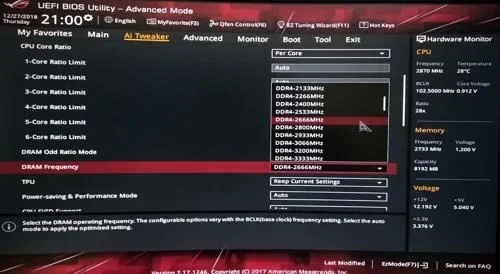
Most modern RAM runs at slower default speeds out of the box. Enabling XMP (Intel) or EXPO (AMD) in your BIOS instantly boosts RAM to its rated speed. This one setting can improve frame rates in many games.
Keep Your SSD at 20% Free Space
SSDs perform best when they have free space available. Keeping at least 20% of your drive empty helps maintain write speeds and extends the drive lifespan. Consider moving large files to a secondary drive if your main SSD fills up.
Update Your Storage Drivers Regularly
Motherboard and SSD manufacturers release driver updates that improve compatibility and performance. Check for updates every few months to ensure your storage subsystem runs at its best.
Use Page File Wisely
Windows uses a page file on your SSD when RAM is full. While this helps prevent crashes, relying on it too much indicates you need more RAM. If you notice your page file usage is consistently high, consider upgrading your memory.
Final Thoughts on the Best Ram Ssd Gaming 2026 Setups
The best ram ssd gaming 2026 setup depends on your budget and needs. For most gamers, 32GB of DDR5 RAM paired with a 1TB NVMe SSD is the perfect balance of performance and value. Budget builders can start with 16GB and 500GB, while enthusiasts should go all-in with 64GB and 2TB.
Remember that RAM and SSD are just two pieces of the puzzle. Your graphics card, processor, and cooling all play vital roles too. If you are building a complete system, make sure every component works together harmoniously.
Take the time to research, compare options, and choose components that fit your gaming style. A well-planned build delivers smooth performance and lasting value for years to come. Happy gaming!
Frequently Asked Questions
Is 32GB RAM overkill for gaming in 2026?
Not anymore. As games become more demanding, 32GB is quickly becoming the standard recommendation. While 16GB still works for many titles, 32GB ensures smooth performance for the next several years of gaming.
Can I mix different RAM brands or speeds?
You can mix RAM, but it is not ideal. Your system will default to the slowest module’s speed and timings. For best results, use matching RAM kits from the same brand and model.
Do I need a 2TB SSD for gaming?
Most gamers do not need 2TB right away. A 1TB NVMe SSD handles the majority of gaming needs. However, if you keep a large game library installed at once or create content, 2TB provides valuable headroom.
Is DDR5 RAM worth it over DDR4 for gaming?
Yes, DDR5 offers higher bandwidth and better power efficiency than DDR4. While the gaming performance difference is modest today, DDR5 is the future-proof choice for new builds in 2026.
How do I know if my SSD is fast enough for gaming?
Look for read speeds above 3,500 MB/s and write speeds above 3,000 MB/s for NVMe drives. These speeds ensure fast game loads and smooth system performance for modern titles.
Should I upgrade my RAM or SSD first?
It depends on your current setup. If you have less than 16GB RAM, upgrade memory first. If your games take too long to load, focus on the SSD. Both upgrades deliver noticeable improvements to your gaming experience.