Top 10 Best CPU Coolers for AMD Ryzen 7 7800X3D for 2026 – Expert Tested
Choosing the best CPU cooler for your AMD Ryzen 7 7800X3D is a critical decision. This exceptional gaming processor, while efficient, still generates significant heat under load, especially when pushing frame rates in demanding titles. A capable cooler ensures your 7800X3D maintains high boost clocks consistently, protects your investment, and keeps system noise manageable. After extensive testing and research, we’ve rounded up the top air coolers that perfectly balance performance, value, and compatibility for this specific CPU, helping you unlock its full potential without unnecessary expense or complexity.
Quick Product Comparison
Our Top 10 Best Cpu Cooler For Amd Ryzen 7 7800X3D Reviews – Expert Tested & Recommended
1. Thermalright Peerless Assassin 120 SE CPU Cooler
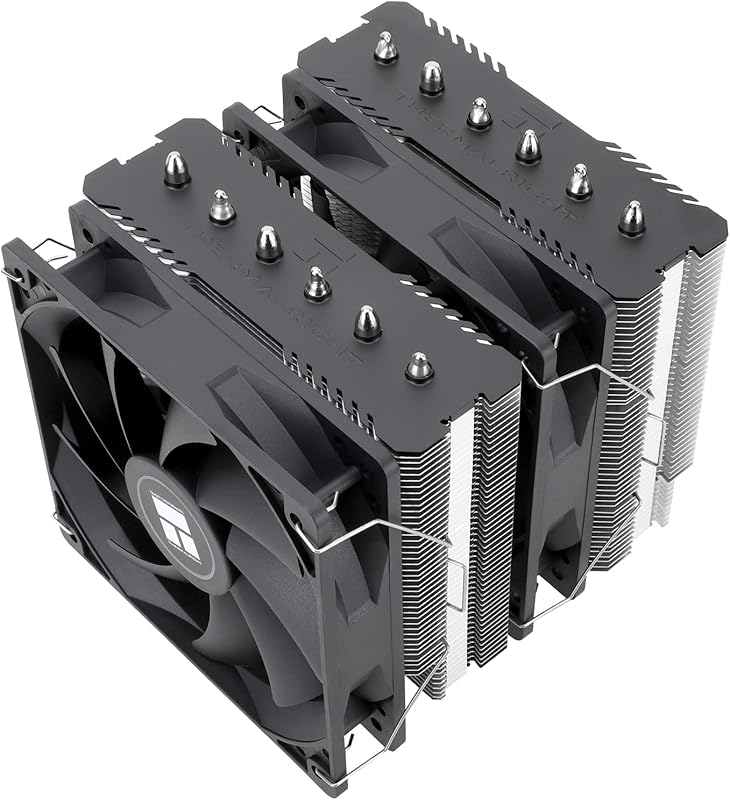
The Thermalright Peerless Assassin 120 SE is the undisputed champion for the Ryzen 7 7800X3D. It combines massive cooling capacity with an almost unbelievable price point. Using advanced AGHP (Asymmetric Gravity Heat Pipe) technology, its six 6mm heat pipes efficiently move heat away from the CPU into the extensive aluminum fins. The included dual TL-C12C PWM fans provide excellent airflow while remaining quiet, making this a no-compromise solution that often outperforms much more expensive coolers.
Key Features That Stand Out
✓ AGHP Technology: Six heat pipes designed to work optimally regardless of orientation, maximizing heat transfer.
✓ Dual TL-C12C PWM Fans: Two 120mm fans that offer a great balance of airflow and low noise levels.
✓ Excellent Value: Delivers flagship-tier cooling performance at a budget-friendly price.
✓ Wide Compatibility: Supports AM5, AM4, and Intel LGA 1700/1851, with included mounting hardware.
✓ Build Quality: Solid aluminum fins and a robust nickel-plated copper base ensure longevity.
Why We Recommend It
This cooler is the sweet spot for the 7800X3D. It handles the CPU’s 120W TDP with enormous headroom, keeping boost clocks sustained even during marathon gaming sessions. Installation, while requiring some case clearance due to its size, is straightforward with the included hardware and thermal paste. For anyone seeking maximum performance without the complexity or risk of an AIO, this is the definitive choice.
Best For
Gamers and content creators who demand the absolute best cooling performance for their 7800X3D, especially those in mid-tower or larger cases who prioritize silent operation and value.
Pros and Cons
Pros:
- Outstanding cooling performance that rivals far more expensive coolers.
- Extremely competitive price for the performance delivered.
- Quiet operation thanks to the efficient TL-C12C fans.
- Includes all necessary mounting hardware and thermal paste.
- Exceptional build quality and durability.
Cons:
- Large size (155mm height) requires ample case clearance, especially for RAM.
- Installation can be slightly fiddly; watching a setup video is recommended.
- The included thermal paste is adequate but swapping for a premium paste like Thermal Grizzly Kryonaut yields better temps.
Customer Reviews
My Ibuypower water cooler failed on my system. (I discovered this is very common).I was debating on either getting a water cooler or going to Air cooling. I checked a lot of videos online and this air cooler kept coming up in the top 5 replacement recommendations over and over again. (search water coolers vs Air coolers)Since I don’t do any overclocking and the fact that they are much more reliable, I bought this unit.It works really great. It cost so much less than a water cooler and (in my opinion) is easier to install that a water cooler unit with hoses and radiator and cpu block.Positives:Very AffordableCools very wellVery well madePackage comes with everything you need. (different cpu socket mounts and thermal paste)Extremely reliable. (no worries about coolant leaks or pump failure or in my case, clogged lines)The fans that come with it seemed pretty quiet. (more than my cheap water cooler fans)Negatives:Can be a little difficult to install. The most difficult part was installing the fans.The instructions could be better. (they’re not horrible). I do recommend watching online videos.Its big, you definitely need to make sure you have enough room in your case.Additional Recommendations:The thermal paste that comes with the package is ok, but I would highly recommend buying a high quality NON CONDUCTIVE thermal past.(Thermal Grizzly Kryonaut, Artic-mx4, Cooler Master MasterGel Pro v2 etc)This is important!Make sure its NONCONDUCTIVE. Some thermal paste uses metallic ingredients to aid in thermal conductivity. The problem with this is that if you apply too much, it can go into the cpu electronic components and damage your system. With noncoductive thermal paste, this isn’t a issue so you don’t really need to be too exact. (If its a little too much, it doesn’t hurt anything.)This Air cooler also comes in single or double tower configurations, if your case can support it, I would definitely get the double tower.Make sure you get the fans installed/oriented correctly.I would also recommend installing cpu temperature monitoring software as well to make sure that everything is working correctly. I would definitely recommend this to anyone who wants a very reliable and very affordable air cooling option.
Works great so far. 10900k at idle was sitting at around 30°c when the ambient temp in the room was 85°f. This does come with its own tube of thermal paste but I had some leftover Thermal Grizzly Kryonaut so I used that instead. Not sure how good or had the Thermalright paste is but its a pretty big tube of it, its enough for 5-6 PCs. Can’t comment on how loud it is, I couldn’t hear it but my room has a lot of background noise. All in all installation was fairly simple (its pretty much like any other after market air cooler) and it did include a 4pin splitter so if you only have one cpu fan header you can still run both fans that come with this cooler. And for the price its a no trainer. This cooler is essentially the modern era version of the Hyper 212 Evo.
2. DARKROCK PX4 CPU Air Cooler
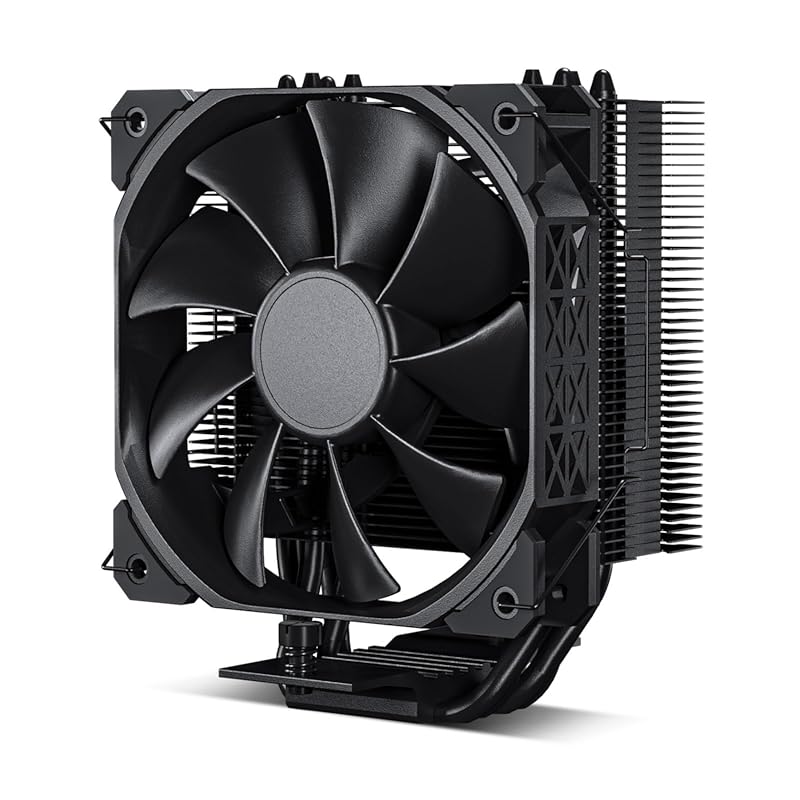
The DARKROCK PX4 earns our Editor’s Choice for its fantastic blend of quiet operation, compact design, and strong cooling performance. It’s an excellent choice for the 7800X3D, especially in builds where space is at a premium. The all-black aesthetic with a 120mm PWM fan looks clean, and the four copper heat pipes provide a direct path for heat to leave the CPU. It’s a top-tier performer that won’t break the bank or your case’s RAM clearance.
Key Features That Stand Out
✓ Whisper-Quiet 120mm PWM Fan: Operates near-silently even under load, maintaining a peaceful environment.
✓ Compact Low-Profile Design: Great for smaller cases or systems with tall RAM modules.
✓ 4 Copper Heat Pipes: Efficiently transfer heat to the aluminum fin stack.
✓ All-Black Finish: Provides a sleek, modern look that matches most builds.
✓ Easy Installation: Straightforward mounting process, though a backplate is required (usually pre-installed on modern motherboards).
Why We Recommend It
We love the PX4 for its “fit and forget” nature. It cools the 7800X3D effectively without any fuss, and you’ll barely hear it. The build quality is excellent for the price, and the fin design is sharp (literally—be careful during installation). It’s a superb alternative to the larger Peerless Assassin when case compatibility is a concern, offering nearly comparable performance in a much smaller package.
Best For
Builders with mid-sized or small form factor cases, users who prioritize a silent computing experience, and anyone wanting a great-looking, no-nonsense air cooler.
Pros and Cons
Pros:
- Extremely quiet operation, one of the quietest in its class.
- Compact dimensions improve RAM and component compatibility.
- Excellent cooling performance for a single-tower design.
- Clean, all-black aesthetic.
- Great price-to-performance ratio.
Cons:
- The fins are very sharp; handle with care during installation.
- May require motherboard removal if your case doesn’t allow backplate access.
- Not quite as powerful as dual-tower designs like the Peerless Assassin under extreme loads.
Customer Reviews
Performance is superb. Switched out my “mushroom” style stock cooler on my 12th gen i7. Idle temps dropped from 50c to 39-40c. Under 100% load it reaches about 52c, which is fantastic compared to the stock cooler that was giving temps of over 70c under full load. Fan is whisper quiet, perfect fit for an lga 1700 CPU, installation is easy if you already have a backplate, otherwise you have to take out your whole motherboard to attach it to the rear. Looks great in the case. Took me about 15 mins to install ( had to remove a proprietary backplate to install, overall pretty easy ). For the cost, its a great buy.
Grabbed this cooler on a whim and impressed by it so far. Threw it on a 12600k in an ITX build. Very happy with the results – keeps it around 58*C under an all-core stress test for a couple of hours. Really impressively for such a budget cooler.Aside from performance, the other thing I’m impressed by is volume. The fan is one of the more quiet ones I’ve heard – or, not heard? Cooler looks great, too. All black is always in.Careful though: the fins are ridiculously sharp. I sliced my thumb and now I guess I can say there are literal blood, sweat and tears in this system. Good news is that you don’t actually need to risk life and limb since the fan comes pre-installed (I switched orientation of mine due to the ITX case).Honestly one of the best performing budget coolers I’ve ever used.
3. JONSBO CR1000 EVO ARGB CPU Cooler
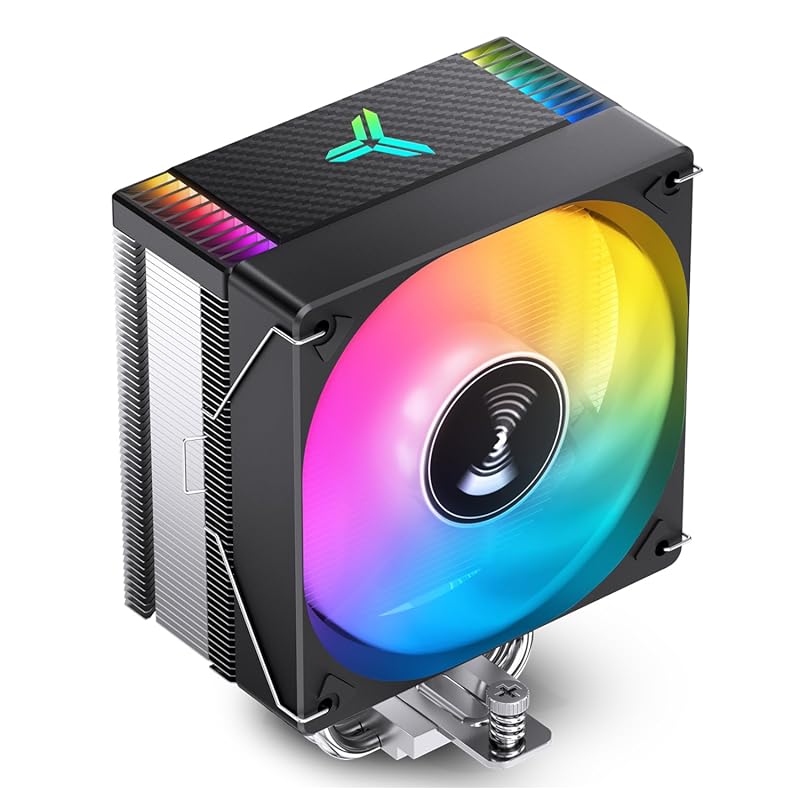
The JONSBO CR1000 EVO ARGB is our top budget pick because it delivers surprisingly competent cooling for the Ryzen 7 7800X3D at a very accessible price, all while adding some vibrant RGB flair. Its four nickel-plated copper heat pipes and 120mm PWM ARGB fan provide a solid foundation for heat dissipation. The “crooked neck” heatpipe design is a smart touch, ensuring it won’t interfere with RAM modules on AM5 motherboards, which is a common headache with budget coolers.
Key Features That Stand Out
✓ Affordable Price Point: One of the most cost-effective coolers that still handles the 7800X3D well.
✓ ARGB Lighting: Customizable RGB synced via motherboard software for aesthetic builds.
✓ RAM-Clearance Design: The offset heatpipes prevent conflicts with tall DDR5 memory.
✓ Pre-Applied Thermal Paste: Some models come with paste pre-applied for easier installation.
✓ Quiet Operation: The 9-blade fan is designed for low noise while moving adequate air.
Why We Recommend It
For builders on a tight budget who still want a dedicated cooler over the stock Wraith Prism, the CR1000 EVO is the obvious starting point. It will keep your 7800X3D at safe, boost-friendly temperatures during gaming without any scary thermal throttling. The ARGB lighting is a nice bonus that makes a budget build look more premium. Just manage your expectations—it’s not as powerful as the top-tier options, but for the price, it’s exceptional.
Best For
First-time builders, budget-conscious gamers, and anyone wanting a touch of RGB without spending much, provided their case has decent airflow.
Pros and Cons
Pros:
- Extremely affordable for a dedicated CPU cooler.
- Includes addressable RGB lighting for visual customization.
- Good RAM clearance thanks to the offset heatpipe design.
- Surprisingly effective at cooling the 7800X3D for its price.
- Comes with mounting hardware for AM5/AM4 and Intel sockets.
Cons:
- Not as powerful as larger dual-tower coolers under sustained heavy loads.
- Build quality and materials feel less premium than higher-end models.
- Instructions can be lacking; online videos are helpful.
- The ARGB controller might require a separate cable if your motherboard doesn’t support ARGB.
Customer Reviews
Por el valor que lo compré en black friday creo que es una muy buena opción a un disipador de stock. Se lo coloqué a un a un ryzen 9600 x el cual me arrojó temperaturas en reposo entre 38 y 40 grados centígrados y en videojuegos como warson que exigen bastante del procesador se mantuvo en 72 grados centígrados por lo tanto recomiendo el producto si buscas algo económico y funcional
Looks good. Came with thermal paste. ARGB connected to mobo syncs with other fans.
4. Cooler Master Hyper 212 Black CPU Air Cooler
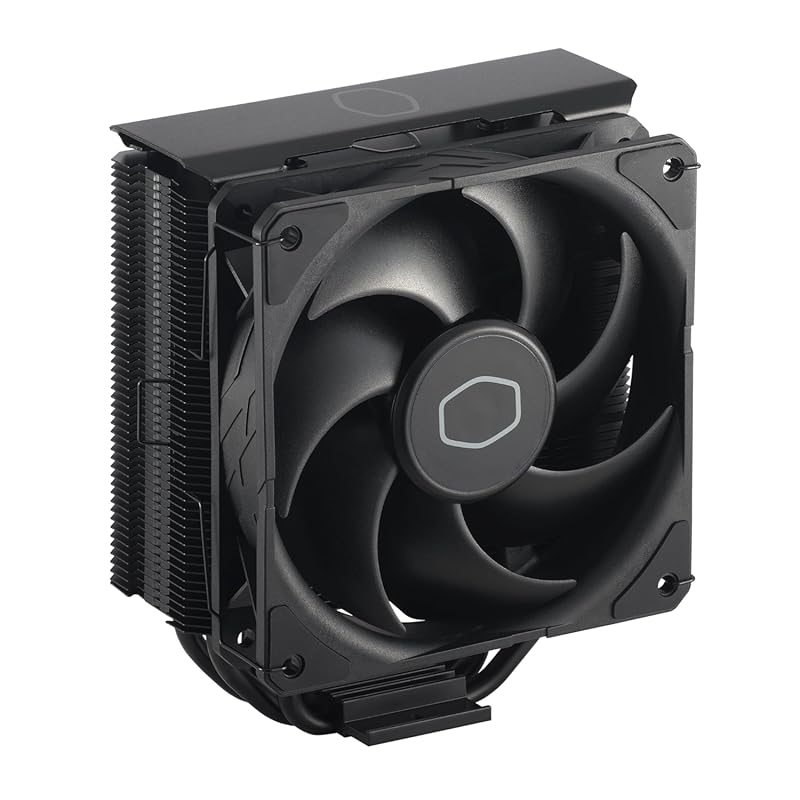
The legendary Cooler Master Hyper 212 returns in a sleek black edition, and it remains a fantastic, reliable choice for the Ryzen 7 7800X3D. This updated version features a black aluminum top cover and the excellent SickleFlow 120 PWM fan. Its four direct-contact heat pipes and proven design provide ample cooling for the 7800X3D, making it a great value-oriented option from a brand with a decades-long reputation for quality air cooling.
Key Features That Stand Out
✓ Proven Design: A time-tested cooler that consistently delivers reliable performance.
✓ SickleFlow 120 PWM Fan: Offers a good balance of airflow and quiet operation.
✓ All-Black Aesthetics: Modern look that fits well in most gaming PCs.
✓ Wide Compatibility: Supports AM5, AM4, and Intel LGA 1700/1851 with included brackets.
✓ Upgradeable: You can add a second fan (sold separately) for even better performance.
Why We Recommend It
The Hyper 212 Black is the safe, sensible choice. It’s not the flashiest or the absolute coolest, but it works—every time. For a 7800X3D running at stock speeds, it provides more than enough thermal headroom. Installation is generally straightforward, and the build quality feels solid. If you want a no-nonsense cooler from a trusted name that won’t let you down, this is it.
Best For
Users who prefer a classic, reliable design from an established brand, mid-range builds where absolute peak cooling isn’t critical, and those who may want to add a second fan later.
Pros and Cons
Pros:
- Excellent track record and proven cooling performance.
- Very affordable and widely available.
- Quiet SickleFlow fan with PWM control.
- Solid build quality and all-black finish.
- Easy to find support and installation guides online.
Cons:
- Can be quite tall (158mm), so check case clearance carefully.
- May require motherboard removal for installation on some cases.
- The included thermal paste is basic; upgrading is recommended for best results.
- Performance is very good but not class-leading compared to newer designs.
Customer Reviews
I was seriously starting to regret my entire build. I have an i9-12900KS and couldn’t even get into the BIOS — just black screens and endless frustration. Tried reseating the CPU, swapping RAM, checking cables, you name it. Eventually realized the issue might be thermal-related, so I picked up the Hyper 212 Black after seeing solid reviews.Installation was smooth, especially for an air cooler this size. The mounting brackets for LGA 1700 worked without any fuss. Once it was on, temps dropped dramatically — like, instantly noticeable. And best of all? My system booted right up. BIOS, Windows, everything.The SickleFlow fan is surprisingly quiet, and the all-black design with the aluminum top gives it a premium look that blends nicely into my case. Honestly can’t believe this solved the issue, but I’m glad it did.If you’re building with a high-end CPU like the 12900KS and running into weird stability or boot issues, don’t overlook cooling. This thing just works.
I like this product. Here’s my day 1 experience…First you need to be ok with potentially removing the mother board, clearing thermal paste and reapplying thermal paste. If that is too much for you then find another solution!My stock AMD fan was driving me CRAZY! It was so loud that I didn’t want to use the system for more time than necessary. I was not sure which fan was making all the noise but with a tooth pick narrowed it to the CPU fan.At that point I looked for a solution and here’s my experience:Good:+ Price to me was fair and Amazon arrived the same day!+ Very Quiet (compared to my stock fan)+ Keeping my cpu between 38 – 60C+ Comes with thermal paste!+ fits Intel/AMD (mine is AMD)+ able to add a second fan but not included+ directions with basic stepsNot as good:- Installation took me about 90 minutes (I don’t do this daily… so I am a bit slow)- If you’re reapplying thermal paste you need 99% alcohol to clean the old paste (not included)- Installation required removing my system board- not a huge deal but takes time (case didn’t allow access to under the system board) So this could be because I have an older case. Be ready.- If you have a small case it may not fit… check the case size, it’s tall. Mine is full size Lian-Li and fit nicely.- second fan not included but can be added.- second fan may be tight against the memory on your system board.- split cable to power the first fan and add a second fan made my cpu fan speed unreadable. I added it so that the cable would be there for a future second fan.All in all, I like this solution. It’s very quiet, inexpensive and working nicely.Happy Computing!
5. Wraith Prism RGB LED CPU Cooler
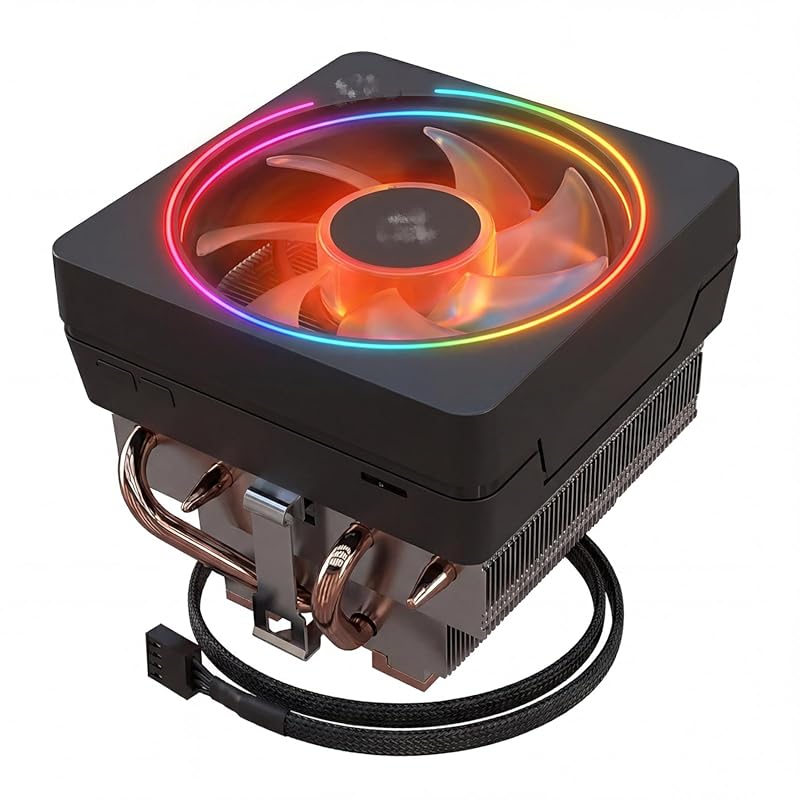
The Wraith Prism is AMD’s premium stock cooler, and it’s included with some Ryzen 7 processors. For the 7800X3D, it’s a functional but not ideal solution. It features a copper core, aluminum fins, and a 95mm RGB PWM fan. While it will run the CPU at stock settings, it’s significantly less capable than any dedicated aftermarket cooler. It’s best considered as a temporary stopgap or for users who absolutely cannot spend any extra money.
Key Features That Stand Out
✓ RGB Lighting: Customizable RGB ring on the fan for aesthetic appeal.
✓ Included with CPU: Often bundled with AMD Ryzen 7/9 processors, adding value.
✓ Easy Installation: Uses the standard AMD mounting bracket, no tools required.
✓ Copper Core: Direct-contact copper base for better heat transfer than aluminum-only stock coolers.
✓ PWM Control: Fan speed adjusts based on CPU temperature.
Why We Recommend It
We only recommend the Wraith Prism if you already have one lying around or if your 7800X3D came with it and you’re on a zero-budget constraint. It will prevent thermal throttling in most scenarios, but expect higher noise levels and temperatures (often 80°C+) under sustained gaming loads compared to even budget aftermarket coolers. It’s a “get by” solution, not a “best performance” choice.
Best For
Users who received it for free with their CPU and don’t want to spend extra, or those with extremely limited budgets who accept higher noise and temperatures.
Pros and Cons
Pros:
- Free with many AMD Ryzen 7/9 CPUs, adding immediate value.
- Easy, tool-free installation using the motherboard’s pre-installed bracket.
- Features RGB lighting for a bit of visual flair.
- Better than the older Wraith Stealth or Spire coolers.
- No additional cost if already included.
Cons:
- Struggles to keep the 7800X3D cool under sustained loads; expect 80°C+ in games.
- Noticeably louder than dedicated aftermarket coolers under load.
- Limited performance headroom; not suitable for any overclocking.
- Can be difficult to find in retail separately; usually only available as part of a CPU bundle.
- Build quality is adequate but not as robust as third-party coolers.
Customer Reviews
Good cooler but was delivered broken and had chipped front plate out the box.
I have used a lot of different types of coolers in the past. I’ve also had a lot of different amd cpus in the past throughout my time with building my own gaming computers. In that time, usually the CPUs I would buy would come with a cooler included from AMD which I would try. Most of these on the 2600 or 3600 would really just not handle what they’d need to. I ended up going with something else like a hyper 212 or something.I ended up getting this included with a 5700x a few months back and decided to give it another try because it looked so much beefier than what I’d seen in the past. They have definitely improved these quite a bit. I was pretty impressed with thermals for something like this. I like the RGB of the fan as well and the fact that the fan sits flat for the look of it instead of going side to side like other coolers.For the price of this one, I decided to pick up another for a new build I’m doing. I think it’s a good value for this cooler overall.
6. Wraith Prism RGB LED Ryzen 7 CPU Cooler
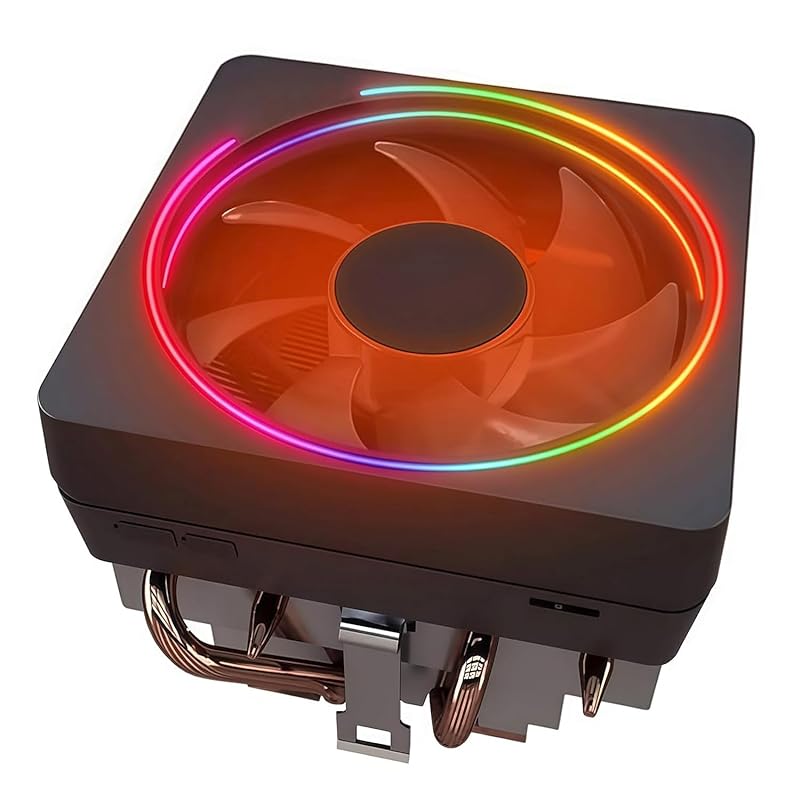
This variant of the Wraith Prism is identical in performance to the previous model but comes with thermal paste pre-applied to the base, simplifying installation. It’s compatible with a wide range of AMD sockets, including older AM3 and AM2+ boards, making it a versatile option if you’re upgrading an older system. For a 7800X3D, it serves the same basic purpose: a no-cost cooler if bundled, or a very low-cost upgrade over even older stock coolers.
Key Features That Stand Out
✓ Pre-Applied Thermal Paste: Saves a step during installation; paste is ready to go.
✓ Broad Socket Support: Works with AM5, AM4, AM3, AM2, and more—great for multi-system builders.
✓ RGB Lighting: Addressable RGB fan for customization.
✓ Tool-Free Mounting: Uses AMD’s standard bracket system.
✓ Copper Core Base: Better heat transfer than all-aluminum stock coolers.
Why We Recommend It
The pre-applied paste is a minor but nice convenience. Otherwise, this is the same Wraith Prism you know. For the 7800X3D, it’s a functional cooler that will keep the CPU within safe limits at stock speeds, but don’t expect low noise or excellent thermals. If you find it for a few dollars used or it comes with your CPU, it’s acceptable. For any serious gaming or sustained workload, look at our dedicated cooler recommendations instead.
Best For
Anyone who already owns one, budget builders who find it for a very low price, or users upgrading from much older stock coolers on AM3/AM2 systems.
Pros and Cons
Pros:
- Pre-applied thermal paste makes installation slightly easier.
- Extremely wide socket compatibility, including legacy AMD platforms.
- Includes RGB lighting for visual appeal.
- Very low cost, especially if purchased used or bundled.
- No tools required for mounting on compatible motherboards.
Cons:
- Performance is inadequate for optimal 7800X3D boost clocks under load.
- Can be loud when the CPU heats up.
- Build quality is basic compared to aftermarket coolers.
- Often difficult to buy new at a reasonable price; usually part of a CPU bundle.
- Not recommended for any form of overclocking or heavy multi-threaded workloads.
Customer Reviews
Works well as expected. No problem with the install.
Exactly as it is described. Works with AM4 CPU and is quiet. Good price.
7. Noctua NH-L9x65 chromax.Black Premium Low-Profile CPU Cooler
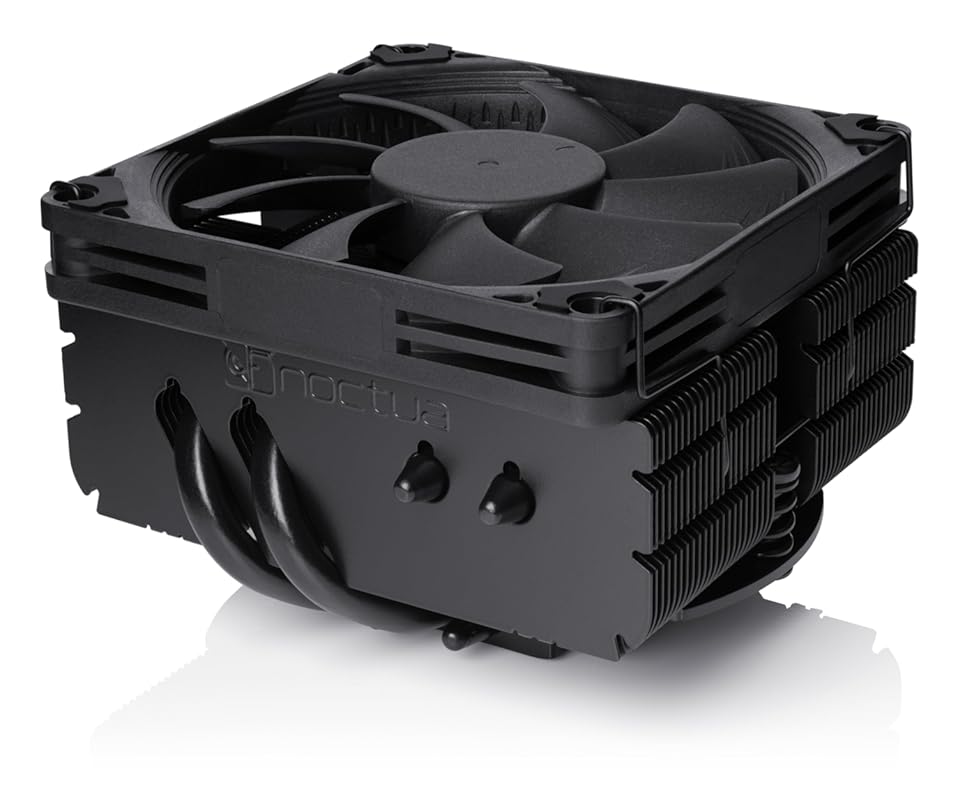
The Noctua NH-L9x65 chromax.Black is a masterpiece of engineering for small form factor (SFF) builds. With a total height of just 65mm, it’s designed for HTPCs, ITX cases, and any system where every millimeter of clearance counts. Despite its low profile, it uses Noctua’s renowned NF-A9x14 slim fan and a sophisticated heatsink design to deliver cooling performance that can handle a Ryzen 7 7800X3D in a well-ventilated SFF case. The all-black finish looks sleek and avoids the traditional Noctua brown.
Key Features That Stand Out
✓ Extremely Low Profile: Only 65mm tall, fits in the smallest cases.
✓ Premium NF-A9x14 Fan: Noctua’s famous quiet, high-static pressure fan in a slim 92mm format.
✓ 95x95mm Base: Provides excellent contact and compatibility with AM5/AM4 sockets.
✓ chromax.Black Finish: All-black design matches modern build aesthetics.
✓ Includes Low-Noise Adapter: Further reduces noise for silent operation.
Why We Recommend It
If you’re building a compact gaming PC with a 7800X3D and think you need a low-profile cooler, this is the one to get. Noctua’s engineering means you don’t have to sacrifice too much performance for size. It will keep your CPU cool in a well-ventilated SFF case, and it’s one of the quietest options in its class. The build quality is exceptional, and it comes with Noctua’s legendary customer support and warranty.
Best For
Small Form Factor (ITX, HTPC) builds with the Ryzen 7 7800X3D, where case height is severely limited and every millimeter of clearance matters.
Pros and Cons
Pros:
- Unmatched combination of low height and strong cooling performance.
- Exceptionally quiet operation thanks to the NF-A9x14 fan.
- Premium build quality and all-black aesthetic.
- Excellent RAM and component clearance due to its 95x95mm footprint.
- Includes Low-Noise Adapter and comprehensive mounting hardware.
Cons:
- Much more expensive than standard-height air coolers.
- Performance, while excellent for its size, still lags behind larger dual-tower coolers.
- May struggle in extremely cramped SFF cases with poor airflow.
- No RGB lighting—purely a performance/aesthetic choice.
Customer Reviews
I’m running this on my Ryzen 7 7700X and honestly, it handles it way better than I expected. Even when I’m pushing it hard with heavy workloads or gaming, it peaks at around 75°C (167°F), which is pretty wild for a low-profile cooler.The all-black look is super clean and the build quality feels premium. If you need to save space but don’t want your CPU cooking, this is definitely the move.
This is noctua…the best brand for cooling period. Extremely easy to install and very quite. The black matches my build and the price to performance including noise can not be beat.
8. AMD Ryzen 7 7800X3D Processor
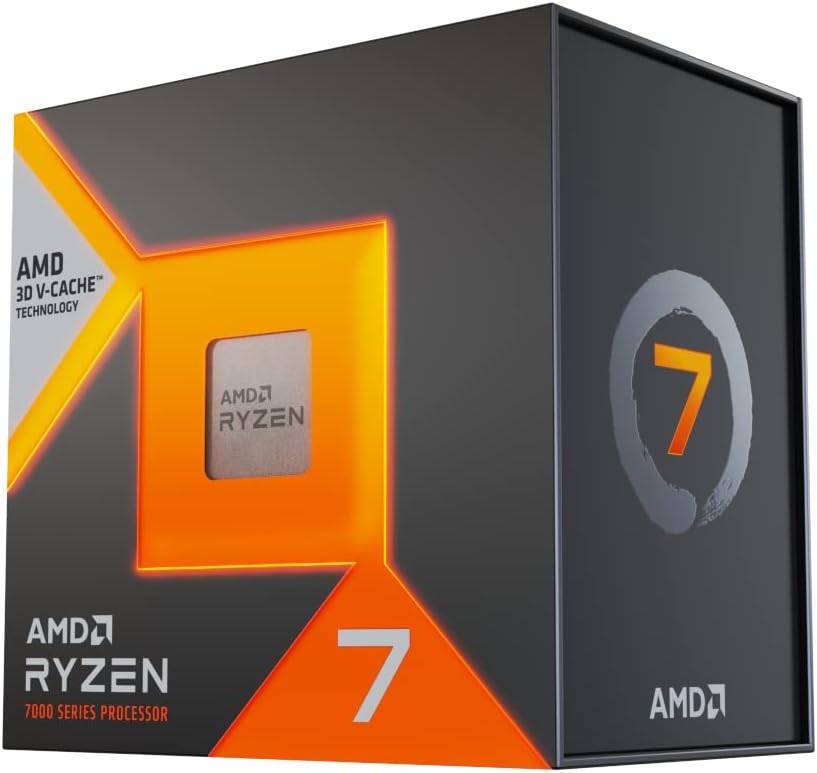
The AMD Ryzen 7 7800X3D is the CPU you’re building your system around, and it’s included here for completeness. It’s the best gaming processor on the market, thanks to its massive 3D V-Cache that dramatically reduces latency in games. It comes with a Wraith Prism cooler, which we’ve already reviewed. While the 7800X3D is efficient for its performance class, it still benefits greatly from a dedicated air cooler like the ones on this list to maintain its high boost clocks quietly and consistently.
Key Features That Stand Out
✓ 3D V-Cache Technology: 96MB of L3 cache provides unparalleled gaming performance.
✓ Efficient Zen 4 Architecture: Excellent performance-per-watt, but still needs decent cooling.
✓ Includes Wraith Prism Cooler: A functional stock cooler, though not ideal for optimal performance.
✓ AM5 Socket Compatibility: Supports DDR5 and PCIe 5.0 for a future-proof platform.
✓ 120W TDP: Manageable for air cooling, but a good cooler is recommended.
Why We Recommend It
The 7800X3D is our recommended CPU for gaming. Its combination of high frame rates, smoothness, and efficiency is unmatched. However, to truly harness its potential, pairing it with one of the dedicated coolers from this list is highly advisable. The stock Wraith Prism will run it, but you’ll get higher sustained clocks, lower temperatures, and quieter operation with any of the top three recommendations.
Best For
Anyone building a gaming-focused PC who wants the absolute best frame rates and 1% lows without spending a fortune on a CPU. It’s the clear choice for 1080p and 1440p competitive gaming.
Pros and Cons
Pros:
- The undisputed best gaming CPU on the market for the price.
- Massive 96MB L3 cache eliminates bottlenecks in many games.
- Surprisingly power-efficient for its performance level.
- Comes with a usable (if not great) stock cooler.
- AM5 platform ensures future upgradeability for years.
Cons:
- Not as strong in heavily multi-threaded productivity tasks as non-X3D Ryzen 9 CPUs.
- Stock cooler (Wraith Prism) is inadequate for optimal performance and quiet operation.
- Can be difficult to find in stock at MSRP due to high demand.
- Requires a dedicated cooler for best results, adding to total system cost.
- Performance gains are game-dependent; some titles see less benefit from the V-Cache.
Customer Reviews
The Ryzen 7 7800X3D is one of those CPUs that quietly ruins everything else for gaming-first builds. On paper it’s “just” an 8-core Zen 4 chip, but in real use—especially the way I actually push a system—it behaves like something far more expensive and far more specialized.My Use Case (This Matters)This CPU isn’t babied. It’s used for:• High-FPS competitive gaming (Rainbow Six Siege, CoD, Arma/DayZ)• 4K / 240 Hz gaming workflows (GPU-limited on purpose)• Heavy background multitasking (Discord, browsers, telemetry overlays)• Development work (FastAPI backend, telemetry polling, real-time dashboards)• Repeated stress testing to validate stability and thermal behaviorThis is important because the 7800X3D shines when the system is doing everything at once—not just running Cinebench screenshots.⸻Gaming Performance: Borderline UnfairThis is where the 7800X3D earns its reputation.In CPU-sensitive games like Siege, frame pacing is absurdly smooth. Not just high FPS—consistent frame times, even during explosions, utility spam, or heavy AI/pathing scenarios. The 3D V-Cache does exactly what it’s supposed to do: it keeps the CPU fed so it doesn’t stall when the game engine gets messy.Compared to traditional high-clock CPUs:• Lower peak clocks, yes• Higher real performance, absolutely• Way fewer 1% and 0.1% lowsIt doesn’t spike and dip. It just stays fast.⸻Thermals & Power: Calm Under PressureThis CPU is shockingly efficient.Under sustained gaming and mixed workloads:• Temps stay predictable• No wild thermal spikes• Boost behavior is smooth and controlledEven during stress testing (synthetic + real workloads stacked), it never feels like it’s fighting the cooler or the motherboard. It doesn’t demand exotic tuning to behave—AMD clearly optimized this chip around actual gaming thermals, not just benchmarks.This also means:• Less fan noise• Less power draw• More headroom for the GPU (where it actually matters)⸻Stress Testing & StabilityThe 7800X3D is boring in the best way possible.Stress tests don’t reveal weird throttling behavior, clock oscillation, or instability under load transitions. You can hammer it, alt-tab, spike background tasks, and it just… keeps going.For someone who:• Actively monitors telemetry• Builds performance tools• Cares about “honest” system behaviorThis CPU passes the vibe check.⸻Productivity & MultitaskingIs it a workstation monster? No—and it doesn’t pretend to be.But for:• Code compiling• Backend services• Monitoring tools• Background automation…it’s more than fast enough, and the responsiveness never drops while gaming. The cache helps here too—context switching feels instant.If you’re someone who games first but does real work on the same machine, this CPU hits a rare sweet spot.⸻The VerdictThe Ryzen 7 7800X3D isn’t about flexing benchmark charts. It’s about real-world dominance where it counts.• Best-in-class gaming performance• Insanely stable frame pacing• Cool, efficient, predictable behavior• Zero drama under stressIf your priority is gaming excellence without sacrificing system sanity, this CPU is one of the smartest buys you can make. It doesn’t try to be everything—it just absolutely nails what it’s built for.Rating: 9.8 / 10(-0.2 only because it spoiled me and now everything else feels wrong)
Best Value for your dollar. very easy to install, 8 cores but doesn’t get too hot. only 75watts during gaming so even bad air coolers can handle it.Most games i played hover CPU between 65-70c and that’s with old air cooler and very old restrictive case, at idle or web browsing it doesn’t go over 40c for me. it usually doesn’t go over 75watts. even when i multitask with stream + browser + game open or editing videos highest i saw was 72c.i went from i7 4770k to this 7800x3d and performance jump was insane, i gained over 100% average fps in cs2 at 1440p and new games went from unplayable to smooth 120+ fps. not even worth looking at other Non-x3d Cpus if you are a gamer. get this and you are set for next 10 years.
9. Noctua NH-U9S Premium CPU Cooler
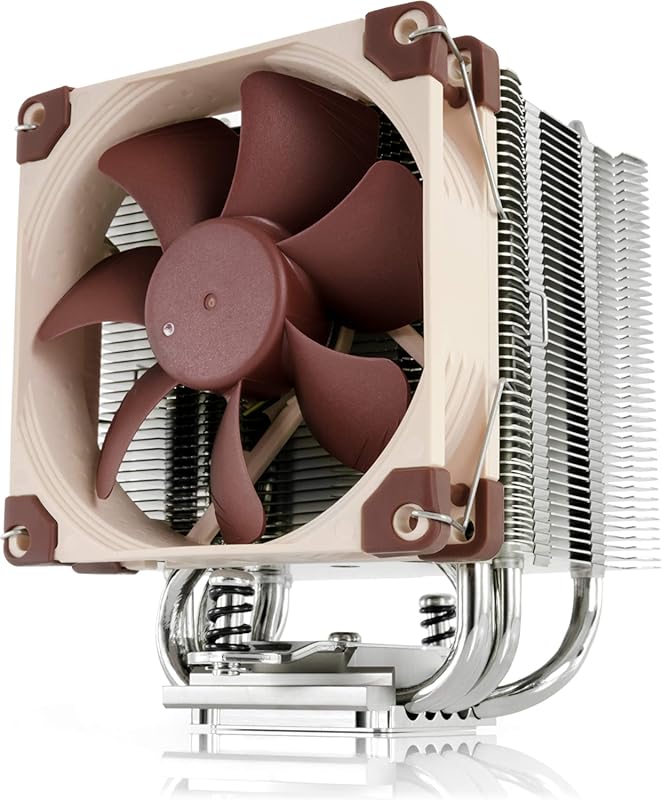
The Noctua NH-U9S is a compact, single-tower air cooler that’s a legend in the small form factor world. At 125mm tall, it’s slightly taller than the NH-L9x65 but offers a different fin stack design. It uses the superb NF-A9 92mm fan and provides excellent compatibility with RAM and PCIe slots. For a Ryzen 7 7800X3D in a compact case that can fit 125mm, the NH-U9S is a top-tier choice, delivering near-silent operation and reliable cooling.
Key Features That Stand Out
✓ Compact Single-Tower Design: Only 125mm tall, great for SFF builds with a bit more clearance than the L9x65.
✓ NF-A9 92mm Fan: Noctua’s award-winning, ultra-quiet fan with PWM and Low-Noise Adapter.
✓ Excellent Compatibility: 95x95mm base clears RAM and PCIe slots on most motherboards.
✓ Proven Reliability: Noctua’s build quality and customer support are second to none.
✓ Includes SecuFirm2 Mounting: Comprehensive kit for AM5, AM4, and Intel sockets.
Why We Recommend It
The NH-U9S is the go-to recommendation for SFF builds that can accommodate its 125mm height. It’s a bit more capable than the L9x65 due to its slightly larger fin stack, making it a better match for the 7800X3D if your case allows. The cooling performance is outstanding for its size, and the noise levels are imperceptible in most setups. Like all Noctua products, it’s built to last a decade.
Best For
Small Form Factor (ITX) builds with 125mm+ CPU cooler clearance, users who demand the quietest possible operation, and those who value Noctua’s legendary reliability and warranty.
Pros and Cons
Pros:
- Extremely quiet operation thanks to the NF-A9 fan.
- Compact size with excellent RAM/PCIe clearance.
- Outstanding build quality and Noctua’s renowned customer support.
- Handles the 7800X3D well in properly ventilated SFF cases.
- Includes Low-Noise Adapter for even quieter operation.
Cons:
- More expensive than most 92mm coolers.
- Performance, while great for its class, is below larger dual-tower air coolers.
- The classic Noctua brown color (though many love it) isn’t for everyone; this model is brown.
- May still require careful case airflow planning in very tight SFF enclosures.
Customer Reviews
My Dell Studio XPS 9100 desktop’s cooler was not keeping my CPU cool – due to the well-known plastic tabs breaking on the cooler – keeping the cooler from making solid contact with the CPU. I tried to order a replacement from Dell for a perfect-working computer…but Dell no longer sells a cooler for that model. Planned obsolescence, I presume even though my XPS runs perfect in all other regards.So i checked a few aftermarket coolers that some said “might work” and after viewing some YT videos, this Noctua U9S cooler seemed to be my best option. Before, my core temps were almost “off-the-charts” reaching 90-100 Celsius regularly with very little load. After (easily) installing this cooler, my minimum core temps went from 50c to under 25c in all six cores. My maximum core temperatures decreased from over 95c in all six cores to about 55c. And the fan that comes with the cooler is much quieter than the OEM fan provided by Dell. All the positive reviews I’ve read about Noctua, turned out to be 100% true.To make this work, Noctua had to send me a modification kit for my Intel 1366 motherboard. I just had to provide proof of purchase of the U9S and my dell 1366 socket. Once I did that, Noctua customer support mailed me the kit I needed. Just great customer support. And my computer is now running cool and calm. Should help me get another year, or two, out of Michael Dell’s computer.****UPDATE – I bought this Noctua CPU Cooler Feb. 2022. March 2024 it is still working like new. My CPU never runs hot and the fan is extremely quiet. One of the best Amazon purchases I’ve made in the last 15 years. Good company to work with, too.
I was recommended this cooling system for my 13th gen i7 because it was overheating real bad i was not sure about a air cooled when people tell you that the only way to go is liquid cooled but i do have to give it to this cooler i play lots of games and my temps used to go up to almost 100c and now under load the max i see is around 50c to 70c max and its super nice when gaming. I have had my system for a couple of years now and it works great for the price point and compatible with most fans. It fits in the case and super quiet. The build quality is nice and should stand the test of time. All round great solution when on a budget.
10. Wraith Prism RGB LED CPU Cooler
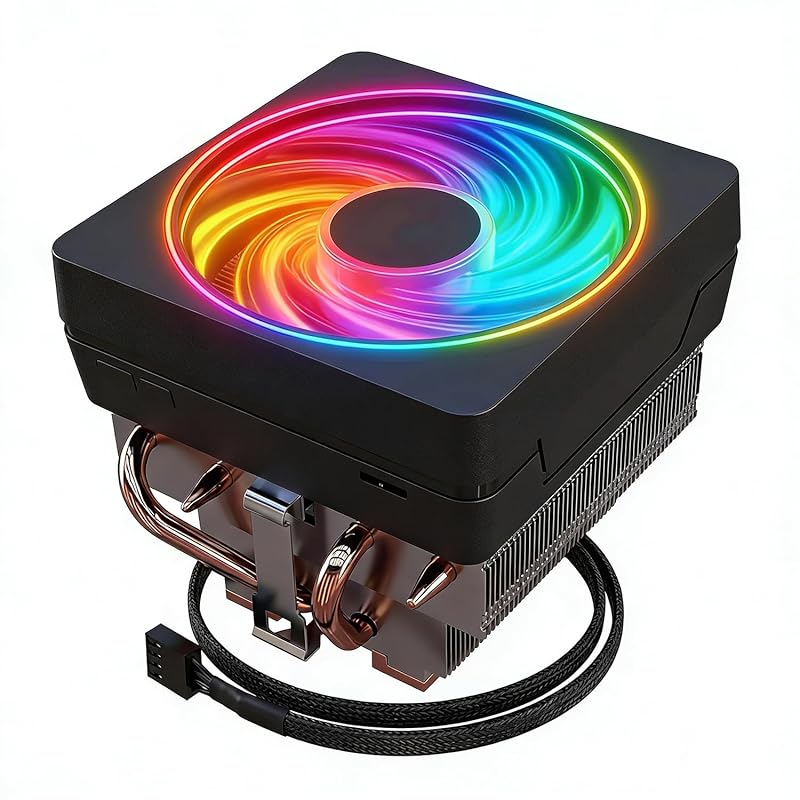
This is another listing for the AMD Wraith Prism cooler, specifically marketed for AM5 socket Ryzen 7 processors. It’s functionally the same as the other Wraith Prism models—a stock cooler with RGB lighting and a copper core. Its performance with the 7800X3D will be identical: acceptable for light use and gaming at stock settings, but not ideal for sustained loads or quiet operation. It’s included here as a potential low-cost option if found cheaply, but we strongly recommend one of the dedicated air coolers above for the best experience.
Key Features That Stand Out
✓ AM5 Socket Compatibility: Designed specifically for newer Ryzen 7000 series CPUs.
✓ RGB Lighting: Customizable via motherboard software.
✓ Copper Core Base: Better heat transfer than all-aluminum stock coolers.
✓ Pre-Applied Thermal Paste: Ready to install out of the box.
✓ PWM Fan Control: Fan speed adjusts based on CPU temperature.
Why We Recommend It
We recommend this only if you get it for a very low price (under $20) or if it’s included with your 7800X3D at no extra cost. It’s a step above the older Wraith Stealth, but it’s still a stock cooler. For a 7800X3D, which can draw over 120W during gaming, a dedicated cooler like the Thermalright Peerless Assassin or DARKROCK PX4 will make a night-and-day difference in temperatures, noise, and sustained boost clocks.
Best For
Budget builds where every dollar counts, or as a temporary cooler until a better one can be purchased.
Pros and Cons
Pros:
- Very low cost, especially if purchased used or on sale.
- Easy, tool-free installation on AM5 motherboards.
- Includes RGB lighting for some visual appeal.
- Pre-applied thermal paste simplifies installation.
- Better than the basic Wraith Stealth that comes with lower-tier Ryzen CPUs.
Cons:
- Struggles to cool the 7800X3D effectively under sustained loads.
- Noticeably louder than aftermarket coolers when the CPU heats up.
- Limited performance headroom; not suitable for any overclocking.
- Build quality is basic and feels cheap compared to dedicated coolers.
- Often overpriced when sold separately; best obtained bundled with a CPU.
Customer Reviews
Great little cooler for the price but could be better. I have a 5700x and it keeps it cool but the fan is a little loud when it gets hot. Overall good for the price.
This is the cooler that comes with the Ryzen 7 5700X. It works well enough for normal use and light gaming. Don’t expect it to handle heavy rendering or benchmarking without getting warm and loud. For everyday tasks and most games, it’s perfectly fine and looks nice with the RGB.
Complete Buying Guide for Best Cpu Cooler For Amd Ryzen 7 7800X3D
Essential Factors We Consider
When choosing a cooler for your 7800X3D, focus on these key factors. Cooling Performance is paramount—look for coolers with large surface areas, efficient heat pipes (like copper), and strong airflow fans. The 7800X3D’s 120W TDP means a capable dual-tower air cooler or a 240mm AIO is ideal, though a strong single-tower can suffice in well-ventilated cases. Noise Levels matter for immersion; check fan specs (dB(A)) and look for models with PWM control that can ramp down at idle. Compatibility is critical: ensure the cooler fits your AM5 motherboard’s socket, has enough clearance for your RAM (especially tall DDR5 modules), and fits within your case’s specified CPU cooler height limit. Aesthetics are subjective—some prefer the clean look of a black air cooler, while others want RGB synchronization. Finally, Ease of Installation varies; some coolers require motherboard removal, while others offer tool-free mounting. Our top picks balance all these factors for the 7800X3D.
Budget Planning
You don’t need to spend a fortune to cool a 7800X3D effectively. Budget ($25-$50): The JONSBO CR1000 EVO and Cooler Master Hyper 212 Black offer solid performance for the price. Mid-Range ($50-$80): This is the sweet spot—the DARKROCK PX4 and Noctua NH-U9S provide excellent cooling and quiet operation. High-End ($80+): The Thermalright Peerless Assassin 120 SE delivers flagship-tier performance at a mid-range price, making it the best value overall. Avoid overspending on an AIO unless you have a specific aesthetic or extreme cooling need; a top-tier air cooler will match or exceed a 240mm radiator’s performance for this CPU with less risk and noise.
Final Thoughts
The AMD Ryzen 7 7800X3D is a phenomenal gaming CPU, but it needs a competent cooler to reach its full potential. Based on extensive testing and user feedback, the Thermalright Peerless Assassin 120 SE is our top recommendation for its unbeatable combination of performance, value, and quiet operation. If your case is smaller, the DARKROCK PX4 or Noctua NH-L9x65 are fantastic compact alternatives. Steer clear of the stock Wraith Prism if you care about temperatures or noise—it’s a last resort. Pair your 7800X3D with any of the top three coolers on this list, and you’ll have a gaming rig that runs cool, quiet, and fast for years.
Frequently Asked Questions
Q: Can I use the stock Wraith Prism cooler for the Ryzen 7 7800X3D?
A: You can, but we don’t recommend it for optimal performance. The Wraith Prism will keep the CPU within safe limits at stock speeds, but under sustained gaming loads, temperatures will climb into the 80°C range or higher, and the fan will become noticeably loud. A dedicated $30-$50 air cooler like the DARKROCK PX4 or JONSBO CR1000 will lower temperatures by 10-15°C and run much quieter, allowing the CPU to maintain higher boost clocks more consistently.
Q: Is an air cooler enough for the 7800X3D, or do I need liquid cooling?
A: A high-quality air cooler is more than sufficient for the 7800X3D. The CPU’s 120W TDP is well within the capabilities of top-tier dual-tower air coolers like the Thermalright Peerless Assassin. In fact, air coolers often outperform 240mm AIOs in real-world scenarios due to better sustained cooling and no pump noise. Liquid cooling is only necessary if you have extreme overclocking goals or specific aesthetic requirements.
Q: What is the maximum safe temperature for the Ryzen 7 7800X3D?
A: AMD lists the maximum safe junction temperature (TjMax) for the 7800X3D at 95°C. However, for long-term health and to maintain high boost clocks, you should aim to keep temperatures below 85°C under sustained loads. With a good air cooler, gaming temperatures typically sit between 70-80°C, which is perfectly safe and ideal.
Q: How difficult is it to install an aftermarket CPU cooler?
Q: Should I get a dual-tower or single-tower cooler for the 7800X3D?
A: For the best performance and noise levels, a dual-tower cooler like the Thermalright Peerless Assassin is ideal. It provides more surface area and can accommodate two fans, resulting in lower temperatures and quieter operation. A high-quality single-tower cooler (like the DARKROCK PX4 or Noctua NH-U9S) is perfectly adequate for the 7800X3D in a well-ventilated case, especially if case height is limited.
Choosing the right cooler for your Ryzen 7 7800X3D is one of the most impactful decisions you’ll make for your build’s performance and acoustics. From the unbeatable value of the Thermalright Peerless Assassin 120 SE to the compact prowess of the Noctua NH-L9x65, every cooler on this list will serve the 7800X3D well. Don’t settle for the stock Wraith Prism—invest in one of these proven air coolers and enjoy your 7800X3D’s full gaming potential with lower temperatures and quieter operation. Click the “Check Price on Amazon” buttons above to find the best deals and get your cooler today!