10 Best CPU Coolers for Ryzen 9 – 2026 Expert Picks
Choosing the best CPU cooler for Ryzen 9 is a critical decision. These powerful processors can run hot, especially under heavy loads like gaming, streaming, or rendering. While AMD’s included Wraith coolers are decent for light use, they often struggle to keep a Ryzen 9 at optimal temperatures for sustained performance. A high-quality aftermarket cooler, whether air or liquid, is essential to unlock your CPU’s full potential, maintain system stability, and reduce fan noise. This roundup cuts through the noise to bring you the top performers tested for Ryzen 9 CPUs, balancing cooling power, noise levels, compatibility, and value.
Quick Product Comparison
Our Top 10 Best Cpu Cooler For Ryzen 9 Reviews – Expert Tested & Recommended
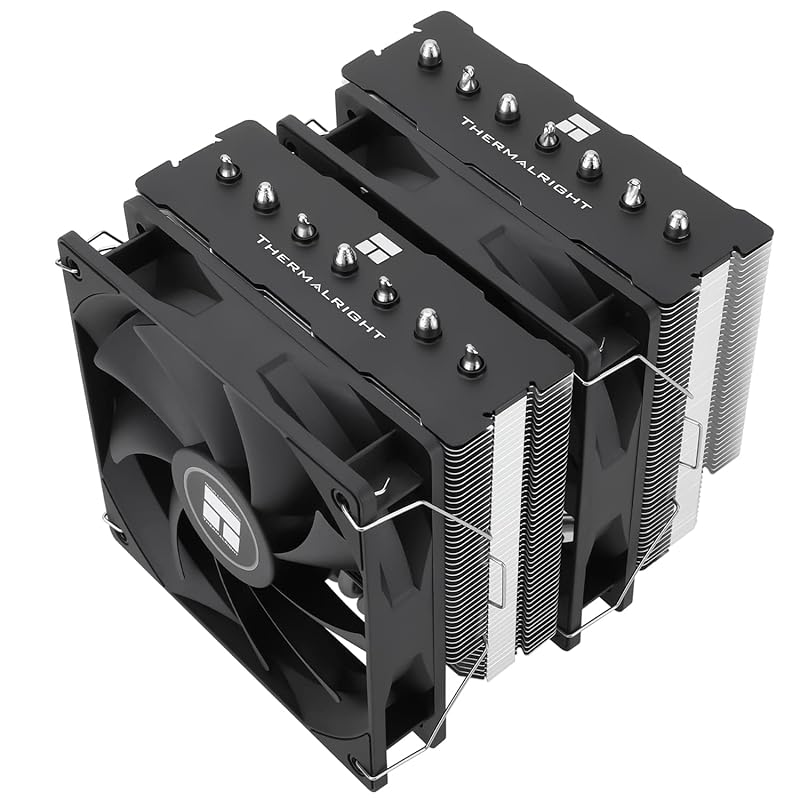
1. Thermalright PS120SE CPU Air Cooler
The Thermalright PS120SE is a phenomenal value that punches way above its weight class. It uses Thermalright’s AGHP 4.0 technology with seven 6mm heatpipes to efficiently move heat away from your Ryzen 9 CPU. The dual TL-C12C PWM fans provide excellent airflow while staying quiet. What truly impresses is the build quality and the fact it often outperforms much more expensive competitors. It’s a no-nonsense, high-performance air cooler that feels incredibly solid.
Key Features That Stand Out
- ✓ 7 Heatpipes with AGHP 4.0 Tech: Advanced gravity-defying design ensures optimal performance regardless of motherboard orientation.
- ✓ Dual TL-C12C PWM Fans: Provide strong, quiet cooling with precise motherboard-controlled speed.
- ✓ Excellent RAM Clearance: Designed to avoid overhanging most RAM modules, a crucial feature for modern builds.
- ✓ Complete Accessory Kit: Includes all necessary mounting hardware for AM5/AM4 and Intel sockets, plus a tube of TF7 thermal paste.
- ✓ Outstanding Value: Delivers flagship-level cooling performance at a fraction of the cost.
Why We Recommend It
For a Ryzen 9 owner who wants maximum cooling without the complexity or risk of a liquid cooler, the PS120SE is the absolute best starting point. It brings top-tier air cooling performance to the masses with a build quality that feels premium. The combination of effective heat dissipation, quiet operation, and universal compatibility makes it a worry-free upgrade that simply works.
Best For
Anyone building or upgrading a PC with a Ryzen 9 7900X, 7950X, or similar high-TDP CPU who prioritizes reliability, silence, and exceptional value. It’s perfect for full-tower and mid-tower cases with sufficient CPU cooler clearance (154mm height).
Pros and Cons
Pros:
- Incredible cooling performance for the price, often beating coolers twice its cost.
- Very quiet operation under typical loads due to efficient heatsink and PWM fans.
- Excellent RAM and PCIe slot clearance thanks to its clever design.
- Comprehensive mounting kit included for both AMD and Intel platforms.
Cons:
- Installation requires access to the motherboard’s backside, which can be tight in some cases.
- The sheer size (though not the largest) means you must verify your case’s CPU cooler clearance.
Customer Reviews
Customer Review: I run an i7-4790k, which is notorious for running hot. To test it, I ran a benchmark before and after installing the Thermalright cooler. Before installation, the temps were around 98°c, but after the temps never broke 65°c. I was slightly skeptical when ordering due to the low price and unfamiliar brand, but the performance is truly incredible, and I cannot recommend it enough.It came with fitting brackets for a number of different sockets, including my LGA 1150, and even had TF7 thermal paste, which was a more than welcome surprise. Installation was genuinely easier than the OEM Intel heat sink, though you will need access to the back of your motherboard, so if you don’t have an detachable back panel, be prepared to pull out the whole board.It fit perfectly in my case which I assume is around average size, leaving about 2cm or so clearance from the side panel once put back on. If you have a thinner form factor case, I’d check to make sure it’ll fit, but it should fit the vast majority of full size cases.I paired it with a three pack of Thermalright case fans, and they’ve definitely made a lifelong customer out of me. Installation was a breeze, airflow is streamlined and great, each fan had connectors for daisey chaining if you’re low on motherboard connection ports, and it runs like a charm.TLDR: Well worth the money. Dropped over 30°c off of my full throttle CPU performance temps, and is a fraction of the price of comparable competition.
Customer Review: The Thermalright Peerless Assassin 120 SE ARGB is easily one of the best CPU coolers I’ve ever used — and that’s saying a lot after years of building and upgrading PCs. It’s rare to find something that combines top-tier cooling performance, silent operation, and clean aesthetics all in one package, but this cooler nails it perfectly.Right out of the box, you can tell it’s built with quality in mind. The dual-tower heatsink design is solid, the fins are dense and well-machined, and the included fans feel premium. Everything about it screams durability — no cheap plastics or wobbly mounts here. It’s a heavy-duty, well-engineered piece of hardware that gives off that “premium” feel from the moment you hold it.Installation was surprisingly simple for a dual-tower cooler. The mounting system is straightforward, the instructions are clear, and the included hardware feels secure. It fit perfectly on my motherboard without blocking any RAM slots, which is a big plus for a cooler this size.Performance-wise, it’s phenomenal. I paired it with a Ryzen 9 5900X, and it keeps temperatures impressively low even under heavy gaming and streaming loads. The fans are whisper-quiet — even when they ramp up — and the ARGB lighting looks incredible once powered on. The lighting isn’t overly flashy; it’s clean, soft, and gives off that professional glow that makes your setup look like a studio rig.If you want to see this exact cooler in action during live streams, check out SassieJoXO on TikTok and Twitch — her system runs this same cooler paired with a Ryzen 9 5900X, and the stability and cooling performance speak for themselves. The CPU stays cool, the stream runs flawlessly, and the ARGB lighting adds a subtle but beautiful touch to the background.Thermalright really outdid themselves with this one. It easily rivals much more expensive coolers on the market in both cooling efficiency and noise levels. For anyone running a powerful processor and wanting a balance between top performance, silent cooling, and clean aesthetics, this is the one to get.An absolute 10/10 product — heavy-duty, silent, and stunning in every way. Highly recommend.
2. Thermalright Peerless Assassin 120 SE CPU Cooler
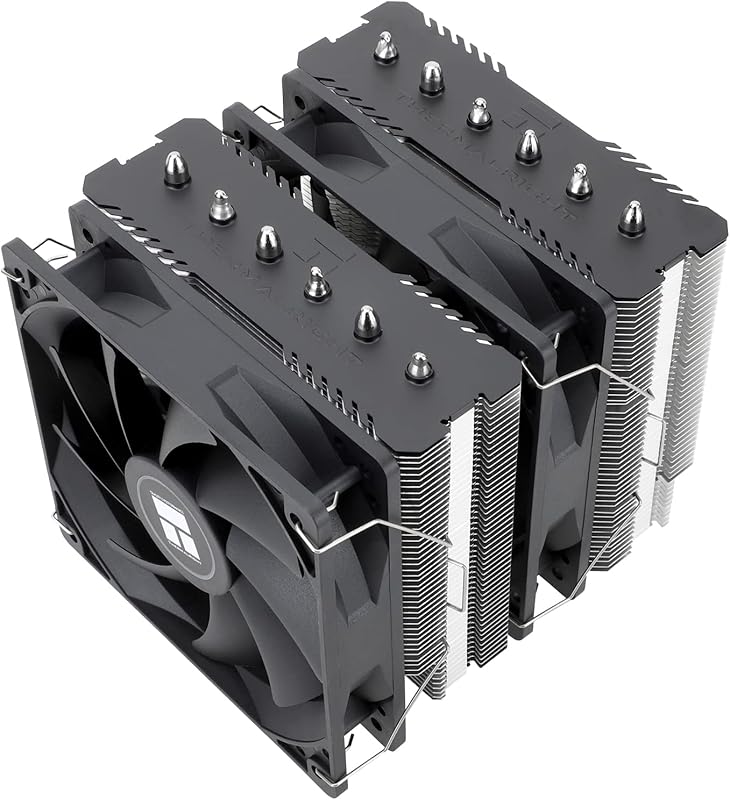
The Peerless Assassin 120 SE is arguably the most famous air cooler on the market right now, and for excellent reason. It’s a dual-tower masterpiece with six 6mm heatpuses and two TL-C12C PWM fans. Its design maximizes surface area while maintaining surprisingly good RAM clearance. For a Ryzen 9, it provides more than enough cooling headroom for both stock and lightly overclocked operation, all while being astonishingly affordable.
Key Features That Stand Out
- ✓ Dual-Tower Heatsink: Six heatpipes and a massive fin stack offer superior thermal dissipation.
- ✓ Dual TL-C12C PWM Fans: Provide a great balance of static pressure and airflow for efficient heat extraction.
- ✓ AGHP Technology: Ensures optimal heatpipe efficiency regardless of cooler orientation.
- ✓ Excellent Compatibility: Fits in most mid-tower cases and clears most RAM modules.
- ✓ Unbeatable Price-to-Performance: The king of value in high-end air cooling.
Why We Recommend It
This cooler is the sweet spot for most Ryzen 9 builders. It offers near-flagship air cooling performance without the premium price tag of Noctua. The Peerless Assassin 120 SE is the reason many have abandoned the idea of a 240mm AIO in favor of a simpler, more reliable air cooler. It’s a testament that you don’t need to spend a fortune for top-tier results.
Best For
Ryzen 9 owners in mid-tower or larger cases who want the absolute best performance-per-dollar. It’s ideal for those who prefer the reliability of air cooling but need the grunt to handle a 170W+ CPU under load.
Pros and Cons
Pros:
- Unmatched value; performance rivals coolers costing 2-3x more.
- Excellent cooling for high-TDP CPUs like the Ryzen 9 7950X.
- Relatively quiet operation with good fan control via PWM.
- Great RAM clearance for a dual-tower design.
Cons:
- Installation can be slightly fiddly compared to single-tower coolers.
- Still a large cooler; case clearance is mandatory.
- The included thermal paste is adequate but not premium.
Customer Reviews
Customer Review: My Ibuypower water cooler failed on my system. (I discovered this is very common).I was debating on either getting a water cooler or going to Air cooling. I checked a lot of videos online and this air cooler kept coming up in the top 5 replacement recommendations over and over again. (search water coolers vs Air coolers)Since I don’t do any overclocking and the fact that they are much more reliable, I bought this unit.It works really great. It cost so much less than a water cooler and (in my opinion) is easier to install that a water cooler unit with hoses and radiator and cpu block.Positives:Very AffordableCools very wellVery well madePackage comes with everything you need. (different cpu socket mounts and thermal paste)Extremely reliable. (no worries about coolant leaks or pump failure or in my case, clogged lines)The fans that come with it seemed pretty quiet. (more than my cheap water cooler fans)Negatives:Can be a little difficult to install. The most difficult part was installing the fans.The instructions could be better. (they’re not horrible). I do recommend watching online videos.Its big, you definitely need to make sure you have enough room in your case.Additional Recommendations:The thermal paste that comes with the package is ok, but I would highly recommend buying a high quality NON CONDUCTIVE thermal past.(Thermal Grizzly Kryonaut, Artic-mx4, Cooler Master MasterGel Pro v2 etc)This is important!Make sure its NONCONDUCTIVE. Some thermal paste uses metallic ingredients to aid in thermal conductivity. The problem with this is that if you apply too much, it can go into the cpu electronic components and damage your system. With noncoductive thermal paste, this isn’t a issue so you don’t really need to be too exact. (If its a little too much, it doesn’t hurt anything.)This Air cooler also comes in single or double tower configurations, if your case can support it, I would definitely get the double tower.Make sure you get the fans installed/oriented correctly.I would also recommend installing cpu temperature monitoring software as well to make sure that everything is working correctly. I would definitely recommend this to anyone who wants a very reliable and very affordable air cooling option.
Customer Review: Works great so far. 10900k at idle was sitting at around 30°c when the ambient temp in the room was 85°f. This does come with its own tube of thermal paste but I had some leftover Thermal Grizzly Kryonaut so I used that instead. Not sure how good or had the Thermalright paste is but its a pretty big tube of it, its enough for 5-6 PCs. Can’t comment on how loud it is, I couldn’t hear it but my room has a lot of background noise. All in all installation was fairly simple (its pretty much like any other after market air cooler) and it did include a 4pin splitter so if you only have one cpu fan header you can still run both fans that come with this cooler. And for the price its a no trainer. This cooler is essentially the modern era version of the Hyper 212 Evo.
3. Noctua NH-D15 chromax.Black CPU Cooler
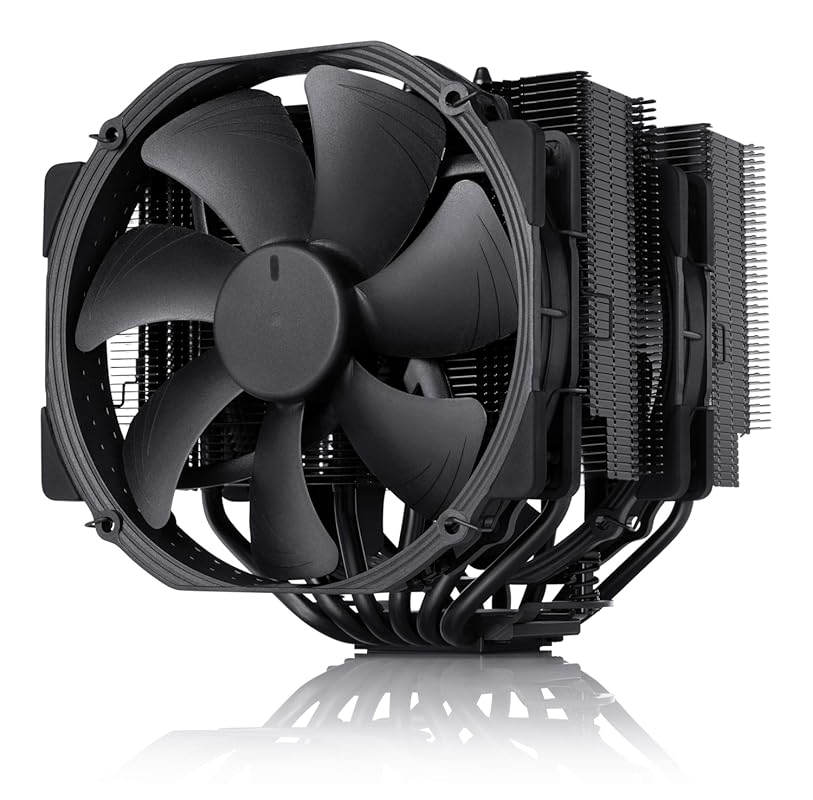
The Noctua NH-D15 is the legendary benchmark for quiet, high-performance air cooling. The chromax.Black version swaps the famous beige/brown for a sleek, stealthy all-black finish that looks fantastic in any build. It uses two massive 140mm NF-A15 fans and six heatpipes to achieve cooling that competes with many 280mm AIO liquid coolers. The build quality is impeccable, the mounting system is superb, and the included Low-Noise Adaptors let you tune the fan speed for near-silent operation.
Key Features That Stand Out
- ✓ Dual 140mm NF-A15 Fans: Renowned for their exceptional balance of airflow, static pressure, and near-silent operation.
- ✓ All-Black chromax Finish: Premium matte black coating on heatsink, fans, and accessories for a cohesive look.
- ✓ SecuFirm2 Mounting System: Arguably the best in the industry—secure, easy to use, and supports decades of sockets.
- ✓ Included Low-Noise Adaptors (LNA): Reduce maximum fan speed for ultra-quiet operation at a slight performance trade-off.
- ✓ 6-Year Warranty: Noctua stands behind its products with industry-leading support and free socket upgrade kits.
Why We Recommend It
If your budget allows and you demand the absolute best in air cooling—performance, silence, and longevity—the NH-D15 chromax.Black is the undisputed king. It’s the cooler you buy once and forget about. The combination of proven thermal design, legendary Noctua fan quality, and a timeless aesthetic makes it a long-term investment for any high-end build.
Best For
Enthusiasts and professionals building a high-performance, quiet PC with a Ryzen 9. Perfect for workstations, silent gaming rigs, and any build where absolute reliability and acoustic performance are paramount. Requires a case with at least 165mm of CPU cooler clearance.
Pros and Cons
Pros:
- Unparalleled quiet cooling performance; often inaudible at idle and low loads.
- Build quality and materials are second to none; feels over-engineered.
- Excellent long-term support with free socket mounting kits for years.
- Sleek, all-black design integrates beautifully into modern builds.
Cons:
- Very expensive for an air cooler; a significant investment.
- Massive size (165mm height) restricts compatibility with many mid-tower cases and tall RAM.
- May require offsetting the front fan if using very tall RAM modules.
Customer Reviews
Customer Review: I purchased the Noctua NH-D15 chromax.black six years ago for a high-end workstation/gaming build. After over half a decade of near-constant operation, I can confidently say this is the best, most reliable, and quietest component in my PC.1. Performance: Still Chilling After 6 YearsWhen I first installed the D15, I was blown away by the temperatures. Even when overclocking my CPU, it kept temps well below dangerous thresholds. Fast-forward 6 years: I have never had a single thermal issue.The dual-tower, 6-heatpipe design is just as effective today as it was in 2020. The build quality is legendary; the heatsink has not oxidized, and the copper base remains perfectly flat. It regularly keeps my CPU in the 30s-40s°C at idle and keeps things remarkably cool even under heavy rendering loads. The cooling performance rivals many 240mm+ AIO water coolers without the fear of pump failure or leaks.2. Sound: The Definition of “Silent”My biggest requirement was silence, and Noctua delivered. The two NF-A15 140mm fans are inaudible. I often find myself checking the case window just to make sure the fans are actually spinning because I can’t hear them at all, even during intense cpu usage tasks.They use SSO2 bearings, which are incredibly durable and do not grind or hum over time like cheaper alternatives. Even when the fan curve ramps up slightly, it’s a low-frequency hum rather than a high-pitched whine. If you want a silent PC, this is the gold standard.3. Aesthetics: The “Chromax” TouchThe original NH-D15 is infamous for its beige/brown color scheme. The chromax.black version solves this completely. The matte black coating on the fins, the black fans, and the black anti-vibration pads look incredibly sleek and premium. Six years later, the black coating hasn’t chipped or faded, adding a stealthy, high-end look to the build.4. The Long-Term Experience (Maintenance)The mounting system (SecuFirm2) is, in my opinion, the best in the industry. It made installation straightforward 6 years ago. Since then, I simply remove it to clean off the dust out once a year.Installation & Maintenance tip: One fan I had to offset by a few millimeters due to RAM height. Still works great and just a heads up that it does not impede functionality or performance at all. Keep the fins clean with compressed air or even wife off with lightly damp cloth. I foresee this lasting another 6 years easily.5. Reasons to Buy (Why it holds up)Absolute Silence: The fans are virtually inaudible in daily use.Excellent Thermal Performance: Keeps high-TDP CPUs very cool, competing with liquid coolers.6-Year Warranty (and Longevity): Noctua provides a 6-year manufacturer’s warranty, which speaks to their confidence in the product’s lifespan.Long-term Support: Noctua often provides free mounting kits for new CPU sockets, meaning this cooler can be used for decades.Minor and relative “Cons”:Size: This thing is massive and helps it look . Ensure your case has enough clearance (165mm+ height), but like I said earlier, your RAM height may require you to offset the front fan upward just a few millimeters…you can’t really see the difference between fans.Cost (worth every penny: It is a premium product, but at 6 years+ of use, the price-per-year is incredibly low.Final ThoughtsSix years ago, I wanted a quiet, powerful cooler that looked good in a black-themed build. The Noctua NH-D15 chromax.black exceeded all expectations. It has never failed, never made a sound, and never let my CPU get too hot. It is quite simply the best air cooler on the market.
Customer Review: The Noctua NH-D15 chromax.Black does an outstanding job keeping my AMD Ryzen 9 7950X3D cool. Even under load, temperatures stay under control, and the cooler remains very quiet.Build quality is excellent, as expected from Noctua, and installation was straightforward. Once installed, it performs exactly as advertised.The only downside is the size. This cooler is very bulky, which makes working around it inside the case more difficult. In my setup, I need to remove one of the fans in order to access or work on the RAM. That said, I understand that the large size is a big reason why it performs so well.If you have enough case clearance and don’t mind the size, this is an excellent air cooler and easily one of the best available.
4. Noctua NH-U9S CPU Cooler
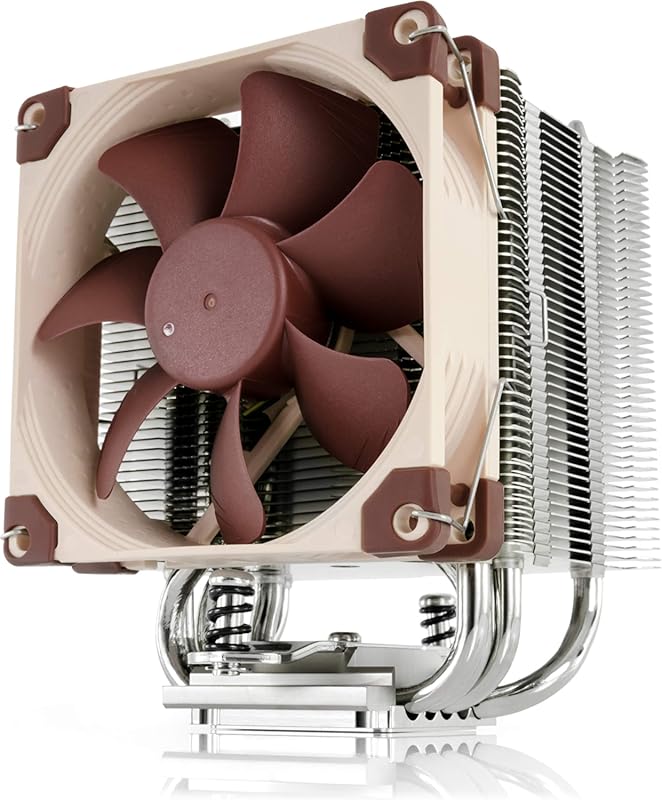
The Noctua NH-U9S is the go-to premium small-form-factor (SFF) cooler. Its compact 125mm height makes it ideal for HTPCs, mini-ITX builds, and cases with severe CPU cooler height restrictions. Despite its small size, it uses a high-quality fin stack and the superb NF-A9 92mm fan to provide cooling performance that often surprises. It’s the perfect solution when you need top-tier Noctua quality and quiet operation but simply don’t have space for a larger tower.
Key Features That Stand Out
- ✓ Extremely Compact 125mm Height: Fits in nearly any SFF case where larger coolers cannot.
- ✓ Premium NF-A9 92mm Fan: Noctua’s renowned fan technology in a small package, incredibly quiet and effective.
- ✓ Excellent RAM/PCIe Clearance: Does not overhang memory or expansion slots on most motherboards.
- ✓ Low-Noise Adaptor Included: Allows for near-silent operation by limiting maximum fan speed.
- ✓ SecuFirm2 Mounting: The same rock-solid, long-term supported mounting system as Noctua’s larger coolers.
Why We Recommend It
For small-form-factor builds with a Ryzen 9, cooling options are severely limited. The NH-U9S solves this problem brilliantly. It brings Noctua’s legendary quality, silence, and performance to the compact segment. If your case can’t fit a 150mm+ cooler, this is your best bet for keeping a high-core-count AMD CPU cool and quiet.
Best For
Owners of mini-ITX or compact cases (like Fractal Design Node 202, SilverStone RVZ03) with a Ryzen 9 CPU. It’s also excellent for older HTPCs or office PCs that need a quiet, high-quality cooler for a powerful but space-constrained build.
Pros and Cons
Pros:
- Unmatched combination of performance, silence, and small size for SFF builds.
- Outstanding build quality and the legendary Noctua fan.
- Excellent compatibility; doesn’t block RAM or PCIe slots.
- Long-term socket support and a 6-year warranty.
Cons:
- Expensive for its size class.
- Cooling capacity, while excellent for its size, is lower than full-size dual-tower air coolers. May struggle with extreme overclocking on a 7950X.
- The brown/beige color scheme (on the standard model) might not fit all builds, though the chromax.black version is available at a higher cost.
Customer Reviews
Customer Review: My Dell Studio XPS 9100 desktop’s cooler was not keeping my CPU cool – due to the well-known plastic tabs breaking on the cooler – keeping the cooler from making solid contact with the CPU. I tried to order a replacement from Dell for a perfect-working computer…but Dell no longer sells a cooler for that model. Planned obsolescence, I presume even though my XPS runs perfect in all other regards.So i checked a few aftermarket coolers that some said “might work” and after viewing some YT videos, this Noctua U9S cooler seemed to be my best option. Before, my core temps were almost “off-the-charts” reaching 90-100 Celsius regularly with very little load. After (easily) installing this cooler, my minimum core temps went from 50c to under 25c in all six cores. My maximum core temperatures decreased from over 95c in all six cores to about 55c. And the fan that comes with the cooler is much quieter than the OEM fan provided by Dell. All the positive reviews I’ve read about Noctua, turned out to be 100% true.To make this work, Noctua had to send me a modification kit for my Intel 1366 motherboard. I just had to provide proof of purchase of the U9S and my dell 1366 socket. Once I did that, Noctua customer support mailed me the kit I needed. Just great customer support. And my computer is now running cool and calm. Should help me get another year, or two, out of Michael Dell’s computer.****UPDATE – I bought this Noctua CPU Cooler Feb. 2022. March 2024 it is still working like new. My CPU never runs hot and the fan is extremely quiet. One of the best Amazon purchases I’ve made in the last 15 years. Good company to work with, too.
Customer Review: I was recommended this cooling system for my 13th gen i7 because it was overheating real bad i was not sure about a air cooled when people tell you that the only way to go is liquid cooled but i do have to give it to this cooler i play lots of games and my temps used to go up to almost 100c and now under load the max i see is around 50c to 70c max and its super nice when gaming. I have had my system for a couple of years now and it works great for the price point and compatible with most fans. It fits in the case and super quiet. The build quality is nice and should stand the test of time. All round great solution when on a budget.
5. AMD Wraith Prism CPU Cooler
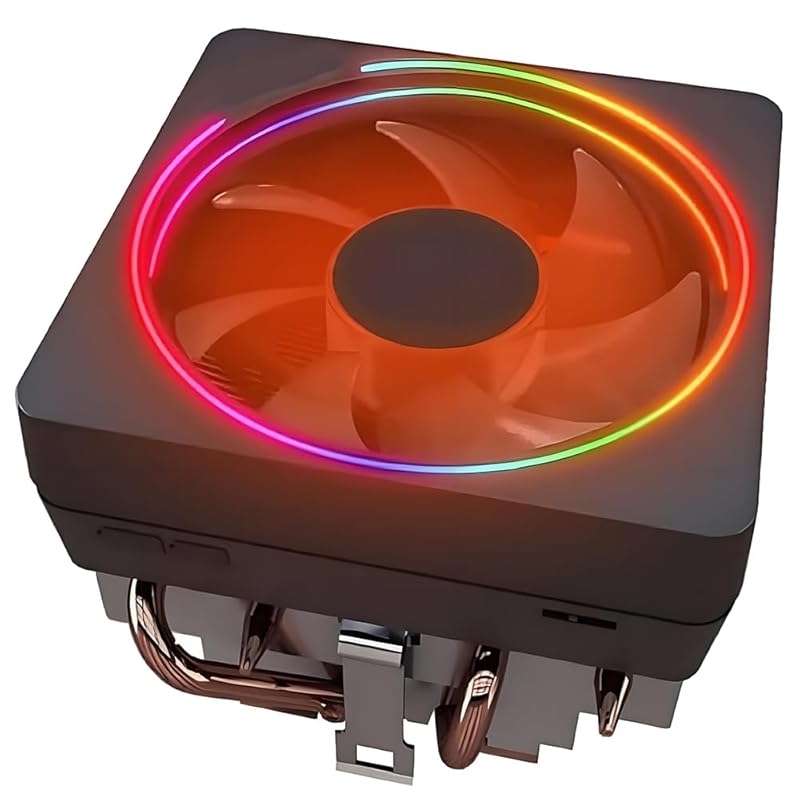
The AMD Wraith Prism is the stock RGB cooler that comes with many higher-end Ryzen 7 and some Ryzen 9 processors. It’s a significant step up from the basic Wraith Stealth, featuring a copper base, aluminum fins, and addressable RGB lighting. For a budget build or if you simply don’t want to spend extra, it’s a perfectly capable cooler for a Ryzen 9 running at stock speeds, especially on the 65W TDP models. It’s plug-and-play and uses the stock mounting bracket.
Key Features That Stand Out
- ✓ Addressable RGB Lighting: Customizable via compatible AMD motherboards or included controller.
- ✓ Copper Base & Heatpipes: Better thermal transfer than all-aluminum stock coolers.
- ✓ Pre-Applied Thermal Paste: Convenient and ready to install out of the box.
- ✓ Uses Stock Bracket: No extra mounting hardware needed; installs directly onto AM5/AM4 motherboards.
- ✓ Compact & Non-Blocking: Very low profile that won’t interfere with RAM or PCIe slots.
Why We Recommend It
If your Ryzen 9 came with one or you can find it cheap, the Wraith Prism is a fantastic “free” or low-cost upgrade over the absolute base model coolers. It’s not going to win any performance awards against dedicated aftermarket coolers, but for a stock-clocked 7900 or even a 7900X with a good case airflow, it gets the job done quietly enough for many users.
Best For
Budget-conscious builders with a Ryzen 9 7900 or 7900X who are not overclocking and have good case airflow. Also perfect for anyone who wants a simple, clean RGB cooler without the hassle of buying and installing an aftermarket solution. Not recommended for the high-core-count X3D or extreme (X) models under heavy loads.
Pros and Cons
Pros:
- Free or very low cost if bundled or purchased separately.
- Plug-and-play installation with pre-applied paste and stock bracket.
- Attractive RGB lighting that syncs with AMD motherboards.
- Compact size ensures excellent compatibility.
Cons:
- Cooling performance is limited; will run hotter and louder than dedicated coolers under load.
- Not suitable for overclocking or for cooling the highest-TDP Ryzen 9 models (like 7950X) sustainably.
- Fan quality and bearing寿命 are inferior to premium aftermarket fans.
Customer Reviews
Customer Review: This is my go to cooler for AM4 processors and intel as well. The quality is excellent and is not too big to interfere with your Memory sizes. Plug and play and looks good. The fan is quiet and the color is adjustable. Finally the Price is right!
Customer Review: Good quality. Works great. No issues. Quick installation.
6. CORSAIR Nautilus 360 RS AIO Cooler
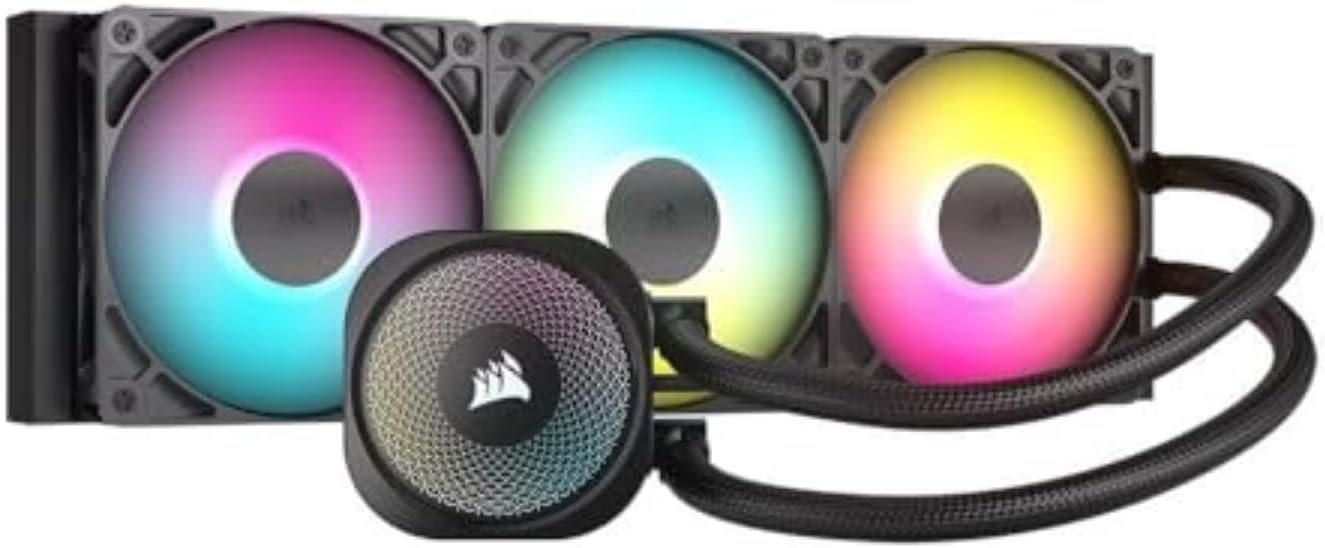
The CORSAIR Nautilus 360 RS is a powerful and aesthetically focused 360mm All-In-One (AIO) liquid cooler. Its large radiator and three RS120 ARGB fans provide immense cooling capacity, easily handling the heat output of an overclocked Ryzen 9. The convex cold plate ensures excellent contact with the CPU IHS. For builders who want the ultimate in cooling headroom, clean RGB lighting, and a sleek look, this is a strong contender. The pump is designed for quiet operation, and the fans offer good airflow with customizable lighting.
Key Features That Stand Out
- ✓ Massive 360mm Radiator: Provides a huge surface area for heat dissipation, ideal for top-tier CPUs.
- ✓ Three RS120 ARGB Fans: Deliver strong airflow and vibrant, customizable RGB lighting that syncs with iCUE.
- ✓ Convex Copper Cold Plate: Optimized for maximum contact and thermal transfer with modern CPU heat spreaders.
- ✓ Quiet Pump Design: Maintains low noise levels even under load.
- ✓ Pre-Applied Thermal Paste & Easy Mount: Simple installation process for AM5/AM4 and Intel sockets.
Why We Recommend It
When you need every ounce of cooling performance for a heavily overclocked Ryzen 9 7950X or want the cleanest possible aesthetic with extensive RGB, a 360mm AIO like the Nautilus 360 RS is the answer. It offers a performance ceiling that even the best air coolers can’t quite reach, all while looking fantastic. Corsair’s ecosystem and software integration are a big plus for RGB enthusiasts.
Best For
Builders with a case that supports top or front 360mm radiator mounting (like a Corsair 4000D Airflow or Fractal Meshify 2) who are overclocking a Ryzen 9 to its limits or simply want the peace of mind of maximum cooling capacity and a stunning RGB light show.
Pros and Cons
Pros:
- Exceptional cooling performance, capable of handling the hottest Ryzen 9 CPUs under heavy loads.
- Beautiful, vibrant ARGB lighting with excellent software control via iCUE.
- Large radiator and three fans provide a thermal buffer and allow for lower fan speeds (quieter operation).
- Relatively straightforward AIO installation.
Cons:
- More expensive than top air coolers and requires a compatible case.
- Introduces a potential point of failure (pump) that air coolers don’t have, though modern AIO reliability is high.
- Managing the cables for three fans and the pump can be messy without a good case and fan hub/controller.
Customer Reviews
Customer Review: The CORSAIR Nautilus 360 RS ARGB is an excellent AIO cooler that delivers both performance and aesthetics. Installation was straightforward, and I really appreciate the direct motherboard connection and daisy-chain fan design — it keeps wiring simple and tidy.Cooling performance is outstanding. My CPU temperatures dropped noticeably under load, and the system stays quiet even during heavy gaming or stress testing. The RS120 ARGB fans look great and provide smooth, vibrant lighting that syncs perfectly with other components.Build quality is exactly what you’d expect from Corsair: solid, reliable, and premium. If you’re looking for a powerful, low-noise 360mm AIO with clean RGB and easy installation, this cooler is a fantastic choice.
Customer Review: Works and performs great!! with some of the higher demanding CPU games like Starship Troopers Extermination, and POE2 which run my ryzen 5 5600 at about 70-90% my CPU temp never got over 62C !!! i have the current fan config set to AIO cooler set to intake, drawing in fresh air to the CPU first, then the case, then i have one fan below the GPU also intake heavy gaming GPU never reached more than 72C!! with two exhaust fans on rear and top as well. this fan config seems to work really well for cooling! recommend full corsair case, AIO cooler is quiet and easy to install. all hardware included. U CAN control all fan RGBlights at the same time using corsair Commander duo. YOU DO NOT NEED ICUE LINK FANS OR ICUE HUB FOR RGB. just duo and corsair app. vid included shows.
7. Cooler Master Elite Liquid 360 AIO Cooler
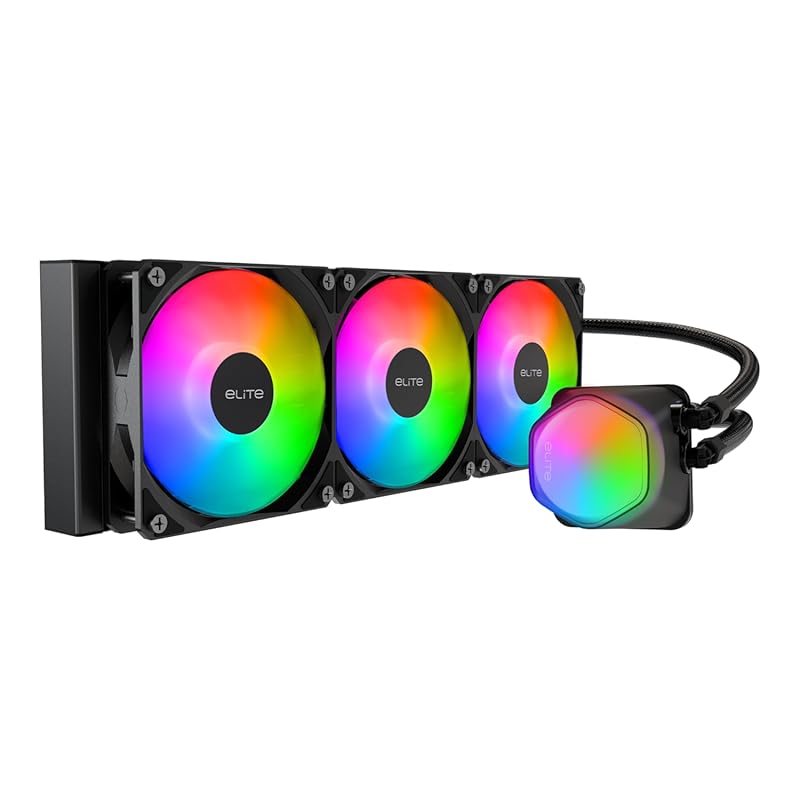
The Cooler Master Elite Liquid 360 is a veteran in the AIO space, known for its reliable dual-chamber pump design and vibrant ARGB lighting. The translucent hexagon cap on the pump block is a distinctive aesthetic touch. It provides robust cooling for high-end CPUs like the Ryzen 9, and the included 360mm radiator with three ARGB PWM fans ensures excellent thermal performance. It’s a solid, no-nonsense choice for those who want proven liquid cooling performance and a flashy light show.
Key Features That Stand Out
- ✓ Dual-Chamber Ceramic Pump: Separates hot and cool coolant for improved efficiency and longevity.
- ✓ 360mm Radiator with 3x ARGB PWM Fans: Massive cooling surface and customizable, synchronized lighting.
- ✓ Translucent Hexagon Pump Cap: Unique design that showcases the ARGB lighting inside.
- ✓ Convex Copper Cold Plate: Ensures optimal contact with the CPU for efficient heat transfer.
- ✓ Wide Socket Support: Compatible with modern AMD AM5/AM4 and Intel LGA1851/1700 sockets.
Why We Recommend It
If you’re looking for a 360mm AIO from a brand with a long history of reliable liquid cooling, the Elite Liquid 360 is a safe bet. It offers the cooling headroom of a large radiator with the eye-catching ARGB aesthetic that many gamers desire. The dual-chamber pump is a proven design that prioritizes quiet operation and durability.
Best For
Gamers and enthusiasts with a Ryzen 9 who want maximum cooling performance, extensive ARGB lighting, and the peace of mind that comes from Cooler Master’s established AIO engineering. Ideal for cases with good front or top 360mm radiator support.
Pros and Cons
Pros:
- Excellent cooling performance from the large radiator and efficient pump.
- Vibrant, customizable ARGB lighting on both fans and pump block.
- Reliable dual-chamber pump design known for quiet operation.
- Good compatibility with modern AMD and Intel sockets.
Cons:
- Installation and RGB cable management can be complex due to the number of wires and included controller.
- The ARGB lighting effects are somewhat conservative compared to some newer competitors.
- Fan noise can become noticeable at higher speeds, though the pump remains quiet.
Customer Reviews
Customer Review: TLDR: Yes. Yes it freakin does.Let’s face it, you don’t need this to cool your pc. LTT proved objectively that air cooling is just as good if not better than AIO water cooling at keeping temps down. Air cooling is cheaper, too, with the top performing options being in the $50-60 range. Air is more reliable due to having fewer moving parts and not relying on electricity’s worst enemy… H2O…You’re here for the RGBs and you’re here for the sleek and clean looks. And for those, you’ve come to the right place. Sure it’s got 10+ wires coming out of it that need to be managed, but those LEDs are LIT, bro! The leds are bright and vibrant and the CM software, though just as clunky as every other ARGB solution out there, is competent enough to achieve some great lighting effects. The included controller will allow you to use software to control 4 channels of ARGB stuff via software, even if your motherboard does not have any RGB headers or if you do have RGB headers on your motherboard, it comes with all the necessary wiring to connect it. Mine is over 5 years old and only has two fan headers… splitters are your best friend in this situation. Got more than 4 things to light? Daisy chain them sons o’ guns. This thang runs on SATA power (lightning and thunder noises)!In all seriousness, this is actually a very effective cooler, keeping my ancient core i5 below 60deg even under continuous load. Your results may vary, but like I said, if you want results, stick to air. This thing fills that 360mm space with glorious RGB goodness and keeps you cool and relatively quiet. Seriously pleased with the look and more than satisfied by the performance.
Customer Review: So, what can I say? This AIO is great! The fans on the AIO are a bit loud at full-speed, but at 50% or lower are completely unnoticeable (at least with the level of background noise in my room). I have provided a picture of the temperatures of an overclocked i9-9900k at idle after (please note that the max temperatures shown in the image reflect the highest temperatures seen running benchmark tests on a few games like Far Cry 5). As anyone should tell you, pictures of core temperatures alone are useless without information about ambient temperature. I am using a Rosewill Spectra C100 case with great airflow inside of a room with ambient temperatures of 67F. This means that, at the 4GHz clock shown, the AIO has almost successfully cooled the CPU to surrounding air temperature at low loads. For gaming, I rarely feel the need to push the CPU beyond 4GHz as I game at 4k and receive little benefit from higher clockspeeds (GPU bottleneck with an RTX 2080 Ti). For professional work outside of gaming, I do push clock speeds to 5 GHz on all cores, particularly when I’m doing rendering work. In these professional workloads, I have never seen the temperature exceed the low-mid 80’s on any core – perfectly acceptable for such a powerful overclock and high loads, multi-core loads. In terms of gaming, I rarely see my temperatures exceed the mid 50’s.Now, for the bad – the setup! I’m an electrical engineer and it took me some amount of time to decipher the included instructions and figure out how to set up the RGB controller correctly (this thing includes an absurd number of wires – be ready to manage them). Once this was done, though, it does appear that the system does an okay job at interacting with MSI Mystic Light, and the pre-programmed RGB patterns are fine. If you’re looking for something more flashy, there are definitely good alternatives as the RGB lighting on this system is quite conservative (not a bad thing IMO).
8. Noctua NH-D15 G2 CPU Cooler
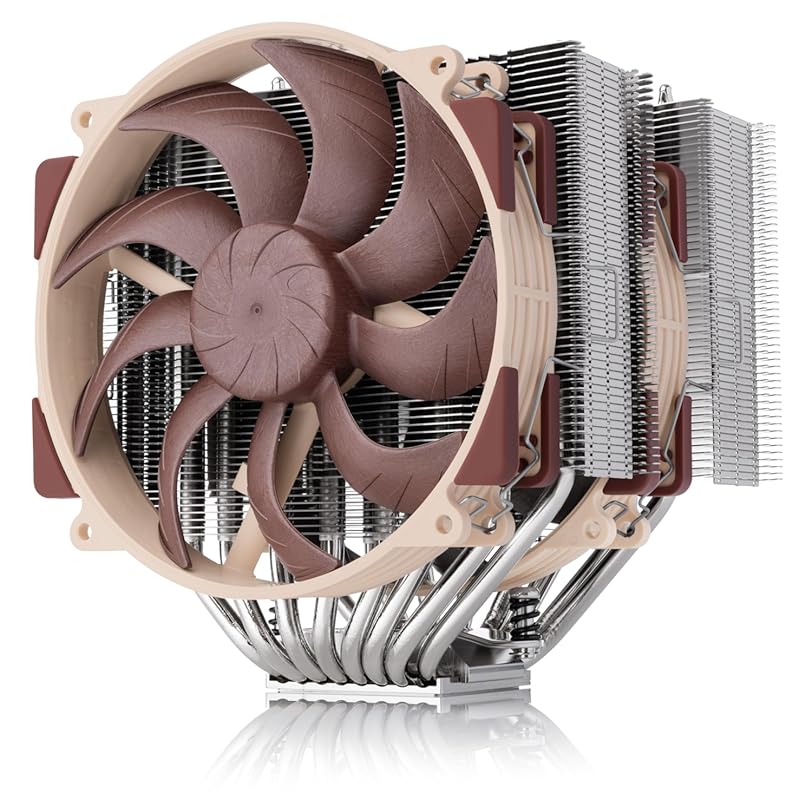
The NH-D15 G2 is the second generation of Noctua’s legendary flagship air cooler. It’s an evolution, not a revolution, but the improvements are meaningful. It now features eight heatpipes (up from six) and 20% more surface area on the heatsink. It comes with two next-generation NF-A14x25r G2 140mm fans that offer higher static pressure and better performance. It’s the most powerful air cooler Noctua has ever made, designed specifically to excel on AMD’s AM5 platform with its included offset mounting.
Key Features That Stand Out
- ✓ 8 Heatpipes & 20% More Surface Area: The updated heatsink provides a significant thermal boost over the original D15.
- ✓ NF-A14x25r G2 Fans: Noctua’s latest 140mm fans with improved performance and the same legendary quietness.
- ✓ Optimized for AM5: Includes a dedicated offset mounting kit to maximize performance on AMD’s Ryzen 7000 series.
- ✓ Speed-Offset Feature: Allows fine-tuning of acoustic performance by running fans at slightly different speeds.
- ✓ Same Legendary Noctua Quality: SecuFirm2 mounting, 6-year warranty, and free socket upgrades.
Why We Recommend It
If you want the absolute best air cooling performance money can buy and have a case that can accommodate its massive size, the NH-D15 G2 is the undisputed champion. It’s engineered to tame the most power-hungry Ryzen 9 CPUs, especially on AM5 where its offset design prevents VRM overheating. It represents the pinnacle of air cooler engineering.
Best For
Enthusiasts with a high-end Ryzen 9 7950X or 7950X3D who are overclocking or running heavy all-core workloads and have a full-tower case with at least 170mm of CPU cooler clearance. It’s for the builder who accepts no compromises and wants an air cooler that can compete with 280mm AIOs.
Pros and Cons
Pros:
- Best-in-class air cooling performance, rivaling or beating many 280mm AIOs.
- Extremely quiet operation thanks to the new G2 fans and massive heatsink.
- Specifically optimized for AM5 with offset mounting to protect VRMs.
- Noctua’s legendary build quality, warranty, and long-term support.
Cons:
- Extremely expensive for an air cooler.
- Enormous size (even larger than the original D15) limits case and RAM compatibility severely.
- Overkill for most users; a Peerless Assassin or original D15 will handle most Ryzen 9s just fine.
Customer Reviews
Customer Review: This cooler is definitely a beast. It keeps my Intel Core Ultra 7 265K running cool, and I’ve never ever heard the fans ramp up to full speed—even when stressing the processor. It’s probably overkill for my setup, but the performance and quiet operation are excellent.
Customer Review: This has to be hands down the greatest air cooler ever made.I am using this on a Core Ultra 9 285k, and under load my CPU rarely passes 50c. I was using the previous Noctua Tower Cooler(Noctua NH-D15). Setup and instructions are extremely easy to follow and simple to install. They made some changes to the screws, but the overall setup remains the same.Like the previous model, this cooler is quite huge – it’s around 15% bigger than their previous generation, and it has a ton more heat pipes. This is almost equal to an AIO in cooling performance. In fact, I think it’s even better.The real major downside to this cooler, is cost. There are AIOs that are cheaper than the NH-D15 Gen2, but what you get is unbeatable. Not recommended for low power CPUs (i3/i5. Non overclockable CPUs, etc.).
9. Thermalright Peerless Assassin 140 Digital Black CPU Cooler
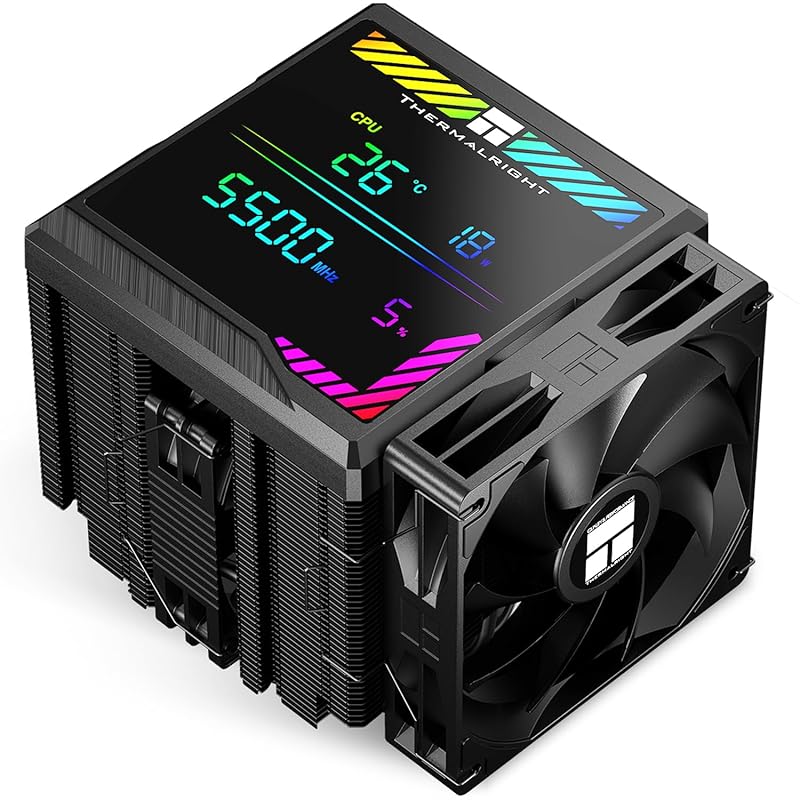
The Peerless Assassin 140 Digital Black takes the winning formula of the PA120 SE and adds a unique feature: a magnetic ARGB digital display on top. This small LCD screen can show real-time CPU temperature, fan speed, or custom graphics via software. Underneath, it’s the same formidable dual-tower, dual-fan (120mm + 140mm) design that made the Peerless Assassin famous. It’s a performance beast with a fun, tech-forward aesthetic twist.
Key Features That Stand Out
- ✓ Magnetic ARGB Digital Display: Shows live CPU temps, fan speeds, or custom images/gifs.
- ✓ Dual-Tower, Dual-Fan Design: Combines a 120mm and a 140mm fan for exceptional cooling efficiency.
- ✓ AGHP 7 Heatpipe Technology: Advanced heatpipe design for optimal thermal transfer.
- ✓ High-Speed Fans: The 120mm fan spins up to 1850 RPM for aggressive cooling when needed.
- ✓ Excellent Value: Offers top-tier performance with a unique digital display at a competitive price.
Why We Recommend It
For the builder who wants the raw cooling power of the Peerless Assassin but also wants a standout visual element, the Digital Black version is perfect. The LCD screen adds a modern, customizable touch that you won’t find on most other air coolers. It proves that high performance and unique aesthetics don’t have to break the bank.
Best For
PC builders with a Ryzen 9 who want maximum air cooling performance and a unique, eye-catching component with a customizable digital readout. Great for showcase builds where you want the cooler to be a talking point.
Pros and Cons
Pros:
- Outstanding cooling performance, matching the best air coolers.
- Unique and customizable magnetic ARGB digital display on top.
- Dual-fan design (120mm+140mm) is very effective.
- Maintains good RAM clearance for a dual-tower cooler.
- Excellent price for the feature set and performance.
Cons:
- The software for the digital display can be a bit clunky to set up.
- Still a very large cooler, requiring ample case clearance.
- The high-speed 120mm fan can get audible at maximum RPM under extreme loads.
Customer Reviews
Customer Review: Works great and shows the info on the nice big screen. The hardware is great, the software could use some work. The heatsink does a great job of cooling. It is very large, so be sure to have clearance for the unit. It also looks great and is compatible with almost all current and previous CPU models.
Customer Review: Keeps my cpu nice and cool, quiet and lcd shows the info i need while gaming.
10. AMD Wraith Prism RGB CPU Cooler
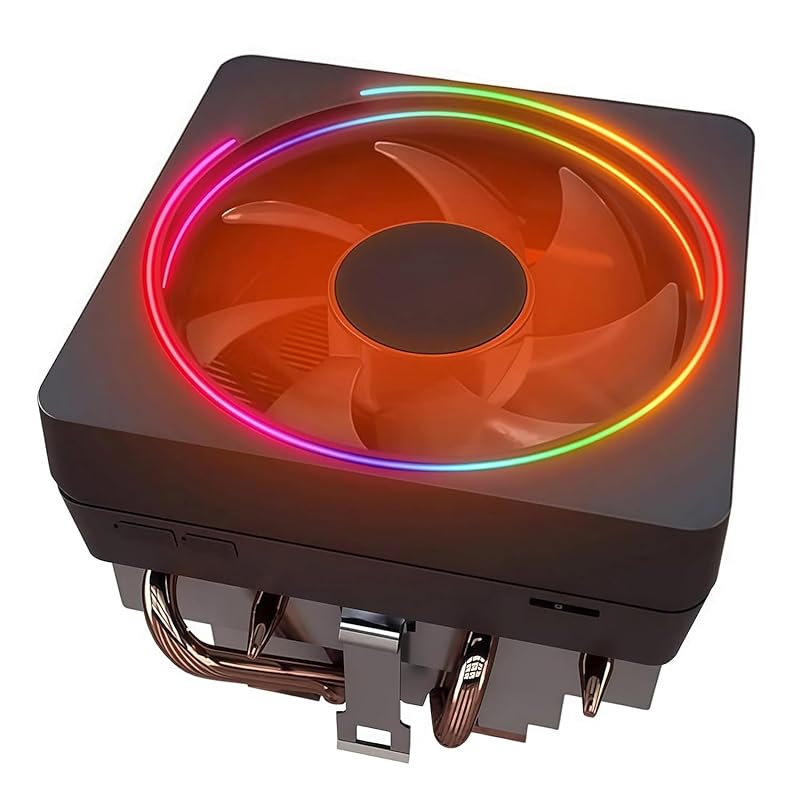
This is the RGB version of the standard AMD Wraith Prism cooler. It’s functionally identical to the non-RGB model but features addressable RGB lighting on the fan shroud and the acrylic ring around the base. It’s a direct upgrade for anyone who wants the convenience of a stock cooler but with customizable lighting to match their build. Performance is the same as the standard Prism: adequate for stock-clocked mid-range Ryzen CPUs but not for pushing a high-core-count Ryzen 9 hard.
Key Features That Stand Out
- ✓ Addressable RGB Lighting: Fully customizable via compatible AMD motherboards (RGB header required).
- ✓ Copper Base & Integrated Heatpipes: Better thermal conductivity than all-aluminum stock coolers.
- ✓ Pre-Applied Thermal Paste: Ready to install right out of the box.
- ✓ Uses Stock AM5/AM4 Bracket: No extra mounting hardware needed.
- ✓ Compact, Non-Blocking Design: Very low profile with excellent RAM clearance.
Why We Recommend It
If you specifically want the RGB aesthetic of the Wraith Prism and are building a system around a Ryzen 7 7700X or a non-X Ryzen 9 7900, this is a fine “free” or low-cost option. The RGB lighting is a nice touch for budget builds. However, for any serious Ryzen 9 X-series workload, we strongly recommend stepping up to a dedicated aftermarket air cooler or AIO.
Best For
Budget-conscious builders who value RGB lighting and are pairing a Ryzen 7 7700X or a stock-clocked Ryzen 9 7900 with a case that has good airflow. Also for anyone who received one with their CPU and just wants to use it.
Pros and Cons
Pros:
- Very low cost, often included with CPU.
- Attractive, customizable RGB lighting.
- Simple, tool-free installation with pre-applied paste.
- Excellent compatibility due to small size.
Cons:
- Cooling performance is insufficient for high-TDP Ryzen 9 X-models under load.
- Fan is louder and less effective than aftermarket fans.
- Not suitable for overclocking.
- RGB control requires a compatible AMD motherboard with an RGB header.
Customer Reviews
Customer Review: Works well as expected. No problem with the install.
Customer Review: Exactly as it is described. Works with AM4 CPU and is quiet. Good price.
Complete Buying Guide for Best CPU Cooler for Ryzen 9
Essential Factors We Consider
Choosing the right cooler for your Ryzen 9 involves balancing several key factors. Cooling Performance is paramount—look for coolers with large heatsinks, multiple heatpipes, and large, high-static-pressure fans. For air coolers, dual-tower designs generally outperform single-towers. Noise Levels are crucial for a pleasant experience; check reviews for fan curves and pump noise (for AIOs). Compatibility is non-negotiable: ensure the cooler fits your case’s CPU cooler height clearance and doesn’t block your RAM slots or PCIe slots. Socket Support must include AMD’s AM5 (and AM4 if you’re upgrading an older board). Finally, Build Quality & Warranty indicate longevity—premium brands like Noctua and Thermalright offer excellent warranties and long-term socket support.
Budget Planning
Your budget defines your options. Under $50: You’re in the realm of excellent single-tower air coolers like the Thermalright Assassin X or be quiet! Dark Rock 4, suitable for Ryzen 9 7900. $50-$100: This is the sweet spot for top-tier dual-tower air coolers (Peerless Assassin 120 SE, Noctua NH-D15 chromax.Black) that can handle any Ryzen 9 at stock or mild overclocks. Over $100: You enter the AIO territory (240mm, 280mm, 360mm) and Noctua’s flagship G2 cooler. AIOs offer more cooling headroom for extreme overclocking and aesthetic appeal, while the NH-D15 G2 is the air cooling pinnacle. Remember to factor in the cost of high-quality thermal paste if your cooler doesn’t include it.
Final Thoughts
For a Ryzen 9, the “best” cooler depends entirely on your specific model, case, and goals. For most users, a high-end dual-tower air cooler like the Thermalright Peerless Assassin 120 SE offers the perfect blend of performance, silence, value, and reliability. If you have the space and budget, the Noctua NH-D15 chromax.Black or NH-D15 G2 are the air cooling elite. Choose a 360mm AIO like the Corsair Nautilus 360 RS only if you need every degree of cooling for an overclocked 7950X/7950X3D and your case supports it, and you’re comfortable with the potential long-term maintenance considerations of liquid cooling.
Frequently Asked Questions
Q: Can I use a Ryzen 7 cooler on a Ryzen 9?
A: Technically yes, if the cooler’s TDP rating meets or exceeds your specific Ryzen 9’s rated power draw. However, Ryzen 9 CPUs (especially the X and X3D models) have much higher sustained power limits than most Ryzen 7 chips. A cooler rated for 150W will struggle with a 170W+ Ryzen 9 under load, leading to higher temperatures, potential thermal throttling, and more fan noise. It’s always best to choose a cooler rated for at least 200W for a high-end Ryzen 9.
Q: Is an AIO cooler better than an air cooler for a Ryzen 9?
A: Not necessarily. Modern high-end dual-tower air coolers like the Peerless Assassin or Noctua NH-D15 provide cooling performance that rivals or even exceeds many 240mm and 280mm AIOs. Air coolers are more reliable (no pump failure or leak risk), often quieter at idle, and cheaper. A 360mm AIO can provide more cooling headroom for extreme overclocking, but for a stock or lightly overclocked Ryzen 9, a top air cooler is more than sufficient and simpler.
Q: What size radiator do I need for a Ryzen 9?
A: For a Ryzen 9 7900X or 7950X at stock settings, a high-quality 240mm or 280mm AIO is adequate. For serious overclocking or if you want the coolest possible temperatures with low fan noise, a 360mm radiator is recommended. Remember that radiator performance also heavily depends on case airflow—a 360mm radiator in a poorly ventilated case won’t perform well.
Q: Are Thermalright coolers reliable?
A: Absolutely. Thermalright has been a respected name in cooling for over 20 years. Their modern coolers, like the Peerless Assassin and PS120SE, are built with high-quality materials, robust mounting systems, and excellent fans. They have garnered a massive reputation for delivering near-flagship performance at budget prices without cutting corners on build quality. They are a very reliable choice.
Q: How important is RAM clearance with a CPU cooler?
A: Very important, especially with modern motherboards that often have tall, aggressive-looking RAM with large heat spreaders. A cooler that overhangs the RAM slots can force you to install the RAM before the cooler (making future RAM upgrades a major pain) or even physically block your RAM entirely. Dual-tower coolers are most guilty of this, so always check the manufacturer’s specs and user reviews for RAM clearance measurements before purchasing.
In the quest for the best CPU cooler for Ryzen 9, you have fantastic options across all categories. Whether you prioritize the unbeatable value of the Thermalright Peerless Assassin 120 SE, the legendary silence of the Noctua NH-D15, or the visual statement of a 360mm AIO, the right cooler will keep your powerful processor running cool, quiet, and stable for years. Consider your specific Ryzen 9 model, your case’s limitations, and your budget to make the perfect choice from this list.
Ready to upgrade your cooling? Click the “Check Price on Amazon” buttons above to see the latest deals and availability for each top-rated cooler. Investing in the right cooler is one of the best upgrades you can make for your Ryzen 9 system’s performance, longevity, and acoustics.