Best Laptop for Recording Audio
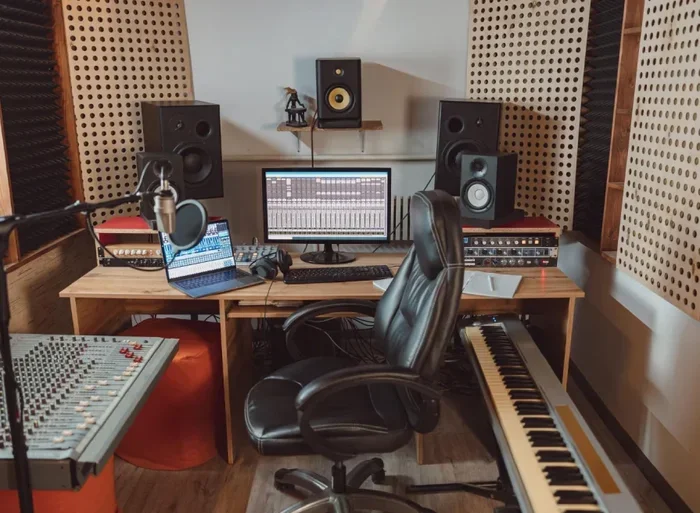
Choosing the best laptop for recording audio depends on your needs, whether you are a podcaster, musician, or audio engineer. The right machine delivers low latency, fast processing, and clean sound output. In this guide, we break down the top options, key specs, and buying tips to help you make a smart choice.
Recording audio on a laptop has become the go-to setup for musicians, podcasters, and content creators everywhere. Gone are the days when you needed a bulky desktop studio to produce professional-quality sound. Today, a best laptop for recording audio can fit on your desk, in your bag, or even on your lap in a coffee shop.
But here is the thing. Not every laptop handles audio recording well. Some struggle with latency. Others lack the right ports or processing power. That is exactly why we put together this guide. Whether you are recording vocals, mixing tracks, or launching a podcast, we will help you find the machine that fits your workflow perfectly.
Key Takeaways
- Processor Power Matters: A fast CPU is essential for smooth audio recording and editing without lag.
- RAM and Storage Are Critical: At least 8GB of RAM and an SSD will keep your audio projects running flawlessly.
- Port Options Matter: Look for laptops with USB-C or Thunderbolt ports for connecting audio interfaces.
- Budget Options Exist: You do not need to spend a fortune to get great audio recording performance.
- Consider Your Use Case: Podcasters, musicians, and engineers each have different laptop needs.
- Build Quality Counts: A sturdy laptop with good cooling handles long recording sessions better.
📑 Table of Contents
- Why the Right Laptop Makes a Difference for Audio Recording
- Key Specs to Look for in a Recording Laptop
- Top Picks for the Best Laptop for Recording Audio
- Laptop vs Desktop for Audio Recording
- Connecting Audio Gear to Your Laptop
- Common Mistakes to Avoid When Buying a Laptop for Audio Recording
- Tips for Optimizing Your Laptop for Audio Recording
- Final Thoughts on Choosing the Best Laptop for Recording Audio
Why the Right Laptop Makes a Difference for Audio Recording
Audio recording is one of the most demanding tasks you can put a laptop through. Unlike simple web browsing, recording audio requires real-time processing, stable performance, and precise sound output. A laptop for audio recording needs to handle multiple tracks, effects, and plugins without skipping a beat.
When you record audio, your laptop is doing a lot behind the scenes. It is capturing the input signal, processing it through software, and sending it back out with minimal delay. This round trip is called latency, and a slow or underpowered laptop will make it noticeable. A laptop for studio recording minimizes this delay so you can focus on creating, not troubleshooting.
Understanding Latency and Why It Matters
Latency is the tiny delay between when you speak into a microphone and when you hear the playback through your headphones. On a powerful laptop for music production, this delay is almost unnoticeable. On a weak machine, it can feel like you are talking through a tunnel. This makes timing difficult and ruins the recording experience.
Several factors contribute to latency. Your processor speed, your RAM amount, and even your storage type all play a role. A laptop with fast processor for audio work will handle these tasks with ease. This is why choosing the right machine is not just a nice-to-have. It is a must.
Key Specs to Look for in a Recording Laptop
Before you browse any best laptop for recording audio list, you should understand what specs actually matter. Not all specs are created equal when it comes to audio work. Here is a breakdown of the most important ones.
Processor (CPU)
The processor is the brain of your laptop. For audio recording, you want a multi-core CPU that can handle real-time audio processing. Intel Core i5 or i7 processors and AMD Ryzen 5 or 7 chips are excellent choices. A high-performance laptop for audio will feature at least a 10th generation Intel Core or an AMD Ryzen 5000 series processor.
If you are running a DAW compatible laptop setup, your CPU will be working overtime. Digital Audio Workstations like Ableton, Pro Tools, and FL Studio demand processing power. A weak CPU will cause your software to crash or stutter during recording sessions.
RAM (Memory)
RAM determines how many tasks your laptop can handle at once. For audio recording, 8GB is the minimum. However, if you work with large projects or run multiple plugins, 16GB or even 32GB is ideal. Think of RAM as your workspace. The bigger it is, the more you can have open without slowing down.
A laptop for podcasters with basic voice recording can get by with 8GB. But if you are layering tracks, adding effects, and mixing multiple instruments, more RAM will make a noticeable difference in your workflow.
Storage (SSD vs HDD)
Storage speed directly affects how quickly your laptop loads audio files and saves projects. An SSD (Solid State Drive) is significantly faster than an old HDD (Hard Disk Drive). For any laptop for home studio setup, an SSD is non-negotiable.
You should aim for at least 256GB of SSD storage. Audio files can take up a lot of space, especially if you work with high-quality recordings. If you need more room, look for laptops with dual storage slots or large capacity SSDs.
Top Picks for the Best Laptop for Recording Audio
Now that you know what specs matter, let us look at some top options. These laptops are well-suited for a range of audio recording needs, from casual podcasting to professional music production.
Dell XPS 15
The Dell XPS 15 is a favorite among creatives for good reason. It packs a powerful Intel Core processor, up to 32GB of RAM, and a stunning display. Its build quality is excellent, and the Thunderbolt ports make connecting external audio gear a breeze. This is a great choice if you want a laptop for graphic work and audio recording combined.
The XPS 15 handles multiple audio tracks with ease. Its cooling system keeps the machine quiet during long sessions, which is important when you are recording vocals or instruments. If you are looking for a reliable recording studio laptop, this is one to seriously consider.
MacBook Pro 16-inch
Apple’s MacBook Pro 16-inch is a powerhouse for audio professionals. The M2 or M3 chip delivers incredible performance with low power consumption. MacBooks are known for their excellent audio drivers and seamless integration with software like Logic Pro and GarageBand.
If you are a musician or producer, a MacBook Pro makes a fantastic laptop for music producers. The large screen is great for working with complex timelines in your DAW. The build quality is top-notch, and the speakers are surprisingly good for a laptop. This machine is built to last through countless recording sessions.
Lenovo ThinkPad X1 Carbon
The Lenovo ThinkPad X1 Carbon is a business-class laptop that performs surprisingly well for audio recording. It is lightweight, durable, and features a great keyboard for long typing sessions. With up to 16GB of RAM and fast SSD storage, it handles audio projects without breaking a sweat.
This laptop is an excellent choice for podcasters who need portability. Its battery life is outstanding, so you can record interviews or sessions on the go without worrying about finding an outlet. If you are shopping for a best laptop for business owners who also create audio content, this is a strong contender.
Acer Aspire 5 (Budget Pick)
Not everyone has a huge budget for a recording laptop. The Acer Aspire 5 offers solid performance at an affordable price. With an AMD Ryzen 5 processor, 8GB of RAM, and an SSD, it handles basic audio recording and editing with ease.
This is a great entry-level option for beginners. If you are just starting out with podcasting or recording vocals, the Aspire 5 will serve you well. You can always upgrade later as your needs grow. Check out our best laptop for under 500 guide for more budget-friendly options.
Laptop vs Desktop for Audio Recording
Many aspiring audio engineers wonder whether they should use a laptop or a desktop for recording. Both have their strengths. Let us compare them side by side.
| Feature | Laptop | Desktop |
|---|---|---|
| Portability | Excellent | Poor |
| Performance | Good to Great | Great to Excellent |
| Upgradeability | Limited | High |
| Price for Same Performance | Higher | Lower |
| Built-in Screen and Battery | Yes | No |
| Best For | On-the-go recording | Fixed studio setups |
Laptops win on portability and convenience. You can record anywhere, from a bedroom to a live venue. Desktops offer more raw power for the same price. If you are building a permanent studio, a desktop paired with a best PC for recording music setup might be the better choice. But if you need flexibility, a laptop is the way to go.
Connecting Audio Gear to Your Laptop
Recording audio is not just about the laptop. You also need the right connections and peripherals to get the best sound. Let us talk about what you will need to set up your laptop for home studio properly.
Audio Interfaces
An audio interface is the bridge between your microphone or instrument and your laptop. It converts analog sound into digital signals that your computer can process. Most audio interfaces connect via USB or Thunderbolt. Look for interfaces with low latency and good preamps for the cleanest recordings.
If you are setting up a new studio, consider checking out our guide on the best audio interface for PC. A quality interface paired with a laptop for recording vocals can rival expensive studio setups.
Headphones and Monitors
Good headphones are essential for monitoring your recordings. You want headphones that give you an accurate picture of the sound, not ones that color the audio. Closed-back headphones are ideal for recording because they prevent sound from leaking into your microphone.
Studio monitors are a great addition if you are mixing and mastering. They provide a flat frequency response, which helps you make better mixing decisions. Whether you choose headphones or monitors, make sure your laptop has the right outputs to connect them.
Common Mistakes to Avoid When Buying a Laptop for Audio Recording
Buying the wrong laptop for audio work can lead to frustration and wasted money. Here are some common mistakes to watch out for.
Skimping on RAM
Many buyers focus on the processor and forget about RAM. This is a big mistake. Insufficient RAM will cause your audio software to lag, freeze, or crash. Always go with at least 8GB, and 16GB if your budget allows.
Ignoring Port Options
Not all laptops have the same ports. Some modern laptops only have USB-C or Thunderbolt connections. If your audio interface uses USB-A, you will need a dongle or hub. Check the ports on your laptop before you buy, and make sure they match your gear.
Choosing a Laptop with Poor Cooling
Audio recording sessions can be long and demanding. A laptop with poor cooling will throttle its performance when it gets hot. This leads to stuttering audio and dropped tracks. Look for laptops with good ventilation and cooling systems, especially if you plan on recording for hours at a time.
Tips for Optimizing Your Laptop for Audio Recording
Once you have your laptop, a few simple tweaks can improve your recording experience significantly.
First, close unnecessary programs while recording. Every open app uses CPU and RAM resources. The fewer programs running in the background, the more power your audio software has. Second, update your audio drivers regularly. Outdated drivers can cause glitches and compatibility issues.
Third, use an external SSD for storing large audio projects. This frees up space on your main drive and improves loading times. Fourth, invest in a good cooling pad if you record on your lap or in bed. Overheating can damage your laptop and degrade performance over time.
Finally, consider your laptop for live streaming needs if you plan to broadcast your recordings. Streaming and recording at the same time puts extra strain on your system, so make sure your laptop can handle the dual workload.
Final Thoughts on Choosing the Best Laptop for Recording Audio
Finding the best laptop for recording audio comes down to understanding your specific needs and matching them to the right specs. Whether you are a podcaster looking for portability, a musician needing powerful processing, or a content creator juggling multiple tasks, there is a perfect laptop out there for you.
Remember to prioritize processor speed, RAM, storage type, and port options. Avoid common pitfalls like ignoring cooling or choosing a machine with insufficient memory. With the right laptop and a quality audio interface, you can create professional-grade recordings from the comfort of your own home.
Take your time, do your research, and invest in a machine that will grow with your skills. The right audio recording laptop is not just a tool. It is the foundation of your entire sound. Choose wisely, and your recordings will reflect that quality for years to come.
Frequently Asked Questions
What makes a laptop good for recording audio?
A good audio recording laptop needs a fast processor, at least 8GB of RAM, an SSD for storage, and low-latency audio drivers. The ports on the laptop also matter, as you will need USB or Thunderbolt connections to link up with audio interfaces and other gear.
Can I use any laptop for music production?
You can use most laptops for basic music production, but a powerful machine will deliver a much better experience. Laptops with multi-core processors, 16GB of RAM or more, and fast SSDs handle music production software like FL Studio and Ableton with far less strain and fewer audio glitches.
Do I need an expensive laptop for podcasting?
No, you do not need an expensive laptop for podcasting. A budget-friendly machine with an SSD, 8GB of RAM, and a decent processor is more than enough for recording and editing voice tracks. You can find excellent options in the mid-range price bracket that handle podcasting with ease.
How much RAM do I need for audio recording?
8GB of RAM is the minimum for audio recording. However, if you work with multiple tracks, virtual instruments, and effects plugins, 16GB will give you a much smoother experience. For heavy professional work, 32GB ensures you never run into performance bottlenecks.
Is a Mac or Windows better for audio recording?
Both platforms work well for audio recording. Macs are known for their stable audio drivers and seamless integration with music software. Windows laptops offer more variety and often better value for the price. Your choice should depend on your software preferences, budget, and workflow.
Do I need a separate audio interface with my laptop?
While some laptops have decent built-in audio, a dedicated audio interface will always deliver better sound quality. An interface provides cleaner inputs, lower latency, and better preamps. It is one of the most important investments you can make for a laptop for recording vocals or any serious audio project.
=== CONCLUSION ===
Selecting the best laptop for recording audio is a decision that impacts every part of your creative workflow. From processor speed to storage type, each spec plays a role in delivering clean, professional sound. Whether you choose a powerful MacBook Pro, a versatile Dell XPS, or an affordable Acer Aspire, the key is matching the laptop to your specific recording needs.
Keep the specs we covered in mind, avoid the common mistakes, and invest in the right peripherals. With the right setup, your laptop becomes a portable recording studio capable of producing tracks and podcasts that sound as good as anything made in a professional facility. Start building your ideal audio setup today, and let your creativity flow without limitations.