What Is Realtek Digital Output

Realtek Digital Output is an audio feature on laptops that sends sound digitally to external speakers, headphones, or home theater systems. It uses your laptop’s Realtek sound card to deliver high-quality audio through digital connections like HDMI or optical cables. Understanding this feature helps you get better sound from your device.
If you have ever plugged your laptop into a sound system and wondered why the audio sounded different, the answer might be Realtek Digital Output. This small but powerful feature plays a big role in how sound travels from your laptop to your speakers or headphones. Many laptop users never dig into this setting, but it can make a huge difference in audio quality.
In this guide, we will break down everything you need to know about Realtek Digital Output. You will learn what it is, how it works, why it matters, and how to set it up on your laptop. Whether you are a casual listener or someone who cares about audio quality, this article has you covered.
Realtek is one of the most common audio chip makers in the world. Almost every laptop uses a Realtek sound card to handle audio input and output. The digital output feature lets your laptop send sound as a digital signal rather than an analog one. This simple change can improve your listening experience a lot.
Key Takeaways
- Realtek Digital Output sends audio as a digital signal: This means cleaner sound without analog conversion losses.
- It works through HDMI and optical ports: You can connect your laptop to external speakers or sound systems easily.
- Setting it up is simple: Just go to your sound settings and select the digital output device.
- Troubleshooting is common: Many users face issues like no sound or crackling, which are usually easy to fix.
- It improves audio quality significantly: Digital output gives you better treble on speakers and overall sound clarity.
- Driver updates matter: Keeping your Realtek audio driver updated ensures smooth performance.
📑 Table of Contents
- What Is Realtek Digital Output?
- Why Does Realtek Digital Output Matter?
- Types of Digital Output Connections
- How to Set Up Realtek Digital Output on Your Laptop
- Common Problems and How to Fix Them
- Realtek Digital Output vs. Analog Output
- Tips to Get the Most From Realtek Digital Output
- Who Benefits Most From Realtek Digital Output?
- Final Thoughts on Realtek Digital Output
What Is Realtek Digital Output?
Realtek Digital Output is a setting on your laptop that allows it to send audio through a digital connection. Instead of using the standard 3.5mm headphone jack, which carries an analog signal, digital output sends sound data in its raw digital form. This means the signal stays clean from your laptop all the way to your speaker or display.
Think of it this way. When you use a regular headphone jack, your laptop converts digital audio into an analog signal. Then your headphones or speakers convert it back. Each conversion can introduce small losses. With digital audio output, that conversion happens only once, at the final device. The result is often clearer and more detailed sound.
How Does Digital Output Work?
Your laptop’s Realtek sound card processes audio and then sends it through a digital port. The most common ports for this are HDMI and optical (S/PDIF). These ports carry digital audio signals directly to your output device. The receiving device, like a soundbar or home theater system, handles the final conversion to analog sound.
Here is a simple breakdown of how the process works:
- Step 1: Your laptop generates digital audio data.
- Step 2: The Realtek audio chip processes the data.
- Step 3: The digital signal is sent through HDMI or an optical cable.
- Step 4: The external device converts the signal to analog sound.
This process keeps the audio signal strong and free from interference. That is why many people prefer digital audio connections over analog ones.
Why Does Realtek Digital Output Matter?
You might be wondering why you should care about this setting. The truth is, it matters more than most people think. Here are the key reasons why Realtek Digital Output is important for your laptop audio experience.
Better Audio Quality
The biggest benefit of using digital output is improved audio quality. Because the signal stays digital for longer, there is less chance of interference or signal loss. You get cleaner highs, deeper lows, and a more balanced sound overall. If you have ever noticed that your treble on speakers sounds harsh or muddy through the headphone jack, digital output might fix that problem.
Digital output also supports higher audio resolutions. This means you can enjoy music, movies, and games in better sound quality. For casual users, the difference might be subtle. But for anyone who pays attention to sound, it is very noticeable.
Surround Sound Support
Another big advantage is surround sound support. Many laptops can only output stereo sound through the analog jack. But with digital output, you can send multi-channel audio to a surround sound system. This is great for movies, gaming, and immersive music listening.
Most modern home theater systems and soundbars support surround sound through HDMI or optical input. By using Realtek Digital Output, you can take full advantage of these systems without needing extra equipment.
Reduced Background Noise
Analog connections are more prone to picking up interference. You might hear a buzzing or humming sound, especially when your laptop is under heavy load. Digital connections do not have this problem. The signal is either on or off, so there is no room for electrical noise to creep in.
Types of Digital Output Connections
Not all digital outputs are the same. Your laptop may have different options for sending digital audio. Let us look at the most common types.
HDMI Audio Output
HDMI is the most popular digital output method today. Almost every modern laptop has at least one HDMI port. When you connect your laptop to a TV or monitor via HDMI, it can send both video and digital audio through the same cable. This makes it very convenient.
HDMI supports uncompressed multi-channel audio. This means you can get lossless surround sound without any extra cables. It is also plug-and-play, so you usually do not need to change any settings.
Optical Audio (S/PDIF)
Optical audio uses a fiber optic cable to send digital sound. It is another popular option for connecting laptops to sound systems. Optical connections are known for being very reliable and resistant to electrical interference.
One thing to keep in mind is that optical audio usually supports up to 5.1 channels. If you want 7.1 surround sound, HDMI is the better choice. But for most setups, optical is more than enough.
USB Audio
Some laptops also support USB audio output. This is less common but still worth mentioning. USB audio devices, like external sound cards or DACs, can use digital output for very high-quality audio. This is popular among audiophiles and music producers.
How to Set Up Realtek Digital Output on Your Laptop
Setting up Realtek Digital Output is straightforward. The exact steps may vary slightly depending on your laptop brand and model, but the general process is the same. Here is how to do it.
Step-by-Step Setup Guide
- Connect your cable: Plug an HDMI or optical cable from your laptop to your external speaker or display.
- Right-click the speaker icon: Click on the small speaker icon in your taskbar and select “Open Sound Settings.”
- Go to Sound Control Panel: Scroll down and click “Sound Control Panel” or “More sound settings.”
- Select the Playback tab: You will see a list of audio devices.
- Choose the digital output: Look for an option labeled “Digital Output” or “HDMI” or “S/PDIF.” Right-click it and set it as the default device.
- Test the audio: Play some sound to make sure it is working correctly.
Configuring Realtek Audio Console
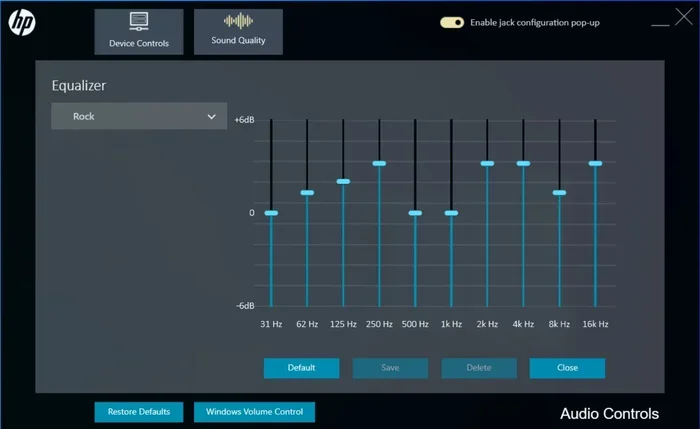
For more advanced settings, you can open the Realtek Audio Console or Realtek HD Audio Manager. This tool gives you more control over your audio output. You can adjust sample rates, channel configurations, and spatial sound settings.
Here are some quick tips for getting the best sound:
- Set the sample rate to 48kHz or higher: This ensures high-quality audio playback.
- Enable spatial sound if your device supports it: This creates a more immersive listening experience.
- Check your speaker configuration: Make sure it matches your setup, whether it is stereo, 5.1, or 7.1.
- Update your Realtek drivers: Always keep your audio drivers up to date for the best performance.
If you want to learn more about how audio quality and speaker settings affect your sound, you might also be interested in understanding what is treble on speakers and how it impacts your listening experience.
Common Problems and How to Fix Them
Like any technology, Realtek Digital Output can sometimes cause issues. Here are the most common problems and their solutions.
No Sound Through Digital Output
This is the most common issue. If you have connected your laptop but hear no sound, try these steps:
- Make sure the cable is firmly plugged in at both ends.
- Check that the digital output device is set as the default in your sound settings.
- Make sure the volume is not muted on either your laptop or the external device.
- Try a different cable or port to rule out a hardware problem.
Audio Delay or Sync Issues
Sometimes the audio and video are out of sync, especially with HDMI connections. This can be annoying when watching movies. To fix this:
- Go to your sound settings and adjust the audio delay.
- Update your graphics and audio drivers.
- Try using a different HDMI port on your display.
Driver Issues
Outdated or corrupted drivers can cause all sorts of audio problems. To fix this, go to your laptop manufacturer’s website and download the latest Realtek audio driver. You can also use Windows Device Manager to update the driver automatically.
For more information on keeping your laptop running smoothly, check out our guide on what is best investment for lifespan of PC to learn how to protect your device long-term.
Digital Output Not Showing in Settings
If you do not see the digital output option, your laptop may not support it, or the driver is not installed correctly. Try reinstalling the Realtek audio driver or checking your laptop’s manual for supported audio outputs.
Realtek Digital Output vs. Analog Output
To understand the value of digital output, it helps to compare it directly with analog output. Here is a quick comparison.
| Feature | Digital Output | Analog Output |
|---|---|---|
| Signal Type | Digital (0s and 1s) | Analog (continuous wave) |
| Connection Types | HDMI, Optical (S/PDIF), USB | 3.5mm headphone jack |
| Audio Quality | Higher, less interference | Good, but prone to noise |
| Surround Sound | Yes, multi-channel support | Limited to stereo |
| Setup Complexity | Slightly more steps | Plug and play |
| Cable Length Limits | Longer runs possible | Shorter, more signal loss |
As you can see, digital output has clear advantages. However, analog output is still useful for quick connections with headphones or portable speakers. Most users benefit from having both options available on their laptop.
Tips to Get the Most From Realtek Digital Output
Now that you know how Realtek Digital Output works, here are some tips to help you get the best experience.
- Use high-quality cables: A good HDMI or optical cable makes a difference. Cheap cables can cause signal drops or poor audio quality.
- Keep your drivers updated: Realtek releases regular driver updates that improve compatibility and performance. Check for updates every few months.
- Match your sample rate: Set your output sample rate to match your speaker or display capabilities for the best results.
- Use the right port: Not all ports on your laptop support digital audio. Check your laptop manual to confirm which ports carry audio signals.
- Explore spatial audio settings: Many Realtek drivers offer spatial audio enhancements. These can make your audio sound wider and more immersive.
- Understand your speaker’s capabilities: If you are connecting to external speakers, make sure you know their frequency response and power handling. Learning about what is good frequency response for speakers can help you choose the right setup.
Understanding your audio setup also helps. For instance, knowing the difference between speaker types can guide your purchasing decisions. If you are curious about speaker configurations, you might want to read about what is the difference between 2-way and 3-way speakers to understand how speaker design affects sound.
Who Benefits Most From Realtek Digital Output?
Not everyone needs digital audio output, but certain users benefit a lot from it. Here are the groups who get the most value.
- Home theater users: If you connect your laptop to a TV or soundbar for movies, digital output gives you the best experience.
- Gamers: Surround sound through digital output makes games more immersive and helps you hear directions and effects more clearly.
- Music lovers: Audiophiles who care about sound quality will notice the difference digital output makes.
- Professionals: Anyone who does video editing, music production, or presentations benefits from cleaner, more reliable audio output.
- Office workers: Even for simple tasks like video calls, digital output can provide clearer and more consistent audio.
If you are shopping for a new laptop and care about audio, look for one with a good Realtek sound card and multiple digital output options. The audio quality on your laptop matters more than you might think.
Final Thoughts on Realtek Digital Output
Realtek Digital Output is a simple feature that can transform your laptop’s audio experience. It sends cleaner, higher-quality sound to your speakers, headphones, and home theater systems. Whether you are watching movies, playing games, or listening to music, digital output helps you hear every detail.
Setting it up takes just a few minutes, and the benefits last as long as you use your laptop. Keep your drivers updated, use good cables, and explore the settings in your Realtek audio console. You will be surprised at how much better your sound can be.
Do not let the technical name scare you. Realtek Digital Output is just a way to get better sound from your laptop. Give it a try, and your ears will thank you.
Frequently Asked Questions
What is Realtek Digital Output used for?
Realtek Digital Output is used to send audio from your laptop to external devices like speakers, soundbars, or TVs using a digital signal. It provides cleaner and higher-quality sound compared to analog output through a standard headphone jack.
How do I enable Realtek Digital Output on my laptop?
Go to your sound settings, right-click the speaker icon in your taskbar, and select “Open Sound Settings.” Then go to the Sound Control Panel, click the Playback tab, and set the digital output device as your default.
Is digital output better than analog output?
Yes, digital output is generally better because it sends audio as a clean digital signal with less interference. It supports surround sound and higher audio resolutions, making it ideal for movies, gaming, and music listening.
Can I use Realtek Digital Output with any speaker system?
You can use it with any speaker system that has a digital input, such as HDMI or optical. Most modern soundbars, home theater systems, and monitors support digital audio input. Check your speaker’s specifications to confirm.
Why is there no sound when I select Realtek Digital Output?
This can happen if the cable is not connected properly, the driver is outdated, or the digital output is not set as the default device. Try checking your cable connections, updating your Realtek audio driver, and verifying the settings in your sound control panel.
Do I need special cables for Realtek Digital Output?
You need an HDMI cable or an optical (S/PDIF) cable, depending on which digital output port your laptop has. These cables are widely available and affordable. A good quality cable ensures the best audio performance.