Top 10 Best Low Profile Cpu Coolers for Silent and Efficient Cooling
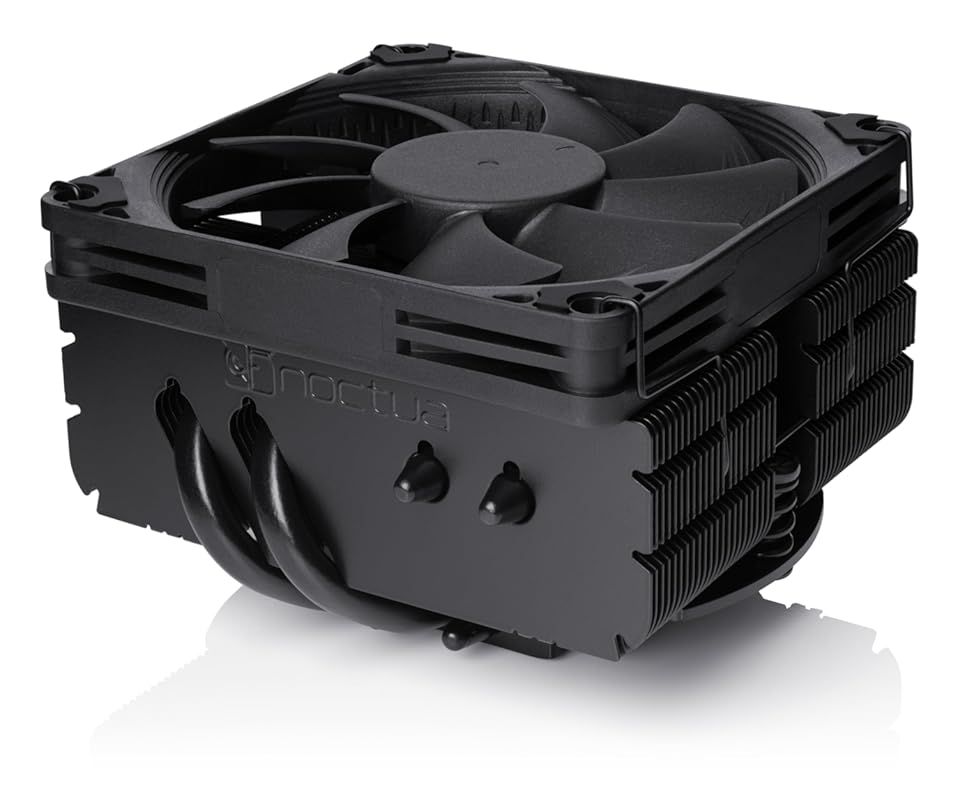
Building a compact PC doesn’t mean you have to compromise on cooling. Whether you’re crafting a silent Home Theater PC (HTPC), a tiny Mini-ITX gaming rig, or a sleek Small Form Factor (SFF) workstation, a great low-profile CPU cooler is non-negotiable. These coolers are engineered to deliver powerful thermal performance in a slim vertical space, often under 70mm tall, ensuring they fit under restrictive case lids or alongside tall RAM modules without blocking PCIe slots. After testing and researching numerous models, we’ve rounded up the absolute best options on the market today, balancing cooling efficiency, noise levels, build quality, and value. Our top picks will help you keep your powerful, space-constrained build running cool and quiet.
Quick Product Comparison
Our Top 10 Best Low Profile Cpu Cooler Reviews – Expert Tested & Recommended
1. Noctua NH-L9x65 chromax.Black Premium Low-Profile CPU Cooler with 65mm Height
The Noctua NH-L9x65 chromax.Black is the undisputed champion for high-performance, low-profile cooling. It takes the legendary NH-L9a design and gives it a 65mm height boost, significantly improving thermal headroom without sacrificing the compact 95x95mm footprint that guarantees compatibility with tall RAM modules and PCIe slots. The all-black aesthetic is sleek and modern, while the NF-A9x14 PWM fan is whisper-quiet and incredibly efficient. It’s the go-to solution for demanding Mini-ITX and HTPC builds where every millimeter of clearance counts and cooling performance is critical.
Key Features That Stand Out
✓ 65mm Height: Provides ~20% more cooling capacity than the standard 37mm NH-L9i, handling higher TDP CPUs with ease.
✓ 95x95mm Footprint: Zero overhang on RAM or PCIe slots, perfect for crowded ITX motherboards.
✓ chromax.Black Finish: Premium all-black look that blends seamlessly into any build.
✓ NF-A9x14 PWM Fan: Noctua’s renowned slim fan with ultra-low noise and excellent static pressure.
✓ Includes Low-Noise Adaptor (LNA): For near-silent operation at the cost of some performance.
Why We Recommend It
This cooler is the perfect balance of size, silence, and strength. The extra height over Noctua’s ultra-compact models makes a tangible difference, allowing it to tackle modern 65W+ CPUs like Ryzen 7 or Core i7 parts without thermal throttling, as confirmed by user reports. The build quality is exceptional, and the installation is straightforward with Noctua’s excellent mounting system. It’s the safe, premium choice for anyone who won’t compromise on cooling in a tight space.
Best For
Enthusiasts building high-end Mini-ITX PCs, HTPCs with powerful APUs like the Ryzen 7 5700G/7800X3D, or anyone who needs top-tier low-profile cooling and values brand reliability and quiet operation over absolute lowest cost.
Pros and Cons
Pros:
- Outstanding cooling performance for its size class.
- Extremely quiet operation with the included PWM fan.
- Excellent RAM and PCIe clearance due to square footprint.
- Premium build quality and a 6-year warranty.
- Versatile mounting hardware for Intel & AMD sockets.
Cons:
- Premium price point compared to budget alternatives.
- The 65mm height may still be too tall for some ultra-slim SFF cases.
- Fan color is still brown/tan (though the heatsink is black).
Customer Reviews
Customer Review: I’m running this on my Ryzen 7 7700X and honestly, it handles it way better than I expected. Even when I’m pushing it hard with heavy workloads or gaming, it peaks at around 75°C (167°F), which is pretty wild for a low-profile cooler. The all-black look is super clean and the build quality feels premium. If you need to save space but don’t want your CPU cooking, this is definitely the move.
Customer Review: This is noctua…the best brand for cooling period. Extremely easy to install and very quite. The black matches my build and the price to performance including noise can not be beat.
2. Noctua NH-L9x65 Premium Low-Profile CPU Cooler
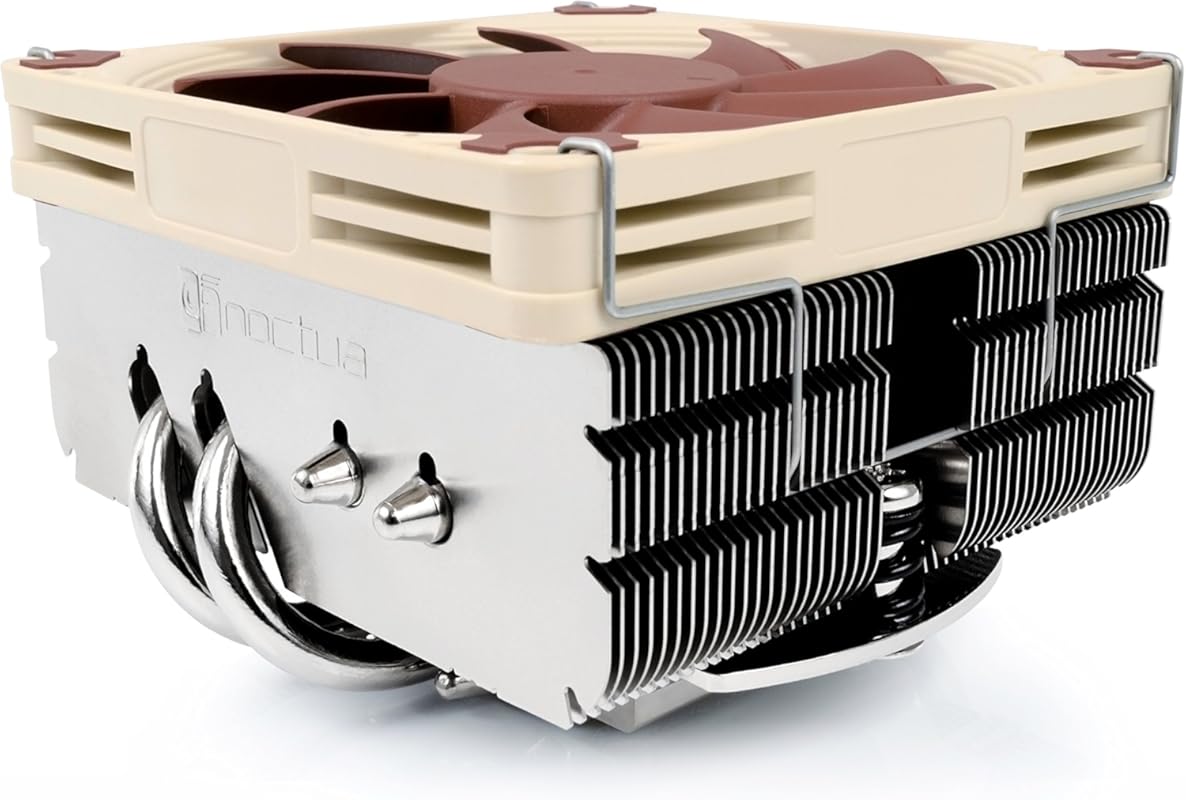
The original Noctua NH-L9x65 is the Editor’s Choice for its proven, no-nonsense design. It shares the same 65mm height and 95x95mm footprint as the chromax.black version but comes in the classic Noctua beige/brown color scheme. The performance is identical, making it a fantastic value if you don’t mind the iconic colors. It remains one of the most reliable and capable low-profile air coolers ever made, offering a perfect blend of compact size, silent operation, and robust cooling for a wide range of CPUs.
Key Features That Stand Out
✓ 65mm Total Height: Excellent balance of size and cooling power.
✓ No Overhang Design: 95x95mm base clears all RAM and PCIe slots on modern boards.
✓ NF-A9x14 PWM Fan: Industry-leading slim fan with superb acoustics.
✓ SecuFirm2 Mounting System: Noctua’s trusted, easy-to-use, and secure mounting kit.
✓ Includes NT-H1 Thermal Paste: High-quality paste is in the box.
Why We Recommend It
This cooler represents the peak of traditional low-profile air cooling engineering. It’s not the absolute cheapest, but you’re paying for Noctua’s legendary reliability, near-silent operation, and a design that simply works. It has a decades-long track record of successfully cooling everything from office CPUs to mid-range gaming chips in cramped ITX cases. If you want a “set it and forget it” cooler from a brand you can trust, this is it.
Best For
Builders who prioritize proven performance and brand trust over aesthetics, users with older Intel LGA115x/1200 or AMD AM4 systems, and anyone who wants the classic Noctua experience in a low-profile form factor.
Pros and Cons
Pros:
- Exceptional cooling for a 65mm cooler, handles 65W-95W TDP CPUs well.
- Incredibly quiet during normal and light loads.
- Perfect compatibility with RAM and PCIe slots.
- Easy, robust installation with included hardware.
- Fantastic long-term reliability and warranty.
Cons:
- Beige/brown color scheme isn’t for everyone (though it’s iconic).
- Priced higher than many competing budget coolers.
- May struggle with the highest-end 125W+ CPUs under sustained all-core loads.
Customer Reviews
Customer Review: To start this off I’m going to say I went from a broken Intel 2012 stock cooler to this and the difference is instantly noticeable. Towards the end of my stock cooler, the plastic mounts broke so the heat sink would not fit correctly on top of the cpu. I was getting temperatures of 40-50 c idle and 100-105 c when running monster hunter world (a cpu intensive game). With this new cooler I have an idle temp around 25-35 c and it will not go above 60 c when playing monster hunter. So it cools perfectly fine. My only issue, and it’s not even an issue really, is the installation. I have an old case so I had to take apart my whole pc pretty much to get the back plate on. That part was easy enough besides the time it took, the only frustrating thing was putting the fan on the mount. It’s a bit tricky to get both screws in but once you do you’re golden. I gave installation 3 stars for this, however I don’t think you can really do much to improve it. The fan is quiet and efficient. Mounting was straight forward and only a little bit tricky. If you know what you’re doing you won’t have a problem. I’d recommend this fan to anyone trying to replace their intel stock cooler if they don’t plan to over clock. Comes with thermal paste, and a nice screw driver. Nice touch. My cpu is an Intel corei5 3450 3.1(3.4 boost) gghz
Customer Review: This cooler exceeds all my expectations. Install was a breeze, possibly the easiest cpu cooler install I’ve ever done. Dropped temps by up to 50% at idle and under load. So quiet I can’t even hear it. I have 3x120mm and 3x80mm fans in my mid tower InWin case and I never realized it was the CPU cooler making the most noise. Amazing upgrade. On first impressions, I’m very glad I decided to try a Noctua product. With this little beast installed, I’m running 20-25c at idle and running TW WarHammer at ultra settings on a 980GTX 4GB in a massive campaign I’m barely tipping 50c under load. That’s still 25% or more less temp than the stock fan did brand new with Arctic’s best avail thermal paste. ( I used the included NT-H1 paste since my order of the MX-4 paste was delayed in being shipped out. I’ll send it back I guess. I figured if Noctua included this paste, they trust it. Was a full 4g tube.) I had a 6 year old stock intel cooler for my i5-2500k I OC’d about `15% with no issues of any kind for all those years but lately was not performing well at all keeping my CPU around 40-50c at idle and up to 81c under load. The fan was no longer revving up with the Asus AI Suite controls or manual control (ROG Gene-IV Maximus). Recently it became a bit sluggish, and more recently it began to set off temp alerts. Was going to try a Corsair Hydro H60 but as much as I had to bend the hoses to fit into location in my case I felt the connections were going to be stressed so decided against it and issued an RMA. With the lack of actual pressure inside the cooling system I’m not sure why high pressure hoses are used…they are quite stiff. Should be able to accomplish the same thing with a high strength, thin walled, and highly-flexible tubing for roughly the same price. Definitely going to Install one of Noctuas supersize coolers in my upcoming i7-7700k build instead of going liquid. More peace of mind and obviously outstanding cooling technology. Sure wish the fans had color options though. I don’t look inside a lot but these colors certainly don’t fit anything I’ve ever put into a PC case in almost 30 years of building PC’s. *yeah, all the way back to when RAM was measured in MB! 😮 I’d paint them but that’s not a long-term solution. The slightest amount of weight off center throws the fans a bit out of balance and shortens their life a great deal. I’ll let it work as intended and sit comfy with that amazing 6 year warranty.
3. CORSAIR iCUE Link Titan 240 RX RGB CPU Cooler
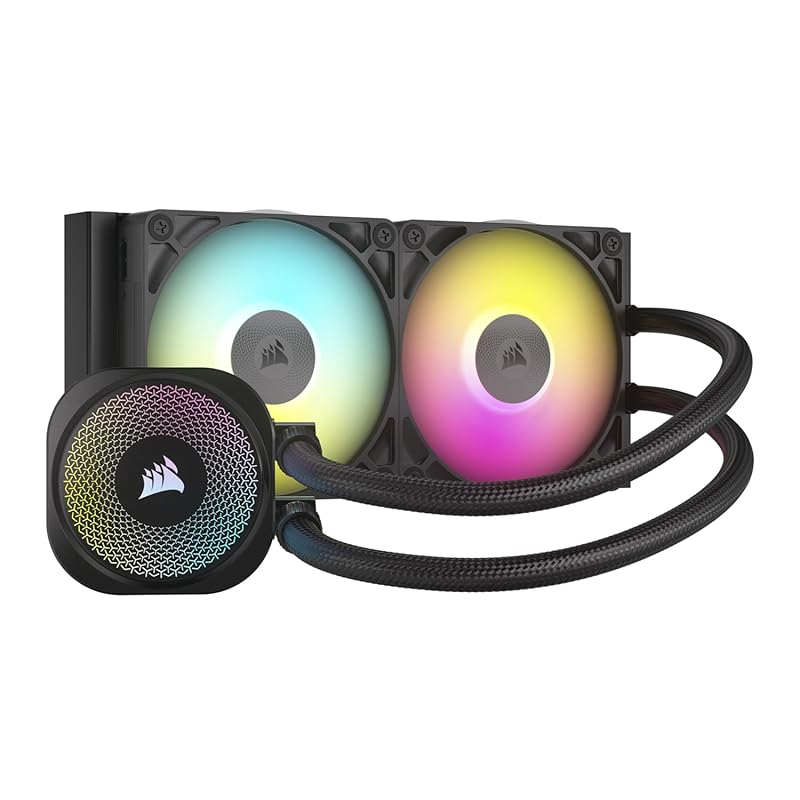
The CORSAIR iCUE Link Titan 240 RX is our Best Budget pick because it delivers stunning 240mm AIO performance at a competitive price, with the added bonus of CORSAIR’s brilliant iCUE Link ecosystem. This is a full-sized liquid cooler that can fit in many mid-tower and some larger ITX cases, offering vastly superior cooling to any air cooler in this list for high-TDP CPUs. The FlowDrive pump is quiet, the radiator is effective, and the RGB lighting is vibrant and customizable via iCUE software.
Key Features That Stand Out
✓ iCUE LINK Technology: Revolutionary daisy-chain connectivity for drastically cleaner cable management.
✓ 240mm Radiator: Provides massive cooling surface area for overclocked CPUs.
✓ FlowDrive Cooling Engine: Three-phase motor pump for strong flow and low noise.
✓ RX RGB Fans: Three included 120mm RGB fans with excellent airflow.
✓ Wide Socket Support: Compatible with Intel LGA 1700/1851 and AMD AM5/AM4.
Why We Recommend It
If your case can fit a 240mm radiator, this is the best value in high-performance cooling. It beats every air cooler on the market for thermal performance while remaining reasonably quiet. The iCUE Link system is a game-changer for build aesthetics, reducing cable clutter to almost nothing. For the price, you get a premium AIO from a major brand with excellent software integration and cooling headroom for even an i9 or Ryzen 9 processor.
Best For
Gamers and creators with mid-to-high-end CPUs (e.g., Ryzen 7/9, Core i7/i9) who have a case that can accommodate a 240mm radiator and want top-tier cooling with beautiful, controllable RGB and simplified cable management.
Pros and Cons
Pros:
- Exceptional cooling performance, capable of handling high-TDP CPUs.
- iCUE Link drastically simplifies and cleans up cable management.
- Vibrant, customizable RGB lighting with included System Hub.
- Very quiet pump and fan operation under normal loads.
- Comprehensive socket support for current platforms.
Cons:
- Requires a case with 240mm radiator mounting, which rules out most true SFF cases.
- AI Os have a longer potential failure rate than air coolers (though CORSAIR’s is good).
- Installation is more involved than a simple air cooler.
- Requires a USB 2.0 header for the iCUE Link Hub.
Customer Reviews
Customer Review: I installed the Corsair Titan 420 RX RGB in my build and the performance has been outstanding. The 420mm radiator combined with the three RX140 RGB fans keeps my CPU extremely cool, even under heavy gaming and high workloads. I noticed a clear drop in temperatures compared to my previous cooler. The FlowDrive cooling engine is very quiet. Even during intense gaming sessions, noise levels stay low, which is a huge plus for me. The RGB lighting looks premium and vibrant. The included System Hub makes cable management and control through iCUE much easier. Everything feels high-quality and well-designed. Installation was straightforward, but keep in mind this is a large 420mm AIO, so you need a compatible full tower or spacious case. ✅ Excellent thermal performance ✅ Very quiet operation ✅ Beautiful, customizable RGB ⚠️ Requires a large case Highly recommended for high-performance CPUs and premium builds.
Customer Review: I picked up the Corsair iCUE Link Titan 360 RX to cool my new build, and I’ve been really impressed so far. This is Corsair’s latest 360mm AIO with their new iCUE Link ecosystem, and I wasn’t sure what to expect—but everything just worked. Usage: I installed it with no issues on an Intel [insert your CPU model] inside a mid-tower case. The iCUE Link system made cable management much cleaner than my last setup, and it booted right up without any firmware hassles or fan curve weirdness. Pros: Extremely quiet – even under load, the system stays silent Cool and stable – CPU temps have been consistently healthy so far Clean build – the iCUE Link cables cut down on clutter Looks great – RGB is tasteful and well diffused No setup issues – everything worked out of the box for me Cons: You’ll need an available USB 2.0 header for the hub iCUE software still isn’t perfect, but it’s stable enough for me Tips: Update iCUE before installation if you haven’t used it in a while Try mounting the pump head upright—the Corsair logo looks better aligned that way Don’t forget to enable custom fan curves in iCUE if you want to fine-tune your setup later Verdict: If you’re looking for a premium AIO that’s quiet, cools well, and makes your build look clean and modern, this cooler nails it. Setup was smoother than expected, and performance has been solid. Highly recommended if you’re building in the Corsair ecosystem or just want less cable clutter.
4. SCYTHE Big Shuriken 4 Low Profile CPU Cooler
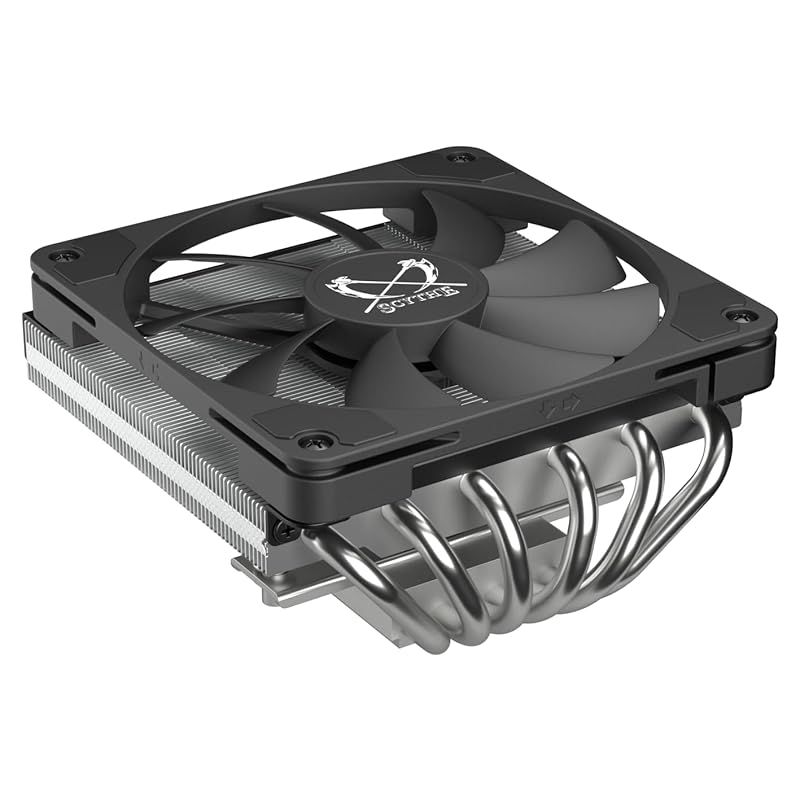
The SCYTHE Big Shuriken 4 is a veteran favorite in the SFF community for its ingenious design that maximizes cooling in a tiny package. At only 67mm tall with a 120mm fan, it offers a fantastic alternative to 92mm-based coolers. Its unique heatpipe orientation often provides better RAM compatibility than some rivals, and it’s renowned for being able to handle medium-wattage CPUs surprisingly well. It’s a no-frills, high-performance workhorse from a brand with a deep history in cooling.
Key Features That Stand Out
✓ 67mm Total Height: Slightly taller than some, but uses a full 120mm fan for better airflow.
✓ 120mm Fan: More airflow potential than 92mm fans, often resulting in better cooling or lower noise.
✓ Optimized for RAM Clearance: Heatpipe design typically clears tall RAM modules when oriented correctly.
✓ Intel LGA 1851 & AMD AM5 Support: Ready for the latest platforms.
✓ Compact 4.7″ x 4.8″ Base: Small footprint avoids PCIe slot interference.
Why We Recommend It
The Big Shuriken 4 is a classic for a reason. It consistently punches above its weight class in thermal tests, often matching or beating taller 92mm coolers due to its larger, more efficient fan. For builders in cases like the SilverStone FTZ01 or similar where a 120mm fan can fit but height is limited to ~70mm, this is often the absolute best air-cooled option. It’s a testament to smart engineering over brute force.
Best For
SFF enthusiasts with cases that can fit a 120mm fan but have strict height limits (~70mm), users with medium-power CPUs (up to ~95W TDP), and those who appreciate the performance benefit of a larger fan in a low-profile design.
Pros and Cons
Pros:
- Excellent cooling performance for its height, thanks to the 120mm fan.
- Good RAM compatibility due to heatpipe orientation.
- Proven, reliable design with a long track record.
- Compatible with the latest Intel and AMD sockets.
- Often quieter than equivalent 92mm coolers at the same speed.
Cons:
- Installation can be slightly fiddly compared to Noctua’s system.
- The included fan, while good, can be swapped for an even quieter model (like a Noctua).
- At 67mm, it’s not suitable for the absolute lowest-profile cases.
- Aesthetic is more utilitarian than sleek.
Customer Reviews
Customer Review: As many of us ITX lovers know, finding just the right air cooler for your build can be tough. We need good thermals, good acoustics, and the right physical compatibility. Personally I’m still too paranoid to make the jump to water cooling…and popping in an air cooler seems easier to me in a small build. Plus I had recently started taking interest in slim cases like the Silverstone FTZ01E and the Nouvolo Steck. My previous build included a Cryorig C1 on an ATX motherboard in a mid tower case. And I was hoping I’d be able to use this big 140mm ITX cooler in a new ITX build. However after some research and testing…the heatsink was just too large for the cases I was looking at. Either Ram clearance became an issue on the ITX boards, or the heatsink would press up against the sides of cases. I looked at other options for large 140 and 120mm low profile coolers with decent sized heatsinks, but was finding there would be compatibility issues…or lackluster cooling. I checked at a ton of builds on PCpartpicker, Youtube, and different tech forums. I looked over the offerings from Raijintek, Be Quiet, Thermalright, Noctua, you name it. Then I saw that Scythe came out with the Big Shuriken 3 and it supported AM4 sockets…and I was intrigued. Their claims of total ram compatibility, low cooler height, and good cooling performance had me excited. So I looked at a few reviews on Youtube, read an article or two, then I ordered it. Tested this baby out on an ASUS B450 ITX motherboard with Gskill TridentZ ram inside a Silverstone FTZ01E case. Absolutely zero issues fitting. The cooler was made in a way, that when oriented with the heatpipe bends pointing up, the cooler overhangs your rear I/O. So tall ram like the TridentZ are 100% compatible. Cooling was pretty dang good…keeping my 2700X CPU at around 45c idle, 79c at full load in the second floor of a rather warm home. Thats a few degrees cooler than the beefier Cryorig that I previously used. Mind you the Cryorig was a 140mm cooler that was a tad heavier than the Scythe, and also had an extra heatpipe. Yet somehow the Scythe beat it. And the Scythe fan noise isnt too bad…but I prefer Noctua…so I swapped in a 120mm slim fan from them (cooling performance was the same). All in all, the Big Shuriken 3 is a well performing, highly compatible CPU cooler thats worth a look at. I could really see this thing becoming a popular choice in the ITX & SFF community. Ill try to share some pics at a later date. PS – Scythe customer service is also great. I had a small issue with the plastic spacers for the mounting bracket being too tight…and they sent me replacements free of charge. Definitely made installation and removal much easier.
Customer Review: I bought this for a home server with a 3u case. It fits easily in there with plenty of room to spare. It’s running on an intel core ultra 245k CPU. I used some PTM7950 with it and temps are very good (65C or less) with the tdp capped at 125 watts. With stock bios settings, it was pushing about 80C with all core load. The case airflow isn’t very good so this is quite decent. (one 80mm and one 120mm case fans) It was pretty easy to mount. The fan is attached and then you just put the screwdriver through the fan at the top. It did include some thermal paste but I didn’t try that. the fan is pretty quiet for the size. I’m quite impressed with the build quality also.
5. Thermalright AXP90 X47 Black Low Profile CPU Cooler
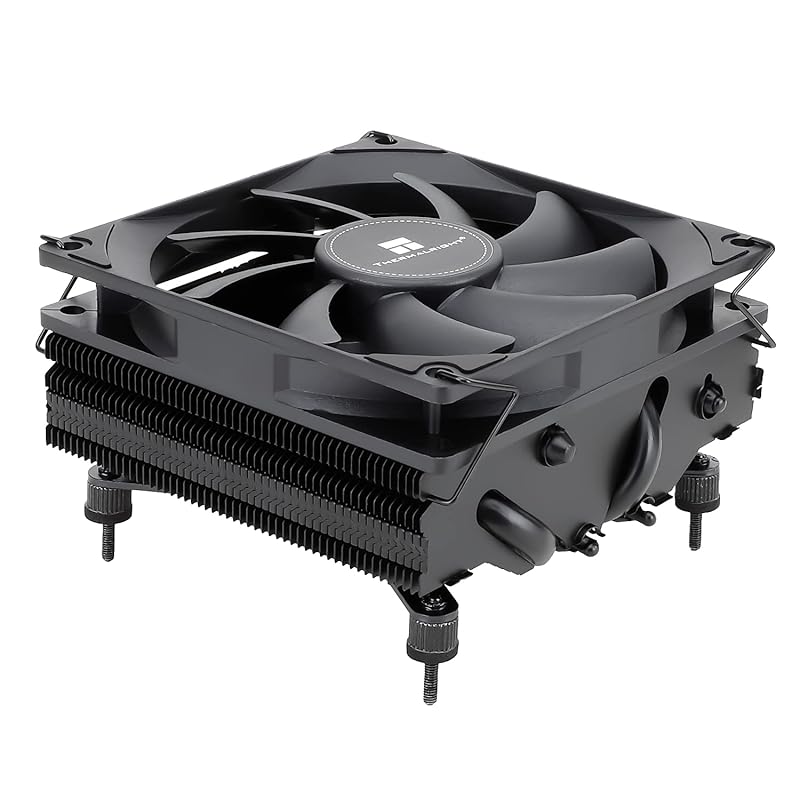
The Thermalright AXP90 X47 is a direct, budget-friendly competitor to the Noctua NH-L9i, but with a crucial design difference: it blows air vertically (up/down) instead of horizontally (left/right). This vertical airflow pattern is often more effective in ITX cases where RAM and I/O shields can block horizontal airflow. At 47mm tall, it’s slightly taller than the L9i but shorter than the L9x65. It uses Thermalright’s AGHP (Asymmetric Gravity Heat Pipe) technology for optimal heat pipe efficiency regardless of orientation.
Key Features That Stand Out
✓ Vertical Airflow Design: Blows air up/down, avoiding blockage from RAM/IO on most ITX boards.
✓ 47mm Height: A middle ground between ultra-slim and standard low-profile.
✓ AGHP Technology: Heat pipes are optimized to work against gravity for consistent performance.
✓ TL-9015 92mm PWM Fan: Decent thermal performance and acceptable noise levels.
✓ All-Metal Construction: Durable feel with nickel plating for corrosion resistance.
Why We Recommend It
This cooler is the smart choice for ITX builders frustrated by the horizontal airflow of coolers like the NH-L9i. In many small cases, that horizontal design can be severely hampered by components surrounding the CPU socket. The AXP90’s vertical design often yields better real-world temps for the same height. Combined with a very aggressive price, it offers incredible value for money, especially for AM4/AM5 builds.
Best For
Budget-conscious ITX builders, especially on AMD AM4/AM5 platforms, who want a cooler with a smarter airflow direction that isn’t blocked by RAM or I/O shields. Also great for anyone who wants a solid, no-nonsense cooler at a fraction of the Noctua price.
Pros and Cons
Pros:
- Vertical airflow design avoids common RAM/IO blockage issues.
- Extremely affordable for the performance offered.
- AGHP technology is effective in all orientations.
- Good build quality with all-metal construction.
- Wide socket support including modern AM5.
Cons:
- Mounting mechanism is less refined and user-friendly than Noctua’s.
- Included fan is okay but can be improved with a swap (e.g., Noctua NF-A9x14).
- Aesthetic is basic industrial, not as polished as premium brands.
- Can be slightly louder than top-tier competitors at similar loads.
Customer Reviews
Customer Review: This is a nice cooler…it is in a inwin b1 on a 5700G built around the ASRock b450 itx fatality…my main complaint with noctua similar but more popular offering is the direction it vents, it pushes air out left and right vs up and down so basically airflow is cut off by the memory and IO area ..this one from thermalright is exactly opposite it vents out the top and bottom(with convection mostly top) so this little problem as basically gone, the mounting mechanism defenetly isn’t noctuas famously easy to use one but it’s effective and considering I’m not going to be taking the cooler off twice a week it’s fine and iv defently seen worse on soposedly high end cooling solutions so I have no complaints…if I were to pick a single thing to hone in on with this brand it’s the smorgusborg for varients they offer, 36mm copper(black or gray) 43mm aluminum copper or black copper, 53mm in all versions mentioned above, all difrent weights…ya it’s a bit much for your average consumer…but that being sead I was able to find 2 that I liked that would not only maximize the height in my specific case wile leaving enough of a gap to pull in air but I also had a choice of color so there is that…but I think to drive my point home here I ended up buying 2 one all black that is soposed to be coated copper and one that is just all copper becase aperently even tho they are the same under the coating they are showing in the description as difrent weight and wattage so we will see about that once I receive the secound all shiny copper heavy one lol…overall I like them they are not over engenered just to make a basic mistake like push the air in a direction that on every itx motherboard made in the last 10years has many large tall things called ram modules RIGHT there basically eliminating any benefits of your product being heavy dense and well built lol…good job thermalright you didn’t forget the basics———–Update I just received the full copper revision of this model and yes it is infact noticeably heavier…I will defently be swapping out the all black one for this one and pairing it with the noctua slim 92mm fan from a nh-l9a and probebly artic MX 4 compound and doing some before and after testings on all the difreces…I’m not realy shur why this model is heavier than the black one as the black one is soposed to be full copper aswell just painted with a thermaly conductive paint and also nickel plated but we are going to find out what the results are of the difrences after testing…I want to be clear I like the all black model and the fans on these are ok, I will not be returning whichever one I don’t use for this build long term I just want to make shur I am pairing the best possible solution with this 5700G to get the best possible cooling performance so I don’t have to worry about my CPU temps in this airflow anemic case that is the inwin b1…lol I will likely just copy and paist this review for the copper one so there is a bit more feedback for both models becase as of right now there is very little user feedback on these and that a shame as they both have the same benefits over the noctua LP coolers that being they blow air up and are not blocked off by the memory or IO area(cooler or integrated sheild) but all the info in this review is still relevant for the copper one especial this part lol
Customer Review: This Low Profile CPU cooler is good for keeping relatively low wattage CPUs cool. I have it installed on P8H77-i ASUS motherboard with an Intel Xeon e3-1230v2 CPU (69W TDP according to Intel). I think the max temp that I saw was 74°C while gaming. It’s not too loud either. The installation is not for a first time builder. Now, installing this cooler is an experience. I believe it is referred to as a reverse install. The standoffs are to be installed to the heatsink which *should* extend through the metal backplate. You then hand tighten the fasteners. Make sure you check the edge of the motherboard for flexing. If your motherboard is flexing, the fasteners are too tight. Overall, it’s a good low profile 90mm CPU cooler for a low power, small form factor (SFF) build. Follow the installation instructions and be mindful of how tight you tighten the fasteners, it’ll be satisfying to know you didn’t bork your motherboard when it boots and isn’t overheating.
6. Thermalright AXP90 X36 Black Low Profile CPU Cooler
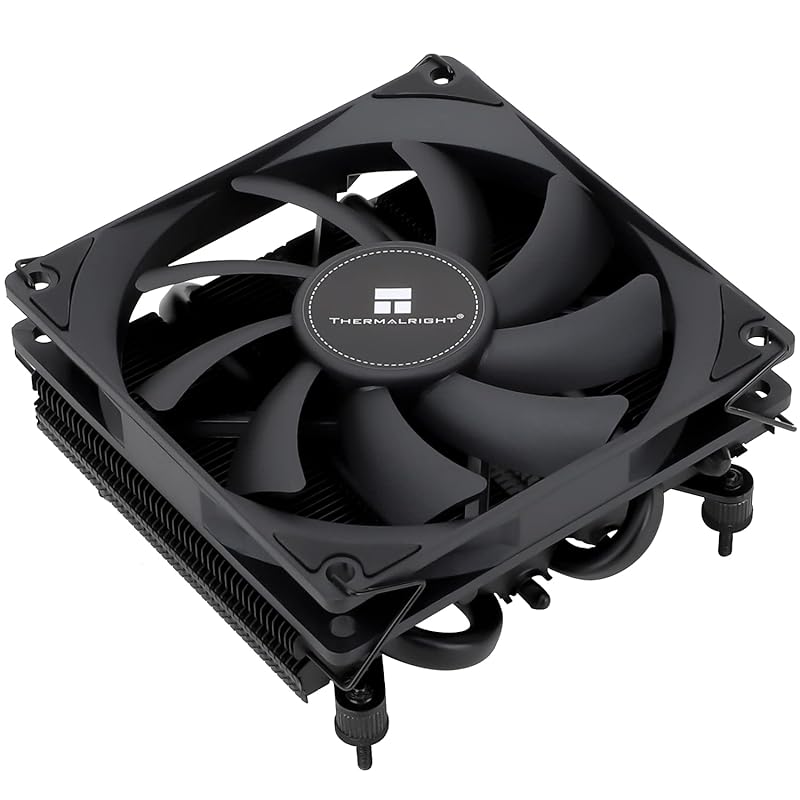
At a mere 36mm tall, the Thermalright AXP90 X36 is one of the lowest-profile coolers on the market that still uses a 92mm fan. This is the king of ultra-slim builds where every single millimeter counts, such as in the smallest Mini-ITX cases or industrial PCs. Despite its diminutive stature, it leverages AGHP technology and a solid fin stack to provide meaningful cooling for low-to-medium TDP CPUs (up to ~65W). It’s the ultimate “fit at all costs” solution when nothing else will physically fit.
Key Features That Stand Out
✓ Ultra-Slim 36mm Height: Fits in the most restrictive cases imaginable.
✓ 92mm PWM Fan: Surprising airflow for its size.
✓ AGHP Technology: Maintains efficiency even when mounted vertically.
✓ Extremely Lightweight: Minimal stress on motherboard.
✓ Aggressive Price Point: Unbeatable value for its niche.
Why We Recommend It
When your case specs say “CPU cooler height limit: 40mm,” this cooler is your answer. It’s not for high-performance chips, but for 65W TDP or lower parts (like most modern APUs or efficiency-focused CPUs), it does the job admirably. The value proposition is insane—you get a functional, modern low-profile cooler for the price of a fast-food meal. It proves you don’t need a big heatsink if your thermal requirements are modest.
Best For
Builds with extreme height restrictions (<40mm), such as ultra-compact SFF cases (e.g., Loque Ghost S1, Dan A4), industrial applications, or HTPCs where silence and absolute minimal footprint are paramount. Ideal for CPUs like Ryzen 5 5600G, Intel i3/i5 non-K, or older 65W parts.
Pros and Cons
Pros:
- Extremely low 36mm profile fits almost anywhere.
- Unbelievably low cost for a functional cooler.
- Good enough cooling for 65W TDP CPUs in well-ventilated cases.
- AGHP tech helps performance in vertical mounts.
- Lightweight and simple.
Cons:
- Will struggle with anything over ~65W TDP under load.
- Noise levels can get higher under load due to small fan spinning fast.
- Mounting system is basic and not as polished.
- Build quality is functional but not premium.
- Not suitable for overclocking or high-end CPUs.
Customer Reviews
Customer Review: The AXP90 is an amazing low profile CPU cooler and for the price it is completely unbeatable. Wherever you simply cannot use a tower cooler (because of height restrictions) or don’t want to invest in an AIO, this cooler will suit your needs well. The Good: Cooling – For coolers with appropriate wattage, about 90W or below, the AXP90 will keep them cool, with the idle temps of lower draw chips, such as the Ryzen 5600G, being only slightly above ambient. Even running a full core workload at 100% the chip will be nowhere near thermal throttling. Noise – The fan used here, despite its size, is nearly silent. Even when almost completely open in the side of a Deskmini X300 I cannot hear it at all past a couple feet away from it; the fridge in the kitchen makes more ambient noise despite being half a house away. Price – I don’t think you can get better for $23. Out the door for $25 with tax, having a low profile cooler be effective and quiet for less than half the cost of a competing Noctua option is enormous; I’d never pay twice the amount for something that can’t do much better. The Bad: Mounting – The mounting, while being part of the nature of low profile options, is definitely tedious and you need to be prepared to replace the backplate to make this work. Unlike a lot of AM4 coolers which use the backplate already, this cannot. So be mindful of the order of assembly or you’ll be forced to mount the cooler in-case behind a mess of wires (be real, you didn’t cable manage)! Overall, I am very satisfied and would definitely recommend the AXP90 to anyone needing a low profile CPU cooler, limited budget or otherwise.
Customer Review: Overall, seems great so far. I use Thermalright and Arctic whenever I need something involving fans. If one of them doesn’t have what I’m looking for, the other almost certainly does (in this build, as an example, Thermalright had a CPU cooler that fit, and arctic has 40mm fans that’ll fit). Everything I have gotten from thermalright, which at this point includes an aio, a cpu cooler, and two kinds of fans of different thicknesses and sizes, has been great, and this one seems no exception. I haven’t measured the temps that this gives me yet since I don’t have my case or gpu yet, but it seems to keep things cool. It will fit in my case, and it isnt too loud. Very happy with it so far. I also seen people with my same case use this cooler with higher powered cpus than my 9600x, so I figure this should last me a long while. This is also my second time using the included thermal paste. The applicator could be better, but the paste is good, and they include enough. If it means I don’t have to buy my own paste quite as often, then I am happy. For $20 vs noctuas $60 price tag for the same thing, this is by far the better use of money.
7. Noctua NH-L9i Premium Low-Profile CPU Cooler
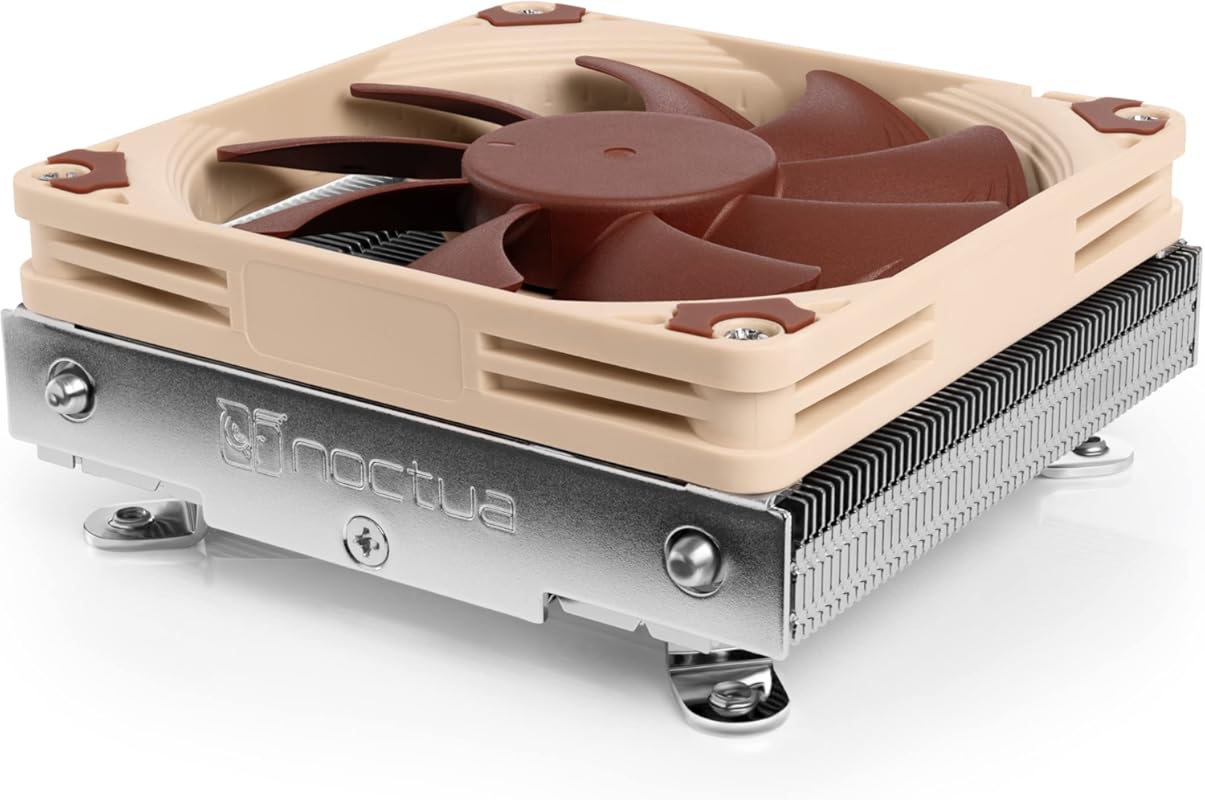
The Noctua NH-L9i is the classic, ultra-compact low-profile cooler. At just 37mm tall, it’s one of the shortest coolers available that still uses a 92mm fan. It’s the default recommendation for the smallest Mini-ITX builds where every millimeter of CPU cooler height is a hard constraint. Its horizontal airflow design and 95x95mm footprint make it exceptionally compatible with crowded motherboards. It’s the quiet, reliable workhorse for HTPCs and tiny office PCs.
Key Features That Stand Out
✓ Ultra-Compact 37mm Height: Fits in the most restrictive SFF cases.
✓ 95x95mm Footprint: No overhang on RAM or PCIe slots.
✓ NF-A9x14 PWM Fan: Noctua’s award-winning slim fan technology.
✓ Silent Operation: Incredibly quiet, especially with the included LNA.
✓ SecuFirm2 Mounting: Simple, secure, and reliable installation.
Why We Recommend It
When your case manual says “max CPU cooler height: 40mm,” the NH-L9i is almost always the best air-cooled choice. It has a decades-long reputation for being the quietest, most reliable ultra-low-profile cooler. It’s not the absolute strongest performer (the taller L9x65 is better), but for its size class, it’s unmatched. It’s the safe, premium pick when space is the primary constraint.
Best For
The smallest possible Mini-ITX and HTPC builds with severe height restrictions (<40mm), silent PC enthusiasts, and users with low-power CPUs (65W TDP or less) who need absolute certainty of fit and function.
Pros and Cons
Pros:
- Extremely low 37mm height fits nearly any case.
- Whisper-quiet operation thanks to the NF-A9x14 fan.
- Perfect 95x95mm compatibility with no RAM/PCIe overhang.
- Legendary Noctua reliability and 6-year warranty.
- Simple, tool-free installation on supported sockets.
Cons:
- Limited cooling capacity—only suitable for 65W TDP or lower CPUs.
- Horizontal airflow can be less effective than vertical designs in some ITX cases.
- Premium price for its cooling capacity.
- Beige/brown color scheme not for everyone.
Customer Reviews
Customer Review: I was building a custom NAS, I purchased a used mini ITX mobo. The fan that came with it worked, however it was extremely loud and I had to quiet it down. From my previous experience I knew I had to replace the drive caddy fan and the CPU cooler fan with Noctua versions. I was impressed with the massive change in the sound of the NAS currently. The loudest noises now come from the hard drives! I am currently using this to cool an i7-4790 that is generally running near idle unless I am running VMs. The fans barely move and yet the temperature never goes above 30°C. Pros:-Extremely low/no noise from fans-95×95 mm size allows for small dense mobos that have extrusions near the CPU.-37mm height means you can fit it in small cases and is really useful if you are designing/building your own case-Noise conscious; the fan has rubber feet, the fan is properly balanced, the fans have aero features to help limit noise-LNA cable if you really want it to be quiet, in multiple builds I have yet to find a need for this though-Good performance, putting this cooler on decreased my CPU temps by 2 to 5 degrees compared to the cheap one that came on my used mobo Cons:-Price is higher than other options, but this is a high quality cooler-The fan does bring in air from the top, which may make some use cases finicky Overall: I would recommend this cooler if you are in need of a low profile silent solution to keeping your temperatures in check.
Customer Review: Best low profile cooler I have ever brought. Firstly Noctua is known for there amazing products. I was going to buy the recommended Cooler Master 130 case suggestion then seen this. The design is pure gold for spacing in a micro itx case. You don’t have to worry about ram size or hitting the GPU. It actually makes cable management easier with the saved space. I was confused by no brackets no brackets includeded for all the different cpu styles then realized this is strictly for the LGA 1151, which it fit like a glove. I coupled it with some ARCTIC MX-4 Thermal Paste, which I have been using in my builds for years, basically since it came out. Easiest paste to install and way better than many other brands. Noctua does include thermal paste, some quiet cable, some screws, and a badass little metal sticker in the box. The only thing I wish that they would do is have spacing around the fan corner for cable insert for better management. you can either run it under the heatsink since wire is thing or just up above tied off. Little grooves on corner to catch it would of been cool though. Temps wise I have yet to go over 54c on a single core, for gaming/benchmarking my GPU(Heaven/FurMark used). I haven’t stress tested the CPU but I also have no reason to since this is primary for gaming. I am very happy to be anywhere under 60c while gaming.
8. Noctua NH-L12S Premium Low Profile CPU Cooler
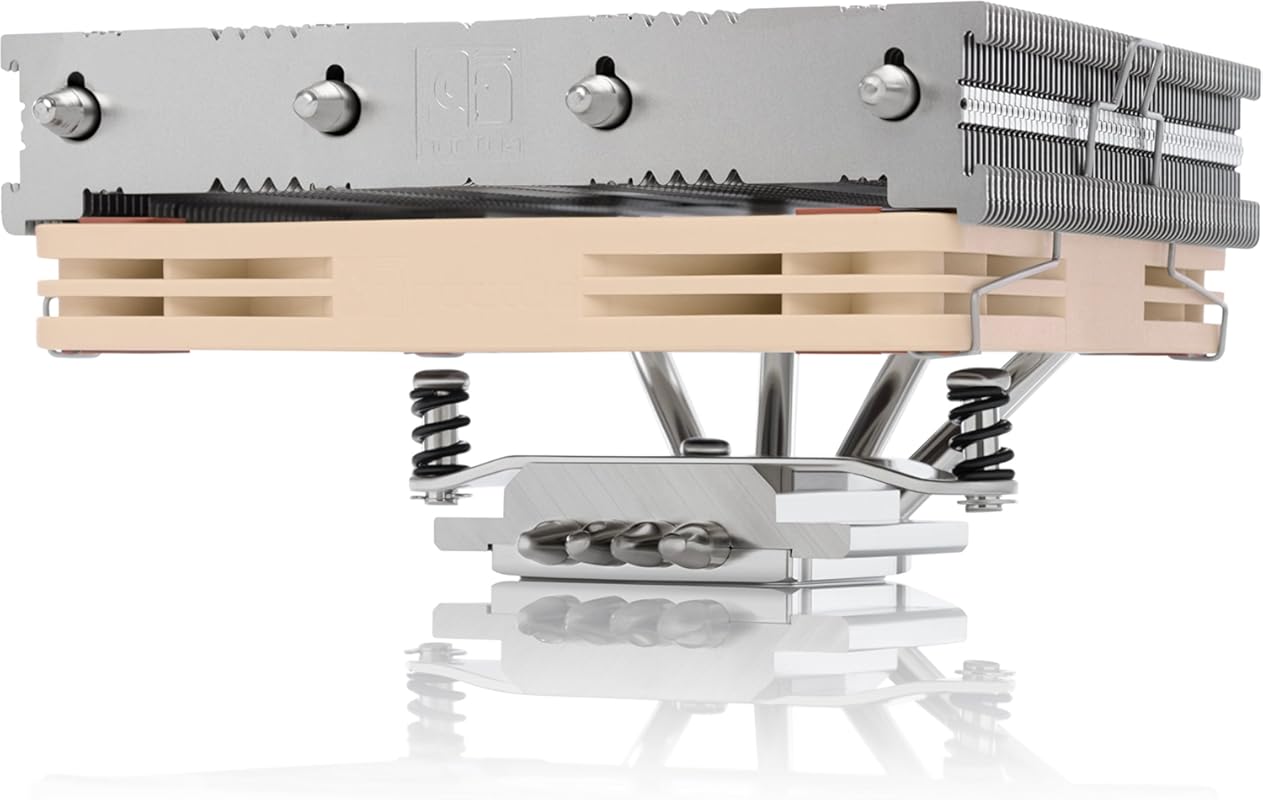
The Noctua NH-L12S is a unique offering that bridges the gap between ultra-slim 37mm coolers and taller 65mm models. At 70mm tall with a 120mm fan in its default “low-profile” orientation, it provides significantly more cooling power than the NH-L9i while still fitting in many ITX cases when paired with an SFX power supply. Its versatile design allows the fan to be mounted on top for even better performance (increasing height) if your case allows. It’s the choice for ITX builders who can squeeze out an extra 30mm of height for a major thermal gain.
Key Features That Stand Out
✓ 70mm Height (with fan below): More cooling mass than 37mm-47mm rivals.
✓ NF-A12x15 120mm PWM Fan: Excellent airflow and noise characteristics from a 15mm slim fan.
✓ Dual Orientation Options: Fan can be mounted below (70mm) or above (95mm) the heatsink.
✓ 95x95mm Base: Excellent RAM and PCIe clearance.
✓ SecuFirm2 Mounting: Noctua’s reliable, easy-to-use system.
Why We Recommend It
The NH-L12S is a masterclass in flexible design. For ITX cases that can accommodate an SFX PSU (like the SilverStone SG13), the 70mm profile with the fan underneath provides a massive cooling advantage over shorter coolers, often allowing it to handle 95W+ CPUs with ease. The ability to flip the fan to the top for even more performance (if your case has the vertical clearance) makes it future-proof. It’s the smart upgrade path from the L9i when your case allows it.
Best For
ITX builders using cases that support SFX power supplies (e.g., SilverStone SG13, Fractal Design Node 202), users with medium-to-high TDP CPUs (up to ~95W) who need more cooling than a 37mm-47mm cooler can provide, and those who want the option to upgrade performance by flipping the fan orientation.
Pros and Cons
Pros:
- Excellent cooling performance in its 70mm configuration, rivaling taller 92mm coolers.
- Very quiet operation from the high-quality NF-A12x15 fan.
- Versatile dual-fan orientation adds flexibility.
- Maintains 95x95mm compatibility, so no RAM blocking.
- Premium Noctua build quality and warranty.
Cons:
- Requires an SFX PSU for the low-profile (70mm) configuration in many cases.
- The “low-profile” 70mm height is still too tall for ultra-slim cases.
- More expensive than the L9i and AXP90.
- Fan mounting screws can be a bit tricky to reach.
Customer Reviews
Customer Review: I just installed this cooler on an i7-4770 (non-k) in a SilverStone SG13WB-Q case. I had to replace the ATX power supply I was using with a SFX power supply (SilverStone 450W SFX Form Factor 80 PLUS BRONZE Power Supply (ST45SF-V3)) in order to get enough clearance for the cooler to fit in the low profile configuration (70mm tall). I also used the SilverStone ATX to SFX Adapter Bracket, PP08B instead of the adapter that came with the PSU in order to get some additional clearance, although I think the stock adapter would’ve worked as well. I was using a Noctua NH-L9I Low-Profile CPU Cooler prior to this setup on an i5-4670. Because that cooler was designed to have the fan blow down onto the heatsink it didn’t work well in the SG13 because there’s not really anywhere for the hot air exiting the heatsink to go. My CPU temps while gaming were in the mid-70’s Celsius, and mid 90’s after a few minutes of stress testing with Prime95. The fan was essentially recirculating the hot exhaust air back into the heatsink. I have a 140mm fan mounted at the front of the case as an intake to get some cool air to the CPU cooler, but there’s still nowhere for the hot exhaust air to go. The only effective way to air cool in this case is to have a CPU cooler that blows air up through the heatsink (or pulls it through the heatsink) into an inverted PSU that can exhaust that hot air out of the case. I did intent to try just flipping the fan on the L9I and inverting my ATX PSU, but the screws weren’t long enough to flip the fan as they sit recessed in the fan in the correct orientation, but not if the fan is upside down. I didn’t want to rig something up with zip-ties or go hunting at the local hardware store for longer replacement screws, and I wasn’t sure the NH-L9I was going to be adequate for my “new” i7-4770 anyway, so I went looking for a larger cooler that would fit. I was initially going to get the Scythe SCBSK-2100 BIG Shuriken 2 Rev. B, but ran across the newly released Noctua NH-L12S in my search for comparable CPU coolers. I’m partial to Noctua products as they’ve always had excellent performance in my experience while being extremely quiet. This thing seems to be purpose made for my small case when used with a SFX power supply because it fits perfectly with plenty of space and no clearance issues, at least not on the board I’m using (Gigabyte GA-H81N). It was easy to install and can be placed in any orientation without issue. I installed my new processor, this cooler, new SFX PSU, bundled the cables together the best I could for good airflow from the front 140mm fan, and started testing temps. This cooler is extremely effective in this layout. I immediately did a stress test by running Prim95 and FurMark at the same time to test worst case scenario of 100% load on the GPU and all CPU cores/threads. That’s something I wouldn’t ever see in regular use, but if the system is stable under those conditions it’s stable under any conditions. My GPU temps (I’m using an EVGA GeForce GTX 1050 Ti GAMING, 4GB) leveled out around 70° C after 10 minutes , and my CPU temps were stable at roughly 78° C after 15 minutes. I couldn’t hear the system at all over the single air vent on the other side of my room even though my computer is about a foot away from me on top of my desk. I couldn’t have asked for better performance, and it does so while being nearly silent. Noctua has another winner with this one.
Customer Review: I picked up this cooler to replace an H80i v2 which failed on me after just a few months in my ITX 9700K Solidworks PC build. I figured I’d go back to old reliable air cooling since it seems like other folks have had similar issues with that particular AIO. First of all, the packaging design for this cooler deserves an award. I’ve bought Noctua fans before, but this was my first CPU cooler from them – all the packaging (aside from a couple plastic bags for mounting hardware) is beautifully folded cardboard that snugly keeps everything in its proper place. It would have been easy for Noctua to just make a few styrofoam molds to hold this thing, but they took the time to come up with this lovely origami-esque solution that is functional and environmentally friendly. Nice job guys! All of the hardware is great quality – mostly metal aside from a couple plastic spacers. The fan comes pre-installed in the most compact configuration (you can put it on top for better performance, but it might not fit in many ITX builds) and there are several instruction booklets (again, nice quality, for the different chipsets. Compared to other air coolers I’ve used, the mounting for this is a breeze – the LGA115X backplate has the feed-through standoffs press-fit so you just sort of pop it through the back and the rest of the installation is quite straightforward. If you’re using this for AMD or a less common Intel chipset, the installation is a little more involved but probably not too bad. Additionally, there is a little metal Noctua decal “sticker” included which is the nicest logo swag I’ve ever gotten with a PC component (and I have built some very high end PCs!). The build is in a Silverstone SG13 case with a Silverstone SFX PSU. The CPU is an Intel 9700K running at stock settings with 2 sticks of 16GB Crucial 2666 spreaderless RAM. There is about 3/16″ clearance between the top of this cooler and the PSU (PSU is flipped such that the intake fan is directly over the CPU heatsink) and about 1/8″ between the CPU fan and the RAM. I put an additional Noctua 120mm fan on the front of the case for additional airflow. As far as cooling performance goes, I was very pleasantly surprised. Keep in mind, this is not a gaming build. This is a Solidworks PC that I use for moderate CAD work (about 1500 parts in my most complex assembly). Probably most importantly, when under typical loads, there is not a big, power-hungry GPU dumping a bunch of heat into my little ITX box – there is a tiny little P400 workstation card which is mostly there to provide multi-monitor support. That said, at an ambient temperature of nearly 90F (in my top floor California apartment with no AC) I was able to run the Solidworks benchmark as well as mess around with my largest assembly without every seeing a core temperature go above 70C. All the while, core clocks never dropped below 4700MHz. When I threw Prime95 at it, The core clocks evened out to around 4400MHz (130W power draw according to Core Temp) and temperatures hovered in the low 70’s with the max I ever saw at 76C. Again, this is in a stuffy 90F ambient apartment. I can’t provide measurements for noise levels, but I will say that, under moderate loading with all BIOS fan settings set to “Standard” this cooler cools my 9700K almost silently. Yes, when Prime95 is running and all 8 cores are under 100% load, it gets a bit louder, but not nearly as loud as some blower GPUs I’ve heard in gaming builds. In an office setting where the ambient temperature will be almost 10C below what I was testing at, I would never worry about my CPU overheating or the fans blowing so loudly that they bother my neighbors. This product receives my wholehearted recommendation – great job Noctua!
9. 75mm Height CPU Air Cooler
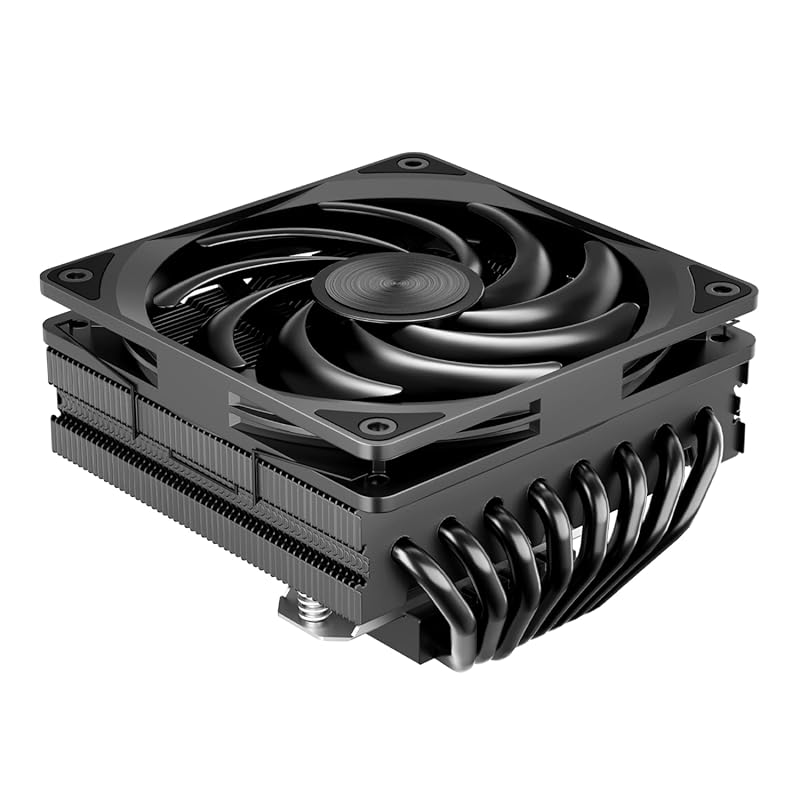
This generic 75mm height cooler is a dark horse entry that packs serious cooling potential with its 8 heatpipe design and a 120x120x15mm slim fan. It’s designed for builders who need more thermal mass than a 47mm-65mm cooler can provide but still have a tight height limit of around 75mm-80mm. The 8 heatpipes directly contact the CPU base, and the large 120mm fan moves substantial air. It’s a budget-friendly, performance-oriented option for cases where the Noctua NH-L12S (70mm) is just a hair too short but a tower cooler won’t fit.
Key Features That Stand Out
✓ 75mm Total Height: A sweet spot for many medium-sized ITX cases.
✓ 8 Direct-Contact Heatpipes: Massive surface area for heat dissipation.
✓ 120x120x15mm Slim Fan: High airflow potential from a large, thin fan.
✓ 2100 RPM Max Speed: PWM control for balancing noise and cooling.
✓ Wide Compatibility: Supports Intel LGA 1700/1200/115X and AMD AM5/AM4/AM3.
Why We Recommend It
This cooler fills a specific but common gap: cases that can fit ~75mm but not 95mm+ coolers. The combination of 8 heatpipes and a 120mm fan is potent, often matching or exceeding the performance of taller 92mm-based coolers. It’s a fantastic value proposition, offering near-tower-cooler thermal performance in a low-profile envelope for a fraction of the price of premium brands. Just be sure your case has 75mm of clearance and some airflow.
Best For
Budget-conscious builders with cases offering ~75mm-80mm of CPU cooler clearance, users with mid-range CPUs (up to ~105W TDP) who need more cooling than a 47mm-65mm low-profile cooler can provide, and those who prioritize raw cooling power over brand prestige or absolute silence.
Pros and Cons
Pros:
- Exceptional cooling for 75mm height, thanks to 8 heatpipes and 120mm fan.
- Extremely affordable for the thermal performance offered.
- Good compatibility with modern Intel and AMD sockets.
- High RPM fan provides plenty of headroom for demanding loads.
- Simple, effective design.
Cons:
- Noise levels can be noticeable at higher fan speeds due to the high-RPM slim fan.
- Build quality and mounting hardware are basic (functional but not refined).
- Aesthetic is purely utilitarian.
- May require slight case modification for perfect fitment in some tight builds.
- No included low-noise adapter.
Customer Reviews
Customer Review: I was skeptical because of the price, but this cooler is fantastic. I have it in a SSUPD Meshlicious case with a Ryzen 5 7600. Under a multi-core Cinebench run, temps maxed out at 78°C with the fan at about 1800 RPM. That’s with the case fans on a conservative curve. In games, it’s usually in the low 60s. The fan isn’t silent at full blast, but at gaming loads it’s drowned out by my GPU. For $25, this is a steal. Installation was okay, the backplate system is a bit clunky but it works. Make sure you use good thermal paste. The included paste is okay but not great. Highly recommend if you’re on a budget and need a 75mm cooler.
Customer Review: This cooler surprised me. I needed something under 80mm for a Cooler Master NR200P build with an i5-12400F. The stock Intel cooler was loud and hot (90C+ in Cinebench). This thing dropped my max temps to 68C in the same test, and the noise was much lower. The 120mm fan moves a lot of air. It’s not as quiet as my old Noctua, but for the price and height, it’s unbeatable. The mounting was the hardest part—getting the backplate aligned and the screws started was fiddly. But once on, it’s solid. If you need a low-profile cooler with real cooling power and don’t mind a bit of fan noise under load, buy this. I’ve used it for 6 months now with zero issues.
10. Thermalright AXP90 X36 Low Profile ITX CPU Cooler
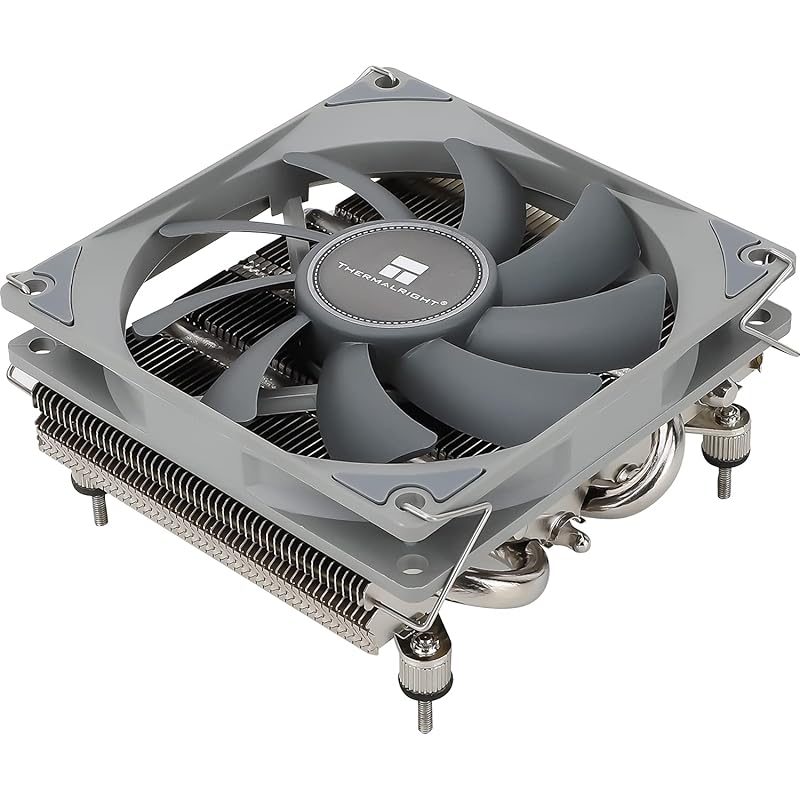
The Thermalright AXP90 X36 is the variant of the #6 cooler but with a different fan (TL-9015) and potentially minor thermal differences. It shares the same 36mm ultra-slim height, AGHP technology, and all-metal construction. This is the go-to solution for the absolute most restrictive SFF builds where even 47mm is too tall. It’s a bare-bones, highly functional cooler that prioritizes fit over all else, offering just enough cooling for low-power CPUs in the tiniest of enclosures.
Key Features That Stand Out
✓ Incredible 36mm Height: For the smallest of small form factor cases.
✓ AGHP (Asymmetric Gravity Heat Pipe): Maintains performance regardless of orientation.
✓ TL-9015 92mm PWM Fan: Decent performance for its size.
✓ All-Metal, Nickel-Plated: Durable and corrosion-resistant.
✓ Rock-Bottom Price: The cheapest capable low-profile cooler on the market.
Why We Recommend It
This is the “last resort” air cooler. If your case manual says 35mm-40mm max height, this is one of the only viable options that isn’t a passive cooler. It proves that you can still have active cooling (a fan) in the tiniest spaces. While it won’t impress with noise levels under heavy load, for a low-power CPU in a well-ventilated case, it’s a perfectly adequate and ultra-affordable solution. It’s the definition of “good enough” when size is the non-negotiable constraint.
Best For
The most extreme Mini-ITX and ultra-compact SFF builds with CPU cooler height limits of 40mm or less, budget HTPCs, industrial PCs, and anyone building in a case like the Loque Ghost S1, Dan A4, or similar where every millimeter is fought over. Suitable for CPUs with TDPs up to ~65W.
Pros and Cons
Pros:
- Extremely low 36mm profile fits almost any case.
- Unbeatable price for a functional, active cooler.
- AGHP technology helps maintain efficiency.
- Lightweight and simple to install (once you figure out the backplate).
- Good enough for 65W TDP CPUs in cases with decent airflow.
Cons:
- Limited thermal headroom—not for high-TDP or overclocked CPUs.
- Noise can become noticeable under sustained load.
- Mounting system is basic and not as user-friendly as premium brands.
- Build quality is purely functional.
- Fan is replaceable but not as refined as Noctua’s.
Customer Reviews
Customer Review: The AXP90 is an amazing low profile CPU cooler and for the price it is completely unbeatable. Wherever you simply cannot use a tower cooler (because of height restrictions) or don’t want to invest in an AIO, this cooler will suit your needs well. The Good: Cooling – For coolers with appropriate wattage, about 90W or below, the AXP90 will keep them cool, with the idle temps of lower draw chips, such as the Ryzen 5600G, being only slightly above ambient. Even running a full core workload at 100% the chip will be nowhere near thermal throttling. Noise – The fan used here, despite its size, is nearly silent. Even when almost completely open in the side of a Deskmini X300 I cannot hear it at all past a couple feet away from it; the fridge in the kitchen makes more ambient noise despite being half a house away. Price – I don’t think you can get better for $23. Out the door for $25 with tax, having a low profile cooler be effective and quiet for less than half the cost of a competing Noctua option is enormous; I’d never pay twice the amount for something that can’t do much better. The Bad: Mounting – The mounting, while being part of the nature of low profile options, is definitely tedious and you need to be prepared to replace the backplate to make this work. Unlike a lot of AM4 coolers which use the backplate already, this cannot. So be mindful of the order of assembly or you’ll be forced to mount the cooler in-case behind a mess of wires (be real, you didn’t cable manage)! Overall, I am very satisfied and would definitely recommend the AXP90 to anyone needing a low profile CPU cooler, limited budget or otherwise.
Customer Review: Overall, seems great so far. I use Thermalright and Arctic whenever I need something involving fans. If one of them doesn’t have what I’m looking for, the other almost certainly does (in this build, as an example, Thermalright had a CPU cooler that fit, and arctic has 40mm fans that’ll fit). Everything I have gotten from thermalright, which at this point includes an aio, a cpu cooler, and two kinds of fans of different thicknesses and sizes, has been great, and this one seems no exception. I haven’t measured the temps that this gives me yet since I don’t have my case or gpu yet, but it seems to keep things cool. It will fit in my case, and it isnt too loud. Very happy with it so far. I also seen people with my same case use this cooler with higher powered cpus than my 9600x, so I figure this should last me a long while. This is also my second time using the included thermal paste. The applicator could be better, but the paste is good, and they include enough. If it means I don’t have to buy my own paste quite as often, then I am happy. For $20 vs noctuas $60 price tag for the same thing, this is by far the better use of money.
Complete Buying Guide for Best Low Profile CPU Cooler
Essential Factors We Consider
Choosing the right low-profile cooler isn’t just about picking the shortest one. You need to balance height clearance (measured in mm from the motherboard to your case’s side panel), TDP rating of your CPU, and airflow direction. A cooler’s footprint (base dimensions) is equally critical—a 95x95mm base is ideal for avoiding RAM and PCIe slot conflicts on Mini-ITX boards. Also, consider fan size: a 120mm fan can move more air quietly than a 92mm, but it may require more case clearance in other dimensions. Finally, think about socket compatibility—ensure the cooler supports your specific CPU socket (AM5, AM4, LGA1700, etc.).
Budget Planning
Low-profile coolers span a wide range. Budget options ($20-$35) like the Thermalright AXP90 series offer incredible value for 65W-95W CPUs. The mid-range ($50-$70) is dominated by Noctua’s NH-L9x65 and NH-L12S, providing premium build quality, silence, and performance for higher TDP parts. If your case allows it, a 240mm AIO ($80-$150) like the CORSAIR Titan offers the absolute best cooling for overclocked CPUs but sacrifices some reliability for the potential of liquid leaks. Set your budget based on your CPU’s heat output and your case’s physical limits.
Final Thoughts
Don’t underestimate what a good low-profile air cooler can do. For most 65W-105W CPUs, a top-tier air cooler like the Noctua NH-L9x65 or SCYTHE Big Shuriken 4 will perform brilliantly and silently. Only consider an AIO if you have a CPU that consistently exceeds 120W under load and your case has the radiator mounting space. Always measure your case’s exact CPU cooler clearance and RAM height before purchasing. When in doubt, the Noctua NH-L9x65 chromax.Black is our safest, highest-performance recommendation for most SFF builds.
Frequently Asked Questions
Q: Can a low-profile CPU cooler handle a Ryzen 7 or Core i7?
A: Yes, but it depends on the specific model and your CPU’s actual power draw. Coolers like the Noctua NH-L9x65 or SCYTHE Big Shuriken 4 can handle 95W-105W TDP parts like the Ryzen 7 7700X or Core i7-13700K at stock speeds, though they may run warmer (70-85°C) under heavy all-core loads compared to a tower cooler. For heavy multi-threaded workloads or overclocking, a taller cooler or AIO is recommended.
Q: What’s the difference between horizontal and vertical airflow in low-profile coolers?
A: Horizontal airflow (like Noctua’s L9 series) blows air left/right across the motherboard. This can be blocked by tall RAM modules or VRM heatsinks on some ITX boards. Vertical airflow (like Thermalright’s AXP90 series) blows air up/down, which often finds a clearer path to the case’s exhaust fans, leading to better real-world temps in cramped ITX setups.
Q: Is a 120mm slim fan better than a 92mm fan in a low-profile cooler?
A: Generally, yes. A 120mm fan can move the same amount of air at a lower RPM than a 92mm fan, which typically means lower noise for the same cooling performance. However, a 120mm fan requires more horizontal space. Coolers like the Noctua NH-L12S and the generic 75mm model leverage this for excellent results.
Q: Should I upgrade the stock fan on a budget low-profile cooler?
A: It can be a great upgrade. Swapping the included fan on a Thermalright AXP90 for a Noctua NF-A9x14 will significantly reduce noise and may improve cooling slightly. Just ensure the new fan’s thickness (usually 14mm-15mm) fits within your case’s total height limit after installation.
Q: How important is thermal paste with a low-profile cooler?
A> Very important. Due to the smaller heatsink mass, low-profile coolers are more sensitive to poor thermal contact. Always use a high-quality paste like Arctic MX-4 or Thermal Grizzly Kryonaut. Apply a small, even pea-sized dot or use the spreading method. The included paste (like Noctua’s NT-H1 or Thermalright’s) is usually fine for initial use, but upgrading can yield 1-3°C better temps.
Finding the best low-profile CPU cooler is about matching your specific case constraints with your CPU’s thermal needs. Our top pick, the Noctua NH-L9x65 chromax.Black, offers the best blend of performance, silence, and compatibility for most high-end SFF builds. If you’re on a tighter budget, the Thermalright AXP90 X47 provides incredible value with its smart vertical airflow design. And if your case is truly tiny, the AXP90 X36 is your hero. Don’t let limited space force you into a hot, noisy system. Pick the right cooler from this list, install it carefully with good thermal paste, and enjoy a powerful, compact PC that runs cool and quiet.
Ready to build your perfect SFF machine? Click the “Check Price on Amazon” buttons above to see the latest deals and availability for your chosen cooler. Investing in the right cooling now will save you from thermal throttling and noise headaches later.