What Are the Components of a Web Address
A web address, also known as a URL, is made up of several key parts that work together to help your browser find the right page. Understanding web address components like the protocol, domain name, path, and query parameters makes navigating the internet much easier. This guide breaks down each piece of a web URL so you can understand exactly what happens when you type a link into your browser.
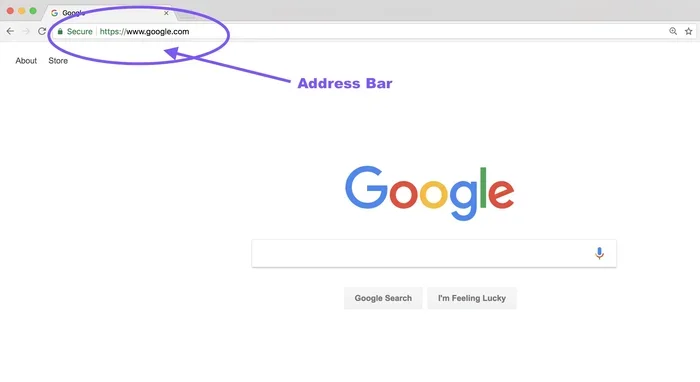
Have you ever looked up at the address bar in your browser and wondered what all those letters, dots, and symbols actually mean? Every time you type a link or click on one, your browser reads a specific structure to know exactly where to go. That structure is called a web address, and it is made up of several distinct parts.
Understanding the components of a web address might sound technical, but it is actually quite simple once you break it down. Each part has a specific job, and they all work together like a mailing address for the internet. In this guide, we will walk through every single part of a web address step by step.
Whether you are a curious beginner or someone who wants to get better at understanding how websites work, this article covers everything you need to know. By the end, you will look at a URL in a completely new way.
Key Takeaways
- The protocol tells your browser how to connect to a website, using either HTTP or HTTPS for security.
- The domain name is the human-readable address that identifies a specific website on the internet.
- Subdomains like “www” organize different sections of a website under one main domain.
- The path directs your browser to a specific page or resource within a website.
- Query parameters pass extra information to a website, often used for searches and tracking.
- Port numbers and fragments are optional parts that control connections and page navigation.
- Knowing URL structure helps you troubleshoot issues and understand how websites are organized.
📑 Table of Contents
What Is A Web Address?
A web address is the full location of a specific page on the internet. People also call it a uniform resource locator, or URL for short. Think of it like a postal address, but instead of delivering mail to a house, it delivers your browser to a specific webpage.
Every website you visit has a unique address. Without these addresses, your browser would not know where to go when you type something into the search bar. The website address is what bridges the gap between you and the content you want to see.
A typical web address might look something like this:
https://www.example.com/products/shoes?color=blue#reviews
At first glance, this looks like a random string of characters. But each section has a clear purpose. Let us break it down piece by piece.
The Protocol Component
The very first part of any web URL is the protocol. In the example above, that is “https://”. The protocol tells your browser how to connect to the website. It is like choosing which road to take before you start your journey.
What Does HTTP Mean?
HTTP stands for HyperText Transfer Protocol. It is the original set of rules that browsers use to communicate with websites. When you see “http://” at the start of an address, it means your browser is using that basic communication method.
However, HTTP does not encrypt your data. That means anyone watching the connection could potentially see what you are sending or receiving. This is fine for reading public blog posts, but it is not safe for entering personal information.
Why HTTPS Matters More Today
The “S” at the end of HTTPS stands for Secure. It means your browser encrypts the data it sends and receives. This keeps your passwords, credit card numbers, and other sensitive information safe.
Most modern websites use HTTPS now. You will often see a small padlock icon next to the address in your browser. That padlock means the connection is secure. If a site does not have HTTPS, most browsers will warn you before you visit it.
When you are browsing, always check for HTTPS, especially when shopping online or logging into accounts. The protocol is the first line of defense in your web address components.
Domain Names And Subdomains
After the protocol comes the domain name. This is the part of the web address that identifies the website itself. In our example, that is “example.com”. Think of the domain name as the name of a building.
What Is A Domain Name?
A domain name is a human-readable label that points to a specific IP address. Computers actually use numbers called IP addresses to find each other on the internet. Something like “192.168.1.1” is an IP address. But remembering numbers for every website you visit would be impossible.
Domain names solve this problem. Instead of typing a long string of numbers, you just type a name like “example.com.” Your browser then uses something called DNS, or Domain Name System, to translate that name into the correct IP address behind the scenes.
Understanding Subdomains
In our example, “www” comes before “example.com.” That “www” part is a subdomain. Subdomains are like different rooms in the same building. They help organize large websites into separate sections.
You might see subdomains like “blog.example.com” or “shop.example.com.” These all point to the same main domain but serve different content. Some websites do not use “www” at all and simply use the main domain name.
Subdomains are flexible. Companies can create as many as they need to organize their content. They are a key part of how websites structure their URL structure for visitors.
The Role Of The Top-Level Domain
The top-level domain, or TLD, is the very last part of a domain name. In “example.com,” the TLD is “.com.” Other common TLDs include “.org,” “.net,” “.edu,” and “.gov.”
Each TLD can give you a hint about what kind of website you are visiting. “.edu” sites are usually educational institutions. “.gov” sites belong to government organizations. “.org” is often used by nonprofits. While these are not strict rules, they give you a general idea of what to expect.
There are now hundreds of different TLDs available, including country-specific ones like “.uk” for the United Kingdom or “.ca” for Canada. The TLD is an important part of your web address components because it helps classify and organize websites.
The Path And Query Parameters
Now let us move past the domain and look at what comes after it. The path and query parameters are what direct your browser to a specific page or resource within a website. They are like the room number and floor in a large building.
What Is A URL Path?
The path comes right after the domain name. In our example, “/products/shoes” is the path. It tells the browser exactly which page or file to load on that website.
Think of it this way. The domain is the building address. The path is the specific office or apartment inside that building. Without a path, your browser would usually load the homepage. But with a path, it goes straight to a particular section.
Paths can be deep and complex. A path like “/blog/2024/january/tips-for-beginners” tells the browser to find a very specific article. Websites use paths to keep their content organized and easy to find.
Understanding Query Parameters
You have probably seen a question mark in a web address before. That is where query parameters begin. In our example, “?color=blue” is a query parameter.
Query parameters pass extra information to the website. They are commonly used for searches, filters, and tracking. For instance, when you search for something on a website, the search term often appears as a query parameter in the address.
You might also see multiple query parameters in one address, separated by ampersands. For example:
?color=blue&size=10&sort=price
These parameters help websites remember your preferences and deliver the right content. They are a useful part of the web URL structure, even though many people overlook them.
Port Numbers And Fragments
Two more parts of a web address are port numbers and fragments. These are optional components that serve specific technical purposes. Most everyday users never see them, but they are still important parts of the URL anatomy.
What Is A Port Number?
A port number tells your browser which specific doorway to use when connecting to a website. Every website has multiple ports available, but only a few are commonly used.
For HTTP, the default port is 80. For HTTPS, the default port is 443. You usually do not see port numbers in everyday web addresses because browsers use the defaults automatically. However, you might see them in addresses like “example.com:8080” when a website uses a non-standard port.
Port numbers are mainly relevant for developers and IT professionals. If you are just browsing the web, you rarely need to think about them. But they are still part of the complete web address components picture.
What Is A Fragment Or Anchor?
A fragment, also called an anchor, is the part of a web address that comes after the hash symbol (#). In our example, “#reviews” is the fragment.
Fragments do not load a new page. Instead, they scroll your browser to a specific section on the same page. This is really handy for long articles or documentation pages where you want to jump straight to a particular section.
When you click a table of contents link on a blog post, it usually uses a fragment to move you down the page. Fragments make navigating long pages much smoother and faster.
Putting It All Together
Now that you understand each part, let us look at how they all fit together in a complete web address. Here is our example again with labels:
https://www.example.com/products/shoes?color=blue#reviews
- https:// is the protocol
- www is the subdomain
- example.com is the domain name and TLD
- /products/shoes is the path
- ?color=blue is the query parameter
- #reviews is the fragment
Each part plays a role in directing your browser to the exact content you want. The protocol handles the connection method. The domain identifies the website. The path finds the specific page. Query parameters pass extra data. And fragments jump to a specific section.
Understanding this structure helps you in many ways. You can troubleshoot broken links more easily. You can understand how websites track your activity. And you can even create cleaner, more organized URLs for your own website.
Many people also wonder about the connection between web addresses and device performance. For example, having enough RAM on a laptop helps your browser load complex web pages faster. If you are curious about how much memory your device needs for smooth browsing, checking your system specs is always a good first step.
Why Understanding Web Addresses Matters
You might be thinking, “Why do I need to know all of this?” The truth is, understanding web address components gives you real-world benefits in your daily internet use.
First, it helps you spot suspicious links. If a web address looks strange or has unexpected parameters, it could be a phishing attempt. Knowing what a normal URL looks like makes you a smarter, safer internet user.
Second, it helps with website management. If you run a blog or business site, clean URL structure improves your search engine rankings. Search engines like Google prefer URLs that are clear and organized.
Third, it makes troubleshooting easier. When a page does not load correctly, looking at the address bar can give you clues about what went wrong. Is the protocol missing? Is the path incorrect? These are things you can check yourself.
Even if you are not a tech expert, this knowledge makes you more confident online. You do not need to be a developer to understand how your browser finds the pages you want to see.
Common Mistakes People Make With Web Addresses
There are a few common mistakes that people make when dealing with web addresses. Avoiding these can save you a lot of frustration.
- Ignoring HTTPS: Always check for the secure protocol before entering personal information. If a site uses HTTP instead of HTTPS, be cautious.
- Copying long URLs blindly: Some URLs contain tracking parameters you do not need. You can often remove the query parameters and still reach the same page.
- Forgetting to check the domain: Scammers sometimes use addresses that look very similar to real ones, with small spelling changes. Always double-check the domain name.
- Using outdated bookmarks: Over time, websites change their URL structure. Old bookmarks may lead to error pages. It is good to periodically update your saved links.
Being aware of these mistakes helps you browse more safely and efficiently. It is a small effort that pays off big time.
Quick Tips For Cleaner Web Addresses
If you manage a website or just want to keep your browsing organized, here are some quick tips.
- Keep URLs short and descriptive. Avoid long strings of random numbers and symbols.
- Use HTTPS whenever possible. This protects both you and your visitors.
- Organize your paths logically. A clear path like “/blog/tips” is better than “/p=12345”.
- Limit query parameters. Only use them when they add real value to the user experience.
- Test your links regularly. Broken links hurt user experience and can affect your site’s reputation.
These simple habits go a long way in making your web presence cleaner and more professional.
Final Thoughts
The components of a web address might seem like a small detail, but they are the backbone of how we navigate the internet. Every time you type a link or click a button, these parts work together behind the scenes to get you where you need to go.
From the protocol that secures your connection to the fragment that jumps you to the right section, each component has a purpose. Understanding them gives you more control over your online experience. You become a smarter, safer, and more confident internet user.
So the next time you look at your browser’s address bar, you will see more than just a random string of text. You will see a well-organized system designed to get you exactly where you want to be. And that is a pretty cool thing to know.
Whether you are browsing for fun, shopping online, or building your own website, knowing your web address components is a valuable skill that stays with you every single day.
Frequently Asked Questions
What is the difference between a URL and a web address?
There is no real difference. URL stands for Uniform Resource Locator, and it is just the technical term for a web address. People use both terms to mean the same thing. Every web address you type into your browser is a URL.
Can a web address have no path?
Yes, it can. When a web address has no path, it usually loads the homepage of the website. For example, “https://example.com” has no path, so the browser shows the main landing page.
Are query parameters necessary for every website?
No, they are not necessary for every website. Many websites work perfectly fine without query parameters. They are mainly used for searches, filters, and tracking purposes. A simple blog might never use them at all.
What happens if I type a wrong web address?
If you type a wrong web address, your browser will usually show an error page saying it cannot find the site. This is called a 404 error. Sometimes the browser will also suggest the correct address if it thinks you made a typo.
Is it safe to click on links in web addresses from emails?
You should be careful. Some links in emails can lead to fake websites designed to steal your information. Always check the domain name in the address before entering any personal details. When in doubt, go directly to the website by typing the address yourself.
Do web addresses work the same way on phones and computers?
Yes, the structure is the same on both devices. Whether you are on a phone, tablet, or computer, the components of a web address work the same way. The only difference is how the address bar looks on a smaller screen.
=== CONCLUSION ===
A web address is more than just a string of text you type into your browser. It is a carefully structured system made up of several important parts. The protocol keeps your connection secure. The domain name identifies the website. The path finds the right page. And query parameters and fragments add extra functionality.
Now that you understand the components of a web address, you can browse with more confidence and awareness. You will spot suspicious links faster, troubleshoot issues more easily, and even build better URLs for your own projects. This knowledge might seem small, but it makes a big difference in how you experience the internet every day.