Best RAM for ASUS ROG The Ultimate Guide to Upgrade

Finding the best RAM for ASUS ROG can transform your gaming and creative work. This guide breaks down DDR4 and DDR5 options, speed ratings, and capacity so you pick the right upgrade. We cover compatibility, dual-channel setups, and real-world performance tips to help you get the most from your ASUS ROG laptop.
When you own an ASUS ROG laptop, you expect top-tier performance. But even the most powerful gaming machine can feel sluggish without the right memory. The best RAM for ASUS ROG makes a huge difference in frame rates, load times, and how smoothly your system handles heavy workloads. Whether you are a competitive gamer, a content creator, or a power user, upgrading your laptop memory is one of the easiest ways to breathe new life into your setup.
In this guide, we walk you through everything you need to know. We cover RAM types, speeds, capacities, and compatibility for different ASUS ROG models. By the end, you will know exactly which RAM upgrade for ASUS ROG makes sense for your needs and budget. Let us dive in.
Key Takeaways
- Choose DDR5 for future-proofing: DDR5 RAM offers faster speeds and better efficiency for demanding ASUS ROG tasks.
- 32GB is the sweet spot: Most ASUS ROG users benefit from 32GB for gaming, streaming, and multitasking without bottlenecks.
- Check compatibility first: Always verify your specific ROG model supports the RAM type, speed, and max capacity before buying.
- Dual-channel matters: Running two sticks in matched pairs boosts memory bandwidth and system responsiveness.
- Speed isn’t everything: Latency timings and dual-channel configuration impact real-world performance just as much as MHz ratings.
📑 Table of Contents
Why RAM Matters for ASUS ROG Laptops
RAM, or random access memory, acts as your laptop’s short-term workspace. Every app, game, and browser tab you open uses memory to store temporary data. The more RAM you have, the more tasks your system can handle at once without slowing down.
ASUS ROG laptops are built for intensive workloads. They run modern games, video editing software, 3D rendering tools, and streaming apps simultaneously. Without enough memory, your system starts swapping data to your storage drive, which tanks performance fast.
How RAM Affects Gaming Performance
Games load textures, maps, and character data into RAM before sending it to your GPU. If your memory is too slow or too small, you experience stuttering, long load screens, and frame drops. Upgrading to faster, higher-capacity memory can smooth out these issues noticeably.
For competitive gamers, memory speed also matters. Higher frequency RAM reduces input lag and helps your processor access data faster. This can give you a real edge in fast-paced shooters and battle royale titles.
RAM for Creative and Professional Work
If you use your ASUS ROG for architecture, video editing, or machine learning, memory demands are even higher. Applications like Adobe Premiere Pro, Blender, and AutoCAD eat up RAM quickly. Many professionals find that 32GB or more is essential for these tasks. You can learn more about whether 16GB is enough for architecture to understand where your needs fall.
Types of RAM: DDR4 vs DDR5 for ASUS ROG
Understanding the difference between DDR4 and DDR5 is crucial when choosing best RAM for ASUS ROG. Each generation brings meaningful improvements in speed, efficiency, and capacity.
DDR4 RAM
DDR4 has been the standard for several years and remains widely compatible with older and mid-range ASUS ROG models. It offers solid performance at affordable prices. Most DDR4 modules run between 3200MHz and 3600MHz, which is more than enough for most gaming and everyday tasks.
If you own an older ROG laptop, DDR4 is likely your only option. It is also a great budget-friendly choice if you do not need the absolute fastest speeds. Check out our guide on 16GB RAM for ASUS laptops for more DDR4 options.
DDR5 RAM
DDR5 is the newer generation and offers significant advantages. It starts at higher base speeds, typically 4800MHz and above, and can reach 6000MHz or more with overclocking. DDR5 also delivers better power efficiency and supports higher single-stick capacities.
Newer ASUS ROG models support DDR5. If you are building or upgrading a recent ROG laptop, DDR5 is the way to go for future-proofing your system. The performance gains in gaming and multitasking are real and noticeable.
How Much RAM Do You Need for ASUS ROG?
Capacity is just as important as speed when picking laptop memory. The right amount depends on what you do with your machine.
8GB RAM
8GB is the bare minimum for modern gaming. You can run most games, but you will likely need to close background apps. For casual use and older titles, 8GB still works. However, it is not a long-term solution for power users.
16GB RAM
16GB is the current sweet spot for most gamers. It handles modern titles at high settings while leaving room for Discord, Chrome, and Spotify running in the background. For most ASUS ROG owners, 16GB provides a great balance of performance and value.
32GB RAM
32GB is ideal for serious gamers, streamers, and content creators. You get headroom for heavy multitasking, large game libraries, and demanding creative software. If you plan to keep your laptop for several years, 32GB gives you the most future-proof upgrade options. You can explore 32GB RAM ASUS gaming laptop configurations for reference.
64GB RAM
64GB is overkill for most users. It makes sense only for specialized workloads like 3D rendering, scientific computing, or running multiple virtual machines. For standard gaming and productivity, 32GB is plenty.
RAM Speed and Frequency Explained
RAM speed, measured in megahertz (MHz), determines how fast your memory transfers data to and from the processor. Higher numbers mean faster data access, but the real-world impact varies by use case.
Speed vs. Latency
Speed alone does not tell the whole story. Latency timings measure how many clock cycles it takes for RAM to respond to a request. Lower latency means faster response times, even at the same frequency. When comparing modules, look at both the MHz rating and the CAS latency (CL) number.
Dual-Channel Configuration
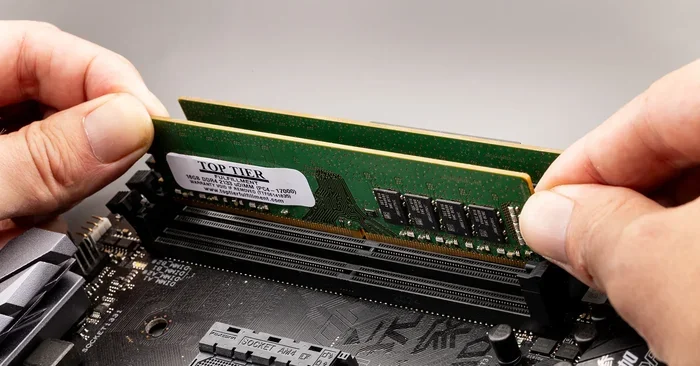
Running RAM in dual-channel mode doubles your memory bandwidth. This means your processor can access data faster, improving overall system responsiveness. Always install RAM in matched pairs, such as two 16GB sticks instead of one 32GB stick, for the best results.
Recommended Speeds for ASUS ROG
For DDR4 systems, aim for 3200MHz to 3600MHz. For DDR5 systems, 5600MHz to 6400MHz is the sweet spot for gaming. These ranges offer excellent performance without pushing your budget too hard.
Compatibility and Upgrade Guide for ASUS ROG
Not all RAM works in every ASUS ROG model. Before you buy, you need to check a few key details to ensure a smooth upgrade.
Check Your Laptop Model
Different ROG models support different RAM types and maximum capacities. The ROG Zephyrus, ROG Strix, and ROG Flow series each have their own specifications. Look up your exact model number on the ASUS support page to find your max supported RAM and the number of available slots.
Verify RAM Type and Speed
Use a free tool like CPU-Z to check what type of RAM your laptop currently uses and what speeds it supports. This prevents buying incompatible modules. If your laptop uses DDR4, do not buy DDR5, and vice versa.
Max RAM Capacity
Most ASUS ROG laptops support up to 32GB or 64GB of total RAM, depending on the model. Some have two slots, while others have one soldered stick and one upgradeable slot. Plan your purchase accordingly.
Easy Upgrade Steps
Upgrading RAM in most ASUS ROG laptops is straightforward. Here is a quick process:
- Power off your laptop and unplug it.
- Remove the back panel screws carefully.
- Locate the RAM slots.
- Remove existing sticks by pushing the side clips outward.
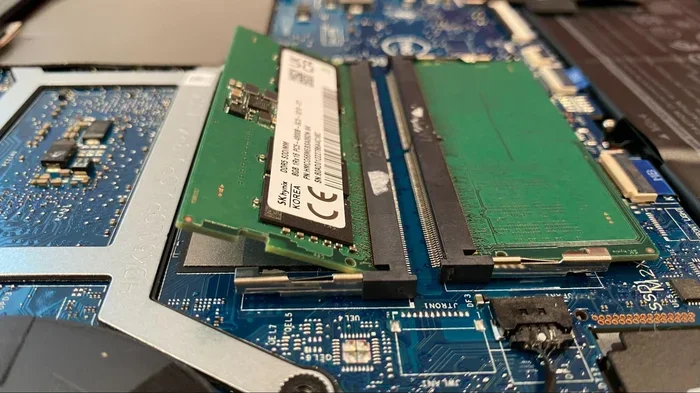
- Insert new sticks at a 45-degree angle and press down until they click.
- Replace the back panel and power on.
If you are not comfortable opening your laptop, consider visiting a professional or checking out our RAM upgrade guide for more detailed instructions.
Top RAM Picks for ASUS ROG in 2024
Here are some of the best RAM options for ASUS ROG laptops, organized by category. These picks are based on compatibility, performance, and value.
Best DDR4 Option: Kingston Fury Beast 32GB (2x16GB) 3600MHz
This DDR4 kit offers excellent speed at a reasonable price. The 3600MHz frequency and CL16 latency make it a great match for ASUS ROG laptops that support DDR4. It runs cool and fits most ROG models with two available slots.
Best DDR5 Option: Corsair Vengeance DDR5 32GB (2x16GB) 6000MHz
For newer ASUS ROG models with DDR5 support, this Corsair kit delivers top-tier performance. The 6000MHz speed and low latency make it ideal for gaming and heavy multitasking. It is a premium choice for users who want the best system performance.
Best Budget Pick: Crucial 16GB DDR4 3200MHz
If you are on a tight budget, this Crucial stick provides solid 3200MHz DDR4 performance. It is reliable, widely compatible, and affordable. A great way to get started with a RAM upgrade without spending too much.
Common Mistakes to Avoid When Upgrading RAM
Even with the best intentions, people make mistakes when upgrading their laptop memory. Here are a few to watch out for.
- Buying the wrong RAM type: DDR4 and DDR5 are not interchangeable. Always double-check your laptop’s specifications before purchasing.
- Mismatched sticks: Using two different RAM modules can cause instability. Buy matched pairs for the best results.
- Ignoring max capacity: Some ROG models only support 32GB total. Buying 64GB will not work if your laptop does not support it.
- Skipping BIOS updates: Sometimes a BIOS update is needed for new RAM to work properly. Check ASUS support for the latest firmware.
- Forgetting dual-channel: A single stick runs in single-channel mode, cutting your bandwidth in half. Always use two sticks when possible.
Final Thoughts
Upgrading your RAM is one of the simplest and most effective ways to improve your ASUS ROG laptop. Whether you choose DDR4 or DDR5, 16GB or 32GB, the right memory upgrade can transform your gaming experience and boost productivity. The best RAM for ASUS ROG depends on your specific model, budget, and use case, but the options in this guide cover all the bases.
Take the time to check your laptop’s compatibility, pick a matched pair of sticks, and enjoy the performance gains. Your ASUS ROG deserves memory that keeps up with your ambitions. Start your upgrade today and feel the difference every time you boot up your machine.
Frequently Asked Questions
Can I mix DDR4 and DDR5 RAM in my ASUS ROG laptop?
No, you cannot mix DDR4 and DDR5 RAM. They are different generations with different physical slots and electrical specifications. Always use the RAM type your laptop model supports.
Is 16GB RAM enough for gaming on an ASUS ROG laptop?
Yes, 16GB is the current sweet spot for most gaming setups. It handles modern titles at high settings and leaves enough memory for background apps. However, 32GB is better if you also stream, edit video, or run heavy multitasking workloads.
Do I need to install RAM in pairs for ASUS ROG?
Yes, installing RAM in matched pairs enables dual-channel mode, which doubles your memory bandwidth. This significantly improves performance for gaming and multitasking. Always buy two identical sticks rather than one larger module.
What is the difference between RAM speed and latency?
RAM speed (measured in MHz) tells you how fast data transfers. Latency (measured in CAS latency or CL) tells you how many cycles it takes for RAM to respond. Lower latency and higher speed both contribute to better real-world performance.
Can I upgrade the RAM in my ASUS ROG if it has soldered memory?
Some ASUS ROG models have soldered RAM that cannot be upgraded. Check your specific model’s specifications to see if upgradeable slots are available. If your RAM is soldered, you must purchase a model with the memory capacity you need from the start.
How much does a RAM upgrade cost for an ASUS ROG laptop?
RAM prices vary by type and capacity. A 16GB DDR4 kit typically costs between $50 and $80, while a 32GB DDR5 kit ranges from $100 to $160. Budget options are available for less, but investing in quality RAM ensures better reliability and performance.