Cheapest Pc for Minecraft
Finding the cheapest PC for Minecraft doesn’t mean sacrificing performance. You can enjoy smooth gameplay on a tight budget with the right hardware. This guide breaks down the best budget picks and what to look for.
Key Takeaways
- Minimum specs matter: Minecraft Java Edition needs at least an Intel Core i3, 4GB RAM, and integrated graphics to run.
- Bedrock Edition is lighter: The Bedrock version runs well on lower-end hardware compared to Java Edition.
- SSD makes a difference: A basic SSD can drastically improve load times even on a budget PC.
- Pre-built options exist: Several pre-built budget PCs from brands like Acer and HP can handle Minecraft affordably.
- Upgrade path is key: Choosing a PC with upgradeable components saves money long-term.
- Avoid overpaying: You don’t need a high-end gaming rig to enjoy Minecraft at good settings.
📑 Table of Contents
- Cheapest PC for Minecraft: A Complete Buying Guide
- What Are the Minimum Requirements for Minecraft?
- Best Budget Pre-Built PCs for Minecraft
- What to Look for in a Cheap Minecraft PC
- Best Laptops vs. Desktops for Budget Minecraft Gaming
- Tips to Save Money on Your Minecraft PC
- Optimizing Minecraft for Better Performance on a Budget PC
- Our Top Picks at a Glance
- Conclusion
Cheapest PC for Minecraft: A Complete Buying Guide
Minecraft is one of the most popular games in the world, and the good news is you don’t need a pricey rig to enjoy it. Whether you’re a casual builder or a redstone engineer, the cheapest PC for Minecraft that still delivers a great experience is out there. In this guide, we’ll walk you through everything you need to know. We’ll cover minimum requirements, the best budget picks, and tips to save money without sacrificing performance.
Minecraft is not a demanding game by modern standards. Its blocky art style and simple mechanics mean even older or lower-end hardware can handle it well. Still, your experience will vary depending on whether you play Java Edition or Bedrock Edition, the pack you use, and how many mods you have installed. We’ll help you sort through all of that.
By the end of this guide, you’ll know exactly what to look for in a budget PC. You’ll also see our top picks that balance cost and performance. Let’s dive in and find the most affordable way to start crafting.
What Are the Minimum Requirements for Minecraft?
Before buying any PC, you need to understand what Minecraft actually requires. The system requirements differ between the two main versions of the game. Let’s break them down so you know exactly what you’re working with.
Minecraft Java Edition Requirements
Java Edition is the original version of Minecraft. It tends to be more resource-hungry, especially with mods. Here’s what you need at a minimum:
- Processor: Intel Core i3-3210 or AMD A8-7610
- RAM: 4GB (8GB recommended)
- Graphics: Intel HD Graphics 4000 or AMD Radeon R5
- Storage: 1GB for installation
These are bare minimum specs. You’ll likely experience lag even on the default settings. For a smoother experience, aim for at least 8GB of RAM and a modern integrated GPU.
Minecraft Bedrock Edition Requirements
Bedrock Edition is the version available on consoles and Windows 10/11. It’s generally lighter on system resources. The minimum requirements are:
- Processor: Intel Core i3 or equivalent
- RAM: 4GB
- Graphics: Intel HD Graphics 4000 or equivalent
- Storage: 1GB
Bedrock Edition scales better on lower-end hardware. If you’re playing on a tight budget, this version often gives you a smoother experience on the same machine.
Best Budget Pre-Built PCs for Minecraft
If you don’t want to build a PC yourself, pre-built options are your best bet. Several brands offer affordable machines that handle Minecraft without breaking the bank. Here are some of the best value picks in the budget category.
Acer Aspire 5
The Acer Aspire 5 is a popular choice for budget gamers. It often comes with an AMD Ryzen 3 or Intel Core i3 processor, 8GB of RAM, and integrated Radeon or Intel graphics. It handles Minecraft Java Edition smoothly at default settings. You can find it for around $400-$500, making it one of the best value options on the market.
It also comes with a 256GB SSD, which helps with fast boot times and quick world loading. The 15.6-inch Full HD display is a nice bonus for immersive gameplay. Overall, it’s a solid all-rounder for a cheap Minecraft PC.
HP Pavilion Gaming Desktop
HP’s Pavilion line offers decent entry-level gaming hardware. The Pavilion Gaming Desktop starts with an AMD Ryzen 3 processor and Vega integrated graphics. It’s a strong contender for the cheapest PC for Minecraft that still feels like a proper gaming machine.
You get 8GB of RAM and a 256GB SSD as standard. The design is clean and unobtrusive. It won’t win any style awards, but it gets the job done quietly and efficiently. This is a great pick if you want something from a reputable brand with reliable support.
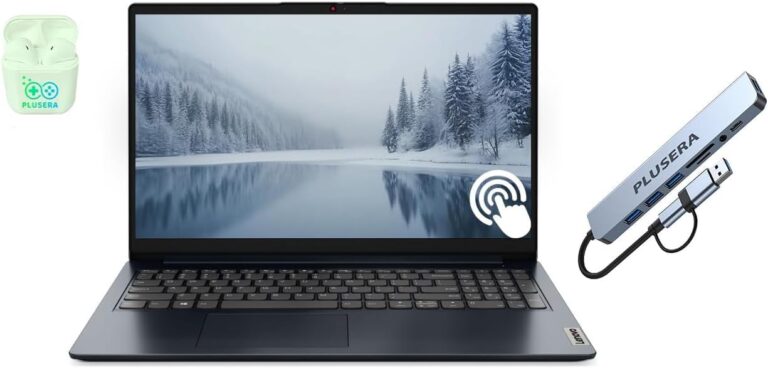
Lenovo IdeaPad Gaming 3
Lenovo’s IdeaPad Gaming 3 offers strong value. It typically features an AMD Ryzen 3 or Intel Core i3 chip with integrated graphics. The build quality is solid, and Lenovo’s customer service is excellent. It’s a reliable choice for budget-conscious Minecraft players.
The keyboard is comfortable for long sessions too. If you’re setting up a dedicated gaming PC for Minecraft on a budget, this model deserves a spot on your shortlist.
What to Look for in a Cheap Minecraft PC
Shopping for a budget PC can be confusing. Marketers use all kinds of terms that don’t always mean what you think. Here’s a straightforward breakdown of what actually matters for Minecraft performance.
RAM: How Much Do You Really Need?
RAM is one of the most important factors for Minecraft, especially if you use mods or resource packs. Here’s a quick guide:
- 4GB: Bare minimum. Works for vanilla Minecraft but expect stuttering with mods.
- 8GB: The sweet spot for most players. Handles mods and resource packs well.
- 16GB: Ideal if you plan to stream or run heavy modpacks.
For the cheapest viable option, 8GB is the target. Don’t settle for 4GB if you can avoid it. The performance difference is noticeable.
Storage: SSD vs. HDD
An SSD makes a huge difference in load times. Worlds load faster, and the game feels more responsive overall. Even a basic 256GB SSD is far better than a 1TB HDD for Minecraft.
If you find a cheap PC with an HDD, consider upgrading to an SSD later. Budget SSDs are very affordable now. A 500GB SSD costs around $30-$40 and is one of the best upgrades you can make. This small change can make your low-cost PC for Minecraft feel much snappier.
Processor and Graphics
For Minecraft, you don’t need a powerful CPU. An Intel Core i3 or AMD Ryzen 3 is perfectly adequate. The integrated graphics that come with these processors can handle the game at medium to high settings.
If you ever want to upgrade, look for a PC with an open PCIe slot for a dedicated graphics card. A basic GTX 1650 or RX 6500 XT can transform performance. But for vanilla Minecraft, integrated graphics are enough.
Best Laptops vs. Desktops for Budget Minecraft Gaming
Choosing between a laptop and a desktop is a big decision when you’re on a budget. Both have pros and cons. Here’s a comparison to help you decide.
Desktop Advantages
- Better performance for the same price
- Easier to upgrade components over time
- Better cooling, which reduces throttling
- Larger screen real estate with a monitor
- Typically more durable long-term
Laptop Advantages
- Portability — play anywhere
- Built-in screen, keyboard, and trackpad
- Lower upfront cost for basic models
- Good for shared spaces or small rooms
Comparison Table: Budget Desktop vs. Laptop for Minecraft
| Feature | Budget Desktop | Budget Laptop |
|---|---|---|
| Avg. Price | $400-$550 | $350-$500 |
| Performance | Better for same price | Slightly lower |
| Upgradability | High | Limited |
| Portability | None | Full |
| Screen Included | No | Yes |
As you can see, desktops offer more value for pure gaming. But if you need portability, a budget laptop works well for Minecraft. Just know you’re paying a small premium for the convenience. Either way, both can deliver a great experience on the cheapest PC for Minecraft you choose.
Tips to Save Money on Your Minecraft PC
You don’t have to spend a lot to enjoy Minecraft. Here are some practical tips to get the best deal possible.
Buy Refurbished or Open-Box
Many manufacturers sell refurbished or open-box PCs at significant discounts. These machines are often fully tested and come with a warranty. You can save $100-$200 off the retail price. Sites like Amazon Renewed, Best Buy Outlet, and manufacturer direct stores are great places to look.
Wait for Sales
Major shopping events like Black Friday, Cyber Monday, and back-to-school sales offer deep discounts on PCs. If you can wait, these events can save you a lot. Setting price alerts on Google Shopping or CamelCamelCamel helps you catch the lowest price.
Skip Unnecessary Features
You don’t need a fancy RGB keyboard or a 4K display for Minecraft. Focus on the core specs: processor, RAM, and storage. A plain, affordable PC will run Minecraft just fine. Avoid paying extras for features you won’t use.
Consider a Console Version
If your budget is extremely tight, Minecraft is available on consoles like Xbox, PlayStation, and Nintendo Switch. The Bedrock Edition cross-play feature means you can still play with PC friends. A used Xbox One can be found for under $100. This is a legitimate alternative if a PC isn’t a must.
Upgrade Gradually
Start with the cheapest PC that meets the minimum specs. Then upgrade one piece at a time. Maybe add an SSD first. Then bump up the RAM later. This approach spreads the cost over time and keeps your initial investment very low. It’s one of the smartest ways to get a cheap PC for Minecraft that evolves with your needs.
Optimizing Minecraft for Better Performance on a Budget PC
Even on a budget machine, you can make Minecraft run better with a few tweaks. These adjustments cost nothing and can make a big difference.
Lower These Settings First
In Minecraft’s video settings, turn down the following:
- Render Distance: Set to 6-8 chunks instead of the maximum.
- Graphics: Set to Fast instead of Fancy.
- Smooth Lighting: Turn off or set to minimum.
- Particles: Set to Minimal.
- VSync: Turn off unless you experience screen tearing.
These changes reduce the load on your GPU and CPU. You’ll see a big boost in frame rates, especially on integrated graphics.
Install OptiFine or Sodium
OptiFine is a free mod that significantly improves performance. It adds support for HD textures and smart rendering optimizations. For Fabric users, the Sodium mod does the same thing. Both are free and easy to install. They are must-haves for any budget Minecraft setup.
Close Background Apps
Your budget PC has limited resources. Close any apps running in the background before playing. Web browsers, streaming software, and downloads all eat up RAM and CPU. Giving Minecraft all your system resources helps it run smoother. This simple step can be the difference between a laggy and a smooth session on your cheapest PC for Minecraft.
Our Top Picks at a Glance
Here’s a quick recap of our recommendations for the best budget options:
- Best Overall Budget PC: Acer Aspire 5 — great balance of price and performance.
- Best Budget Desktop: HP Pavilion Gaming Desktop — solid build and easy to upgrade.
- Best Budget Laptop: Lenovo IdeaPad Gaming 3 — reliable and portable.
- Best Value Play: Refurbished business laptops with 8GB RAM and SSD storage.
Each of these options delivers a solid Minecraft experience without overspending. Your choice depends on whether you need portability or want the best performance for the money. All of them are perfectly capable of running Minecraft at good settings.
Conclusion
Finding the cheapest PC for Minecraft is absolutely doable. You don’t need to spend hundreds on a gaming rig. Focus on the essentials: 8GB of RAM, an SSD, and a modern processor. Both Java and Bedrock Editions are playable on budget hardware.
Use the tips in this guide to stretch your budget further. Buy refurbished, wait for sales, and skip unnecessary features. Optimize your game settings once you’re set up. These small steps add up to a much better experience.
Minecraft is a game that runs on creativity, not raw power. With the right budget PC, you’ll have everything you need to build, explore, and survive. Grab one of our recommended picks and start crafting today. The world of Minecraft is waiting for you!
Frequently Asked Questions
What is the cheapest PC that can run Minecraft?
The cheapest option is typically a refurbished laptop or desktop with an Intel Core i3 processor, 8GB of RAM, and an SSD. You can find solid options for around $300-$400. Minecraft Bedrock Edition is also available on consoles like Xbox, which can be found used for under $100.
Can Minecraft run on a PC with 4GB RAM?
Yes, but only for vanilla Minecraft with very low settings. If you plan to use mods or resource packs, 4GB will not be enough. We strongly recommend at least 8GB of RAM for a comfortable experience with the cheapest PC for Minecraft setup.
Is Minecraft better on Java or Bedrock Edition for budget PCs?
Bedrock Edition tends to run better on lower-end hardware. It’s more optimized and uses fewer resources. Java Edition is more flexible with mods but can be heavier. If pure performance on a budget is your goal, Bedrock is the way to go.
Do I need a dedicated graphics card for Minecraft?
No, you don’t need a dedicated GPU. Modern integrated graphics from Intel and AMD can handle Minecraft at medium to high settings. A dedicated card becomes useful only if you want to play with high-end mods or stream gameplay simultaneously.
How much storage do I need for Minecraft?
The game itself only needs about 1GB of storage. However, we recommend at least a 128GB SSD for your operating system and games. Budget SSDs are very affordable now and make a huge difference in load times and overall system responsiveness.
Is it better to buy a cheap laptop or build a cheap desktop for Minecraft?
Building a desktop gives you better performance and upgradeability for the same price. But it requires technical knowledge and time. If you’re not comfortable building, a budget pre-built desktop or laptop is the simpler choice. Either way, you can get a great gaming PC for Minecraft without spending a lot.