Disposable Camera Qr Code for Wedding
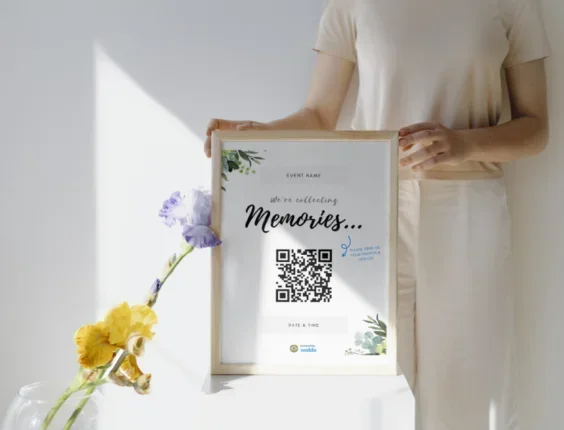
A disposable camera QR code for wedding celebrations is a simple way to get guests involved in photography. It lets people scan a code to access photos, share moments, or learn how to use the camera. This trend adds a fun, interactive layer to your big day. You will learn how to set it up, why it works, and how to make it shine.
Planning a wedding involves countless details, but some of the best memories come from simple, playful ideas. A disposable camera QR code for wedding celebrations is one of those clever touches that guests love. It blends the nostalgic charm of film photography with the convenience of modern technology. Instead of letting cameras sit untouched on tables, you give people a clear reason to pick them up and start shooting.
Many couples want their receptions to feel interactive and personal. A QR code does exactly that. It can link to a photo gallery, a wedding hashtag, or quick tips on how to use the camera. Guests do not need to guess what to do. They just scan, learn, and snap. This small addition can change how people experience your event. It turns passive observers into active participants who capture candid laughter, dancing, and quiet moments you might otherwise miss.
In this guide, you will learn why this idea works so well, how to set it up in minutes, and what to avoid so everything runs smoothly. You will also find practical tips for placement, design, and sharing the final photos. By the end, you will have a clear plan to make your wedding photography more fun, personal, and memorable.
Key Takeaways
- Easy guest engagement: A QR code makes it simple for attendees to interact with disposable cameras and shared photo albums.
- Cost-effective fun: Disposable cameras are affordable, and adding a QR code costs almost nothing.
- Personalized touch: You can link the code to a custom wedding hashtag, photo gallery, or usage instructions.
- Better photo results: Clear instructions via QR help guests take better pictures and avoid common mistakes.
- Simple setup: Creating and printing QR codes takes minutes with free online tools.
- Memorable keepsake: Guests enjoy the mix of retro film and modern sharing technology.
- Flexible use: Place codes on tables, welcome bags, or signage for maximum visibility.
📑 Table of Contents
- Why a Disposable Camera QR Code for Wedding Events Works So Well
- How to Set Up a Disposable Camera QR Code for Wedding Tables
- Creative Ways to Use QR Codes With Disposable Wedding Cameras
- Tips for Better Disposable Camera Photos at Weddings
- Where to Place the QR Code for Maximum Impact
- How to Share and Display the Final Photos
- Common Questions About Disposable Camera QR Codes for Weddings
- Final Thoughts on a Disposable Camera QR Code for Wedding Memories
Why a Disposable Camera QR Code for Wedding Events Works So Well
Weddings are busy, and guests often want to help but do not know how. A disposable camera QR code for wedding setups solves that problem in a friendly way. When people see a camera on a table, they may wonder if they should use it. Some worry about wasting shots. Others forget how the flash works. A quick scan removes that confusion. It gives them a simple path to follow, which means more cameras get used and more genuine moments get captured.
There is also a strong emotional benefit. Film photography feels special because it is slow and intentional. You cannot delete a shot or check every image right away. That slight mystery makes people pay attention. When you pair that retro feel with a QR code, you create a nice contrast. The code feels modern and helpful, while the camera feels warm and nostalgic. Guests enjoy that mix. It feels thoughtful without being complicated.
Another reason this idea works is that it encourages sharing. People love to talk about photos they took or found. A QR code can lead to a shared album where everyone can upload their favorites later. That turns one camera roll into a group project. It also gives you, the couple, a richer collection of images. You get views from different angles, unexpected laughs, and details you might not have planned to photograph.
Guest Participation Made Simple
People are more likely to join in when the steps are clear. A QR code can link to a short note that says something like, “Grab a camera, take 10 fun shots, and leave it on the table.” That kind of direction removes hesitation. It also helps to mention that the cameras are meant to be passed around. When guests understand the game, they play along. You will see cameras moving from table to table, which creates a lively, shared experience.
The Nostalgia Factor
Film cameras bring back a sense of timelessness. They remind people of school events, family trips, and old photo albums. That feeling fits weddings well because weddings are about tradition, love, and memory. A disposable camera does not try to be perfect. It embraces grain, light leaks, and surprise results. Those quirks become part of the story. When you add a QR code, you keep the charm while making the process easier for everyone.
How to Set Up a Disposable Camera QR Code for Wedding Tables
Setting up a disposable camera QR code for wedding displays is easier than most people think. You do not need special software or a big budget. The main goal is to create a code that works well, looks clean, and leads guests to the right place. Once you know the basic steps, you can finish the whole setup in under an hour.
Start by deciding what the QR code should do. Most couples use it to share a wedding hashtag, link to a photo upload page, or show quick camera tips. Pick one main purpose so guests are not confused. A single, clear goal works better than a long list of options. After you choose the destination, you can build the code and prepare it for printing.
Step-by-Step Setup Guide
Here is a simple way to get everything ready:
- Choose your link: Decide whether the code will open a photo gallery, a hashtag page, a Google Form, or a short instruction note.
- Create the QR code: Use a free generator online. Paste your link, pick a simple design, and download the image.
- Test it first: Scan the code with a few different phones before you print anything. Make sure it opens quickly and reads easily.
- Design a small sign: Add a friendly line like, “Scan to see wedding photos” or “Scan for camera tips.” Keep the text short and easy to read.
- Print and protect: Print on sturdy paper or cardstock. If possible, laminate the sign or place it in a small frame so it survives spills and busy hands.
- Place it wisely: Set the code where guests can see it without crowding the camera. A small stand, table card, or tent card works well.
Once the code is in place, do a quick walk-through during setup. Ask a friend to scan it from different angles. Check that the lighting does not create a glare on the sign. Small adjustments now can save you trouble later.
Choosing the Right Link Destination
The link you choose should match your goal. If you want guests to upload photos later, a shared album or simple upload form makes sense. If you want them to understand how to use the camera, a short note with tips works better. You can even use two codes if you want one for instructions and one for sharing. Just keep the signs labeled clearly so people know which is which.
Creative Ways to Use QR Codes With Disposable Wedding Cameras
A disposable camera QR code for wedding ideas can go far beyond a basic link. You can use the code to shape the guest experience in fun and meaningful ways. The best part is that you can match the idea to your wedding style. A rustic reception, a modern party, and a cozy evening gathering can all use the same basic tool in different ways.
One popular approach is to turn the camera into a mini activity. Place a sign that invites guests to take candid shots of the first dance, the cake cutting, or the dance floor. You can even give each camera a little theme, like “capture laughter” or “snap the details.” That gives people a reason to use the camera with purpose. It also helps guests feel like they are part of the memory-making process.
Ideas for Guest Photo Missions
If you want to make the cameras more engaging, try a few simple prompts:
- Table moments: Ask guests to photograph their table, their meals, and the people they came with.
- Dance floor energy: Encourage shots of movement, lights, and joyful faces during the party.
- Detail hunting: Invite guests to capture small things like centerpieces, shoes, bouquets, or handwritten notes.
- Friendship frames: Suggest group photos that show off your favorite people all together.
These little prompts help guests feel confident. They also create a nice variety of images. Instead of everyone taking the same posed picture, you get a mix of scenes that tell a fuller story.
Linking to a Shared Photo Album
A QR code can also lead to a place where guests upload their favorite film photos after the event. That is especially helpful because disposable cameras need developing, and not everyone wants to wait to share a few snapshots. You can ask guests to photograph the developed prints later and add them to the album. Or, if you prefer, you can upload the scanned film photos yourself and let guests comment, react, or download them.
This approach keeps everything in one place. It also makes it easier to combine film photos with digital ones. You end up with a layered collection that shows both the polished moments and the spontaneous ones. That mix often becomes one of the most cherished parts of the wedding memory box.
Tips for Better Disposable Camera Photos at Weddings
Even the best disposable camera QR code for wedding setup works better when guests know how to use the camera well. Disposable cameras are simple, but they still benefit from a few helpful habits. A short guide can improve the results without making the process feel technical or stressful.
The first tip is to keep the subject in good light. Film cameras usually do best when the light is steady and bright enough. Indoor receptions can be tricky, so remind guests to move closer when the room is dim. Another useful habit is to hold the camera steady. A steady hand reduces blur, especially when the flash fires. It also helps to avoid shooting through glass or reflective surfaces, since that can soften the image.
Flash Basics for Guests
Many people forget that flash is part of the experience with disposable cameras. A quick note on the sign can explain when the flash helps most. For example, guests can use it indoors, at night, or when faces look shadowed. If your cameras have a flash option, remind people to check that it is ready. A small line like, “Use flash indoors for clearer faces,” can make a big difference.
Common Mistakes to Avoid
A few simple warnings can save shots that would otherwise be lost:
- Too much distance: Disposable cameras work better when the subject is not too far away.
- Dark corners: Low light can make images muddy, so encourage guests to step closer.
- Shaky hands: A quick breath and steady grip help keep the photo sharp.
- Blocked lenses: Remind guests to keep fingers away from the front of the camera.
- Forgotten caps: If the camera has a cap or cover, make sure it is removed before shooting.
These are small details, but they matter. When guests get a few helpful reminders, they usually enjoy the process more and take better pictures.
Where to Place the QR Code for Maximum Impact
Placement matters more than people expect. A disposable camera QR code for wedding signs should be easy to spot, easy to scan, and close enough to the camera that the connection feels natural. If the code is hidden or awkward to reach, guests may ignore it. Good placement turns the code into part of the experience instead of an extra task.
Table settings are a classic choice because that is where guests naturally notice the cameras. You can place a small tent card near the camera stack or tape a neat sign to the table. Another good spot is the welcome area or guest lounge, especially if you want to share instructions before the reception starts. You can also put a sign near the photo display or memory table if you want guests to scan after the event.
Best Spots for Visibility
Here are a few placement ideas that usually work well:
- Next to the camera stack: Keeps the code and camera together.
- On each table: Makes it easy for guests to scan without walking around.
- At the entrance: Introduces the activity early.
- Near the guest book or memory table: Encourages sharing after the main event.
- In welcome bags: A printed card with a QR code can be a thoughtful touch for out-of-town guests.
Whichever spot you choose, keep the sign clean and readable. Avoid clutter. A short message and a clear code are usually enough. If you want to add style, match the sign to your wedding colors or use a simple border that fits your theme.
How to Share and Display the Final Photos
The fun does not end when the cameras are collected. In fact, that is when the real payoff begins. A disposable camera QR code for wedding project becomes even more meaningful when you share the developed photos in a thoughtful way. Guests love seeing what others captured, and couples often enjoy discovering unexpected moments in the images.
Start by deciding how you want to present the photos. Some couples create a slideshow for a post-wedding gathering. Others make a small print display or a digital album. You can also mix film scans with phone photos for a fuller story. The goal is not perfection. The goal is to show the day through many eyes. That is what makes the collection feel alive.
Ideas for Sharing After the Wedding
There are many easy ways to share the results:
- Digital album: Upload scans and let guests view or download them.
- Print wall: Display favorite images on a corkboard or framed grid.
- Wedding follow-up email: Send a thank-you note with a link to the photo collection.
- Social post: Share a few highlights using your wedding hashtag.
- Guestbook add-on: Place printed snapshots beside guest signatures for a personal touch.
You can also ask guests to vote on their favorite shots or add captions. That turns the photo share into a second round of celebration. It keeps the wedding feeling connected even after the event is over.
If you want to make the process smoother, think about the order of operations. Collect the cameras, develop the film, scan the images, and then organize them by table, moment, or theme. A simple system helps you avoid feeling overwhelmed. Even a basic folder layout can make the final sharing step much easier.
Common Questions About Disposable Camera QR Codes for Weddings
Many couples like this idea but still have a few practical questions. That is completely normal. The good news is that the setup is flexible, and you can adjust it to fit your style and budget. Below are a few common concerns and simple ways to handle them.
One question is whether guests will actually use the cameras. They usually do when the process feels easy and inviting. Clear signage, a friendly tone, and a simple goal make a big difference. Another common worry is whether the QR code will be hard to scan. That is why testing matters. A well-printed code with good lighting usually works without trouble.
People also ask what happens if the link changes. If you use a stable page or album, that is rarely a problem. If you expect to update the destination later, choose a link you can manage easily. It is also smart to keep the message on the sign general enough that it still makes sense even if the page evolves.
Quick Troubleshooting Tips
If something feels off, try these fixes:
- Code not scanning: Print it larger, increase contrast, and avoid glare.
- Guests confused: Shorten the message and make the goal clearer.
- Low photo count: Encourage camera passing and add a few fun prompts.
- Photos too dark: Remind guests to use flash indoors and move closer to the subject.
- Sharing feels slow: Use one simple upload spot instead of multiple options.
With a little planning, the whole experience can feel smooth and joyful. That is really the point. The QR code is not there to complicate things. It is there to make the cameras more welcoming and the memories easier to collect.
Final Thoughts on a Disposable Camera QR Code for Wedding Memories
A disposable camera QR code for wedding celebrations is one of those small ideas that can make a big emotional impact. It invites guests to participate, adds a playful touch to the reception, and helps you collect photos that feel honest and personal. It also respects the charm of film while giving people a helpful modern bridge to follow.
The best results come from keeping things simple. Choose one clear goal for the code. Make the sign easy to read. Test the scan before the big day. Give guests a few friendly tips so they feel confident using the cameras. Then let the moment unfold. You do not need a perfect system. You just need a thoughtful one.
If you are looking for a way to make your wedding photography feel more interactive and memorable, this is a great place to start. It is affordable, easy to set up, and full of personality. More importantly, it gives your guests a role in the story. And when they look back at those film photos later, they will remember not just the images, but the fun of being part of the day.