Does Hdmi 2 Need a New Cable
Does HDMI 2 need a new cable? The short answer is: it depends on your device and what you want to achieve. HDMI 2.0 and HDMI 2.1 bring big upgrades in bandwidth, 4K resolution support, and refresh rates. But your old cable might still work fine for basic setups. This guide breaks down everything you need to know about HDMI cable compatibility and helps you decide if an upgrade is truly necessary.
You just bought a new TV, monitor, or gaming console. The box says it supports HDMI 2. You look at the cable you already own and wonder, do I actually need a new one? This is a question a lot of people ask, and the answer is not as simple as yes or no.
Does HDMI 2 need a new cable? The truth is that HDMI 2 is not a cable at all. It is a standard version that defines what a cable can carry. The cable you need depends on what version of HDMI your devices support and what kind of picture and sound quality you want. In this guide, we will walk through everything you need to know. You will learn about cable types, bandwidth, compatibility, and how to avoid spending money on something you do not need.
Whether you are setting up a home theater, connecting a gaming PC, or just hooking up a laptop to a display, understanding your HDMI cable options saves time and money. Let us dive right in.
Key Takeaways
- HDMI 2 is not a cable type: HDMI 2 refers to the HDMI standard version, not a specific cable. You need the right cable for the version you are using.
- HDMI 2.0 cables support 4K at 60Hz: If you want higher resolution and smoother visuals, a high-speed HDMI cable is essential.
- HDMI 2.1 cables unlock 8K and 4K at 120Hz: Gamers and home theater users benefit the most from the newest cable standards.
- Your old cable may still work: If you only need 1080p or basic 4K at 30Hz, your current cable might be just fine.
- Check your device ports first: The port version on your TV or monitor determines the maximum capability, not just the cable.
- Cable length matters: Longer cables can signal quality loss, so choose the right length for your setup.
- Backward compatibility is real: HDMI 2.1 cables work with older HDMI ports, but you will not get the full benefits.
📑 Table of Contents
What Is HDMI 2 and Why Does It Matter
HDMI stands for High-Definition Multimedia Interface. It is the standard display connection used in TVs, monitors, laptops, gaming consoles, and Blu-ray players. Over the years, HDMI has gone through several versions. Each version brings better bandwidth, which means it can carry more data. More data means higher resolution, better color, and smoother motion.
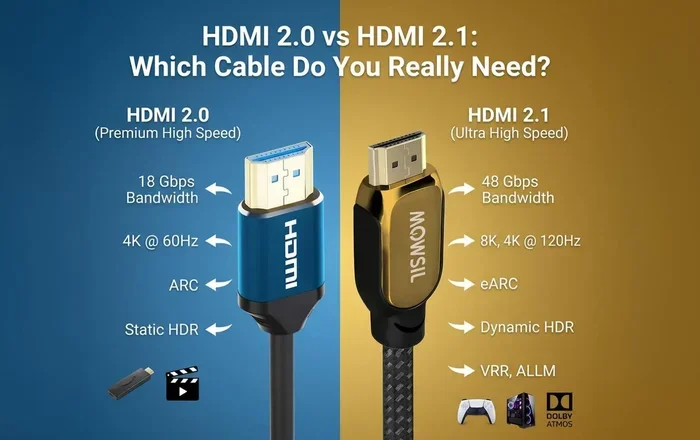
HDMI 2.0 came out in 2013. It was a big step forward. It introduced support for 4K resolution at 60 frames per second. Before that, HDMI 1.4 could only do 4K at 30 frames per second, which looked choppy for fast content. HDMI 2.0 also added HDR support, which gives you wider color ranges and better contrast.
Then came HDMI 2.1 in 2017. This version took things even further. It supports 8K resolution at 60Hz and 4K at 120Hz. For gamers, this is a game changer. A higher refresh rate means smoother gameplay with less motion blur. HDMI 2.1 also introduced features like Variable Refresh Rate, or VRR, and Auto Low Latency Mode, known as ALLM. These features reduce input lag and make gaming feel much more responsive.
Why the Version Number Matters
The version number tells you what a port or cable can handle. If your TV has an HDMI 2.0 port, it can receive 4K at 60Hz. If it has an HDMI 2.1 port, it can handle 4K at 120Hz or even 8K. But here is the thing: the port version and the cable version must match for you to get the full benefit. A cable that only supports HDMI 1.4 will not magically give you 4K at 60Hz just because your TV has an HDMI 2.0 port.
Do You Need a New Cable for HDMI 2
This is the core question, and the answer hinges on what you are trying to do. Does HDMI 2 need a new cable? Not always. But in many cases, yes. Let us break it down by use case so you can decide for yourself.
When Your Old Cable Is Fine
If you are connecting a device that outputs 1080p or 4K at 30Hz, your existing cable will likely work. Most standard HDMI cables from the last decade can handle these resolutions. If you are just watching regular TV, browsing the web, or doing basic work on an external monitor, you probably do not need to upgrade.
Also, if your devices only have HDMI 1.4 ports, then no cable in the world will give you HDMI 2.0 features. The port itself is the bottleneck. In that case, a new cable would not help at all.
When You Definitely Need a New Cable
You need a new cable if any of these situations apply to you:
- You want to watch 4K content at 60Hz and your current cable is HDMI 1.4 or lower.
- You are a gamer who wants 4K at 120Hz or 1440p at 144Hz on a modern TV or monitor.
- You want to use HDR features that require higher bandwidth than older cables can provide.
- Your current cable is damaged, frayed, or too long, causing signal quality issues.
- You are using an HDMI 2.1 device like the PlayStation 5, Xbox Series X, or a high-end graphics card.
In these cases, a high-speed HDMI cable or an ultra-high-speed HDMI cable is what you need. These cables are designed to handle the increased bandwidth speed that HDMI 2.0 and 2.1 demand.
Can You Use an HDMI 2.1 Cable with Older Devices
Yes! Backward compatibility is one of the best things about HDMI. An HDMI 2.1 cable works perfectly fine with older HDMI ports. You just will not get the advanced features like 8K or 4K at 120Hz. The connection will fall back to whatever the older port and device can support. This is similar to how checking whether a motherboard like the B450 supports M.2 NVMe SSD works, where port compatibility determines what you can actually use. You can plug in the newest cable, but the older port limits the outcome.
So if you already own an ultra-high-speed HDMI cable, there is no harm in using it with an older device. It will not damage anything. It just might not unlock all the features you paid for.
HDMI Cable Types Explained
Not all HDMI cables are the same. The HDMI Licensing Group has defined specific cable categories. Understanding these helps you pick the right one without overpaying.
Standard HDMI Cable
This is the basic cable. It supports up to 1080p or 720p. It handles audio and video but at lower resolutions. If you are connecting a DVD player or an older gaming console, this cable works. For anything modern, it is not enough.
High-Speed HDMI Cable
A high-speed HDMI cable supports resolutions up to 4K at 30Hz or 1080p at higher refresh rates. It also supports HDR and deeper color depths. For most people watching Ultra HD content on a 4K TV, this is the sweet spot. It is affordable and handles the vast majority of home setups.
Premium High-Speed HDMI Cable
This is a certified high-speed cable that has been tested for signal quality at higher bandwidths. It reliably supports 4K at 60Hz with HDR. If you want peace of mind, this is a solid choice. Look for the HDMI Premium Certified logo on the packaging.
Ultra-High-Speed HDMI Cable
This is the newest and most capable cable. It supports HDMI 2.1 features, including 4K at 120Hz, 8K at 60Hz, and higher bandwidth up to 48 Gbps. If you have an HDMI 2.1 TV and a PS5 or Xbox Series X, this is the cable you need. It also supports advanced VRR features that gamers love.
| Cable Type | Max Resolution | Bandwidth | Best For |
|---|---|---|---|
| Standard HDMI | 1080p | 4.95 Gbps | Basic setups, older devices |
| High-Speed HDMI | 4K at 30Hz | 10.2 Gbps | 4K TVs, Blu-ray players |
| Premium High-Speed | 4K at 60Hz with HDR | 18 Gbps | Home theater, 4K gaming |
| Ultra-High-Speed | 8K at 60Hz / 4K at 120Hz | 48 Gbps | HDMI 2.1 devices, next-gen gaming |
How to Check If Your Current Cable Supports HDMI 2
Before you buy a new cable, check what you already have. Here is a simple way to find out.
First, look at the cable itself. Many HDMI cables have printing on the jacket that tells you the version or category. Look for words like “High Speed,” “Premium High Speed,” or “Ultra High Speed.” If you see “Standard,” it likely will not support 4K at 60Hz.
Second, check the packaging or receipt if you still have it. The version or category should be listed there.
Third, if there is no label at all, you can test the cable. Connect your device to a 4K display and play 4K content at 60Hz. If the picture looks smooth and without artifacts, your cable likely supports it. If the screen flickers, shows a lower resolution, or drops frames, your cable might be the bottleneck.
Also, keep in mind that cable length affects signal quality. A longer cable can degrade the signal, especially at higher resolutions. For most setups, a cable under 6 feet works great. If you need a longer run, consider an active HDMI cable or a signal booster.
Quick Tips for Cable Selection
- Always match the cable to the highest version port on your devices.
- Buy from reputable brands to avoid fake cables that do not meet their claimed specs.
- Do not pay extra for cables longer than you need.
- If you are connecting a laptop for work or study, make sure your setup supports the display output you need. For more on laptop specs, you might also want to check how much RAM you need in a laptop to ensure your whole system is balanced.
- If you are concerned about power delivery through your display connection, learn how much power a laptop uses when plugged in to understand your overall setup needs.
Common HDMI 2 Cable Mistakes to Avoid
There are several mistakes people make when buying or using HDMI cables. Avoiding these saves money and frustration.
Buying the Most Expensive Cable
You do not need to spend $100 on an HDMI cable. In most cases, a $15 to $25 high-speed HDMI cable does the job perfectly well. Expensive cables sometimes offer better build quality, but the signal quality is the same as a budget cable that meets the same standard. Do not fall for marketing hype that claims premium cables deliver dramatically better picture quality.
Ignoring the Port Version
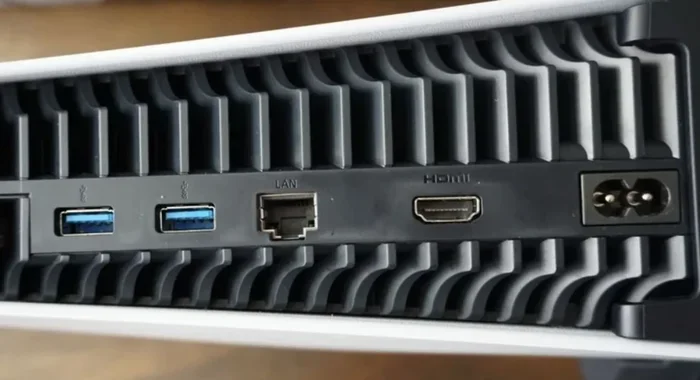
The best cable in the world cannot make an HDMI 1.4 port output 4K at 60Hz. Always check your device ports first. If your TV or monitor only has HDMI 1.4, upgrading the cable will not help. You would need an HDMI adapter or a new display to get HDMI 2.0 features.
Using the Wrong Cable for Gaming
Gamers need low latency and high refresh rates. Using a standard HDMI cable with a gaming console or PC limits your experience. If your setup supports 120Hz or 144Hz, make sure you have the right cable. An ultra-high-speed HDMI cable is the best choice for serious gaming setups.
Overlooking Cable Direction and Orientation
Some HDMI cables have a specific direction, meaning one end plugs into the source device and the other into the display. Make sure you plug it in correctly. Also, avoid sharp bends in the cable, as this can damage the internal wiring and degrade signal quality over time.
Final Verdict: Does HDMI 2 Need a New Cable
So, does HDMI 2 need a new cable? The answer really comes down to your setup and your needs. If you are happy with 1080p or basic 4K, your old cable is probably fine. But if you want to take advantage of 4K at 60Hz, HDR, 120Hz refresh rates, or 8K resolution, you will need a cable that matches the HDMI 2.0 or HDMI 2.1 standard.
The good news is that HDMI cables are affordable and widely available. You do not need to spend a fortune to get a great one. Just identify what your devices support, pick the right cable category, and enjoy a better viewing or gaming experience.
Before you buy, take a moment to check your ports, your devices, and what you actually need. A little research goes a long way. And remember, a great display connection starts with the right cable. Do not let a cheap or outdated cable hold back your setup.
Whether you are a casual viewer, a movie lover, or a competitive gamer, getting the right HDMI cable for your HDMI 2 devices makes a real difference. You will see sharper images, smoother motion, and richer colors. That is well worth the small investment.
Now you know exactly what you need. Go ahead, check your current cable, and make the upgrade if it makes sense for you. Your eyes will thank you.
Frequently Asked Questions
Can I use an HDMI 2.0 cable with an HDMI 2.1 port?
Yes, you can. An HDMI 2.0 cable will work with an HDMI 2.1 port, but you will only get HDMI 2.0 features. You will not be able to use the full 48 Gbps bandwidth that HDMI 2.1 offers. To get the full benefits, you need an ultra-high-speed HDMI 2.1 cable.
How do I know if my HDMI cable supports 4K?
Check the cable for labels like “High Speed” or “Premium High Speed.” Standard HDMI cables usually do not support 4K at 60Hz. If there are no labels, try connecting a 4K device and see if the display outputs at the correct resolution and refresh rate.
Does HDMI cable length affect picture quality?
Yes, longer cables can cause signal degradation, especially at higher resolutions. For most setups, a cable under 6 feet is ideal. If you need a longer cable, look for active HDMI cables or ones with built-in signal boosters to maintain quality.
Do I need a new cable for HDR?
HDR requires more bandwidth than standard video. A standard HDMI cable may not support HDR properly. You need at least a high-speed HDMI cable to enjoy HDR content with correct colors and contrast.
Are all HDMI 2.1 cables the same?
No. HDMI 2.1 cables must meet the ultra-high-speed standard, but build quality can vary between brands. Look for cables that are certified ultra-high-speed and from reputable manufacturers to ensure reliable performance.
Will a new HDMI cable improve my gaming experience?
If your current cable cannot support the resolution and refresh rate your gaming setup demands, a new cable will make a noticeable difference. Features like VRR and 4K at 120Hz require the right cable to work properly.
=== CONCLUSION ===
Does HDMI 2 need a new cable? The answer depends entirely on your devices and what you want to achieve. For most everyday uses, your existing cable might be perfectly fine. But for 4K gaming, HDR content, or future-proofing your setup, upgrading to a high-speed or ultra-high-speed HDMI cable is a smart move. Check your ports, match your cable to your needs, and enjoy the best picture your setup can deliver.