Does Usb to Ethernet Work

Yes, a USB to Ethernet adapter works and gives you a reliable wired internet connection. These small devices plug into any USB port and let you connect an Ethernet cable for faster, more stable internet. Whether you use a laptop, desktop, or tablet, a USB to Ethernet adapter can solve your connectivity problems in minutes.
Have you ever plugged in a USB to Ethernet adapter and wondered if it really works? The short answer is yes. These small adapters solve a big problem. Many modern laptops and tablets no longer come with a built-in Ethernet port. A USB to Ethernet adapter fills that gap in seconds.
Whether you game online, work from home, or just want a more stable connection, a wired setup beats Wi-Fi in many situations. In this guide, we walk through everything you need to know about USB to Ethernet adapters. We cover how they work, what speeds you can expect, and how to set one up in minutes.
The goal is simple. Help you decide if a USB to Ethernet adapter is the right fix for your internet needs. Let us get into it.
Key Takeaways
- USB to Ethernet adapters work reliably: They convert USB signals into wired Ethernet connections with ease.
- They support multiple speeds: From 100 Mbps to Gigabit Ethernet depending on the adapter model.
- Plug and play setup: Most adapters work instantly without needing extra software or drivers.
- Great for laptops and desktops: They fix missing Ethernet ports on modern thin laptops and devices.
- Consider compatibility first: Check USB port type, driver support, and your internet speed needs before buying.
- They improve stability: Wired connections reduce lag and interference compared to Wi-Fi.
📑 Table of Contents
- What Is a USB to Ethernet Adapter?
- How Does a USB to Ethernet Adapter Work?
- Benefits of Using a USB to Ethernet Adapter
- Common Uses for USB to Ethernet Adapters
- Things to Consider Before Buying
- Setting Up Your USB to Ethernet Adapter
- Troubleshooting Common USB to Ethernet Adapter Issues
- USB to Ethernet Adapters and Other USB Devices
- USB to Ethernet Adapter vs. Wi-Fi: Which Is Better?
- Final Thoughts
What Is a USB to Ethernet Adapter?
A USB to Ethernet adapter is a small device that plugs into a USB port on your computer or laptop. It gives you an Ethernet port so you can connect to a router or modem with a network cable. Think of it as a bridge between your USB port and your wired internet connection.
These adapters come in different shapes and sizes. Some are tiny thumb-drive-style dongles. Others are larger units with a USB cable attached. The ones with a cable tend to work better because they get more power from the USB port.
Types of USB to Ethernet Adapters
Not all adapters are the same. Here are the main types you will find on the market:
- USB-A to Ethernet: The most common type. Plugs into the standard rectangular USB port found on older computers and laptops.
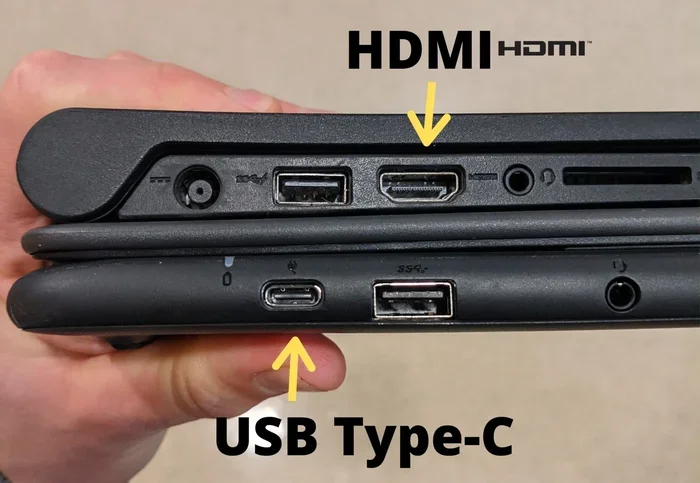
- USB-C to Ethernet: Fits into the newer oval-shaped USB-C ports found on modern laptops, tablets, and phones.
- USB 3.0 Ethernet Adapters: Offer faster data transfer speeds than USB 2.0 versions.
- USB 3.1 and USB 3.2 Adapters: Support even higher speeds and better performance for demanding tasks.
Each type serves a different need. The key is matching the adapter to your device’s USB port. If you have a USB-C laptop, a USB-C to Ethernet adapter is the way to go. If your device has a USB-A port, the standard adapter works perfectly.
How Does a USB to Ethernet Adapter Work?
The inner workings of a USB to Ethernet adapter are simpler than you might think. Inside the adapter, there is a small chip called a network controller. This chip translates data between the USB connection on your computer and the Ethernet cable.
When you plug the adapter in, your computer recognizes it as a new network device. It installs the necessary adapter driver automatically in most cases. Once the driver is in place, data flows through the USB port, gets converted by the chip, and travels out through the Ethernet cable to your router.
The Role of the Adapter Driver
The adapter driver is a small piece of software that tells your computer how to talk to the adapter. Most modern operating systems like Windows 10, Windows 11, macOS, and Linux already include drivers for popular adapters. This means you can just plug it in and go.
Sometimes, though, you need to install a driver manually. This happens with newer or less common adapters. The manufacturer usually provides a download link on their website. The process is simple and only takes a few minutes.
USB to Ethernet vs. Built-in Ethernet
You might wonder how a USB to Ethernet adapter compares to a built-in Ethernet port. The truth is, modern USB adapters offer speeds that are very close to built-in ports. A good USB 3.0 adapter can handle Gigabit Ethernet speeds without any issues.
The only real difference is the slight extra latency from the USB conversion process. For most users, this is completely unnoticeable. Gamers and professionals who need the absolute lowest latency might prefer a built-in port, but for everyday use, a USB to Ethernet adapter works just as well.
Benefits of Using a USB to Ethernet Adapter
There are many reasons to use a USB to Ethernet adapter. Let us look at the biggest benefits.
Faster and More Stable Internet
Wi-Fi is convenient, but it has its limits. Walls, other devices, and distance from the router can all slow down your wireless signal. A wired Ethernet connection removes all of that interference.
With a USB to Ethernet adapter, you get a direct line to your router. This means faster speeds, lower latency, and fewer dropped connections. If you work from home or stream video often, this difference is huge.
Easy to Use
Most adapters are plug and play. You do not need to be a tech expert to set one up. Just plug the adapter into your USB port, connect an Ethernet cable, and you are online. No tools, no complicated setup, no fuss.
Portable and Affordable
These adapters are small and lightweight. You can carry one in your laptop bag and use it anywhere. They cost between $10 and $30 for most models. That is a small price for a reliable wired connection.
Works with Many Devices
A USB to Ethernet adapter is not just for laptops. It works with desktops, tablets, gaming consoles, smart TVs, and even some Raspberry Pi setups. If a device has a USB port, it can probably use an Ethernet adapter.
Common Uses for USB to Ethernet Adapters
People use USB to Ethernet adapters in many situations. Here are the most common ones:
- Working from home: A wired connection gives you the stability you need for video calls and file uploads.
- Gaming: Wired connections reduce ping and lag, giving you a competitive edge.
- Streaming 4K video: A stable Ethernet connection prevents buffering and stuttering.
- Older computers: Many older desktops and laptops do not have Ethernet ports. An adapter solves this problem.
- Traveling: Hotel rooms and business centers often only offer wired internet connections.
- Network troubleshooting: A wired connection helps you test if your Wi-Fi is causing slow speeds.
No matter your situation, a USB to Ethernet adapter can help. It is one of the most useful and affordable tech accessories you can own.
Things to Consider Before Buying
Not every USB to Ethernet adapter is the same. Before you buy, consider these factors.
Check Your USB Port Type
Look at your computer or laptop. Does it have USB-A ports or USB-C ports? Buy an adapter that matches your port type. Using a USB-A to Ethernet adapter in a USB-C port (or vice versa) will not work without the right cable or adapter.
Check the Speed Rating
Look for adapters that support Gigabit Ethernet (1000 Mbps) if your internet plan is fast. If you only have a basic internet plan, a 100 Mbps adapter will work fine and cost less.
Driver Compatibility
Make sure the adapter works with your operating system. Most adapters support Windows, macOS, and ChromeOS. Check the product listing to confirm.
Build Quality
Choose an adapter from a reputable brand. Cheap, no-name adapters may overheat or fail after a few months. Spending a little extra on quality saves you from headaches later.
Setting Up Your USB to Ethernet Adapter
Setting up a USB to Ethernet adapter is quick and easy. Follow these simple steps:
- Plug the adapter into a USB port on your computer or laptop.
- Wait for your computer to recognize it. Most systems install the driver automatically within seconds.
- Connect an Ethernet cable from the adapter to your router or modem.
- Check your network settings. Your computer should detect the wired connection and show it as active.
- Test your connection by opening a website or running a speed test.
If your computer does not recognize the adapter right away, do not panic. Try a different USB port. You can also visit the manufacturer’s website to download the latest adapter driver. In most cases, the setup takes less than two minutes.
Troubleshooting Common USB to Ethernet Adapter Issues
Even though these adapters work well, you might run into occasional issues. Here are the most common problems and how to fix them.
Adapter Not Recognized
If your computer does not detect the adapter, try these steps:
- Unplug the adapter and plug it into a different USB port.
- Restart your computer.
- Check if the adapter needs a driver update from the manufacturer’s website.
- Try the adapter on another computer to rule out a hardware issue.
Slow Internet Speeds
If your speeds are slower than expected:
- Make sure you are using a USB 3.0 or higher port for better performance.
- Check that your Ethernet cable is not damaged or too long.
- Run a speed test on Wi-Fi first to see if the problem is with your internet plan, not the adapter.
- Update the adapter driver to the latest version.
Connection Drops Frequently
If your connection keeps dropping:
- Try a different Ethernet cable.
- Make sure the adapter is plugged in firmly.
- Avoid using USB extension cables or hubs, as they can reduce power and stability.
- Check for driver updates or reinstall the adapter driver.
Most issues with a USB to Ethernet adapter are easy to fix. A little troubleshooting goes a long way.
USB to Ethernet Adapters and Other USB Devices
One question people often ask is whether a USB to Ethernet adapter affects other USB devices. The answer is no. USB ports can handle multiple devices at once. You can use your Ethernet adapter while also charging your phone, using a USB flash drive, or connecting a wireless mouse or keyboard.
However, keep in mind that USB ports share bandwidth. If you are transferring large files from a USB drive while using the Ethernet adapter, you might see a slight dip in performance. For most everyday tasks, this is not noticeable at all.
If you are exploring other USB accessories, you might also want to look into how a USB to Ethernet adapter compares with other USB adapter types. For example, a M.2 NVMe SSD to USB 3.1 adapter works on a similar principle of converting one connection type to another. Understanding how different USB adapters function helps you make smarter buying decisions.
USB to Ethernet Adapter vs. Wi-Fi: Which Is Better?
Both wired and wireless connections have their place. Here is a quick comparison:
- Speed: Wired Ethernet is generally faster and more consistent than Wi-Fi.
- Stability: A USB to Ethernet adapter gives you a rock-solid connection with no interference.
- Convenience: Wi-Fi wins for portability and ease of use.
- Latency: Wired connections have lower latency, which matters for gaming and video calls.
- Setup: Wi-Fi requires no extra hardware. A USB Ethernet adapter needs the adapter and a cable.
For most home and office users, a wired connection through a USB to Ethernet adapter is the better choice. It is faster, more reliable, and more secure than Wi-Fi.
On the other hand, if you are always on the move and need internet everywhere, Wi-Fi is still the way to go. The best approach is to use both. Use Wi-Fi for casual browsing and a USB to Ethernet adapter for important tasks that need a stable connection.
Final Thoughts
So, does USB to Ethernet work? Absolutely. A USB to Ethernet adapter is one of the simplest and most effective ways to get a wired internet connection on any device with a USB port. It is fast, reliable, affordable, and easy to set up.
Whether you are a remote worker, a gamer, a streamer, or just someone who wants better internet, a USB to Ethernet adapter delivers real results. You do not need expensive equipment or technical skills. Just plug it in, connect the cable, and enjoy a faster, more stable internet connection.
If you are still on the fence, grab a basic adapter and give it a try. The low cost and instant improvement in your internet experience make it one of the best small investments you can make for your setup.