Iphone 16 Pro Camera Protectors
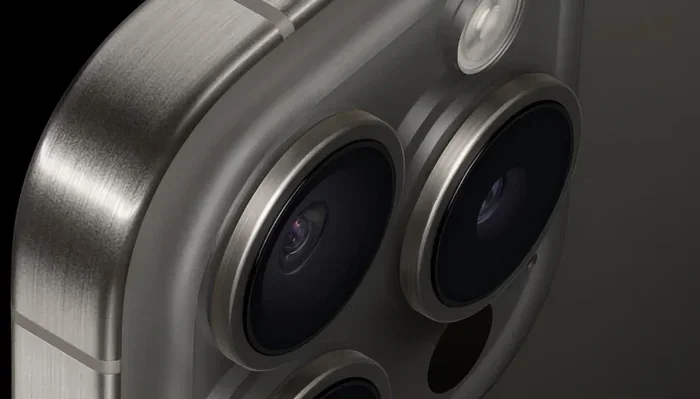
Your iPhone 16 Pro camera deserves real protection. A quality iphone 16 pro camera protector shields your lens from scratches, dust, and daily wear. We break down the best options, clear installation steps, and what to avoid so your photos stay sharp. You will learn exactly how to pick the right cover for your needs.
Key Takeaways
- Durability matters: Look for tempered glass or hardened polycarbonate that resists scratches and impact.
- Optical clarity is key: A good iphone 16 pro camera protector should not blur edges or reduce low-light performance.
- Easy installation saves time: Choose kits with alignment frames, cleaning cloths, and dust removal stickers.
- Fit affects function: Precise cutouts prevent camera bumps from interfering with the lens ring or flash.
- Maintenance extends life: Clean gently with a microfiber cloth and replace the cover when scratches deepen.
- Value beats price: Spending a little more on trusted brands often means better adhesion and clearer glass.
📑 Table of Contents
- Why You Need an iPhone 16 Pro Camera Protector
- What Makes a Good iPhone 16 Pro Camera Protector
- Tempered Glass vs Polycarbonate: Which Should You Choose
- How to Install Your iPhone 16 Pro Camera Protector Correctly
- Will a Camera Protector Affect Photo Quality
- How to Clean and Maintain Your Protector for Long-Term Use
- Choosing the Right iPhone 16 Pro Camera Protector for Your Lifestyle
- Final Thoughts on Protecting Your Lens
Why You Need an iPhone 16 Pro Camera Protector
Your phone camera takes amazing photos. But the lens sits exposed on the back of the device. Every time you set it down, slip it into a bag, or bump it against a table, the glass faces risk. A small scratch can soften edges and create glare in bright light. Dust can stick to the surface and show up in your pictures. That is why many people choose an iphone 16 pro camera protector before the first drop happens.
This simple accessory works like a shield. It takes the hit so your real lens does not have to. Think of it as a sacrificial layer. When it wears out, you replace the cover, not the camera. That keeps repair costs low and peace of mind high. You also protect the ring around the lens, which can scratch just as easily.
Many users worry that a cover will hurt photo quality. The right product will not. Modern protectors use clear materials that let light pass through with very little distortion. You still get crisp shots, smooth bokeh, and reliable focus. The key is picking a well-made option and installing it carefully. A poorly fitted cover can cause haze or edge shadows, so fit matters just as much as material.
Here are the main reasons people add this protection:
- Scratch defense: Keys, coins, and rough surfaces lose their sharpness on the protector instead of your lens.
- Dust and grit control: A sealed surface keeps tiny particles from settling on the glass.
- Everyday peace of mind: You can carry your phone without constantly worrying about the camera bump.
- Preserved resale value: A well-kept phone with an undamaged lens appeals to future buyers.
If you want a cover that also guards the body, you can pair it with a full case. Some people prefer a matched set so the edges line up neatly. Others like a slim cover that stays low-profile. Either way, the goal stays the same: keep the lens clear and the phone ready to shoot.
What Makes a Good iPhone 16 Pro Camera Protector
Not every cover performs the same. Some feel cloudy right out of the box. Others peel at the edges after a few weeks. A strong iphone 16 pro camera protector balances clarity, toughness, and fit. When you compare options, focus on a few core traits instead of flashy marketing.
Start with the material. Tempered glass is popular because it stays clear and handles small impacts well. Hardened polycarbonate is lighter and can flex slightly, which helps it sit flat on curved surfaces. Both can work well when they are made correctly. The best choice depends on how you use your phone and what kind of protection you want.
Next, check the optical quality. A good cover should feel almost invisible. You should not notice extra glare, color shifts, or soft edges. Look for products that mention high light transmission and low reflection. If a seller shows sample photos taken through the cover, study the corners and low-light shots. Those areas reveal the truth fast.
Fit is another big factor. The camera bump on this model is large, so the cutout must match precisely. A loose fit can shift when you grip the phone. A tight fit can lift at the edges and catch dust. The right shape sits flush and leaves enough room for the lens ring and flash. Many buyers also like a cover that adds a small lip to protect the glass from direct contact.
Adhesion matters too. A clean, sticky base helps the cover stay put through daily use. You want something that bonds well without leaving residue when you remove it. Quality kits usually include a strong cleaning cloth, a removal tool, and a dust tab. These extras make a real difference during setup.
Quick Tips:
- Check the edges: Smooth, even borders reduce the chance of catching lint.
- Read real reviews: Look for comments about clarity after a month of use, not just day one.
- Match your style: If you use a case, make sure the cover does not conflict with the case opening.
- Avoid cheap shortcuts: Ultra-low prices often mean thinner glass and weaker glue.
Common Mistakes:
- Ignoring the camera bump shape: A generic cutout may block part of the lens or flash.
- Skipping the cleaning step: Even a tiny speck can create a visible bubble or shadow.
- Touching the adhesive: Oils from your fingers weaken the bond and reduce clarity.
- Forcing the cover: Pressing too hard can cause stress marks or misalignment.
If you want a deeper look at lens guards for this model, you can read our guide on iphone 16 case with camera cover. It explains how a case and lens cover work together.
Tempered Glass vs Polycarbonate: Which Should You Choose
This choice comes up a lot, and the answer depends on your habits. Tempered glass usually feels more solid and stays clearer over time. It handles scratches well and gives a smooth surface that wipes clean easily. Many people like the way it feels under the finger because it mimics real glass. That said, it can be a bit heavier and may crack under a hard impact instead of bending.
Polycarbonate takes a different path. It is lighter and more flexible, so it can absorb some shock without breaking. That makes it appealing for active users who carry their phone in rough pockets or bags. The tradeoff is that it can pick up fine scratches sooner than glass. It also may look slightly less crisp if the material is not polished well.
Here is a simple comparison to help you decide:
| Feature | Tempered Glass | Polycarbonate |
|---|---|---|
| Clarity | Very high, minimal haze | Good, but varies by brand |
| Scratch resistance | Strong | Moderate |
| Impact response | Can crack under hard hits | Tends to flex first |
| Weight | Slightly heavier | Lighter |
| Cleaning ease | Wipes clean quickly | Can attract lint more |
| Best for | Daily use, photo clarity focus | Active routines, lighter feel |
If your priority is photo quality and a premium feel, tempered glass is often the safer bet. If you want a lighter cover and a bit more flex, polycarbonate can suit you well. Either way, buy from a brand that tests its materials and gives clear installation instructions. A well-made polycarbonate cover can outperform a poor glass one, and vice versa.
For users who also want lens protection on older models, our article on camera protector iphone 14 pro shows how these choices compare across generations.
How to Install Your iPhone 16 Pro Camera Protector Correctly
A careful setup makes a huge difference. Even the best cover will look bad if dust gets trapped or the alignment is off. The good news is that the process is simple when you slow down and follow a clean routine. Take your time, and you will end up with a smooth, clear finish.
Start by preparing a clean workspace. A table with good light works best. Wash your hands so you do not leave oils on the cover or phone. Gather the included tools, plus a microfiber cloth and a dust removal sticker if the kit has one. If you have a case, remove it first so you can reach the camera area easily.
Next, clean the back of the phone thoroughly. Wipe the camera area until it feels spotless. Pay attention to the ring around the lens and the flat surface around the bump. Any leftover grit can create a bump under the cover. After cleaning, let the surface dry fully. Do not rush this step.
Now align the cover. Most kits include an alignment frame or a clear guide. Use it if you have one. It keeps the cover centered and reduces the chance of crooked edges. If there is no frame, hold the cover close to the lens and check the fit before pressing it down. Make sure the cutout matches the lens and does not block the flash.
When you are ready, peel the backing slowly. Avoid touching the sticky side. Place the cover near the lens first, then lower it gently into position. Press from the center outward with light, even pressure. Do not slide it around once it touches the phone. If a bubble appears, lift the edge carefully and try again with a cleaner surface.
Quick Tips:
- Work in a low-dust room: Less air movement means fewer particles floating around.
- Use the dust tab early: Remove stray lint before it settles on the adhesive.
- Press in stages: Start at the center, then move to the edges for even contact.
- Check the flash area: Make sure nothing blocks the light path.
If you want extra ideas for keeping the lens area clean over time, see our tips in iphone 16 pro max case with camera protector. It covers practical care habits that work well with most covers.
Will a Camera Protector Affect Photo Quality
This question comes up all the time, and the honest answer is simple: it depends on the cover. A high-quality iphone 16 pro camera protector should not change your photos in a noticeable way. You should still get sharp details, natural colors, and reliable focus. The lens is designed to let light through, and a good cover respects that.
Problems usually show up when the cover is too thick, poorly polished, or installed with dust underneath. Those issues can cause soft edges, extra reflections, or small dark spots in certain lighting. In low light, even a tiny imperfection can become more visible. That is why clarity and fit matter so much. A clear, flat cover keeps the light path clean.
Another thing to watch is the flash. If the cover sits too high or blocks part of the flash window, your night shots may look uneven. A well-cut cover leaves the flash area open and smooth. That helps the phone illuminate scenes evenly. It also keeps portraits from getting strange shadows on the subject.
Most users notice no real difference in everyday shooting. If you take photos in bright daylight, the cover is even less likely to matter. If you shoot a lot in dim rooms or at night, test the cover after installation. Compare a few sample shots with and without it if possible. That quick check tells you whether the cover is truly invisible in use.
Expert Insights:
- Test with static shots: Photograph a detailed object and compare edge sharpness.
- Check night mode: Look for halos or softness around bright lights.
- Watch the corners: Uneven glass can soften the outer parts of the frame.
- Keep it clean: Smudges reduce contrast more than the cover itself.
If you are curious about lens protection on other Apple models, our guide on iphone 15 pro camera cover explains similar quality checks in a simple way.
How to Clean and Maintain Your Protector for Long-Term Use
A camera cover lasts longer when you care for it properly. The routine is easy, but it helps to be consistent. Wipe the surface regularly so fingerprints and dust do not build up. Use a soft microfiber cloth and a little gentle pressure. If the cover is glass, it usually responds well to a light wipe. If it is polycarbonate, stay gentle so you do not micro-scratch the surface.
Avoid harsh cleaners. Strong chemicals can leave a film or damage the adhesive edge. Water alone usually works for light smudges. For tougher marks, use a small amount of mild screen cleaner on the cloth, not directly on the phone. Then wipe dry with a clean section of the cloth. This keeps the surface clear without soaking the area around the lens.
Take a moment to inspect the edges every so often. If the cover starts to lift, clean the area and press it back down carefully. If the lift keeps coming back, the adhesive may be wearing out. That is a sign it is time to replace the cover. A loose edge can trap lint and create uneven contact with the lens area.
Store your phone wisely when you are not using it. A pocket with loose keys or coins can scratch the cover over time. A soft pouch or a case with a smooth interior helps a lot. If you travel often, keep the phone separated from rough items. Small habits make a big difference over months of use.
Common Mistakes:
- Using rough tissues: They can leave tiny scratches and spread oil.
- Spraying liquid directly: Excess moisture can seep near the edges.
- Ignoring edge lift: A small gap can turn into a bigger problem.
- Cleaning with sweat or saliva: These add residue and make the surface streaky.
Quick Tips:
- Keep a microfiber cloth handy: Fast wipe-downs prevent buildup.
- Clean before reattaching a case: Dust trapped between the case and cover can cause pressure marks.
- Replace when clarity drops: A scratched cover no longer protects well.
- Use gentle motions: Light passes work better than hard scrubbing.
Choosing the Right iPhone 16 Pro Camera Protector for Your Lifestyle
The best cover is the one that fits how you live. A quiet office routine is different from a busy outdoor schedule. Think about where your phone spends the most time. If it stays in a clean bag and on a desk, a slim glass cover may be enough. If it rides in a toolbox, gym bag, or pocket full of items, you may want extra toughness and a secure fit.
Style matters too. Some people want the thinnest possible add-on so the phone stays light. Others prefer a cover that blends with a case and gives a neat, uniform look. If you switch cases often, choose a cover that works with your favorite style. If you use a rugged case, make sure the camera opening does not squeeze the cover at the edges.
Budget also plays a role. You do not need the most expensive option, but you should avoid the cheapest no-name products. A mid-range cover from a trusted maker usually gives the best balance of clarity, adhesion, and durability. Read the return policy too. A good return window gives you a chance to test the cover in real life.
If you want to compare lens protection across different Apple devices, our page on iphone 14 case with camera protection can help you spot patterns in fit and clarity.
Final Thoughts on Protecting Your Lens
Protecting the camera on your iPhone 16 Pro is a smart move. A good iphone 16 pro camera protector keeps the lens safer from scratches, dust, and daily wear. It also helps you hold onto photo quality when you choose a clear, well-fitted cover. The best results come from careful installation, regular cleaning, and a cover that matches your routine.
Take your time when shopping. Check the material, test the fit, and read real user feedback. Install the cover in a clean space and press it down gently. Then enjoy the phone you already love, with less worry about the lens taking a hit. A small accessory can make everyday use feel much easier.
Frequently Asked Questions
Does an iPhone 16 Pro camera protector reduce photo quality?
A well-made iphone 16 pro camera protector should not noticeably change your photos. Good glass or polycarbonate stays clear and lets light pass through with very little distortion. Problems usually come from poor fit, dust, or low-quality materials.
Can I install a camera protector myself?
Yes, you can install it at home if you work slowly and keep the area clean. Use the included alignment tools, clean the lens area well, and avoid touching the adhesive. A careful setup prevents bubbles and edge lift.
Will a camera protector fit under my phone case?
That depends on the case opening and the cover thickness. Some cases leave enough room, while tighter cases may push on the edges. Check the case design first so the cover sits flat without pressure.
How long does a camera protector usually last?
Lifespan varies based on material and daily use. Tempered glass often stays clear for a long time, while polycarbonate may show wear sooner. Replace the cover if scratches deepen or the edges start lifting.
Do I need a camera protector if I already use a case?
A case helps protect the body, but the lens can still touch surfaces when the phone faces down. A lens cover adds direct protection for the glass itself. Many people use both for fuller coverage.
What is the best way to clean a camera protector?
Use a soft microfiber cloth and gentle wiping motions. For stubborn marks, apply a small amount of mild cleaner to the cloth, not directly on the phone. Avoid rough tissues and strong chemicals that can leave streaks.