Is Hdmi the Same as Video
HDMI and video are not the same thing. HDMI is a physical cable and connection standard, while video refers to the visual content or signal being transmitted. Understanding this difference helps you choose the right cables and devices for your setup.
You hear the term HDMI all the time. You plug it in, you watch your favorite shows, and you move on with your day. But have you ever stopped to ask, is HDMI the same as video? The short answer is no. They are related, but they are not the same thing at all.
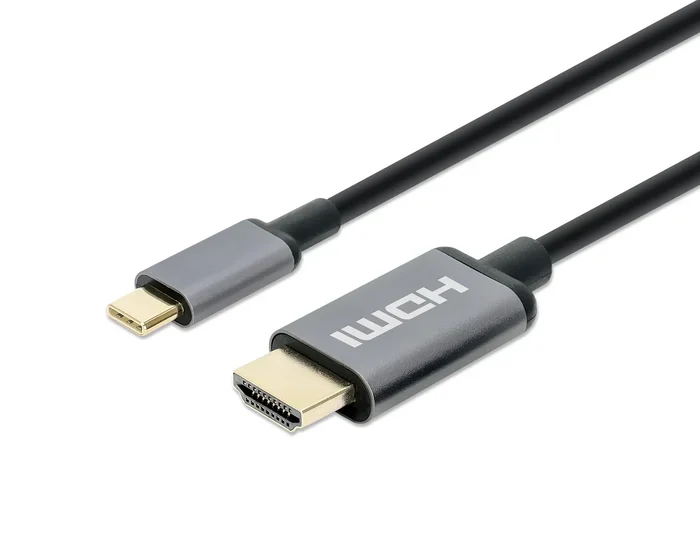
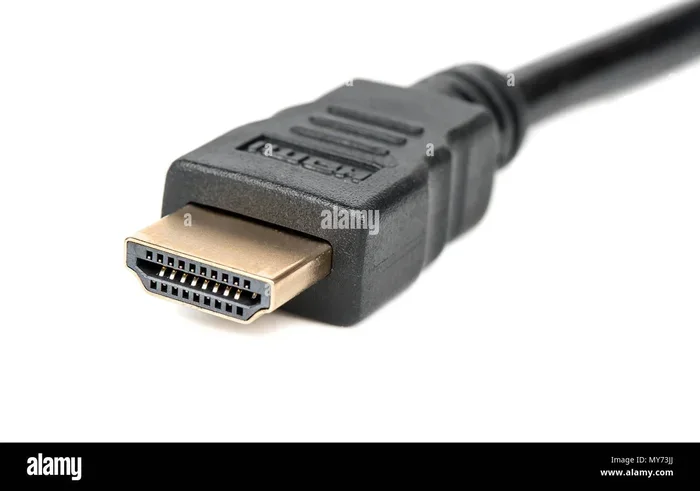
HDMI is a type of cable and connector. It is a physical piece of tech that sends signals from one device to another. Video, on the other hand, is the content itself. It is the moving pictures you see on your screen. Think of it like this: HDMI is the road, and video is the car driving on it. You need the road for the car to travel, but they are two very different things.
This guide will walk you through everything you need to know. We will break down what HDMI really is, what video means in this context, and why the difference matters. Whether you are setting up a home theater, connecting a laptop, or just curious about how your devices work, you will find clear answers here.
By the end of this article, you will never confuse the two again. You will also know which cable to use, when to upgrade, and how to get the best picture quality from your setup. Let us dive right in.
Key Takeaways
- HDMI is a cable type: It stands for High-Definition Multimedia Interface and is a specific way to connect devices.
- Video is the content: Video refers to the moving images and visual signals, not the cable itself.
- HDMI carries both video and audio: A single HDMI cable can transmit high-quality video and sound together.
- Multiple HDMI versions exist: Different versions support different resolutions and features like 4K and HDR.
- Other video connections exist too: VGA, DisplayPort, and USB-C are alternatives to HDMI for video output.
- HDMI is everywhere: Most TVs, laptops, gaming consoles, and streaming devices use HDMI ports.
- Knowing the difference matters: It helps you troubleshoot issues and pick the right gear for your needs.
📑 Table of Contents
What Is HDMI?
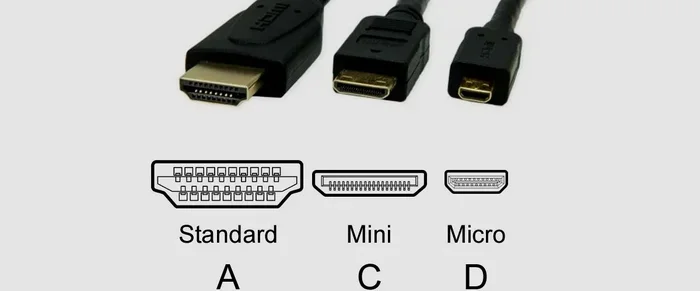
HDMI stands for High-Definition Multimedia Interface. It is a standard cable used to connect devices and send both video and audio signals at the same time. A single HDMI cable can carry high-quality picture and sound from your laptop to your TV, from a gaming console to a monitor, or from a streaming stick to your home theater system.
The HDMI standard was first introduced in the early 2000s. It quickly became the most popular way to connect devices because it replaced the need for multiple cables. Before HDMI, you often needed one cable for video and a separate one for audio. HDMI combined both into one simple connection.
Different Versions of HDMI
Over the years, HDMI has evolved. New versions came out with better features and higher bandwidth. Here are the main versions you should know about:
- HDMI 1.4: Supports 4K resolution at 30Hz. It also added the ARC (Audio Return Channel) feature.
- HDMI 2.0: Supports 4K at 60Hz. This is great for smooth video playback and gaming.
- HDMI 2.1: Supports 4K at 120Hz and even 8K resolution. It is the latest and fastest version available.
Each new version improved the video quality and added features like HDR (High Dynamic Range) and eARC (enhanced Audio Return Channel). When you buy an HDMI cable, check which version it supports to make sure you get the best performance.
What Does Video Mean in This Context?
When we talk about video, we mean the visual content displayed on a screen. This includes everything from a movie on Netflix to a PowerPoint presentation at work. Video is made up of frames, resolution, color depth, and frame rate. All of these factors determine how clear and smooth the picture looks.
Video signals can be sent through many different types of connections. HDMI is just one of them. Other connections include VGA, DisplayPort, and USB-C. Each of these carries the video signal in a different way, but the video content itself stays the same.
Video Resolution and Quality
Video quality depends on several things. Resolution is how many pixels make up the image. A higher resolution means a sharper picture. Here are the common resolutions you will encounter:
- 720p (HD): Basic high definition. Still looks good on smaller screens.
- 1080p (Full HD): The standard for most TVs and monitors. Very clear and detailed.
- 4K (Ultra HD): Four times the detail of 1080p. Stunning on larger screens.
- 8K: The newest high-resolution standard. Incredible detail but requires powerful hardware.
Frame rate also matters. This is how many images are shown per second. A higher frame rate means smoother motion, which is especially important for fast action scenes and gaming.
Key Differences Between HDMI and Video
Now that you understand what each term means, let us look at the key differences. This is where it all clicks into place.
Connection vs. Content
The biggest difference is simple. HDMI is the connection method. It is the physical port on your TV and the cable in your hand. Video is the content flowing through that connection. You can send video through HDMI, but you can also send video through other cables and ports.
Think about it this way. When you connect your laptop to a TV using an HDMI cable, the HDMI is the bridge. The video is what appears on the screen once the bridge is built. Without the video signal, the HDMI cable does nothing. Without the HDMI cable (or another connection), the video cannot reach your TV.
Audio and Video Together
One unique thing about HDMI is that it carries both audio and video through a single cable. This is a huge advantage. Many other video connections, like VGA, only carry the video signal. You would need a separate cable or connection for audio.
This is why HDMI is so popular for home theater setups. You plug in one cable, and you get both your picture and your sound. It keeps things simple and tidy. If you want to learn more about how different connections handle audio and video, checking out what is the ram on a laptop can help you understand how your device handles multimedia tasks overall.
When Do You Need an HDMI Cable?
You need an HDMI cable whenever you want to connect a source device to a display. This is the most common way people watch video content on a big screen. But there are specific situations where HDMI really shines.
Common Devices That Use HDMI
HDMI ports are found on almost all modern devices. Here is a quick list of devices that typically use HDMI:
- Televisions: Almost every modern TV has at least one HDMI port.
- Laptops: Many laptops include an HDMI output for connecting to external displays. If you are using a laptop for heavy tasks like video editing, having enough RAM matters too. Learn more about is 12gb ram enough for video editing to optimize your setup.
- Gaming Consoles: PlayStation, Xbox, and Nintendo Switch all use HDMI for video output.
- Streaming Devices: Roku, Apple TV, Amazon Fire Stick, and Chromecast use HDMI.
- Blu-ray Players: These devices rely on HDMI to deliver high-quality video and audio.
If you use your phone to record videos, you might also wonder about video output from mobile devices. For example, the what is the flower in iphone camera feature shows how smartphones have evolved to handle video recording in new ways, even if they do not always use HDMI directly.
HDMI vs. Other Video Connections
HDMI is not the only way to connect a device to a screen. Here is how it compares to other common options:
- VGA: An older analog connection. It only carries video, not audio. Picture quality is lower than HDMI.
- DisplayPort: A digital connection often found on computers. It supports high resolutions and refresh rates, similar to HDMI.
- USB-C: A versatile modern connector. Many newer laptops and tablets use USB-C for video output through Alt Mode or docking stations.
- DVI: Another older digital connection. It carries video only and is now largely outdated.
For most people, HDMI is the easiest and most versatile option. It works with almost everything and delivers great quality through a single cable.
Can HDMI Carry Both Video and Audio?
Yes! This is one of the biggest advantages of HDMI. A single HDMI cable can carry uncompressed video and compressed or uncompressed audio at the same time. This means you do not need separate cables for picture and sound.
How does this work? HDMI uses a technology called TMDS (Transition Minimized Differential Signaling) to transmit data. This technology sends the video and audio data as digital signals, which means less interference and better quality compared to older analog connections.
How HDMI Transmits Multiple Signals
Inside an HDMI cable, there are multiple tiny wires. Each wire has a specific job. Some wires carry the video data, some carry the audio data, and others handle control signals. This is why a single cable can do so much work.
The latest HDMI versions also support advanced audio formats like Dolby Atmos and DTS:X. This means you can send immersive surround sound from your source device to your soundbar or receiver using the same HDMI cable that carries your video.
Setting Up Your Home Theater
If you are building a home theater, HDMI is your best friend. You can connect your streaming device, Blu-ray player, or gaming console directly to your TV with one cable each. If your TV supports ARC (Audio Return Channel), it can even send audio back to your soundbar through the same HDMI cable.
For the best results, use an HDMI 2.1 cable if your devices support it. This ensures you get the highest video quality and the most features. If you are into gaming and want the smoothest experience, an HDMI 2.1 cable with 4K at 120Hz support is a game-changer.
Common HDMI Problems and How to Fix Them
HDMI connections are generally reliable, but problems can happen. Here are some of the most common issues and quick fixes.
No Signal or Black Screen
If your screen goes black after connecting an HDMI cable, try these steps:
- Check that the cable is firmly plugged in at both ends.
- Try a different HDMI port on your TV or monitor.
- Unplug the cable, wait 30 seconds, and plug it back in.
- Make sure the correct input source is selected on your display.
Poor Video Quality
If the picture looks blurry or has artifacts, the cable might be damaged or too old. Try using a newer HDMI cable that supports the resolution you need. Also, check your device settings to make sure the output resolution matches your display.
No Audio
If you get video but no sound, your device might be set to output audio through a different port. Go into your device settings and make sure HDMI is selected as the audio output device. Also, make sure the cable is fully seated in both ports.
Should You Upgrade Your HDMI Cable?
Not everyone needs the latest and greatest HDMI cable. If your current setup works fine, there is no rush to upgrade. But if you are buying a new 4K TV or a gaming console that supports HDMI 2.1, a better cable will help you get the full experience.
When shopping for an HDMI cable, look for these features:
- Version support: Make sure the cable supports HDMI 2.0 or 2.1 for the best quality.
- Cable length: Longer cables can sometimes cause signal loss. Keep cables as short as possible for the best performance.
- Build quality: Look for cables with good shielding and sturdy connectors.
- Ethernet support: Some HDMI cables include a built-in Ethernet channel, which can be handy for connected devices.
If you use a laptop for work or entertainment and connect it to an external display via HDMI, your overall setup matters. Having enough memory and a good video output setup makes a big difference. You might also want to read about are gaming laptops good for video editing to understand how different devices handle video tasks through their HDMI and display outputs.
Conclusion
So, is HDMI the same as video? No, they are not the same. HDMI is the cable and connection standard. Video is the content that flows through it. They work together, but they serve very different purposes.
Understanding this difference is simple but powerful. It helps you make better buying decisions, troubleshoot problems faster, and get the most out of your devices. The next time you plug in an HDMI cable, you will know exactly what is happening behind the scenes.
HDMI remains one of the most convenient and widely used ways to connect devices and enjoy high-quality video and audio. Whether you are watching a movie, playing a game, or giving a presentation, HDMI makes it easy. Just remember: HDMI is the road, and video is the car. You need both for the journey to work.
Frequently Asked Questions
Can I use HDMI to connect my phone to a TV?
Yes, you can. Many smartphones support HDMI output through a compatible adapter or cable. You will need either a USB-C to HDMI adapter or a specialized MHL cable. This lets you mirror your phone screen on a larger display for videos, photos, and presentations.
Does HDMI quality degrade over long distances?
Yes, HDMI signals can weaken over very long cable runs. For runs longer than 15 feet, you may notice a drop in picture quality. Using a high-quality cable or an HDMI signal booster can help maintain strong video and audio signals over longer distances.
Can HDMI carry 4K video?
Yes, but only with the right HDMI version. HDMI 2.0 supports 4K at 60Hz, and HDMI 2.1 supports 4K at 120Hz or even 8K. Make sure both your cable and your devices support the version you need for the best 4K experience.
What is the difference between HDMI and DisplayPort?
HDMI is more common on TVs and home entertainment devices. DisplayPort is often found on computer monitors and graphics cards. Both carry high-quality video and audio, but DisplayPort is designed more for PC use and supports higher refresh rates at certain resolutions.
Do all HDMI cables look the same?
Yes, physically they look very similar. The differences are inside the cable. Higher-quality HDMI cables have better shielding and support faster data transfer rates. Look for cables labeled with their HDMI version to know what they can handle.
Is VGA the same as HDMI?
No, VGA and HDMI are very different. VGA is an older analog connection that only carries video. HDMI is a modern digital connection that carries both video and audio. HDMI also supports much higher resolutions and better picture quality than VGA.