How to Clean a Mousepad
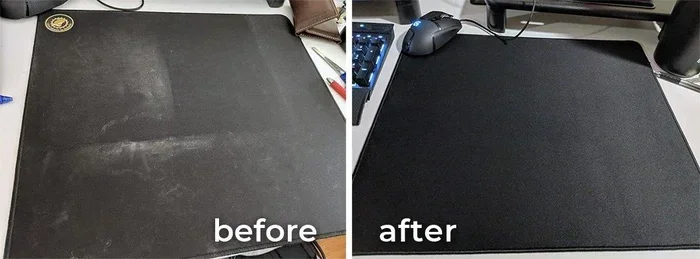
Keeping your mousepad clean boosts tracking accuracy and extends its life. This guide shows you the best way to clean a mousepad using simple household items like mild soap and warm water. Whether you have a fabric or hard surface pad, you will find easy step-by-step instructions that work every time.
A clean mousepad makes a huge difference in how your mouse tracks and feels during daily use. Over time, dirt, sweat, and oils build up on the surface. This buildup creates friction that slows your cursor and makes movements feel sticky. If you have ever noticed your mouse jumping or sticking in certain spots, a dirty pad might be the cause.
Cleaning your mousepad is one of the simplest maintenance tasks you can do. It takes just a few minutes and requires items you already have at home. Whether you use a cloth fabric pad or a hard plastic one, the process is straightforward and effective. In this guide, we walk you through every step to get your mousepad looking and working like new.
We also share tips on how often to clean your pad and how to avoid common mistakes. By the end, you will know exactly how to keep your setup fresh and responsive. Let us dive in and show you the best way to clean a mousepad the right way.
Key Takeaways
- Regular cleaning prevents dust buildup: A dirty mousepad slows your cursor and causes inaccurate tracking.
- Fabric pads need hand washing: Use mild soap and lukewarm water, then air dry flat.
- Hard pads can be wiped clean: A damp cloth with isopropyl alcohol works great for hard surfaces.
- Avoid harsh chemicals: Bleach and strong detergents can damage the pad surface and harm mouse sensors.
- Dry completely before use: Using a wet mousepad can promote mold and ruin tracking performance.
- Clean every 2-4 weeks: Regular maintenance keeps your mousepad fresh and your mouse gliding smoothly.
📑 Table of Contents
Why Cleaning Your Mousepad Matters
Many people forget about their mousepad when cleaning their desk. But a dirty pad affects more than just looks. It directly impacts how your mouse performs. Here is why regular mousepad cleaning is so important.
The Hidden Dirt on Your Mousepad
Every day, your hand leaves behind oils and sweat on the pad. Dust from the room settles on the surface. Tiny food crumbs can find their way into the fabric. Over weeks and months, all of this builds up into a layer of grime. This grime creates a rough surface that your mouse sensor struggles to read.
A clean mousepad gives your sensor a smooth, consistent surface to track on. This means faster response, fewer errors, and a much better experience. If you use your mouse for gaming or design work, the difference after cleaning is very noticeable.
Beyond performance, a dirty pad can start to smell bad. The combination of sweat and bacteria creates an unpleasant odor. Regular cleaning eliminates this issue and keeps your desk area fresh. It also helps with mousepad hygiene, which matters if you share your workspace or eat near your desk.
Materials You Will Need
You do not need any special products to clean a mousepad. Most items are already in your home. Here is what you will need for a basic cleaning session.
- Mild dish soap or hand soap
- Lukewarm water
- Soft cloth or sponge
- Clean towel
- Isopropyl alcohol (for hard surface pads only)
- A flat drying area like a table or clothesline
For fabric mousepads, stick to mild soap and water. Avoid using bleach or strong detergents. These can damage the fabric and fade the colors. For hard pads, isopropyl alcohol is your best friend. It cuts through grime quickly and evaporates without leaving residue.
Step-by-Step Guide to Cleaning a Mousepad
Now that you have your materials ready, let us walk through the cleaning process. We cover both fabric and hard mousepads below so you can follow the method that fits your pad type.
Cleaning Fabric Mousepads
Fabric mousepads are the most common type. They are comfortable and provide great tracking. But they also trap more dirt than hard pads. Here is how to wash a fabric mousepad properly.
- Shake off loose debris. Take the pad outside and give it a good shake. This removes crumbs, dust, and loose particles.
- Prepare a soapy solution. Fill a sink or basin with lukewarm water. Add a few drops of mild dish soap. Mix it gently until you see light suds.
- Spot clean stains first. Use a soft cloth or sponge dipped in the soapy water. Gently rub any visible stains in small circles. Do not scrub too hard or you may damage the fabric.
- Wash the full surface. Wipe down the entire pad with the soapy cloth. Focus on areas where your hand rests most often.
- Rinse thoroughly. Hold the pad under clean running water. Make sure all soap residue is gone. Leftover soap can make the surface sticky.
- Pat dry with a towel. Press a clean towel against the pad to absorb excess water. Do not wring or twist the pad.
- Air dry flat. Lay the pad on a flat surface or hang it over a clothesline. Let it dry completely before using it again.
This method works well for cleaning fabric mousepads at home. For deep stains or heavy buildup, you can let the pad soak in the soapy water for 15 to 20 minutes before scrubbing.
Cleaning Hard Surface Mousepads
Hard mousepads made of plastic, aluminum, or glass are easier to clean. They do not absorb water or soak up dirt. A simple wipe-down usually does the job.
- Remove loose dust. Use a dry cloth to wipe away any loose particles.
- Dampen a cloth with isopropyl alcohol. Use a concentration of 70% or higher for best results.
- Wipe the entire surface. Use smooth, even strokes across the pad. The alcohol dissolves oils and grime quickly.
- Address stubborn spots. For tough stains, apply a small amount of alcohol directly to the spot. Let it sit for 30 seconds, then wipe gently.
- Dry with a clean cloth. Buff the surface dry to prevent any water spots or streaks.
Hard mousepads can also be cleaned with a mild soap and water solution if you prefer. Just make sure to dry them immediately. The key with hard pads is that they do not need soaking or long drying times. A quick wipe and you are done.
Drying and Maintaining Your Mousepad
Proper drying is just as important as the cleaning process itself. A wet mousepad can develop mold and mildew. It can also damage the surface and affect mouse tracking. Here are some tips to make sure your pad dries correctly.
Best Drying Practices
- Always air dry. Do not use a hairdryer or put the pad in a dryer. Heat can warp or shrink fabric pads.
- Dry in a well-ventilated area. Good airflow speeds up the process and prevents moisture from settling.
- Make sure it is completely dry. Even slight dampness can cause issues. Touch the surface before using it again.
- Store flat or rolled. Never fold a damp or wet mousepad. Folding creates creases that can become permanent.
Ongoing Maintenance Tips
Once your mousepad is clean, a little regular maintenance goes a long way. Wipe down your pad once a week with a dry or slightly damp cloth. This removes surface dust before it builds up. If you eat at your desk, try to keep food away from the pad. Crumbs are one of the biggest causes of dirty mousepads.
For mousepad maintenance, consider washing your fabric pad once every two to four weeks. Hard pads can be wiped down more frequently since they resist grime better. Staying on top of cleaning keeps your setup looking great and performing at its best.
Common Mistakes to Avoid
Even though cleaning a mousepad is simple, people still make mistakes that can damage the pad. Here are the most common ones to watch out for.
- Using too much water on fabric pads. Soaking a fabric pad for too long can weaken the adhesive backing. This causes the pad to peel or curl at the edges.
- Using harsh chemicals. Bleach, ammonia, and strong solvents can destroy the pad surface. They can also leave a residue that confuses your mouse sensor.
- Using a machine washer. The agitation in a washing machine can tear or distort fabric pads. Hand washing is always the safer option.
- Not drying the pad fully. Using a damp pad right after cleaning can lead to mold growth and poor tracking performance.
- Scrubbing too aggressively. Hard scrubbing can wear out the fabric texture and damage the surface coating on hard pads.
Avoiding these mistakes will help your mousepad last much longer. A little care goes a long way in maintaining your accessories.
Expert Tips for Extending Your Mousepad Life
Beyond regular cleaning, there are a few extra steps you can take to keep your mousepad in great shape for years.
- Use a mousepad cover or desk mat. This adds an extra layer of protection against spills and dust.
- Wash your hands before using your mouse. Clean hands mean less oil transfer to the pad surface.
- Keep your workspace dust-free. Regularly dust your desk area to reduce the amount of dirt that reaches your pad.
- Rotate your mousepad. If you have a spare pad, rotating between two spreads out wear and tear.
- Replace when needed. Even with the best care, mousepads wear out over time. If the surface becomes rough or the tracking feels inconsistent, it might be time for a new one.
Taking care of your mousepad is part of taking care of your whole workspace. When your accessories are clean and in good condition, everything just works better. If you are looking to improve other parts of your setup, check out our guide on how to use a mouse on a laptop for tips on getting the most from your peripheral. You might also want to learn how to connect a wireless mouse to a laptop if you are considering upgrading your current setup. For general mouse troubleshooting, our article on how to get a mouse to work on a laptop covers common issues and quick fixes.
Conclusion
Cleaning your mousepad is a quick and easy task that makes a big impact. A clean pad gives you better tracking, a smoother feel, and a fresher workspace. Whether you have a fabric or hard surface pad, the steps are simple and require nothing more than mild soap and water.
Remember to clean your mousepad every two to four weeks. Avoid harsh chemicals and always let the pad dry completely before use. These small habits keep your mousepad clean and your mouse performing at its best. With the tips in this guide, you have everything you need to maintain a fresh and responsive setup. Start today and feel the difference a clean mousepad makes.
Frequently Asked Questions
Can I put my mousepad in the washing machine?
It is not recommended. The agitation and heat from a washing machine can damage fabric pads, warp hard pads, and weaken the adhesive backing. Hand washing is always the safer and more effective method for cleaning a mousepad.
How often should I clean my mousepad?
You should clean your mousepad every two to four weeks. If you eat near your desk or have pets, you may need to clean it more often. Regular mousepad cleaning keeps the surface smooth and your tracking accurate.
Can I use hand sanitizer to clean my mousepad?
It is best to avoid hand sanitizer. Most hand sanitizers contain alcohol and other chemicals that can leave a sticky residue on fabric pads. Stick to mild soap and water for fabric pads, and isopropyl alcohol for hard surface pads.
How do I remove stubborn stains from a mousepad?
For stubborn stains, let the pad soak in a soapy solution for 15 to 20 minutes before scrubbing gently with a soft cloth. Avoid using bleach or harsh scrubbing tools. Patience and gentle cleaning work best for removing tough stains without damaging the pad.
Can I use a hairdryer to speed up drying?
No, you should not use a hairdryer. The heat can warp fabric pads and damage the surface of hard pads. Always air dry your mousepad flat in a well-ventilated area. This is the safest way to ensure proper mousepad maintenance and longevity.
Is it normal for a mousepad to peel after washing?
Peeling can happen if the pad was soaked for too long or if the adhesive backing was already weak. To prevent this, avoid over-saturating fabric pads and never use hot water. If peeling occurs, the pad may need to be replaced for best performance.