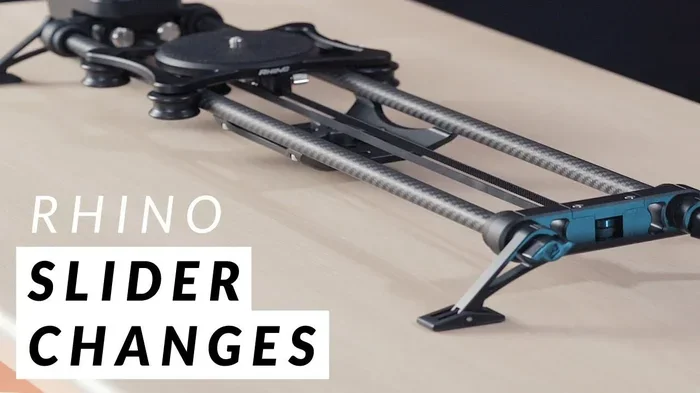
Rhino Camera Gear Ultimate Slider Bundle
The Rhino Camera Gear Ultimate Slider Bundle delivers professional-grade motion control for creators who want smooth, cinematic shots without breaking the bank. This complete kit includes a durable track, precision carriage, and essential accessories that simplify complex camera movements. Whether you film product demos or travel vlogs, this bundle gives you reliable performance and creative freedom.
Video creators always want smoother shots. Audiences notice jitter, shaky frames, and awkward movement right away. A good slider solves that problem by giving your camera a clean path to travel. The Rhino Camera Gear Ultimate Slider Bundle stands out because it combines durability, portability, and ease of use in one package. If you want cinematic motion without a huge budget, this bundle deserves a close look.
Many sliders feel overcomplicated. They require heavy tools, confusing setup steps, or expensive add-ons. This bundle takes a simpler path. It gives you the core parts you actually need, along with accessories that make everyday shooting easier. You can use it for product videos, lifestyle content, interviews, and creative transitions. The goal is simple: help you move the camera with control and confidence.
In this guide, we will break down what makes this slider bundle useful, how it performs in real shoots, and which features matter most. We will also cover setup tips, common mistakes, and practical ways to get better results. By the end, you will know whether this kit fits your workflow and how to use it effectively.
Key Takeaways
- Complete all-in-one kit: The bundle provides a track, carriage, remote, and mounting hardware so you start shooting immediately.
- Smooth cinematic motion: Precision bearings and a stable carriage create fluid dolly and pan movements for professional-looking footage.
- Portable and durable design: Lightweight aluminum construction makes it easy to carry to locations while resisting daily wear.
- Versatile camera compatibility: The system supports smartphones, mirrorless cameras, and DSLRs with standard mounting adapters.
- Easy setup and quick adjustments: Tool-free assembly and intuitive controls help you save time during shoots.
- Great value for growing creators: This bundle offers premium features at a friendly price point for indie filmmakers and content creators.
- Ideal for multiple shot types: Use it for product reveals, walking shots, slider transitions, and subtle camera moves that elevate visual storytelling.
📑 Table of Contents
- What Makes the Rhino Camera Gear Ultimate Slider Bundle Stand Out
- Key Features and Performance You Should Know
- How to Get the Best Shots With This Slider Bundle
- Practical Uses for the Rhino Camera Gear Ultimate Slider Bundle
- Common Mistakes to Avoid When Using a Slider
- Expert Tips to Improve Your Slider Workflow
- Comparing Slider Options: What Matters Most
- Final Thoughts on the Rhino Camera Gear Ultimate Slider Bundle
What Makes the Rhino Camera Gear Ultimate Slider Bundle Stand Out
A slider bundle sounds simple, but the details matter a lot. The Rhino Camera Gear Ultimate Slider Bundle is built around a few core ideas: stability, smooth motion, and practical design. Instead of forcing you to buy separate parts, it brings the essentials together in one kit. That saves time and reduces frustration, especially if you are new to motion control.
One of the biggest strengths is the carriage system. A slider only works well when the camera moves evenly. This bundle uses a carriage designed to glide with minimal resistance. That helps you create slow reveals, gentle pans, and controlled tracking shots. If the carriage feels sticky or wobbly, the footage suffers. This system aims to avoid that problem with a more refined motion path.
Another important feature is the track itself. The track needs to stay rigid while the camera moves. If it flexes too much, the shot loses stability. The bundle focuses on a sturdy design that holds its shape during use. It also needs to be practical for transport. Many creators shoot on location, so a bulky system becomes a hassle. This bundle balances strength with portability so you can bring it to different sets without much trouble.
The accessory package also matters. A slider is more useful when you can control it easily and mount your gear quickly. This bundle includes the extras that help you start shooting faster. That means less guessing and more creating. For busy creators, that kind of convenience makes a real difference.
Why Creators Choose a Slider Bundle Instead of Separate Parts
Buying pieces one by one can work, but it often leads to compatibility issues. You may end up with a track that does not match your carriage or a remote that feels awkward to use. A bundle removes that guesswork. It gives you parts that are meant to work together.
This approach also helps beginners. If you are just learning cinematic movement, you do not want to spend hours comparing mounting threads, connectors, and track lengths. A bundled kit gives you a ready path forward. You can focus on shooting instead of troubleshooting.
Who Benefits Most From This Bundle
This slider bundle works well for several types of creators. Product shooters can use it for clean reveal shots. Real estate videographers can create subtle camera moves that make rooms feel more dynamic. Travel vloggers can add polished transitions without carrying a large rig. Even hobbyists can improve their footage with smooth motion that feels more professional.
It also helps anyone who wants to practice camera movement. Smooth sliding takes practice. Having a reliable setup makes learning easier because you can repeat shots and compare results. That kind of consistency matters when you are building your filmmaking skills.
Key Features and Performance You Should Know
When evaluating a slider, it helps to look beyond marketing language. The Rhino Camera Gear Ultimate Slider Bundle earns attention because it focuses on practical performance. Here are the main areas that matter most during real-world use.
Motion Smoothness and Camera Control
Smooth motion is the whole point of a slider. If the camera jitters or accelerates unevenly, the shot loses its cinematic feel. This bundle is designed to support controlled movement across the track. The carriage should roll steadily so you can move the camera by hand or with a gentle push. That gives you more consistency, especially for slow and deliberate shots.
For best results, keep your movements deliberate. Fast slides can still look good, but slow motion often reveals more about the slider quality. If the carriage maintains steady motion, your footage feels cleaner. If it catches or stalls, you will notice it immediately.
Build Quality and Portability
A slider must survive regular use. It may sit in a bag, get set up on uneven surfaces, or move between shoots all day. Durable materials help it hold up over time. At the same time, weight matters. If the system is too heavy, you will avoid using it on location.
This bundle aims to strike a practical balance. It should feel solid without becoming a burden to carry. That makes it more likely you will actually use it often. For creators who shoot outside the studio, portability can be just as important as stability.
Mounting Flexibility and Camera Compatibility
A slider is only useful if it fits your gear. Different cameras, phones, and accessories use different mounting needs. This bundle supports common setups so you can adapt it to your workflow. That flexibility makes it more useful across multiple projects.
If you shoot with a smartphone, a compact mirrorless camera, or a larger DSLR, you want a system that can handle the load without feeling unstable. A secure mount keeps the camera aligned and reduces unwanted tilt. That matters for both static framing and moving shots.
Setup Speed and Everyday Usability
Time matters on set. If a slider takes forever to assemble, you may use it less often. A good bundle should make setup straightforward. Clear connections, easy adjustments, and intuitive controls help you move from setup to shooting faster.
Quick setup also helps when conditions change. Maybe the light shifts, or you need to reposition for a new angle. A flexible and easy-to-adjust slider lets you adapt without slowing down the shoot.
How to Get the Best Shots With This Slider Bundle
A slider can improve your footage, but technique matters just as much as gear. The Rhino Camera Gear Ultimate Slider Bundle gives you the tools. Your job is to use them with intention. Here are practical ways to get better results.
Plan Your Movement Before You Shoot
Before recording, decide what the camera should do. Should it slide left to reveal a product? Should it move slowly toward a subject? Should it combine a slide with a slight tilt? Planning ahead helps you avoid random movement that looks messy.
A simple plan improves consistency. You can mark the start and end positions on the track if needed. That makes repeat shots easier. It also helps when you want to match the same movement in multiple takes.
Keep the Camera Stable and Balanced
A slider works best when the camera is balanced. If the gear leans too far in one direction, the carriage may feel uneven. That can affect motion and make the shot harder to control. Check your mounting position before you start.
Also, make sure your payload matches the slider’s intended use. A system that is overloaded may not glide as smoothly. Keep the setup within a comfortable range so the movement stays clean.
Use Slow and Controlled Motion
Cinematic sliders often look best with patience. A slow slide gives the viewer time to notice the subject and the movement together. Rushed motion can feel distracting. Start with gentle speed, then adjust based on the mood you want.
If you want a more dynamic feel, you can still move faster. Just keep the motion smooth. The goal is controlled energy, not sudden jerks.
Combine the Slider With Other Techniques
A slider does not have to work alone. You can pair it with changes in focus, slight pans, or subject movement. That creates more visual interest. For example, a product shot can slide in while the focus shifts from the background to the item itself.
You can also use the slider for transitions. A clean slide out of one scene and into the next can make your edit feel more polished. This is especially useful for brand videos and social content.
Practical Uses for the Rhino Camera Gear Ultimate Slider Bundle
One of the best things about a slider bundle is its flexibility. You can use it in many different projects. The Rhino Camera Gear Ultimate Slider Bundle fits situations where controlled movement adds value.
Product Photography and Video
Product shots benefit from subtle motion. A slow slide can show off shape, texture, and design without overwhelming the viewer. It also helps the product feel more premium. For e-commerce content, that kind of polish can make a real difference.
Social Media and Short-Form Content
Short videos often need eye-catching movement. A slider can make a simple subject feel more dynamic. It can also help your content stand out in a crowded feed. Even a few seconds of smooth motion can improve the overall feel.
Interviews and Portraits
Interviews do not always need big camera moves, but a gentle slide can add depth. It can shift the framing slightly while keeping the subject comfortable and centered. That small movement often feels more natural than a sudden cut or dramatic motion.
Travel and Location Shoots
When you shoot on location, portability matters. You want gear that is easy to carry and quick to deploy. A compact slider bundle helps you capture more dynamic scenes without hauling a large rig. That makes it a smart choice for solo creators and small teams.
Common Mistakes to Avoid When Using a Slider
Even great gear can produce weak results if it is used poorly. Here are some common mistakes that can reduce the quality of your shots.
- Moving too fast: Quick slides can look shaky or rushed if you do not control the pace.
- Ignoring balance: An unbalanced camera can make the carriage move unevenly.
- Forgetting to secure the mount: A loose connection can cause wobble or unwanted tilt.
- Using the slider on unstable surfaces: If the track shifts, the shot loses stability.
- Overloading the system: Too much weight can affect smoothness and control.
- Not practicing the movement: Smooth sliding takes repetition. Plan and rehearse before recording.
Expert Tips to Improve Your Slider Workflow
If you want better results, small adjustments often help the most. Here are a few expert-friendly tips that can improve your experience with the Rhino Camera Gear Ultimate Slider Bundle.
First, test the carriage before important shots. Move it back and forth a few times to check for resistance or uneven spots. That quick check can save you from surprises later.
Second, think about framing early. Slider movement changes the composition as the camera travels. Make sure your subject stays in the frame for the full movement. If the shot drifts out of view, the motion loses impact.
Third, use consistent starting points. If you need multiple takes, begin from the same position each time. That makes editing easier and helps you compare versions fairly.
Fourth, keep your hands steady during manual moves. If you push the carriage yourself, use a relaxed but controlled motion. Sudden pressure can introduce wobble. A smooth hand movement often produces the most natural result.
Finally, review your footage on a larger screen when possible. Small playback on a phone can hide subtle shake or framing issues. A closer look helps you catch problems before you finish the project.
Comparing Slider Options: What Matters Most
Not every slider serves the same purpose. Some are built for heavy rigs, while others focus on portability. Some prioritize extreme precision, while others favor quick setup. The Rhino Camera Gear Ultimate Slider Bundle fits creators who want a practical mix of usability and performance.
If you mainly shoot in one studio space, a larger track may make sense. If you travel often, a lighter setup may be better. If you want to practice cinematic movement without a complicated rig, a bundled kit can be the easiest entry point.
The right choice depends on your goals. Ask yourself how often you will move the gear, what cameras you will use, and how much setup time you want to spend. Those answers help you pick a slider that actually fits your workflow.
Final Thoughts on the Rhino Camera Gear Ultimate Slider Bundle
Smooth camera movement changes the way a video feels. It adds polish, directs attention, and makes simple shots more engaging. The Rhino Camera Gear Ultimate Slider Bundle offers a practical way to achieve that look without making the process overly complicated. It brings together the core pieces you need for controlled motion, which makes it appealing for creators who value both convenience and results.
If you want to improve product videos, social content, portraits, or creative transitions, this bundle can be a strong addition to your kit. The most important thing is how you use it. Plan your movement, keep the setup balanced, and practice steady motion. When you combine good technique with reliable gear, your footage gets a noticeable upgrade.
A slider is not just a tool for movement. It is a tool for better storytelling. With the right approach, the Rhino Camera Gear Ultimate Slider Bundle can help you create shots that feel intentional, polished, and professional.
Frequently Asked Questions
What is included in the Rhino Camera Gear Ultimate Slider Bundle?
The bundle typically includes the core slider track, carriage, mounting hardware, and helpful accessories that make setup easier. It is designed to give you a complete starting kit for smooth camera movement without buying separate parts.
Can I use this slider bundle with a smartphone?
Yes, many slider bundles work well with smartphones when paired with the right mounting adapter. Just make sure the phone and mount stay balanced so the carriage moves smoothly across the track.
Is the Rhino Camera Gear Ultimate Slider Bundle good for beginners?
It can be a great option for beginners because it simplifies the setup process and gives you the main parts you need in one kit. That makes it easier to practice cinematic camera movement without dealing with too many separate components.
How do I make my slider shots look more cinematic?
Focus on slow, controlled movement and keep your framing consistent throughout the shot. A balanced camera, stable surface, and planned start and end points will also help your footage look cleaner and more professional.
Does this slider bundle work for product videos?
Yes, it is especially useful for product videos because a smooth slide can reveal shape, detail, and design in a polished way. Gentle motion often makes products feel more premium and engaging on screen.
What should I avoid when using a camera slider?
Try to avoid moving too fast, overloading the carriage, or setting up on an unstable surface. You should also make sure the camera is securely mounted and balanced so the movement stays smooth and steady.