Ssd Lifespan How Long Do Ssds Last and What Affects Them
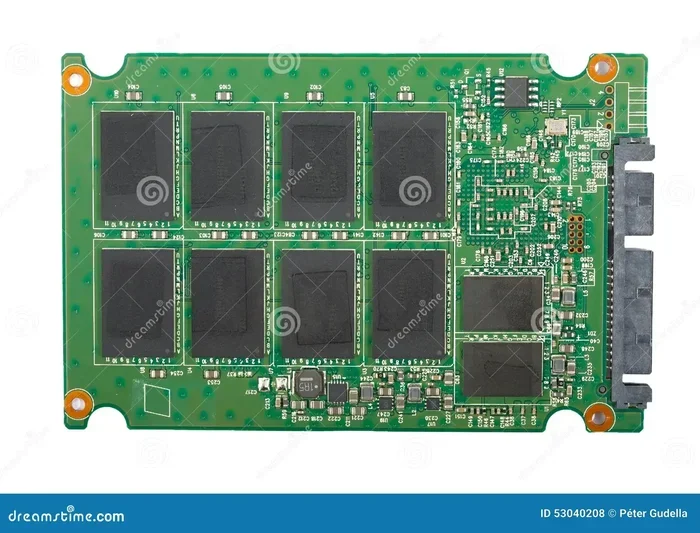
SSD lifespan depends on several factors, including NAND flash type, write workload, temperature, and usage habits. Most modern SSDs last 5 to 10 years under normal use, but heavy workloads can shorten that significantly. Understanding TBW ratings, wear leveling, and S.M.A.R.T. monitoring helps you get the most life out of your drive.
Key Takeaways
- SSD lifespan averages 5 to 10 years: Most drives outlast their warranty, but heavy use can shorten this.
- TBW (Terabytes Written) matters most: This rating tells you how much data you can write before the drive wears out.
- NAND flash type affects longevity: QLC lasts less than TLC, and TLC lasts less than MLC in terms of write endurance.
- Heat and power surges reduce SSD life: Keeping your drive cool and using surge protection helps a lot.
- S.M.A.R.T. data reveals drive health: Monitoring tools let you spot early warning signs before failure.
- SSDs outlast HDDs in most scenarios: No moving parts means fewer mechanical failure points.
- Firmware updates improve lifespan: Manufacturers release updates that optimize wear leveling and performance.
📑 Table of Contents
- SSD Lifespan: How Long Do SSDs Last and What Affects Them
- What Is SSD Lifespan and How Is It Measured?
- Types of NAND Flash and Their Impact on SSD Lifespan
- What Factors Affect SSD Lifespan?
- SSD Lifespan vs HDD Lifespan
- How to Monitor Your SSD Health
- How to Extend Your SSD Lifespan
- Signs Your SSD Is Dying
- How Long Do Different Types of SSDs Last?
- Final Thoughts on SSD Lifespan
SSD Lifespan: How Long Do SSDs Last and What Affects Them
Have you ever wondered how long your SSD will actually last? Maybe you just bought a new drive and want to know what to expect. Or perhaps your current drive is a few years old and you are wondering if it is on its way out.
SSD lifespan is a topic that confuses a lot of people. Unlike hard drives with spinning disks, solid state drives use flash memory. This means there are no moving parts to wear down mechanically. But that does not mean SSDs last forever. Every flash memory cell has a limited number of write cycles.
Here is the good news. Most modern SSDs last 5 to 10 years under normal use. Many even outlast their manufacturer warranty. But several factors can shorten or extend that timeline. In this guide, we will break down exactly what affects SSD longevity and how you can get the most life out of your drive.
What Is SSD Lifespan and How Is It Measured?
SSD lifespan refers to how long a drive can reliably store and retrieve data before it starts failing or degrading. There is no single number that applies to every drive. Instead, manufacturers use several metrics to estimate how long an SSD will last.
TBW (Terabytes Written)
The most important metric is TBW, which stands for Terabytes Written. This number tells you how many terabytes of data you can write to the drive over its lifetime before reaching the manufacturer’s endurance limit. For example, a typical 1TB consumer SSD might have a TBW rating of 600 TBW. That means you can write 600 terabytes of data to it before the drive is expected to reach its write endurance limit.
DWPD (Drive Writes Per Day)
Another metric you may see is DWPD, or Drive Writes Per Day. This tells you how many times you can rewrite the entire drive capacity each day over the warranty period. A 1TB drive rated at 1 DWPD means you can write 1TB of data every single day for the warranty period (usually 5 years) without issues.
For most regular users, these numbers are more than enough. You would need to write hundreds of gigabytes every single day to wear out a modern SSD quickly.
Types of NAND Flash and Their Impact on SSD Lifespan
The type of NAND flash memory inside your SSD plays a huge role in how long the drive will last. Not all NAND is created equal. Here is a breakdown of the main types.
SLC (Single-Level Cell)
SLC stores one bit per cell. It is the most durable and fastest type of NAND. SLC SSDs can handle around 90,000 to 100,000 write cycles per cell. However, SLC drives are very expensive and mostly used in enterprise settings, not consumer PCs.
MLC (Multi-Level Cell)
MLC stores two bits per cell. It offers a good balance between endurance and cost. MLC NAND handles around 10,000 write cycles per cell. You will still find MLC drives in some high-end consumer products, but they are becoming less common.
TLC (Triple-Level Cell)
TLC stores three bits per cell. This is the most common type in modern consumer SSDs. TLC NAND handles around 3,000 write cycles per cell. It offers great performance and reasonable endurance for everyday use.
QLC (Quad-Level Cell)
QLC stores four bits per cell. It is the most affordable but has the lowest endurance at around 1,000 write cycles per cell. QLC SSDs are great for storing large amounts of data and reading files quickly. But they wear out faster under heavy write workloads.
| NAND Type | Bits Per Cell | Write Cycles | Best For |
|---|---|---|---|
| SLC | 1 | 90,000–100,000 | Enterprise workloads |
| MLC | 2 | ~10,000 | High-end consumer use |
| TLC | 3 | ~3,000 | Most consumer PCs |
| QLC | 4 | ~1,000 | Mass storage, light writes |
If you want a drive that lasts a long time, look for TLC-based SSDs. They offer the best balance of price, speed, and endurance for most users.
What Factors Affect SSD Lifespan?
Several factors determine how long your SSD will actually last in real-world use. Let us go through the biggest ones.
Write Workload
The more data you write to your SSD, the faster it wears out. If you constantly download large files, install and uninstall games, or run workloads that generate heavy write activity, your SSD lifespan will be shorter than someone who mainly reads data and does light writing.
For the average user, write workloads are light enough that this is not a real concern. But if you do video editing, server hosting, or constant file transfers, you should pay closer attention to TBW ratings.
Temperature
Heat is the silent killer of electronics, and SSDs are no exception. High temperatures accelerate SSD degradation and can shorten the lifespan of NAND flash cells. Ideally, you should keep your SSD below 70 degrees Celsius during heavy use.
If your PC runs hot, consider adding more case fans or improving airflow. A simple cooling upgrade can add years to your solid state drive longevity.
Power Surges and Outages
Sudden power loss can corrupt data and damage SSD firmware. Using a surge protector or a UPS (Uninterruptible Power Supply) helps protect your drive from unexpected electrical issues. This is one of the easiest ways to protect your SSD lifespan.
Firmware and Software Updates
Manufacturers regularly release SSD firmware updates that improve wear leveling algorithms and fix bugs. Keeping your drive’s firmware up to date can extend its life. You can usually check for updates through the manufacturer’s software tool.
Over-Provisioning
Over-provisioning means leaving extra free space on your SSD. This space helps the drive manage wear leveling and garbage collection more effectively. Keeping at least 10 to 20 percent of your drive free can significantly improve SSD endurance and overall performance.
SSD Lifespan vs HDD Lifespan
One of the most common questions is whether SSDs last longer than HDDs. The answer depends on the use case.
HDDs have moving parts, which means they can physically break. Mechanical failures are the leading cause of HDD death. On the other hand, SSDs have no moving parts, so they are more resistant to physical shock and vibration.
However, SSDs wear out electronically through write cycles. HDDs can last a long time if you do not write much data to them. In practice, most modern SSDs outlast HDDs in typical consumer use because they are less prone to mechanical failure.
When it comes to NVMe vs SATA SSD lifespan, both types use the same NAND flash technology, so their endurance is similar. The main difference is speed. If you want to learn more about speed differences, check out how much faster NVMe is than SATA SSD.
How to Monitor Your SSD Health
You do not have to guess whether your SSD is dying. Modern drives use S.M.A.R.T. (Self-Monitoring, Analysis, and Reporting Technology) to track their own health. You can check this data using free tools.
Tools to Check SSD Health
- CrystalDiskInfo: A free Windows tool that reads S.M.A.R.T. data and shows drive health at a glance.
- Manufacturer software: Samsung Magician, Crucial Storage Executive, and WD Dashboard all offer built-in health monitoring.
- BlackDisk: Another reliable tool for checking SSD health and S.M.A.R.T. attributes.
Key S.M.A.R.T. Attributes to Watch
- Total Host Writes: Shows how much data you have written to the drive. Compare this to the TBW rating.
- Percentage Used: A rough estimate of how much life the drive has left.
- Media and Data Integrity Errors: Any non-zero number here is a red flag.
- Power-On Hours: Tells you how long the drive has been powered on.
If you want to learn how to set up a new NVMe SSD and monitor it from day one, check out our guide on how to set up a new NVMe SSD for step-by-step instructions.
How to Extend Your SSD Lifespan
Want to get the most years out of your SSD? Here are practical tips that actually work.
1. Avoid Constant Heavy Writes
Do not use your SSD as a download folder or torrent client for constant writing. Use a mechanical hard drive or external storage for heavy write tasks. This alone can significantly extend your SSD lifespan.
2. Keep Your Drive Cool
Ensure good airflow around your SSD, especially in laptops and compact desktops. Heat sinks for M.2 SSDs are cheap and very effective. If you are installing a new M.2 drive, our guide on how to install M.2 NVMe SSD in PC covers proper placement for optimal cooling.
3. Enable TRIM
TRIM tells your SSD which data blocks are no longer in use. This helps the drive manage wear leveling efficiently. Most modern operating systems enable TRIM by default, but it is worth checking to make sure it is active.
4. Keep Firmware Updated
Check for firmware updates every few months. Manufacturers improve wear leveling and fix bugs through these updates. You can usually do this through the manufacturer’s desktop app.
5. Use a Surge Protector
A sudden power spike can damage your SSD’s controller and flash memory. A basic surge protector costs very little and adds a layer of protection that can save your drive from early failure.
6. Do Not Fill the Drive to 100 Percent
Keeping 10 to 20 percent free space helps the SSD perform garbage collection and wear leveling. A nearly full SSD wears out faster and performs slower.
Signs Your SSD Is Dying
Even with the best care, SSDs can fail. Here are the warning signs to watch for:
- Frequent file corruption: Files that won’t open or keep getting corrupted.
- Slow read/write speeds: Your drive suddenly becomes very slow, even after a reboot.
- Boot failures: Your PC fails to boot or gets stuck at the loading screen.
- Bad blocks errors: The operating system reports bad sectors or read/write errors.
- Drive not recognized: The BIOS or operating system cannot detect the SSD at all.
- Excessive S.M.A.R.T. warnings: Health status drops below 90 percent in monitoring tools.
If you notice any of these signs, back up your data immediately. SSD failure can happen suddenly, and once a drive dies, data recovery is very difficult.
Understanding SSD lifespan helps you plan ahead. If your drive is several years old and showing warning signs, it is time to consider a replacement. For help choosing the right drive, our article on how much faster NVMe is than SSD can help you decide between NVMe and SATA options.
How Long Do Different Types of SSDs Last?
Not all SSDs are built the same. Here is a quick look at expected lifespans for different types.
Consumer TLC NVMe SSDs
These are the most common drives in modern PCs. With a typical TBW of 300 to 600 TBW for a 1TB drive, they easily last 5 to 10 years for average users. Most people will upgrade to a new drive before the old one wears out.
Enterprise SSDs
Enterprise drives are built for heavy workloads and can handle 3 to 5 times more writes than consumer drives. They often last 10+ years in data center environments with proper cooling and power protection.
QLC Consumer SSDs
QLC drives are affordable but have lower endurance. They work great for light use like browsing, streaming, and office work. Heavy writers should avoid QLC for primary drives.
Portable and External SSDs
Portable SSDs have the same NAND lifespan as internal drives. However, they are more vulnerable to physical damage from drops and impacts. Handling them carefully extends their solid state drive longevity significantly.
For users who want to know about SSDs in specific devices, many wonder do Chromebooks have SSD storage. The answer is yes, most Chromebooks use eMMC or NVMe SSD storage, and their lifespan follows the same principles we have discussed.
Final Thoughts on SSD Lifespan
SSD lifespan is something most users do not need to worry about. Modern SSDs are built to last 5 to 10 years or more under normal use. By understanding what affects drive longevity and following the tips in this guide, you can get the most life out of your investment.
Monitor your drive health with S.M.A.R.T. tools. Keep it cool, avoid constant heavy writes, and keep your firmware updated. These simple habits go a long way toward maximizing your SSD endurance.
Remember, SSDs are faster, more reliable, and more durable than old-school hard drives for most everyday tasks. Whether you are building a new PC or upgrading an old one, a quality SSD is one of the best investments you can make. If you are ready to upgrade or set up a new drive, our guide on how to install NVMe SSD in PC will walk you through the entire process.
Take care of your SSD, and it will take care of your data for years to come.
Frequently Asked Questions
How long does an SSD last on average?
Most modern SSDs last between 5 and 10 years under normal consumer use. The exact lifespan depends on the NAND type, write workload, and how well you maintain the drive. Many SSDs outlast their manufacturer warranty, which is typically 5 years.
Can an SSD last 20 years?
It is possible but unlikely under heavy use. Light-use SSDs stored in cool environments with minimal write activity can potentially last 15 to 20 years. However, most users will upgrade their drive before it reaches that age.
What does TBW mean for SSD lifespan?
TBW stands for Terabytes Written. It is the total amount of data you can write to the SSD before it reaches its endurance limit. A higher TBW rating means the drive is built to handle more write activity over its lifetime.
Do SSDs fail suddenly or gradually?
SSD failure can be both sudden and gradual. Some drives fail without warning, while others show gradual degradation like slow speeds, file corruption, or bad blocks. This is why monitoring S.M.A.R.T. data is so important.
Does filling an SSD to 100% reduce its lifespan?
Yes, filling an SSD completely can reduce its lifespan. SSDs need free space for wear leveling and garbage collection. Keeping at least 10 to 20 percent free helps the drive manage write cycles more effectively and extends its overall lifespan.
Is it worth replacing an SSD that is 7 years old?
If the drive is still healthy according to S.M.A.R.T. data and meets your performance needs, there is no urgent reason to replace it. However, if you notice slow speeds, errors, or frequent crashes, replacing it is a smart move to protect your data.