Server Ssd Buying Guide to Choose the Best SSD for You

Choosing the right server SSD can make or break your data center performance. This buying guide walks you through everything you need to know, from NVMe speeds and form factors to endurance ratings and capacity planning. You will learn how to match the perfect drive to your server workload and budget.
Key Takeaways
- NVMe SSDs deliver the fastest speeds: If your server handles heavy workloads, a PCIe Gen4 or Gen5 NVMe drive is the way to go.
- Capacity matters just as much as speed: Plan for growth and choose a size that fits both current and future needs.
- Endurance ratings (TBW) tell you how long the drive will last: Higher TBW means better reliability for write-heavy tasks.
- Form factor compatibility is critical: Always check your server supports 2.5-inch, M.2, or U.2 drives before purchasing.
- Enterprise-grade SSDs offer better reliability: They are built for 24/7 operation and heavy workloads.
- Do not skip the warranty and support: A strong warranty reflects the manufacturer’s confidence in their product.
📑 Table of Contents
What Is a Server SSD and Why Does It Matter?
A server SSD is a solid-state drive built specifically for use in servers and data center environments. Unlike the SSD you might find in a laptop, these drives are designed to handle constant reading and writing, often around the clock. They are faster, more reliable, and built to last longer under heavy loads.
Why does this matter? Your server handles important tasks like hosting websites, running databases, managing backups, and storing critical business data. If the storage is slow or unreliable, everything downstream suffers. A good server SSD keeps things running smoothly and quickly.
Think of it this way. You would not put cheap tires on a delivery truck that drives thousands of miles every day. Similarly, you should not put a cheap drive in a server that never sleeps. The right SSD makes a real difference in speed, stability, and long-term cost.
In this guide, we will break down everything you need to know. We will cover types of SSDs, key specs to look at, common mistakes to avoid, and practical tips to help you choose with confidence.
Types of Server SSDs You Should Know
Not all SSDs are the same. There are different types, and each has its own strengths. Understanding these types is the first step toward making a smart purchase.
SATA SSDs for Servers
SATA SSDs use the same interface as older hard drives. They are easy to install and widely compatible. These drives offer solid performance and are a great choice for budget-friendly server setups. If your server does not need blazing-fast speeds, a SATA SSD can handle everyday tasks just fine.
SATA SSDs typically max out around 550 MB/s in read and write speeds. That is plenty for file servers, light databases, and general office work. They also tend to be less expensive than newer options, which makes them attractive for small businesses.
NVMe SSDs for Servers
NVMe SSDs are the modern choice for high-performance servers. They connect directly through the PCIe bus, which means much faster speeds. If you want the absolute best performance, look no further than NVMe technology.
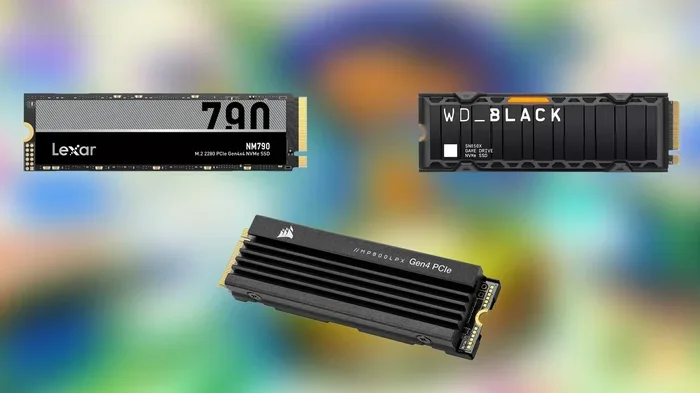
For example, a PCIe Gen4 NVMe M.2 SSD can reach speeds of 7,000 MB/s or more. That is over ten times faster than a typical SATA drive. This makes NVMe drives ideal for demanding workloads like virtualization, large databases, and real-time analytics.
If you are still deciding, consider reading about the best NVMe M.2 SSD options available right now to get a sense of what the market offers.
Enterprise vs. Consumer SSDs
Enterprise SSDs are built for 24/7 operation in demanding environments. They use higher-quality NAND flash, better controllers, and stronger error correction. These drives also come with longer warranties and higher endurance ratings.
Consumer SSDs work fine for light server tasks, but they are not designed for constant heavy use. If your server runs important workloads, investing in an enterprise NVMe SSD M.2 is a smart move. You will get better reliability and peace of mind.
Key Factors to Consider When Buying a Server SSD
Choosing a server SSD involves more than just picking the fastest drive on the shelf. Several factors play into finding the right fit for your setup.
Capacity and Storage Needs
Start by figuring out how much storage you actually need. Ask yourself what the server will be used for and how much data it will handle. A web server might need 500 GB to 1 TB, while a database server could easily require 4 TB or more.
It is always wise to plan ahead. Choose a capacity that gives you room to grow. Running out of space on a server is a headache you do not want to deal with. If you are not sure, go bigger than you think you need today.
Speed and Performance
Speed is where SSDs really shine over traditional hard drives. But not all SSDs are equally fast. The interface and generation matter a lot here.
PCIe Gen4 NVMe drives offer excellent speeds for most workloads today. If you have a newer server that supports PCIe Gen5, you can get even higher performance. For most real-world server tasks, sequential read speeds above 5,000 MB/s are more than enough.
Keep in mind that random read/write speeds (measured in IOPS) often matter more for server workloads than sequential speeds. Databases and virtual machines rely heavily on random access, so pay attention to those numbers too.
Endurance and TBW Ratings
TBW stands for Terabytes Written. It tells you how much data you can write to the drive over its lifetime before it is expected to fail. Higher TBW means a longer-lasting drive.
For a server that writes a lot of data constantly, endurance is critical. Enterprise SSDs typically have much higher TBW ratings than consumer drives. A good rule of thumb is to choose a drive with a TBW rating that comfortably exceeds your expected annual write volume.
Form Factor and Compatibility
Server SSDs come in different shapes and sizes. The most common form factors are 2.5-inch, M.2, and U.2. Before buying, check your server’s specifications to see which form factors it supports.
M.2 SSDs are compact and mount directly onto the motherboard. They are great for space-constrained servers. 2.5-inch SSDs fit into standard drive bays and are easy to swap out. U.2 drives are typically found in high-end enterprise servers and offer top-tier performance.
Best Server SSDs Compared
To help you narrow down your choices, here is a quick comparison of popular server SSD options across different categories.
| Drive | Interface | Capacity | Read Speed | Best For |
|---|---|---|---|---|
| Crucial P3 Plus NVMe SSD | PCIe Gen4 NVMe | Up to 4 TB | 7,000 MB/s | Budget server upgrades |
| Enterprise NVMe SSD M.2 | PCIe Gen4 NVMe | Up to 8 TB | 7,400 MB/s | Heavy enterprise workloads |
| SATA 2.5-inch SSD | SATA III | Up to 4 TB | 550 MB/s | Budget file servers |
| PCIe Gen5 NVMe SSD | PCIe Gen5 NVMe | Up to 8 TB | 12,000+ MB/s | Cutting-edge performance |
For most servers, a PCIe Gen4 NVMe M.2 SSD hits the sweet spot between speed, price, and availability. If you need maximum capacity, look at options like 8TB SSD M.2 NVMe drives that can store massive amounts of data in a single compact unit.
Budget-conscious setups can still benefit from SATA SSDs. They are reliable, affordable, and widely available. The key is matching the drive type to your actual workload requirements.
Quick Tips for Choosing the Right Server SSD
- Check your server manual: Confirm supported interfaces and form factors before purchasing.
- Do not ignore the warranty: Enterprise drives often come with 5-year warranties, while consumer drives may offer 3 years or less.
- Look for power loss protection: This feature protects your data if the server loses power unexpectedly.
- Consider cooling: High-performance NVMe drives can run hot. Make sure your server has adequate airflow or consider a drive with a heatsink.
- Read real-world reviews: Benchmarks are helpful, but real user experiences tell you how a drive performs under actual server conditions.
Common Mistakes to Avoid When Buying a Server SSD
Even experienced IT professionals sometimes make mistakes when choosing server storage. Here are the most common pitfalls to watch out for.
Mistake 1: Buying based on price alone. The cheapest drive is rarely the best choice for a server. You get what you pay for when it comes to endurance, reliability, and performance.
Mistake 2: Ignoring the warranty. A short warranty on a server SSD is a red flag. Enterprise drives come with longer warranties because they are built to last. Always check the warranty period before buying.
Mistake 3: Overlooking compatibility. Not every SSD fits every server. A drive might be the right speed and capacity but the wrong form factor. Always double-check your server’s specifications.
Mistake 4: Underestimating endurance needs. A drive that works fine for a home PC might fail quickly in a server environment. Servers write far more data than personal computers, so endurance ratings matter a lot.
Mistake 5: Skipping the controller quality. The controller is the brain of the SSD. Better controllers handle wear leveling, error correction, and garbage collection more effectively. Enterprise SSDs use superior controllers that consumer drives simply cannot match.
Final Thoughts and Recommendations
Choosing the right server SSD does not have to be overwhelming. Start by understanding your workload requirements. Then match the drive type, capacity, speed, and endurance to those needs. A well-chosen SSD will improve your server’s performance, reliability, and lifespan.
For most users, a PCIe Gen4 NVMe M.2 SSD offers the best balance of speed and value. If you need maximum capacity, look at high-capacity options that can store terabytes of data without breaking the bank. And always prioritize endurance and warranty when your server handles critical workloads.
Take your time, compare options, and do not rush the decision. The right server SSD is an investment that pays off every single day. If you are still exploring options, check out the Crucial P3 Plus NVMe SSD for a great entry point into enterprise-grade server storage.
Remember, your server is only as good as its storage. Choose wisely, and your data center will thank you for years to come.
Frequently Asked Questions
What is the best SSD for a server?
The best SSD for a server depends on your workload. For most servers, a PCIe Gen4 NVMe M.2 SSD offers excellent speed and value. For heavy enterprise workloads, look for drives with high TBW ratings and enterprise-grade components. Always match the drive to your specific needs and budget.
How much SSD storage do I need for a server?
This depends on what your server does. A basic file server might need 500 GB to 1 TB, while a database server could require 4 TB or more. Always plan for growth and choose a capacity that gives you headroom for future data expansion.
Is NVMe better than SATA for servers?
Yes, NVMe SSDs are significantly faster than SATA SSDs. NVMe drives can reach speeds of 7,000 MB/s or more, while SATA drives max out around 550 MB/s. For performance-critical server workloads, NVMe is the clear choice.
What does TBW mean on a server SSD?
TBW stands for Terabytes Written. It measures how much data you can write to the SSD over its lifetime before it is expected to fail. Higher TBW ratings mean better endurance, which is especially important for servers that write large amounts of data constantly.
Can I use a consumer SSD in a server?
You can, but it is not recommended for heavy workloads. Consumer SSDs have lower endurance ratings and shorter warranties than enterprise drives. They may work fine for light tasks, but they are not built for 24/7 server operation.
Do server SSDs need special cooling?
High-performance NVMe SSDs can generate significant heat. Most servers have adequate airflow, but in compact or dense server setups, you may need additional cooling. Some NVMe SSDs come with built-in heatsinks to help manage temperatures.
=== CONCLUSION ===
Selecting the right server SSD is one of the most important decisions you will make for your server setup. The right drive improves speed, boosts reliability, and protects your valuable data. By understanding the different types of SSDs, key specs like capacity and endurance, and common mistakes to avoid, you are now equipped to make a confident choice.
Whether you need a compact NVMe drive for a small business server or a high-capacity enterprise SSD for a data center, the options are better than ever. Take the time to evaluate your needs, compare products, and invest in quality storage. Your server performance and peace of mind are worth it.