What Is a Csv File
A csv file is a plain text file that stores data in a simple comma-separated format. It is one of the most widely used file types for sharing tabular data between different programs. Whether you work with spreadsheets, databases, or SaaS platforms, understanding how a csv file works will make your life much easier.
If you have ever downloaded data from a website or imported information into a spreadsheet, chances are you have worked with a csv file. But what exactly is a csv file, and why do so many people use it? This guide breaks everything down in simple terms. You will learn what a csv file is, how it works, and why it is so popular across different industries.
A csv file is one of the oldest and most reliable ways to store and share data. Unlike complex file formats, a csv file uses plain text to organize information. This makes it incredibly easy to move data between different programs and platforms. Whether you are a beginner or a seasoned tech user, understanding csv files is a must.
Key Takeaways
- A csv file stands for comma-separated values and stores data in a simple plain text format.
- You can open a csv file with Excel, Google Sheets, and most spreadsheet programs.
- Csv files are lightweight, easy to share, and work across different platforms and devices.
- They are commonly used in data analysis, business reporting, and software integrations.
- Knowing how to create, edit, and troubleshoot a csv file is a valuable skill for any tech user.
📑 Table of Contents
What Is a Csv File?
A csv file stands for comma-separated values. It is a simple text file that stores data in a structured format. Each line in the file represents a row of data, and commas separate the values within each row. Think of it like a spreadsheet, but without any fancy formatting or styling.
The beauty of a csv file is its simplicity. There are no hidden codes, no special fonts, and no complex structures. Just plain text organized in a logical way. This is exactly why csv files have been around for decades and remain so widely used today.
Here is a quick example of what a csv file looks like when you open it in a text editor:
Name, Age, City
John, 28, New York
Sarah, 34, London
Mike, 22, Tokyo
Each line is a record. Each comma separates a field. This clean structure makes a csv file easy to read for both humans and machines. It also makes it incredibly versatile for different uses.
How Does a Csv File Work?
A csv file works by using a delimiter to separate values. In most cases, the delimiter is a comma, which is where the name comes from. However, some csv files use other delimiters like semicolons or tabs, depending on the region or program.
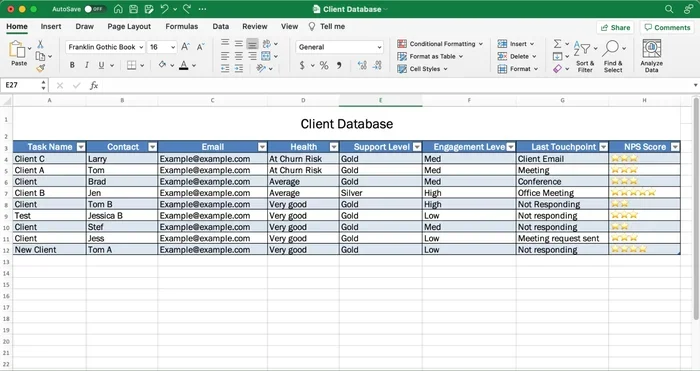
When you open a csv file in a program like Excel or Google Sheets, the software reads the text and places each value into its own cell. The commas tell the program where one value ends and another begins. This process is called parsing, and it happens almost instantly.
The first row of a csv file often contains headers. These are labels that describe what each column of data represents. For example, the first row might say “Name, Age, City” to tell you what kind of information is in each column. Headers are not required, but they make the data much easier to understand.
Why Are Csv Files So Popular?
Csv files have been around since the early days of computing, and for good reason. They are simple, universal, and work with almost any software. Here are the main reasons why a csv file remains a go-to format for data sharing.
Universal Compatibility — Almost every spreadsheet program, database, and data tool can read a csv file. Whether you use Excel, Google Sheets, LibreOffice, or a custom application, a csv file will work. This universal support is a huge advantage when sharing data with others.
Lightweight and Fast — A csv file contains only plain text. There are no images, no formatting, and no extra code. This makes csv files extremely small and fast to load. Even large csv files with thousands of rows can be opened quickly on most computers. If you are working with RAM and system resources, a csv file is one of the lightest options available.
Easy to Create and Edit — You do not need special software to create a csv file. You can make one in any text editor, like Notepad on Windows or TextEdit on Mac. Just type your data, separate values with commas, and save the file with a .csv extension. It really is that simple.
Perfect for Data Migration — When businesses need to move data from one system to another, csv files are often the answer. Whether you are migrating to a new SaaS environment or exporting data for analysis, a csv file provides a clean, standardized format that most systems understand.
How to Open a Csv File
Opening a csv file is straightforward, but the method depends on what program you are using. Here are the most common ways to open and view a csv file.
Using Microsoft Excel — Excel is one of the most popular programs for opening csv files. Simply double-click the file, and Excel will open it automatically. If the data does not display correctly, you can use the “Import” feature to specify the delimiter. If you are new to Excel, you might want to check out a guide on is Excel easy to learn for helpful tips on getting started.
Using Google Sheets — Google Sheets also handles csv files with ease. Go to File, click “Import,” and upload your csv file. Google Sheets will automatically detect the delimiter and format the data into a clean spreadsheet. This is a great option if you prefer cloud-based tools.
Using a Text Editor — If you want to see the raw text of a csv file, you can open it in any text editor. This is useful for troubleshooting or when you need to make quick edits. The data will look exactly like the example shown earlier, with commas separating each value.
Common Uses for Csv Files
Csv files are used in a wide variety of settings. Their simplicity and versatility make them ideal for many tasks. Here are some of the most common ways people use a csv file.
Data Export and Import — Many software applications allow you to export data as a csv file. This is common in CRM systems, e-commerce platforms, and analytics tools. You can then import that csv file into another program for further processing or analysis.
Data Backup — Because csv files are plain text, they make excellent backup files. If your database or application fails, you can often recover your data from a csv export. The data remains readable even years later because the format has not changed.
Business Reporting — Companies use csv files to generate and share reports. Sales data, customer lists, and inventory records are often stored in csv format. These files can be easily shared with team members or uploaded to reporting dashboards.
Data Analysis and Research — Researchers and analysts frequently work with csv files. The format is compatible with programming languages like Python and R, as well as data analysis tools like Tableau and Power BI. A csv file gives analysts a clean starting point for their work.
Website and App Development — Developers use csv files to store configuration data, import test data, or migrate content between systems. The lightweight nature of a csv file makes it a practical choice for development workflows.
Common Problems with Csv Files and How to Fix Them
While csv files are simple, they are not without their quirks. Here are some common issues you might encounter and how to solve them.
Data Misalignment — Sometimes, when you open a csv file in Excel, the data does not line up correctly. This often happens when the file uses a different delimiter, like a semicolon instead of a comma. To fix this, use the “Import” feature in Excel and manually select the correct delimiter.
Encoding Issues — Csv files can sometimes display strange characters, especially with non-English text. This is usually an encoding problem. Make sure your csv file is saved in UTF-8 encoding, which supports a wide range of characters and languages.
Large File Sizes — Although csv files are generally lightweight, very large files can slow down your computer. If you are working with a massive csv file and your system struggles, consider using a text editor designed for large files or splitting the file into smaller parts.
Missing or Extra Commas — Since commas are used as delimiters, any commas within your actual data can cause problems. For example, if a address field contains “123 Main St, Suite 5,” the extra comma will confuse the program. The fix is to wrap that field in quotation marks, like this: “123 Main St, Suite 5.”
Tips for Working with Csv Files
Here are some practical tips to help you work with csv files more effectively.
- Always back up your data before making edits to a csv file. Since csv files are plain text, there is no undo button in most text editors.
- Use a consistent delimiter throughout your file. Mixing commas and semicolons will cause parsing errors.
- Save your csv file in UTF-8 encoding to avoid character display issues, especially with international text.
- Use quotation marks around fields that contain commas, line breaks, or special characters.
- Preview your csv file in a text editor before importing it into a spreadsheet program. This helps you catch errors early.
- Keep your headers clear and descriptive so anyone who opens the file can understand what each column represents.
Frequently Asked Questions
What program opens a csv file?
You can open a csv file with Microsoft Excel, Google Sheets, LibreOffice Calc, or even a simple text editor like Notepad. All of these programs can read the plain text format of a csv file and display the data in an organized way.
Can a csv file contain images or formatting?
No, a csv file is plain text only. It cannot store images, colors, fonts, or any other formatting. This is actually one of its greatest strengths, because it keeps the file lightweight and universally compatible.
Is a csv file the same as an Excel file?
Not exactly. A csv file is a plain text format, while an Excel file (like .xlsx) is a binary format with built-in formatting. You can open a csv file in Excel, but the reverse is not always true. Excel files can contain features that csv files do not support.
What does the .csv file extension mean?
The .csv extension tells your computer that the file contains comma-separated values. It is a standard file extension recognized by almost all operating systems and software programs. When you see a file ending in .csv, you know it is a data file in plain text format.
Can I convert a csv file to another format?
Yes, absolutely. You can convert a csv file to Excel (.xlsx), PDF, or other formats using most spreadsheet programs. Simply open the csv file in Excel or Google Sheets and use the “Save As” or “Export” function to choose a different format.
Are csv files secure?
A csv file itself does not have built-in security features like encryption or password protection. If you need to share sensitive data, you should encrypt the file or use a secure file-sharing service. Always be careful when distributing csv files that contain personal or confidential information.
Conclusion
A csv file is one of the simplest and most useful file formats in computing. Its plain text structure makes it easy to create, share, and use across virtually any platform. Whether you are exporting data from a software application, preparing a report, or migrating to a new system, a csv file gets the job done reliably and efficiently.
Understanding how a csv file works gives you a practical skill that applies in many areas of technology and business. From opening a csv file in Excel to troubleshooting common issues, the knowledge you have gained from this guide will serve you well. Start working with csv files confidently, and you will wonder how you ever managed without them.