What Is a D Sub Port
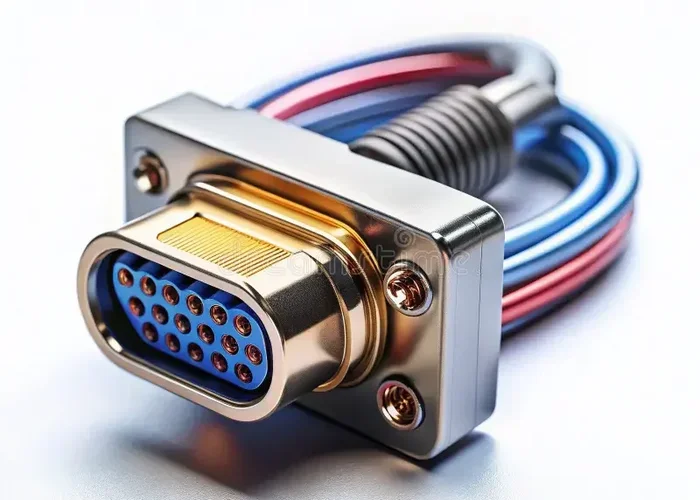
A D Sub Port is a type of computer connector shaped like the letter D, used to link devices like monitors, printers, and serial peripherals. The most common types are DB-9 and DB-25 connectors, which have been around since the 1950s and are still found on many legacy devices today. Understanding this port helps you identify cables, troubleshoot connection issues, and make informed decisions about your computer hardware.
You have probably seen a D Sub port on the back of your computer or monitor and wondered what it is. Maybe you have been trying to connect an older device and could not figure out which cable goes where. You are not alone. These connectors have been around for decades and they show no signs of disappearing. In this guide, we will break down everything you need to know about D Sub ports in simple, plain language.
A D Sub Port is a type of electrical connector that gets its name from its shape. The metal shielding around the connector forms a letter D, which gives it the name D Sub or D-Sub. These ports are found on computers, monitors, printers, and many other devices. They come in different sizes and pin configurations, and each one serves a specific purpose. Whether you are troubleshooting a connection or just curious about your hardware, this article has you covered.
Key Takeaways
- D Sub stands for D-Subminiature: It is a family of connectors with a distinctive D-shaped metal shield.
- DB-9 and DB-25 are the most common types: DB-9 has 9 pins and DB-25 has 25 pins, each serving different purposes.
- VGA connections use D Sub ports: Many older monitors and projectors connect via a DB-15 D Sub connector.
- D Sub ports are still relevant: They appear in industrial equipment, legacy systems, and some modern peripherals.
- They support both analog and digital signals: Depending on the type, D Sub ports handle video, data, and serial communication.
- Proper identification matters: Knowing your port type helps with cable selection and troubleshooting.
📑 Table of Contents
What Does D Sub Stand For?
The term D Sub stands for D-Subminiature. It was coined by Cannon ITT, the company that developed these connectors back in the 1950s. The D shape was not just for looks. It provided a way to align the connector properly and protect the pins inside. Over the years, the D Sub design became a standard in the electronics industry. You will find D Sub connectors in computers, servers, industrial machines, and even some audio equipment.
D Sub connectors come in a range of sizes. The size is determined by the number of pins or sockets on the connector. The most common ones you will encounter are DB-9, DB-15, DB-25, and DB-37. Each of these has a different number of pins and a different use case. The D-shaped metal shell is what makes them easy to identify at a glance.
Why Is the D Shape Important?
The D shape is more than just a design choice. It serves a practical purpose. The metal shield around the connector helps prevent electromagnetic interference. This means your signal stays clean and strong. The shape also ensures that the connector can only be inserted one way, which prevents damage from incorrect alignment. This is a simple but clever engineering solution that has stood the test of time.
Types of D Sub Ports You Will See
Not all D Sub ports are the same. The number of pins tells you what kind of port it is and what it is used for. Here are the most common types you will run into.
DB-9 Port
The DB-9 connector has 9 pins and is one of the most recognizable D Sub ports. It was widely used for serial communication in older computers. You might find it labeled as COM1 or COM2 on a desktop PC. The DB-9 port was the standard for connecting mice, modems, and other serial devices before USB took over. Today, you will still see DB-9 ports on industrial equipment, routers, and some legacy systems.
DB-15 Port
The DB-15 has 15 pins and is most commonly associated with VGA video connections. If you have ever plugged a monitor into an older computer using a blue cable, that was likely a DB-15 D Sub port. The female connector on the computer side and the male connector on the cable side make up a standard VGA setup. While VGA is being replaced by HDMI and DisplayPort, the DB-15 is still very much in use in offices, schools, and conference rooms.
DB-25 Port
The DB-25 is the largest of the common D Sub connectors with 25 pins. It was originally used for parallel printer ports on computers. The famous LPT1 port on older PCs used a DB-25 connector. Beyond printers, DB-25 ports also served as serial ports in some configurations. You will still find DB-25 connectors in professional audio equipment, networking hardware, and telecommunications devices.
DB-37 Port
The DB-37 has 37 pins and is less common but still important. It is often found in networking equipment, particularly older Cisco routers and switches. Some industrial control systems also use DB-37 connectors for data communication. If you work with networking gear or industrial machinery, you may encounter this port type regularly.
How D Sub Ports Are Used Today
You might think D Sub ports are outdated, but that is not entirely true. While USB and wireless connections have replaced many of the original uses, D Sub connectors are still widely used in specific areas. Let us look at where they show up today.
VGA and Video Connections
The DB-15 D Sub port is the backbone of VGA video connections. Many projectors, monitors, and computers still include VGA ports alongside newer options like HDMI. The reason is simple: VGA works reliably and many existing devices depend on it. If you are setting up a conference room or a classroom, a VGA connection via a D Sub port is often the easiest option. The analog signal it carries is perfectly fine for standard definition displays.
Serial Communication
Serial communication through DB-9 and DB-25 ports is still alive in many industries. Factory automation systems, medical devices, and point-of-sale terminals often rely on serial D Sub connections. These ports provide a stable and predictable data link that is hard to beat for certain applications. Even in an age of wireless technology, the reliability of a wired serial connection remains valuable.
Networking and Telecommunications
DB-37 and DB-25 connectors are common in networking and telecom equipment. They are used for console connections on routers and switches, allowing technicians to configure and troubleshoot devices. If you have ever seen a blue or black cable plugged into a router with a DB-25 or DB-37 connector, that was a serial console connection. These ports are essential for network administration and maintenance.
Industrial and Military Applications
D Sub ports are rugged and reliable, which makes them ideal for industrial and military use. Factory floors, power plants, and military vehicles all use D Sub connectors for various purposes. The metal shielding protects against interference, and the sturdy design withstands harsh environments. In these settings, a D Sub connection is often preferred over more fragile alternatives.
D Sub Port vs. Modern Connectors
It is natural to compare D Sub ports with modern connectors like USB-C, HDMI, and DisplayPort. Each has its strengths and weaknesses. Understanding the differences helps you choose the right connection for your needs.
USB connections have largely replaced D Sub ports for everyday peripherals like keyboards, mice, and external drives. USB is faster, more versatile, and more user-friendly. However, D Sub ports still hold an advantage in specific areas. For video, VGA through a DB-15 D Sub port offers broad compatibility with older displays. For serial communication, D Sub ports provide a direct and stable connection that does not require drivers or adapters.
If you are wondering how your computer’s overall performance affects your connection quality, you might want to check what a good idle GPU temperature looks like, as thermal management can impact port performance over time. Similarly, having enough RAM in your system ensures smooth data handling through any port type.
How to Identify a D Sub Port
Identifying a D Sub port is easy once you know what to look for. Here are the key features to check.
- D-shaped metal shell: This is the most obvious feature. The connector has a rounded D shape with a flat edge.
- Two rows of pins: Most D Sub ports have pins arranged in two parallel rows inside the D shell.
- Screw locks on the sides: Many D Sub connectors have small screws that hold the cable in place. These prevent accidental disconnection.
- Label or color: Some ports are labeled with the connector type (DB-9, DB-15, DB-25) or have color coding. VGA ports are often blue.
When you look at the back of a computer, the D Sub ports are usually grouped together near other video and serial ports. They are easy to spot because of their distinctive shape and the metal screws on either side. If you are unsure which port is which, count the pins or check the labels on your device manual.
Common D Sub Port Problems and How to Fix Them
Like any connector, D Sub ports can develop problems over time. Here are the most common issues and how to address them.
Pins Are Bent or Broken
One of the most common problems is bent or broken pins. This happens when a cable is forced into the wrong angle or when dust builds up inside the port. If a pin is bent, you can carefully straighten it with a small flathead screwdriver. If a pin is broken, you will likely need to replace the connector or the cable entirely.
Loose Connection
A loose D Sub connection can cause intermittent signal loss. This is often caused by worn-out screw locks or a damaged cable. Try tightening the screws on the connector. If that does not work, replacing the cable is the best fix. A secure connection is essential for reliable signal transmission.
No Signal or Distorted Display
If you are using a VGA D Sub connection and the display shows no signal or a distorted image, check a few things first. Make sure the cable is firmly seated in both ports. Try a different cable if possible. Also check that your graphics card is properly seated and that your GPU is running at a healthy temperature, as overheating can sometimes cause display issues through D Sub ports.
Quick Tips for Working with D Sub Ports
- Always power off your device before plugging in or removing a D Sub cable.
- Use compressed air to clean dust from D Sub ports regularly.
- Label your cables if you have multiple D Sub connections to avoid confusion.
- Keep spare DB-9 and DB-25 cables on hand for legacy devices.
- When buying a replacement cable, match the pin count exactly to the port type.
- Do not force a connector into a port. If it does not fit, check the orientation.
D Sub ports have been a staple of computer connectivity for over 70 years. Their simple, reliable design has kept them relevant even as technology evolves. Whether you are connecting a vintage printer, setting up a projector, or working with industrial equipment, understanding D Sub ports gives you confidence and control. Next time you see that distinctive D-shaped connector, you will know exactly what it is and how to use it.
The world of computer hardware is full of connectors that come and go, but the D Sub port has earned its place as a lasting standard. From the DB-9 serial ports of the 1980s to the VGA connections still found in boardrooms today, D Sub connectors have proven their value time and again. As long as there are legacy devices and specialized equipment that need reliable connections, the D Sub port will remain an important part of our tech landscape.
Now that you understand what a D Sub port is and how it works, you can tackle any connection task with confidence. Whether you are a tech enthusiast, a professional, or just someone trying to get an older device working again, this knowledge will serve you well. Keep this guide handy for future reference and share it with anyone who might benefit from it.
Frequently Asked Questions
What is a D Sub port used for?
A D Sub port is used for connecting various devices including monitors (via VGA), serial peripherals like mice and modems (via DB-9), printers (via DB-25), and networking equipment (via DB-37). Each type of D Sub connector has a specific purpose based on its pin count and design.
Is a D Sub port the same as a VGA port?
A VGA port is a type of D Sub port. Specifically, VGA uses a DB-15 connector, which has 15 pins arranged in three rows. So all VGA ports are D Sub ports, but not all D Sub ports are VGA ports. The DB-9 and DB-25 are also D Sub connectors used for different purposes.
Are D Sub ports still used in modern computers?
Yes, D Sub ports are still used in many modern computers, though less frequently than in the past. VGA D Sub ports are common on office computers and projectors. Serial DB-9 ports remain popular in industrial and networking equipment. Many modern PCs have removed D Sub ports in favor of USB and HDMI, but they are far from obsolete.
How do I know if my D Sub port is DB-9 or DB-25?
You can identify the type by counting the pins. A DB-9 has 9 pins arranged in two rows. A DB-25 has 25 pins in two rows. The physical size also differs, with DB-25 being noticeably larger. Check the labels on your device or count the pins to be sure.
Can I convert a D Sub port to USB?
Yes, you can use adapters to convert D Sub connections to USB. For example, a USB-to-DB-9 adapter lets you connect serial devices to modern computers without a native D Sub port. These adapters are widely available and affordable. Just make sure to install any required drivers for the adapter to work properly.
Why do D Sub ports have screws on the sides?
The screws on D Sub ports serve as locking mechanisms. They hold the cable connector firmly in place, preventing accidental disconnection. This is especially useful in environments where cables might get bumped or pulled, such as in offices, factories, or server rooms. The screws also help maintain a stable electrical connection.
=== CONCLUSION ===
A D Sub Port is a versatile and reliable connector that has been serving the tech world for decades. From the DB-9 serial ports to the DB-15 VGA connectors and the DB-25 parallel ports, each type has its own role to play. While newer connection standards have taken over many of the original D Sub functions, these ports remain essential in specific applications and industries. Understanding how D Sub ports work empowers you to connect, troubleshoot, and maintain a wide range of devices with confidence.