What Is a Query Processor
A query processor is the brain of any database system that takes your questions (queries) and turns them into results you can use. It parses, optimizes, and executes every query you send to a database, making sure you get answers fast and accurately. Understanding how a query processor works helps you build better databases and write smarter queries.
Have you ever wondered what happens the moment you type a search into a database? You hit enter, and in a fraction of a second, thousands — sometimes millions — of records return the exact answer you need. But behind that instant result lies a powerful engine called the query processor. It is the unsung hero of every database system, working tirelessly to make sense of your questions and deliver precise answers.
The query processor is the component inside a database management system that interprets, analyzes, and executes every query you send. Whether you are running a simple lookup or a complex analysis across billions of rows, the query processor handles it all. Without it, databases would just be massive storage bins with no way to pull out the specific data you need. In this guide, we will break down exactly what a query processor does, how it works, and why it is so important for modern technology.
Understanding the query processor is valuable whether you are a developer, a data analyst, a student, or simply someone curious about how databases power the apps you use every day. Let us dive in and explore this fascinating piece of database architecture step by step.
Key Takeaways
- Core Function: A query processor parses, optimizes, and executes database queries to return results efficiently.
- Key Components: It consists of a query parser, optimizer, and execution engine that work together seamlessly.
- Performance Matters: Proper indexing, caching, and query optimization dramatically improve how fast a query processor delivers results.
- Modern Applications: Query processors power everything from SaaS platforms to cloud databases and GPU-accelerated analytics.
- Memory Matters: Having enough RAM, like knowing what RAM is good for in a laptop, directly impacts query processing speed.
- Scalability: Distributed and parallel query processing lets systems handle massive data loads with ease.
📑 Table of Contents
What Does a Query Processor Do?
At its core, a query processor acts as the translator between you and your database. You write a query in a language like SQL, and the processor converts it into actions the database can understand and carry out. But this is not a simple one-step process. It involves several stages, each designed to make the execution as fast and accurate as possible.
The main job of a query processor is to take raw database requests and turn them into meaningful results. Think of it like a restaurant kitchen. You place an order (your query), the kitchen reads the ticket (parsing), decides the best way to prepare the dish (optimization), and then cooks it (execution). The result lands at your table — the data you asked for.
How Queries Flow Through the Processor
Every query follows a clear path through the query processor. First, the system receives your query. Then it checks the syntax to make sure it is written correctly. Next, it figures out the most efficient way to retrieve the data. Finally, it runs the query and sends the results back to you. Each of these steps is critical, and skipping or rushing any one of them can lead to slow performance or incorrect results.
The query processor also handles things like joining multiple tables together, filtering results based on conditions, and aggregating data for reports. All of this happens in milliseconds for well-optimized databases, which is truly remarkable when you think about the complexity involved.
Key Components of a Query Processor
A query processor is not one single piece of software. It is made up of several specialized components, each with a specific role. Let us look at the three main parts that make up a typical query processor.
The Query Parser
The first stop for any query is the parser. This component reads your query and checks it for errors. It breaks the query down into smaller pieces, called tokens, and verifies that the syntax follows the rules of the query language. If you made a typo or forgot a clause, the parser catches it and sends back an error message.
The parser also translates your query into an internal representation that the rest of the query processor can work with. Think of it as converting English into a language the database engine understands. Without the parser, the system would have no idea what you were asking for.
The Query Optimizer
Once the parser is done, the query moves to the optimizer. This is where things get really interesting. The optimizer looks at your query and figures out the absolute best way to execute it. There are often many different ways to get the same result, and the optimizer picks the fastest one.
For example, if you want to find all customers in California, the optimizer might decide to use an index on the state column instead of scanning every single row. This decision can mean the difference between a query taking one second versus one minute. The query optimizer is essentially the brain behind the speed of every query processor.
The Execution Engine
After optimization, the query reaches the execution engine. This is the component that actually does the work. It reads data from storage, applies filters, joins tables, sorts results, and returns the final output to you.
The execution engine works closely with the database’s storage layer, pulling data from disk or memory as needed. It also manages transaction processing, making sure that multiple queries running at the same time do not interfere with each other. A well-tuned execution engine is what separates a fast database from a slow one.
How Query Processing Works in Practice
Now that you know the components, let us see how a query processor handles a real-world example. Imagine you run an online store and want to find all orders placed last month that totaled more than $100.
You write a SQL query like this:
SELECT FROM orders WHERE order_date > '2024-01-01' AND total > 100;
Here is what the query processor does behind the scenes:
- Parsing: The parser checks the SQL syntax and breaks the query into its parts — the SELECT clause, the FROM clause, and the WHERE conditions.
- Optimization: The optimizer decides which indexes to use and in what order to apply the filters. It might choose to filter by date first because that narrows the dataset quickly.
- Execution: The engine scans the orders table, applies both conditions, and returns only the matching rows.
- Result Delivery: The results are sent back to your application or screen.
All of this happens in a split second. The query processor makes it look effortless, but underneath there is a complex and highly coordinated sequence of operations.
Query Execution Plans
Database administrators often use something called an execution plan to see exactly how the query processor intends to run a query. An execution plan is like a roadmap that shows each step the processor will take. By examining the plan, you can spot bottlenecks and write better queries. Most database systems let you view the execution plan with a simple command, and it is one of the most powerful tools for database performance tuning.
Why Query Processors Matter for Performance
The efficiency of a query processor directly impacts how fast your applications run. If the processor is slow or poorly configured, every query takes longer, and users notice. In today’s fast-paced digital world, even a one-second delay can frustrate users and hurt business metrics.
The Role of Indexing
One of the most important factors in query performance is indexing. An index is like a book’s table of contents — it lets the query processor find data quickly without scanning every row. Proper indexing can speed up data retrieval by orders of magnitude.
However, too many indexes can slow things down as well. Every time you insert or update data, the indexes need to be updated too. Finding the right balance is a key part of database performance tuning, and understanding how the query processor uses indexes is essential for this balance.
Query Caching
Another performance booster is query caching. When the query processor runs the same query multiple times, it can store the result in memory. The next time someone asks the same question, the processor returns the cached result instantly without doing any work. This is especially helpful for OLAP queries and applications with heavy read traffic.
Memory plays a big role here too. Having enough RAM allows the query processor to cache more results and keep more data in fast-access memory. If you are running a database on a laptop or server, knowing your memory limits — like checking what RAM is good for in a laptop — can help you plan for better performance.
Parallel and Distributed Query Processing
Modern databases often handle enormous datasets that no single machine can process quickly. That is where parallel and distributed query processing comes in. The query processor splits a large query into smaller pieces and runs them across multiple CPU cores or even multiple servers.
This approach is the backbone of data warehouse systems and big data platforms. It allows organizations to run complex analytics queries across terabytes of data in minutes instead of hours. The query processor orchestrates all of this behind the scenes, making massive-scale data analysis possible.
Query Processors in Modern Technology
The query processor is not just a theoretical concept. It powers real-world systems that billions of people rely on every day. From cloud platforms to enterprise software, query processing is everywhere.
Cloud and SaaS Databases
If you use a cloud-based application, there is a query processor working hard on a remote server to get your data. In a SaaS environment, the provider manages the database infrastructure, including the query processor. This means you never have to worry about tuning or maintaining it — the provider handles all of that for you.
Popular SaaS platforms use advanced query processors that can handle millions of queries per second. They leverage techniques like auto-scaling, load balancing, and intelligent caching to keep performance smooth even during peak usage times.
GPU-Accelerated Query Processing
Some cutting-edge query processors now use graphics processing units (GPUs) to speed up data analysis. GPUs are excellent at handling parallel computations, which makes them ideal for processing large datasets quickly. However, running intensive GPU workloads can cause your system to heat up, which is why monitoring GPU temperature is important for anyone running GPU-accelerated database workloads.
This technology is still emerging, but it is already making waves in fields like machine learning, scientific research, and real-time analytics. The fusion of GPU power with traditional query processing opens up exciting possibilities for the future of data management.
Relational vs. Non-Relational Query Processors
Traditional relational database management systems (RDBMS) use SQL-based query processors. These are proven, reliable, and widely used in industries ranging from finance to healthcare. Examples include MySQL, PostgreSQL, and Oracle Database.
On the other hand, non-relational databases (NoSQL) like MongoDB and Cassandra use different query processors designed for unstructured or semi-structured data. These processors trade some of the strict consistency of relational databases for greater flexibility and scalability. Both types have their strengths, and the choice depends on your specific use case.
Common Mistakes That Slow Down Query Processors
Even the best query processor can struggle if the queries it receives are poorly written. Here are some common mistakes that hurt performance:
- Selecting too many columns: Using SELECT instead of specifying only the columns you need forces the processor to retrieve extra data you will never use.
- Ignoring indexes: Writing queries that do not leverage available indexes means the processor has to scan entire tables instead of jumping straight to the right rows.
- Using subqueries unnecessarily: Sometimes a JOIN is much faster than a nested subquery, and the optimizer handles JOINs more efficiently.
- Not filtering early: Applying WHERE conditions as early as possible reduces the amount of data the processor needs to handle at each step.
- Over-complicating queries: Breaking a complex query into smaller, simpler steps can often improve performance and make debugging easier.
Avoiding these mistakes can dramatically improve how your query processor performs. Even small changes in how you write queries can lead to significant speed improvements, especially on large datasets.
Quick Tips for Better Query Processing
- Always use indexes on columns you frequently filter or join on.
- Use EXPLAIN or execution plan tools to understand how your queries are being processed.
- Keep your database statistics up to date so the optimizer can make the best decisions.
- Limit the amount of data returned by using pagination or specific column lists.
- Monitor your database memory usage and ensure you have enough RAM for your workload.
- Break complex reports into smaller, incremental queries when possible.
Conclusion
The query processor is one of the most important components in any database system. It takes your questions, figures out the best way to answer them, and delivers results at remarkable speed. From parsing and optimization to execution and caching, every step in the process is designed to make data access as efficient as possible.
Whether you are building a small app or managing a massive enterprise data warehouse, understanding how the query processor works gives you a real advantage. You will write better queries, troubleshoot faster, and design systems that scale. The next time you run a database query, take a moment to appreciate the incredible engine working behind the scenes to bring you the results you need.
The world of query processing is vast and constantly evolving, with new techniques and technologies emerging all the time. By staying curious and keeping your knowledge up to date, you can stay ahead of the curve and build database systems that truly perform at their best.
Frequently Asked Questions
What is the main job of a query processor?
The main job of a query processor is to interpret, optimize, and execute database queries. It takes the questions you ask in SQL or another query language and turns them into actual data results. Without it, a database would just store information with no way to retrieve it efficiently.
How is a query processor different from a database engine?
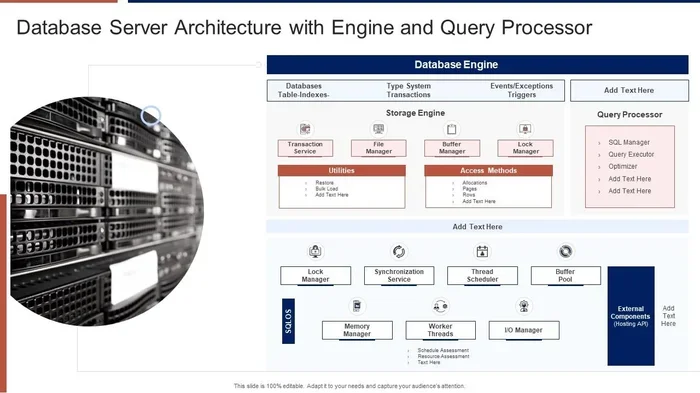
The query processor is a component within the broader database engine. The engine handles storage, indexing, and transaction management, while the processor focuses specifically on interpreting and executing queries. Think of the engine as the whole car and the query processor as the steering system that directs it.
Can a query processor work with non-SQL databases?
Yes, absolutely. While SQL-based query processors are the most common, NoSQL databases use their own query processing mechanisms. These processors are designed to handle different data models like documents, key-value pairs, and graphs. Each type of database has a query processor tailored to its specific structure.
What happens when a query processor runs out of memory?
When a query processor runs low on memory, it may need to spill data to disk, which slows things down significantly. This is why having enough RAM is so important for database performance. If you are running a database on a laptop, understanding memory requirements — like learning about what is a good amount of RAM for a laptop — can help you avoid these bottlenecks.
How can I speed up my query processor?
The best ways to speed up a query processor include adding proper indexes, writing efficient queries, keeping statistics updated, and ensuring you have enough memory. Using execution plans to analyze query performance is also a powerful technique. Small improvements in how you write queries often lead to big gains in processing speed.
Do cloud databases use the same query processors as on-premise databases?
Cloud databases use the same fundamental query processing principles as on-premise systems, but they add layers of automation and scalability. In a SaaS environment, the provider manages the query processor infrastructure, so you get optimized performance without the manual work. Cloud processors also benefit from distributed architectures that can scale resources up or down based on demand.