What Is Amd Raidxpert2 Tech
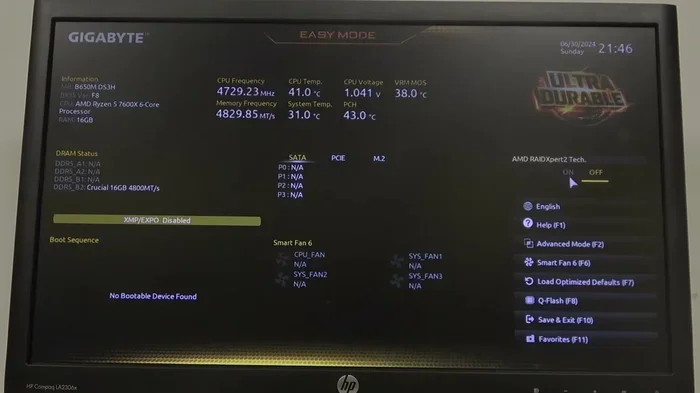
AMD RAIDXpert2 Tech is a powerful RAID management software designed to help users configure, monitor, and manage their RAID arrays with ease. Built specifically for AMD motherboards, this tool simplifies complex storage setups, giving both beginners and advanced users full control over their disk arrays and data redundancy settings.
Key Takeaways
- RAIDXpert2 is AMD’s free software for managing RAID arrays on server motherboards.
- It supports RAID levels 0, 1, 5, 10, and JBOD configurations.
- The tool provides a user-friendly graphical interface for easy array management.
- RAIDXpert2 works with AMD EPYC and Ryzen Threadripper server platforms.
- You can monitor drive health and rebuild arrays without rebooting the system.
- It offers advanced features like background initialization and stripe size customization.
- The software is essential for administrators managing AMD-based storage servers.
📑 Table of Contents
- What Is AMD RAIDXpert2 Tech
- What Does AMD RAIDXpert2 Tech Do?
- Key Features Of AMD RAIDXpert2 Tech
- How AMD RAIDXpert2 Tech Fits Into Your System
- Setting Up RAID With AMD RAIDXpert2 Tech
- Who Should Use AMD RAIDXpert2 Tech?
- AMD RAIDXpert2 Tech: Pros And Cons
- Comparing RAIDXpert2 With Other RAID Management Tools
- Final Thoughts On AMD RAIDXpert2 Tech
What Is AMD RAIDXpert2 Tech
AMD RAIDXpert2 Tech is a powerful RAID management utility designed for AMD server and workstation platforms. If you have ever wondered how to set up, manage, or monitor a RAID array on AMD-based hardware, this tool is your go-to solution. It gives users a simple and intuitive way to configure storage arrays without needing deep technical knowledge. Whether you are a small business owner or a power user, AMD RAIDXpert2 Tech makes storage management far less intimidating. In this guide, we will break down everything you need to know about this software and why it matters for your system.
Storage reliability is one of the most overlooked aspects of PC ownership. Many people focus on RAM, processors, and graphics cards but forget that their data lives on hard drives and SSDs. AMD RAIDXpert2 Tech helps protect that data by enabling RAID configurations that provide redundancy and performance boosts. Think of it as an insurance policy for your stored files. Let us dive deeper into what makes this tool so useful and how it fits into the broader AMD ecosystem.
What Does AMD RAIDXpert2 Tech Do?
At its core, AMD RAIDXpert2 Tech is a software application that lets you create and manage RAID arrays. RAID stands for Redundant Array of Independent Disks. It is a technology that combines multiple physical drives into a single logical unit. This setup can improve speed, protect your data, or both. AMD RAIDXpert2 Tech supports several RAID levels, giving you flexibility based on your needs.
Supported RAID Levels
The software supports a range of RAID configurations. Here is a quick look at what you can expect:
- RAID 0 — Strips data across drives for faster performance. No redundancy.
- RAID 1 — Mirrors data across two drives for protection against drive failure.
- RAID 5 — Distributes data and parity across drives. Offers a balance of speed and safety.
- RAID 10 — Combines mirroring and striping. Great for performance and redundancy.
- JBOD — Just a Bunch of Disks. Combines drives without any RAID benefits.
Each level serves a different purpose. AMD RAIDXpert2 Tech makes it easy to choose the right one for your situation. You do not need to be a storage engineer to get started.
Key Features Of AMD RAIDXpert2 Tech
AMD RAIDXpert2 Tech comes packed with features that make storage management straightforward. Let us look at what stands out most.
User-Friendly Interface
One of the best things about this tool is how approachable it is. The dashboard is clean and organized. Even if you have never touched RAID software before, you will feel comfortable quickly. The menus are logical, and the setup wizard walks you through each step. You are never left guessing what to do next.
Real-Time Monitoring
AMD RAIDXpert2 Tech gives you live updates on the health of your drives. You can check drive temperatures, status indicators, and rebuild progress. This real-time visibility helps you catch potential problems early. If a drive starts showing signs of failure, you will know right away.
Drive Management Tools
The software lets you add, remove, and replace drives within an array. Hot-swapping support means you can swap out a failing drive without shutting down your system. This feature is a lifesaver for servers that need to stay online around the clock.
Email Notifications
You can set up alerts so the system notifies you when something goes wrong. AMD RAIDXpert2 Tech can send email updates about drive failures, rebuilds, or other critical events. This means you do not have to constantly monitor the dashboard manually.
How AMD RAIDXpert2 Tech Fits Into Your System
Understanding where AMD RAIDXpert2 Tech lives in your system helps you appreciate its role. It runs on AMD server chipsets and works alongside the AMD chipset drivers. The software interfaces directly with the RAID controller built into AMD processors. This tight integration means fewer compatibility headaches and smoother performance.
If you are building or managing a workstation, having this tool in your arsenal is a big advantage. It handles the heavy lifting of RAID management so you can focus on your actual work. Think of it as the control center for all your storage needs. When paired with quality hardware like a good amount of RAM for a laptop or a fast NVMe drive, your system becomes a well-oiled machine.
For laptop users, storage management might not be the first thing on your mind. But if you use your laptop for business or creative work, protecting your data matters. AMD RAIDXpert2 Tech is more common in desktop workstations and servers, but the principles it uses apply to any AMD-based system. You can also explore what makes a biggest NVMe SSD to complement your RAID setup with fast storage.
Setting Up RAID With AMD RAIDXpert2 Tech
Getting started with AMD RAIDXpert2 Tech is simpler than most people expect. The process involves a few clear steps that anyone can follow.
- Install the software — Download AMD RAIDXpert2 from the official AMD website. Run the installer and follow the on-screen prompts.
- Access the dashboard — Launch the application after installation. You will see an overview of your connected drives and current RAID status.
- Create a new array — Click on the option to create a RAID volume. Select your drives and choose the RAID level you want.
- Configure settings — Set up email alerts, schedule regular checks, and customize notification preferences.
- Monitor and maintain — Regularly check the dashboard for drive health updates. Replace any failing drives promptly.
The setup process typically takes less than 15 minutes for a basic configuration. The key is to plan your RAID level ahead of time so you know exactly what you need. AMD RAIDXpert2 Tech makes adjustments easy, so you are never locked into a decision you cannot change.
Who Should Use AMD RAIDXpert2 Tech?
This tool is ideal for a specific group of users. Let us break down who benefits most from AMD RAIDXpert2 Tech.
Small Business Owners
If you run a small business and rely on local storage for your files, RAID is essential. Losing customer data or financial records can be devastating. AMD RAIDXpert2 Tech gives you the tools to set up a protective RAID array without hiring an IT specialist.
Content Creators
Video editors and photographers deal with massive files. RAID 0 setups can dramatically speed up read and write times. With AMD RAIDXpert2 Tech, you can configure a high-performance storage array and monitor it with ease. Pair this with smart investments for your PC lifespan and your system will serve you well for years.
IT Administrators
For IT professionals managing multiple workstations or servers, AMD RAIDXpert2 Tech is an efficient management tool. The centralized dashboard and email alerts save time. You can monitor many systems from one place without physically visiting each machine.
Enthusiast Builders
If you love building custom PCs and want full control over your storage setup, this tool is a must-have. It gives you the power to configure RAID arrays exactly the way you want them. It is a great companion to understanding your system’s hardware, including what RAM size fits your needs and how storage works hand in hand with memory.
AMD RAIDXpert2 Tech: Pros And Cons
Like any tool, AMD RAIDXpert2 Tech has its strengths and areas where it could improve. Here is an honest look at both sides.
Pros
- Free to use with compatible AMD hardware
- Supports multiple RAID levels for different needs
- Clean and intuitive user interface
- Real-time drive monitoring and alerts
- Hot-swap support for drive replacement
- Email notification system for proactive management
- Lightweight and does not hog system resources
Cons
- Only works with AMD server and workstation chipsets
- Not designed for consumer laptops or desktops
- Limited to AMD ecosystem, so no support for Intel or other platforms
- Advanced features may require some learning for beginners
- No mobile app for on-the-go monitoring
Overall, AMD RAIDXpert2 Tech delivers solid value for its target audience. If you are working within the AMD ecosystem, it is hard to find a better RAID management tool. The software does exactly what it promises without unnecessary bloat.
Comparing RAIDXpert2 With Other RAID Management Tools
There are other RAID utilities on the market. Here is how AMD RAIDXpert2 Tech stacks up against a few common alternatives.
| Feature | AMD RAIDXpert2 Tech | Intel RST | Third-Party RAID Tools |
|---|---|---|---|
| Platform Support | AMD chipsets only | Intel chipsets only | Varies by tool |
| Cost | Free | Free | Often paid |
| Ease of Use | Very user-friendly | Moderate | Can be complex |
| RAID Levels | 0, 1, 5, 10, JBOD | 0, 1, 5, 10 | Varies widely |
| Email Alerts | Yes | Limited | Depends on tool |
| Hot-Swap Support | Yes | Yes | Varies |
As you can see, AMD RAIDXpert2 Tech holds its own against competing tools. Its free price tag and user-friendly design make it a strong choice for AMD users. The email alert feature is particularly useful for anyone managing a server remotely.
Final Thoughts On AMD RAIDXpert2 Tech
AMD RAIDXpert2 Tech is a reliable and straightforward RAID management tool for AMD server and workstation platforms. It simplifies the process of setting up and maintaining storage arrays. Whether you are protecting business data or boosting performance for creative work, this software delivers real value.
The tool shines in its simplicity. You do not need a degree in computer science to use it effectively. The dashboard is clear, the setup process is guided, and the monitoring features keep you informed. For anyone working within the AMD ecosystem, AMD RAIDXpert2 Tech is a must-have utility that deserves a place in your software toolkit.
If you are ready to take control of your storage, download AMD RAIDXpert2 Tech today and explore what it can do for your system. Your data is too important to leave unprotected, and this tool gives you the power to keep it safe and running at its best.
Frequently Asked Questions
What Is Amd Raidxpert2 Tech?
Amd Raidxpert2 Tech is a user-friendly management software tool designed for AMD RAID controllers. It allows users to configure, monitor, and manage their RAID arrays through a simple graphical interface. This tool is commonly bundled with AMD server and workstation motherboards that support RAID functionality.
How Do I Install Amd Raidxpert2 Tech on My System?
You can install Amd Raidxpert2 Tech by downloading it from the official AMD website or using the driver disc that came with your motherboard. The installation process is straightforward and typically involves running the setup file and following the on-screen prompts. Once installed, you can access the tool from your system tray or through the BIOS/UEFI RAID configuration menu.
What RAID Levels Does Amd Raidxpert2 Tech Support?
Amd Raidxpert2 Tech supports several common RAID levels, including RAID 0, RAID 1, RAID 5, RAID 10, and JBOD (Just a Bunch of Disks). Each level offers different benefits for performance, data redundancy, or storage capacity. The supported levels may vary depending on your specific AMD RAID controller model.
Is Amd Raidxpert2 Tech Free to Download and Use?
Yes, Amd Raidxpert2 Tech is a free utility provided by AMD for users who own compatible hardware. You do not need to purchase a license to access its full range of RAID management features. However, you will need an AMD RAID-capable motherboard or server platform to use the software.
What Are the Minimum System Requirements for Amd Raidxpert2 Tech?
The software typically requires a Windows operating system such as Windows 10 or Windows 11, along with an AMD RAID controller installed on the motherboard. You will also need basic system resources like a modern processor, sufficient RAM, and available disk space for the installation. Always check the AMD support page for the latest requirement details.
Can Amd Raidxpert2 Tech Help Improve Storage Performance?
While Amd Raidxpert2 Tech itself is a management tool and does not directly boost performance, it lets you set up RAID configurations that can improve read and write speeds. For example, configuring a RAID 0 array through the tool spreads data across multiple drives for faster access. It also helps you monitor drive health, which keeps your storage system running at peak efficiency.