What Is an Erp System Administration
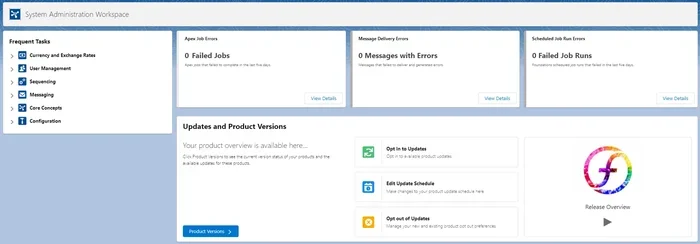
ERP system administration is the practice of managing, configuring, and maintaining an enterprise resource planning system to keep business operations running smoothly. It covers everything from user access and data integrity to workflow automation and system updates. Understanding ERP administration helps businesses get the most value from their investment.
Running a business means juggling a lot of moving parts. Inventory, finances, human resources, customer orders — it all needs to work together. That is where an ERP system comes in. But having the software is only half the battle. Someone needs to keep it running, updated, and secure. That someone is the ERP system administrator.
ERP system administration is the behind-the-scenes work that makes enterprise software actually useful. Without proper administration, even the best ERP platform can become a mess of errors, security gaps, and wasted time. In this article, we will break down exactly what ERP system administration involves, why it matters, and how to excel at it.
Key Takeaways
- ERP system administration manages the entire lifecycle of an enterprise resource planning platform, from initial setup to daily operations and long-term maintenance.
- Core responsibilities include user management, data security, system configuration, and ensuring all ERP modules work together seamlessly.
- Proper ERP administration improves business efficiency, reduces errors, and supports better decision-making across departments.
- Ongoing training and support are essential for ERP admins to stay current with updates and new features.
- Common mistakes include poor data governance and neglecting regular backups, which can lead to costly system failures.
- ERP administration is a growing career field with strong demand in tech and business sectors.
📑 Table of Contents
- What Is ERP System Administration?
- Core Responsibilities of an ERP System Administrator
- Key Skills Needed for ERP System Administration
- ERP Administration and Project Management
- ERP Administration in a SaaS Environment
- Common Mistakes in ERP System Administration
- Career Path and Opportunities in ERP System Administration
- Best Practices for Effective ERP System Administration
- Conclusion
What Is ERP System Administration?
ERP stands for enterprise resource planning. An ERP system is a software platform that connects different business functions into one unified system. ERP system administration refers to the day-to-day management of this platform. It includes setup, configuration, user management, security, troubleshooting, and ongoing maintenance.
Think of an ERP system like the engine of a car. The ERP administrator is the mechanic who keeps everything running smoothly. They make sure all the parts work together, fix problems when they arise, and perform regular upkeep to prevent breakdowns.
The scope of ERP system administration is broad. It spans technical tasks like server management and database upkeep. It also covers business-facing duties like training users and configuring workflows. A good ERP admin understands both technology and business processes.
Why ERP Administration Matters
ERP systems handle critical business data. Financial records, customer information, and supply chain details all live inside the system. If the ERP is not properly managed, data can become corrupted, access can be compromised, and operations can grind to a halt.
Effective ERP administration ensures that:
- Data remains accurate and consistent across all departments.
- Users have the right level of access without security risks.
- System workflows match real business processes.
- Updates and patches are applied on time.
- Performance stays fast and reliable.
Without strong administration, businesses face downtime, data loss, and frustrated employees. That is why ERP system administration is such a vital role in any organization that uses ERP software.
Core Responsibilities of an ERP System Administrator
The day-to-day tasks of an ERP admin can vary depending on the company and the ERP platform being used. However, there are several core responsibilities that most ERP administrators share.
User Management and Access Control
One of the first jobs of ERP system administration is managing user accounts. This means creating accounts for new employees, assigning them to the right roles, and removing access when someone leaves the company.
ERP systems use role-based access control. This means different users see different parts of the system based on their job. For example, a finance team member sees billing and invoicing tools, while a warehouse worker sees inventory management features. The ERP admin sets up and maintains these permissions.
Good access control is critical for security. If too many people have access to sensitive data, the risk of breaches increases. If access is too restricted, employees cannot do their jobs efficiently.
System Configuration and Customization
Every business operates differently. ERP systems need to be configured to match specific workflows. This is a major part of ERP system administration.
Configuration tasks include:
- Setting up ERP modules for finance, HR, inventory, and sales.
- Defining approval workflows for purchase orders and invoices.
- Configuring tax rules, currency settings, and reporting formats.
- Customizing dashboards and reports for different departments.
Some ERP platforms also allow deeper customization through coding or scripting. The ERP admin may work with developers to build custom features or integrate the ERP with other tools the business uses.
Data Management and Integrity
Data is the lifeblood of any ERP system. ERP system administration involves ensuring that data stays clean, organized, and accurate. This includes managing master data like customer records, product catalogs, and chart of accounts.
ERP admins also handle data imports and exports. When a company migrates from an old system to a new ERP, the admin oversees the data transfer. They verify that records match up correctly and nothing gets lost in the process.
Regular data audits are another responsibility. The admin checks for duplicate records, outdated information, and inconsistencies. Clean data leads to better reports and smarter business decisions.
Monitoring Performance and Troubleshooting
ERP systems need to perform well, especially during peak business hours. ERP system administration includes monitoring system performance and responding to issues quickly.
Common troubleshooting tasks include:
- Diagnosing slow report generation or system lag.
- Fixing integration errors between the ERP and third-party tools.
- Resolving user login or permission issues.
- Handling data sync problems between modules.
ERP admins often work with support teams from the ERP vendor. They escalate complex issues and coordinate fixes. Keeping detailed logs of problems and solutions helps speed up future troubleshooting.
System Updates and Maintenance
ERP vendors regularly release updates. These updates patch security vulnerabilities, add new features, and improve performance. ERP system administration includes planning and applying these updates.
Maintenance tasks also include:
- Scheduling and performing ERP backups on a regular basis.
- Monitoring server health and storage capacity.
- Reviewing system logs for unusual activity.
- Testing updates in a staging environment before deploying them live.
Skipping updates or backups is one of the biggest risks in ERP management. A single security breach or data loss event can cost a company millions.
Key Skills Needed for ERP System Administration
Being a successful ERP administrator requires a mix of technical and soft skills. Let us look at the most important ones.
Technical Skills
ERP admins need a solid understanding of databases, networking, and server management. They should be comfortable working with SQL, understanding system architecture, and navigating complex software environments.
Knowledge of ERP integration is also valuable. Many businesses connect their ERP to CRM tools, e-commerce platforms, and accounting software. The admin needs to understand how these integrations work and how to fix them when they break.
Business Process Knowledge
Technical skills alone are not enough. ERP admins must understand the business processes the system supports. This includes finance cycles, supply chain operations, and HR workflows.
When a business process changes, the ERP admin needs to adjust the system accordingly. This requires strong communication skills and the ability to work closely with different departments.
Problem-Solving and Attention to Detail
ERP systems are complex. Problems rarely have simple answers. ERP admins need strong analytical skills and the patience to dig into issues methodically.
A small configuration error can cause cascading problems across multiple modules. Attention to detail is not just helpful — it is essential.
ERP Administration and Project Management
Implementing a new ERP system is a major project. ERP admins often play a key role in the deployment process. They work alongside project managers to plan timelines, configure the system, and test everything before going live.
The admin’s role during implementation includes setting up the initial configuration, migrating existing data, and creating user accounts. They also develop training materials and lead training sessions for end users.
After go-live, the admin shifts into a support and maintenance role. They monitor the system closely, fix issues, and gather feedback from users for future improvements.
Many ERP admins also transition into broader project management roles over time. Understanding ERP system administration gives professionals a strong foundation for managing complex tech projects.
ERP Administration in a SaaS Environment
More and more companies are moving their ERP systems to the cloud. A SaaS environment changes some aspects of ERP system administration. Instead of managing physical servers, the admin focuses more on user management, configuration, and cloud-based monitoring.
Cloud-based ERP platforms handle much of the infrastructure maintenance automatically. This frees up the admin to focus on higher-value tasks like optimization and user support. However, cloud ERP still requires careful security management and regular review of user permissions.
The shift to SaaS has also made ERP administration more accessible. Many cloud ERP platforms offer intuitive admin dashboards that simplify routine tasks. This is good news for businesses that want strong ERP management without a large IT team.
Common Mistakes in ERP System Administration
Even experienced ERP admins can make mistakes. Here are some of the most common ones to avoid.
Neglecting Regular Backups
Some admins assume the ERP system handles backups automatically. This is not always true. Manual backup schedules need to be verified and tested regularly. A backup that has not been tested is not a real backup.
Poor Access Control Practices
Granting everyone admin access “to make things easier” is a dangerous shortcut. Over time, unused accounts pile up and permissions become too broad. Regular access reviews are essential for keeping the system secure.
Skipping System Updates
Updates can be inconvenient, especially during business hours. But skipping updates leaves the system vulnerable to known security threats. ERP admins should schedule updates during low-activity periods and communicate changes to users in advance.
Ignoring User Training
Even the best ERP system will fail if users do not know how to use it properly. ERP admins should invest time in training and creating clear documentation. This reduces errors and boosts user confidence.
Career Path and Opportunities in ERP System Administration
ERP system administration is a rewarding career path for tech professionals. The demand for skilled ERP admins continues to grow as more businesses adopt enterprise software.
Typical career progression includes starting as an ERP support analyst, moving up to ERP administrator, and eventually reaching senior admin or ERP manager roles. Some professionals transition into ERP consulting or project management.
Certifications from major ERP vendors like SAP, Oracle, and Microsoft can boost career prospects. These certifications demonstrate expertise in specific ERP platforms and are valued by employers.
ERP administration also pairs well with skills in project management, business analysis, and data management. Combining these skills opens up even more career opportunities.
Best Practices for Effective ERP System Administration
Following best practices helps ERP admins work more efficiently and keep systems running at their best.
- Document everything. Keep detailed records of configurations, changes, and troubleshooting steps. This saves time and helps onboard new team members.
- Perform regular audits. Review user access, data quality, and system performance on a monthly or quarterly basis.
- Stay current with updates. Subscribe to vendor release notes and apply patches promptly.
- Communicate with users. Regular check-ins with department users help identify issues early.
- Invest in ongoing learning. ERP platforms evolve constantly. Continuing education keeps skills sharp.
- Plan for scalability. As the business grows, the ERP system needs to grow with it. admins should think ahead about capacity and feature needs.
Investing in ERP system administration is one of the best investments a business can make for its long-term operational health. A well-managed ERP system delivers value for years to come.
Conclusion
ERP system administration is the backbone of any business that relies on enterprise resource planning software. From managing users and configuring workflows to ensuring data security and system performance, the ERP admin plays a critical role in keeping operations running smoothly.
The field combines technical expertise with business understanding. It offers strong career opportunities and the chance to make a real impact on how a company operates. Whether you are new to ERP or looking to deepen your skills, focusing on solid administration practices is the key to success.
By following the best practices outlined in this guide, both aspiring and experienced ERP administrators can build systems that are secure, efficient, and ready to support business growth. The investment in proper ERP system administration pays dividends every single day.
Frequently Asked Questions
What does an ERP system administrator do daily?
An ERP system administrator handles user account management, system configuration, data integrity checks, performance monitoring, and troubleshooting issues. They also apply updates, manage backups, and train users on system features. Daily tasks vary depending on the size of the organization and the complexity of the ERP platform.
Is ERP system administration a good career choice?
Yes, ERP system administration is a strong career choice. Businesses across industries rely on ERP systems, creating steady demand for skilled administrators. The role offers competitive salaries, clear career progression, and opportunities to specialize in specific ERP platforms like SAP, Oracle, or Microsoft Dynamics.
What is the difference between ERP administration and ERP development?
ERP administration focuses on managing, configuring, and maintaining the existing system. ERP development involves building custom features, writing code, and creating new integrations. While there is overlap, admins typically handle day-to-day operations while developers handle building and extending the system.
Do I need a degree to become an ERP system administrator?
A degree in computer science, information technology, or a related field helps, but it is not always required. Many ERP admins build their skills through certifications, hands-on experience, and vendor training programs. Practical knowledge of ERP platforms and business processes matters just as much as formal education.
How does ERP system administration relate to data security?
ERP system administration plays a central role in data security. Admins control user access levels, manage authentication settings, apply security patches, and monitor for suspicious activity. They ensure that sensitive business data stays protected and that the system complies with relevant regulations and standards.
Can ERP administration be done remotely?
Yes, especially with cloud-based ERP systems. Many modern ERP platforms are designed for remote management. Admins can monitor system health, apply updates, and support users from anywhere with an internet connection. Remote ERP administration has become increasingly common in recent years.