What Is an Rf Cable Used For
An RF cable is a specialized cable designed to carry radio frequency signals for devices like TVs, routers, and communication equipment. It transmits data, video, and audio with minimal signal loss. Understanding RF cables helps you choose the right one for your setup and avoid common signal problems.
Key Takeaways
- Signal Transmission: RF cables carry radio frequency signals for TVs, internet, and communication devices.
- Multiple Types Available: Coaxial, flat, and waveguide RF cables each serve different purposes.
- Connector Choice Matters: Matching the right connector (BNC, SMA, F-type) ensures clean signal flow.
- Quality Impacts Performance: Better shielding and construction reduce interference and signal loss.
- Common Problems Are Fixable: Interference, damaged connectors, and cable degradation are easy to diagnose and resolve.
- Length Affects Signal Strength: Shorter cables preserve signal quality better than long runs.
- Investment Pays Off: Choosing a quality RF cable saves money and headaches over time.
📑 Table of Contents
What Is an Rf Cable?
An RF cable is a specialized cable built to carry radio frequency signals from one device to another. These signals travel as electromagnetic waves and carry information like video, audio, and data. Unlike regular power cords or USB cables, RF cables are designed specifically for high-frequency signal transmission.
The basic structure of an RF cable includes a central conductor, insulation, a metallic shield, and an outer protective jacket. This layered design blocks outside interference and keeps the signal clean. You will find RF cables inside nearly every modern home and office. They connect your television to a cable source, link your router to an antenna, and even help medical devices communicate internally.
RF cables come in many shapes and sizes. The right one depends on what you need it to do. Factors like frequency range, signal strength, and the environment all matter. In this guide, we will explore exactly what an RF cable is used for and how to pick the best one for your needs.
What Is an Rf Cable Used For?
The main purpose of an RF cable is to transmit radio frequency signals with as little loss as possible. These signals carry information across distances, making wireless communication possible in countless ways. Without RF cables, many of the devices we use every day would not function properly.
Television and Broadcasting
One of the most common uses for an RF cable is in television and broadcasting. Cable TV systems rely on RF cables to deliver channels to your home. The cable carries the signal from the provider’s tower or satellite to your television set. Satellite dishes also depend on RF cables to receive programming from space.
Broadcast stations use high-quality RF cables to send signals over long distances. These cables make sure the picture and sound stay clear. Even in modern streaming setups, RF cables often play a behind-the-scenes role in connecting different pieces of equipment together.
Wireless Communication Systems
RF cables are essential in wireless communication setups. They connect antennas to transmitters and receivers. Cell towers use RF cables to link the antenna equipment to the base station. This connection allows your phone to send and receive calls and mobile data every day.
Two-way radios, police scanners, and walkie-talkies all depend on RF cables. These cables carry the radio signal between the device and its antenna. In emergency situations, reliable RF cable connections can make a real difference in communication quality.
Computer Networking and Internet
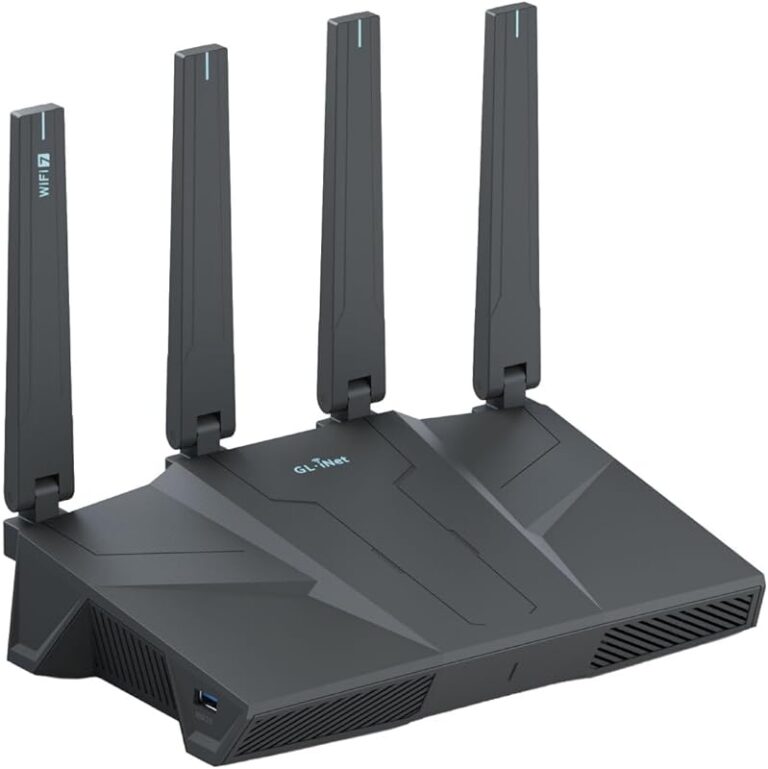
Many people do not realize that RF cables play a role in internet connectivity. Wi-Fi routers use RF cables to connect to external antennas. These cables boost the wireless signal and extend its range across a building. In large offices or warehouses, RF cables help distribute internet coverage evenly throughout the space.
Some internet service providers also use RF cables in their infrastructure. The cables carry broadband signals from the main line to individual homes. Just like how frequency response affects the quality of audio output from speakers, the quality of your RF cable affects signal clarity and speed. Poor cables lead to weak connections and slow data transfer.
Medical and Scientific Equipment
RF cables are used in hospitals and laboratories too. MRI machines and other medical imaging devices use RF cables to transmit sensitive data. Scientific instruments that measure electromagnetic signals also depend on these cables. In these environments, precision and reliability are absolutely critical.
Types of Rf Cables and Connectors
Not all RF cables are the same. Different types serve different purposes. Understanding the main categories helps you choose the right one for your setup. Here are the most common types you will encounter.
Coaxial Cables
Coaxial cables are the most widely used RF cables in the world. They feature a single central conductor wrapped in a metallic shield. This design provides excellent protection against signal interference. Coaxial cables are used in cable TV, broadband connections, and radio equipment.
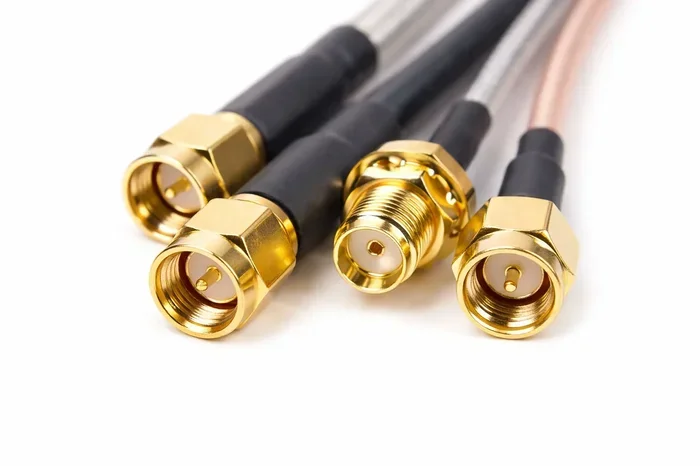
The most common coaxial connectors include BNC and F-type connectors. BNC connectors are popular in professional and laboratory settings. They lock into place and provide a secure, stable connection. F-type connectors are what you typically see on the back of your television set. They screw on easily and work well for home installations.
Flat and Ribbon Rf Cables
Flat RF cables are thinner and more flexible than traditional coaxial cables. They are useful in tight spaces where rigid cables will not fit. These cables are common in laptop antennas and compact electronic devices.
While flat RF cables are convenient, they may offer slightly less shielding. This means they are more susceptible to interference in noisy environments. Choose them only when space is a real constraint and signal quality is not the top priority.
Waveguide Cables
Waveguide cables are a specialized type of RF cable. They carry signals at very high frequencies with extremely low loss. You will find waveguide cables in radar systems and satellite communication equipment. These cables are not common in home setups but are vital in industrial and military applications.
How to Choose the Right Rf Cable
Choosing the right RF cable can feel overwhelming at first. There are many options on the market, and each one has its strengths. Here are the key factors to consider before making a purchase.
Frequency Range
Every RF cable has a frequency range it can handle effectively. If you try to push a signal beyond that range, you will lose quality. Check the specifications of your equipment first. Then choose a cable that supports the required frequency range for your application.
For most home applications, a standard coaxial cable covers the needed frequencies just fine. But for professional or industrial use, you may need a cable rated for much higher frequencies. Always match the cable to the device requirements.
Signal Loss and Attenuation
Signal loss, also called attenuation, is a real concern with RF cables. The longer the cable, the more signal you lose along the way. This is why shorter cables are generally better for maintaining strong signal quality.
If you must use a long cable run, look for one with low-loss specifications. Higher-quality cables have better shielding and thicker conductors. They preserve signal integrity over longer distances and reduce the chance of dropped connections.
Connector Compatibility
Make sure the connectors on your RF cable match your devices. Mismatched connectors cause signal problems and can even damage equipment over time. Common connector types include SMA, N-type, and BNC. Each one serves a specific purpose and works best within a certain frequency range.
Just as choosing the right speaker wiring setup ensures the best audio performance, picking the correct connector type ensures your RF signal stays clean and strong. Take a moment to verify compatibility before buying.
Environment and Durability
Consider where the cable will be installed. Indoor cables do not need heavy shielding or weatherproofing. Outdoor cables, on the other hand, must withstand moisture, UV exposure, and temperature changes throughout the year.
For industrial environments, choose cables with robust shielding and flexible jackets. These cables resist damage from movement and harsh conditions. Investing in durable cables saves money in the long run.
Common Rf Cable Problems and How to Fix Them
Even the best RF cables can develop problems over time. Knowing what to look for helps you troubleshoot quickly and avoid frustration. Here are the most common issues and their practical solutions.
Signal Interference
If you notice static, flickering, or dropped signals, interference may be the cause. Nearby electronics, power lines, or even fluorescent lights can create electromagnetic noise. Move your RF cables away from these sources and see if the problem improves.
Using cables with better shielding also reduces interference significantly. Double-shielded or quad-shielded cables offer the best protection in noisy environments. They keep your signal clean even when surrounded by other electronic devices.
Connector Damage
Connectors are the weakest point in any RF cable setup. They bend, corrode, and wear out over time. A damaged connector causes intermittent signal loss or complete signal failure. Inspect your connectors regularly for signs of wear.
Replace any connectors that show corrosion, bent pins, or loose fits. A new connector is inexpensive and easy to swap out. This simple fix can restore your signal quality immediately.
Cable Degradation
Over time, the insulation on an RF cable can break down. This is especially true for cables that are frequently bent, stretched, or stepped on. Degraded insulation leads to signal leakage and increased interference.
Replace cables that show visible damage like cracks, kinks, or exposed wiring. Regular inspection helps you catch problems before they affect your signal quality and device performance.
Why Quality Rf Cables Matter
It can be tempting to buy the cheapest RF cable available at the store. But quality cables make a noticeable difference in everyday performance. They maintain signal strength, reduce interference, and last much longer than budget options. Think of it as an investment, much like choosing the best components for your PC’s lifespan to ensure long-term reliability and performance.
Cheap cables often use thin conductors and poor shielding. They may work fine for a short time but degrade quickly under regular use. A quality RF cable pays for itself through better performance and fewer replacement costs over the years.
When shopping for RF cables, look for reputable brands and always check the specifications carefully. Pay attention to the frequency rating, shielding type, and connector quality. A well-chosen cable will serve you reliably for years without any headaches.
Quick Tips for Working with Rf Cables
- Keep cables as short as possible. Shorter cables mean less signal loss and better overall performance.
- Avoid sharp bends. Sharp bends can damage the internal conductor and shield, leading to signal problems.
- Use cable ties to secure cables. This prevents accidental disconnections and keeps your setup neat and organized.
- Label your cables. In complex setups, labeling helps you identify each cable quickly during troubleshooting.
- Check connectors for tightness. A loose connector is one of the most common causes of signal issues.
- Store cables properly. Coiling cables loosely and storing them in a cool, dry place extends their lifespan significantly.
Final Thoughts
RF cables are a small but essential part of modern technology. They carry the signals that power our TVs, internet connections, medical equipment, and communication systems. Understanding what an RF cable does and how to choose the right one helps you get the best performance from your devices every single day.
Whether you are setting up a home entertainment system, building a communication network, or working with scientific equipment, the right RF cable makes all the difference. Take the time to understand your needs, pick the correct cable type, and maintain your connections properly. Your setup will reward you with clearer signals, fewer interruptions, and a longer lifespan.
Frequently Asked Questions
What does an RF cable do?
An RF cable transmits radio frequency signals between devices. It carries video, audio, and data over distances with minimal signal loss. You will find RF cables connecting TVs, routers, antennas, and communication equipment in homes and businesses.
Is an RF cable the same as a coaxial cable?
Coaxial cables are the most common type of RF cable, but not all RF cables are coaxial. RF cables include coaxial, flat, and waveguide types. Each type is designed for specific frequency ranges and applications. Coaxial cables are the go-to choice for most home and office setups.
How long can an RF cable be before signal loss becomes a problem?
Signal loss increases with cable length. For most standard coaxial cables, runs over 50 feet may start showing noticeable signal degradation. If you need longer runs, choose a low-loss cable with better shielding. Amplifiers can also help boost the signal over longer distances.
Can I use any RF connector with any cable?
No, connectors must match both the cable type and the device port. Common connectors include BNC, SMA, F-type, and N-type. Using the wrong connector causes signal problems and can damage equipment. Always verify compatibility before purchasing or installing a new cable.
What causes RF cable interference?
Interference comes from nearby electronics, power lines, fluorescent lights, and other electromagnetic sources. Poor shielding makes cables more vulnerable to interference. Using double-shielded or quad-shielded cables and keeping RF cables away from noise sources helps reduce interference significantly.
How do I know if my RF cable is damaged?
Signs of a damaged RF cable include static on your TV, weak Wi-Fi signals, flickering screens, or intermittent connections. Visually inspect the cable for cracks, kinks, or exposed wiring. Check connectors for corrosion or loose fits. Replace any cable showing these signs to restore proper signal quality.