What Is Mcafee Epo Agent
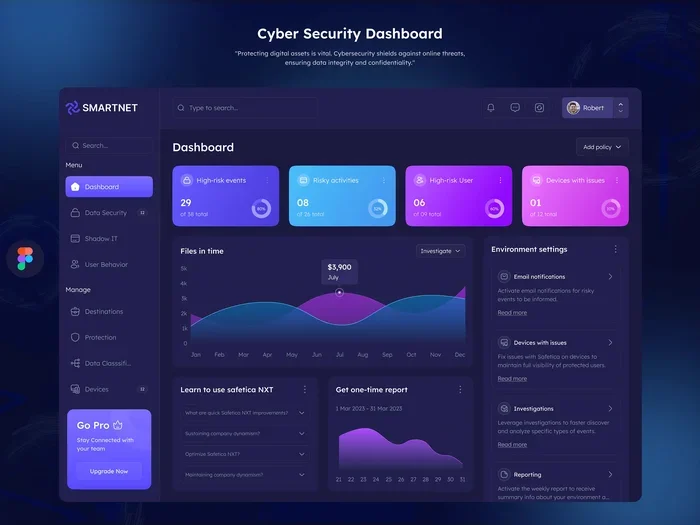
The McAfee EPO Agent is a lightweight software component that connects your computer to the McAfee ePolicy Orchestrator platform. It lets IT teams manage security policies, deploy updates, and monitor threats across all devices from one central dashboard. Understanding how this agent works helps businesses keep their networks safe and compliant.
The world of enterprise security can feel overwhelming. There are firewalls, antivirus programs, intrusion detection systems, and a dozen other tools. But one piece of the puzzle that often gets overlooked is the McAfee EPO Agent. If you have ever wondered how big companies keep thousands of computers safe and up to date, this agent is a big part of the answer.
McAfee EPO Agent is a small but powerful program that runs on each computer in a network. It connects that computer to a central management system called McAfee ePolicy Orchestrator, or ePO for short. Think of ePO as the control center and the agent as the messenger that carries commands to and from each device.
In this article, we will break down exactly what the McAfee EPO Agent does, how it works, and why it matters for businesses of all sizes. Whether you are an IT professional or just curious about how enterprise security works, this guide will give you a clear picture.
Key Takeaways
- Core Function: The McAfee EPO Agent acts as a bridge between endpoint devices and the central ePolicy Orchestrator server.
- Centralized Control: It allows IT administrators to push security policies, updates, and scans to thousands of machines at once.
- Lightweight Design: The agent runs quietly in the background without slowing down your system.
- Threat Detection: It reports security events, malware detections, and compliance status back to the ePO server in real time.
- Easy Deployment: IT teams can install and update the agent remotely, saving significant time and effort.
- Enterprise Essential: It is a critical piece of any McAfee endpoint security setup for medium to large organizations.
📑 Table of Contents
- What Is McAfee EPO Agent?
- How Does McAfee EPO Agent Work?
- Key Features Of McAfee EPO Agent
- System Requirements And Installation
- Benefits Of Using McAfee EPO Agent
- Common Challenges And Troubleshooting
- Best Practices For Managing McAfee EPO Agent
- How McAfee EPO Agent Compares to Other Endpoint Solutions
- Conclusion
What Is McAfee EPO Agent?
The McAfee EPO Agent is a software program installed on individual computers and servers. Its main job is to communicate with the McAfee ePolicy Orchestrator server. This communication allows IT teams to manage security settings, push updates, run scans, and enforce policies across every device on the network.
Without the agent, each computer would need to be managed separately. That would be a nightmare for any company with more than a few employees. The agent makes large-scale security management possible and practical.
How the Agent Fits Into the McAfee Ecosystem
McAfee offers a full suite of security products. The ePolicy Orchestrator is the brain of the operation. It collects data, analyzes threats, and creates security policies. The McAfee EPO Agent is the hands and feet. It carries out the policies created in ePO and reports back what is happening on each device.
Together, the ePO server and the agent form a complete endpoint management solution. Other McAfee products like McAfee Endpoint Security and McAfee VirusScan Enterprise work alongside the agent to provide full protection.
How Does McAfee EPO Agent Work?
Understanding how the McAfee EPO Agent operates helps you appreciate its value. The process is straightforward but powerful.
First, the agent installs itself on a device. This can happen manually or through automated deployment. Once installed, the agent establishes a secure connection to the ePO server. It then receives instructions, which might include updating virus definitions, running a full system scan, or applying a new security policy.
The agent carries out these instructions and sends status reports back to the ePO server. This cycle happens continuously. IT administrators can monitor every device from a single dashboard and see exactly what is happening across the entire network.
The Communication Process
The agent uses a pull-based communication model. This means the endpoint device checks in with the ePO server at scheduled intervals. During each check-in, it downloads any new tasks or policies and uploads any security events or logs.
This approach is efficient because it does not require a constant open connection. It also works well across different network types, including remote and hybrid setups. For organizations that use a SaaS environment for their ePO deployment, the agent connects through secure cloud channels, making remote management even easier.
Key Features Of McAfee EPO Agent
The McAfee EPO Agent comes packed with features that make enterprise security management smoother. Here are the most important ones.
Policy Enforcement
One of the biggest advantages of the agent is its ability to enforce security policies across all devices. IT teams can define rules for password complexity, firewall settings, encryption requirements, and more. The agent makes sure every device follows these rules. If a device falls out of compliance, the agent flags it immediately.
Remote Software Deployment
Instead of walking to each computer to install updates, IT staff can push software and patches remotely through the agent. This saves hours of manual work. It also ensures that every device gets updates at the same time, reducing the window of vulnerability.
Real-Time Threat Reporting
The agent continuously monitors the device for threats. When it detects malware, suspicious activity, or a policy violation, it sends an alert to the ePO server. Security teams can then respond quickly, often before the threat spreads to other devices on the network.
Inventory and Asset Management
The agent collects detailed information about each device. This includes hardware specifications, installed software, operating system version, and patch levels. This inventory data helps IT teams plan upgrades, manage licenses, and ensure that every device meets security standards.
System Requirements And Installation
Installing the McAfee EPO Agent is generally simple, but you need to make sure your systems meet the requirements first.
The agent is designed to be lightweight. It does not consume a lot of CPU or memory. However, you should still have good RAM on the device to ensure smooth operation alongside other security tools and applications. Most modern business computers will handle the agent without any issues.
Supported Operating Systems
The McAfee EPO Agent supports a wide range of operating systems. These typically include:
- Windows 10 and Windows 11
- Windows Server editions
- macOS
- Linux distributions
McAfee regularly updates the agent to support new operating system versions. Always check the official McAfee documentation for the latest compatibility information before deployment.
Installation Methods
There are two main ways to install the agent. You can deploy it manually on individual machines, or you can push it out remotely through the ePO server. The remote method is much faster and is the preferred approach for organizations with many devices. Automated deployment also reduces the chance of human error.
For IT teams managing large fleets of computers, having a solid investment for PC lifespan strategy is essential. The agent helps extend the useful life of devices by keeping them secure, updated, and running efficiently.
Benefits Of Using McAfee EPO Agent
The McAfee EPO Agent delivers several tangible benefits for organizations. Here is why so many businesses rely on it.
Centralized Security Management
Instead of logging into each computer individually, IT admins can manage security from one central location. This saves time and reduces the risk of missed updates or inconsistent policies. Centralized management also makes auditing and compliance reporting much simpler.
Improved Threat Response Times
Because the agent reports threats in real time, security teams can respond faster. A malware outbreak that might take days to contain through manual processes can often be stopped within hours when the agent is in place. Quick response is critical in today’s threat landscape.
Consistency Across the Network
Every device running the agent follows the same security policies. This consistency eliminates gaps that attackers could exploit. It also makes it easier to onboard new devices into the network securely.
Scalability
Whether your organization has 50 devices or 50,000, the McAfee EPO Agent scales to meet the need. The ePO platform is designed to handle large deployments, and the agent is built to perform reliably at any scale.
Common Challenges And Troubleshooting
Like any software, the McAfee EPO Agent can encounter issues. Being aware of common problems helps you resolve them quickly.
Agent Communication Failures
The most common issue is the agent losing its connection to the ePO server. This can happen due to network problems, firewall rules, or server outages. When this occurs, the agent will retry the connection automatically. IT teams should check network connectivity and firewall logs first when troubleshooting.
High Resource Usage
Although the agent is lightweight, it can sometimes consume more resources than expected. This often happens after a major update or during a full system scan. Scheduling scans during off-hours can help minimize the impact on users.
Version Compatibility
Running an outdated agent version can cause compatibility issues with newer ePO server versions. Regular updates are important. IT teams should establish a routine to check for and apply agent updates promptly.
Deployment Failures
Sometimes remote deployment fails on specific machines. Common causes include insufficient permissions, disk space issues, or conflicting software. Running the deployment as an administrator and checking system logs usually resolves these problems.
Best Practices For Managing McAfee EPO Agent
Getting the most out of the McAfee EPO Agent requires following some proven best practices. These tips come from experienced IT professionals.
- Keep the agent updated. Regular updates patch security vulnerabilities and add new features. Set up automatic updates whenever possible.
- Monitor agent health. Use the ePO dashboard to track which devices have active agents and which are offline. Address offline devices quickly.
- Schedule tasks wisely. Run heavy tasks like full scans during nights or weekends to avoid disrupting users during work hours.
- Document your deployment. Keep records of which version is installed on each device and when it was last updated.
- Test before rolling out. Always test agent updates and new policies on a small group of devices before deploying them organization-wide.
- Train your IT team. Make sure everyone managing the ePO platform understands how the agent works and how to troubleshoot common issues.
Following these practices ensures that your McAfee EPO Agent deployment runs smoothly and delivers maximum protection for your network.
How McAfee EPO Agent Compares to Other Endpoint Solutions
It is helpful to understand how the McAfee EPO Agent compares to other endpoint management tools. While there are many options on the market, the agent’s tight integration with the McAfee ecosystem sets it apart.
Other solutions may offer similar centralized management, but the McAfee EPO Agent benefits from years of development and a large user base. It is deeply integrated with McAfee’s antivirus, firewall, and encryption products. This integration means fewer compatibility issues and a more unified security posture.
For organizations already using McAfee products, the agent is a natural and essential addition. For those considering switching from another platform, the agent’s robust feature set makes a strong case for choosing McAfee.
Managing endpoint security can feel like a full-time job. Having the right tools in place, including a reliable agent and a well-planned project management approach to IT operations, makes the work much more manageable and effective.
Conclusion
The McAfee EPO Agent is a small but essential piece of any enterprise security setup. It connects individual devices to a central management platform, enabling IT teams to enforce policies, deploy updates, detect threats, and maintain compliance across the entire network. Without it, managing security at scale would be incredibly difficult.
Whether you are an IT administrator looking to streamline your security operations or a business owner trying to understand what protects your network, the McAfee EPO Agent deserves your attention. It is reliable, scalable, and designed to make endpoint security management as simple as possible.
Take the time to understand how it works, follow best practices for deployment and maintenance, and you will have a strong foundation for keeping your organization’s devices safe and secure.
Frequently Asked Questions
What does McAfee EPO Agent stand for?
EPO stands for ePolicy Orchestrator. The McAfee EPO Agent is the software component that connects endpoint devices to the ePolicy Orchestrator management platform. Together, they allow IT teams to manage security across all devices from one central location.
Is the McAfee EPO Agent free?
The agent itself is included as part of the McAfee ePolicy Orchestrator license. You do not need to pay separately for the agent. However, you do need a valid ePO license to use it, and that comes with its own cost depending on the number of managed endpoints.
Can the McAfee EPO Agent be uninstalled?
Yes, the agent can be uninstalled from individual devices. However, removing it means that device will no longer receive security policies, updates, or threat alerts from the ePO server. It is best to keep the agent installed on all managed devices.
How often does the McAfee EPO Agent check in with the server?
The default check-in interval is typically every few hours, but IT administrators can configure this. More frequent check-ins provide faster updates and threat reporting but may increase network traffic slightly.
Does the McAfee EPO Agent work on Mac and Linux?
Yes, the agent supports Windows, macOS, and Linux operating systems. This cross-platform support makes it suitable for mixed-technology environments where different types of devices need to be managed together.
What happens if the McAfee EPO Agent loses connection to the server?
The agent will automatically retry the connection when it is able. In the meantime, it continues to enforce locally cached policies and monitor the device. Once the connection is restored, it syncs all events and status reports with the ePO server.