What Is Navision Software
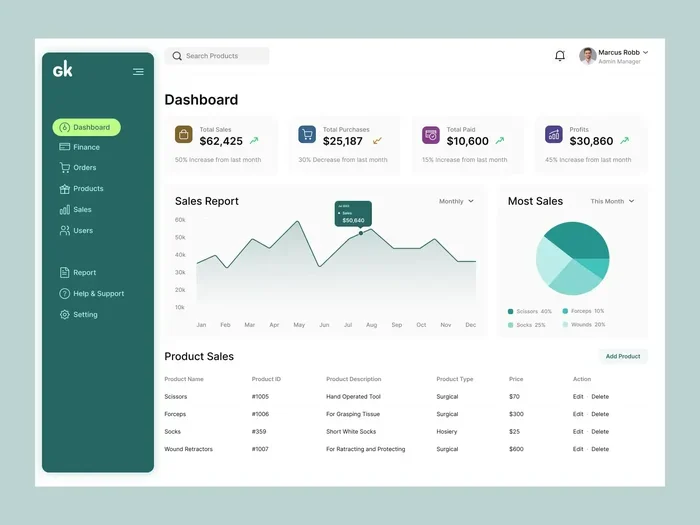
Navision software is a powerful enterprise resource planning (ERP) tool that helps businesses manage finances, inventory, sales, and operations from one platform. Originally developed as a standalone solution, it evolved into Microsoft Dynamics NAV and is now part of Dynamics 365 Business Central. Small and mid-sized companies use it to streamline workflows, reduce manual tasks, and gain real-time insights into their business performance.
Running a business means juggling a lot of moving parts. You need to track money coming in and going out. You need to manage inventory. You need to handle customer relationships. And you need to keep your team on the same page. That is where Navision software comes in. It is an enterprise resource planning tool built to bring all of those pieces together in one place.
If you have ever felt overwhelmed by spreadsheets, disconnected systems, or manual data entry, you are not alone. Many growing businesses face this exact problem. Navision software was created to solve it. Over the years, it has grown from a niche accounting tool into a full-blown business management platform used by companies around the world. In this article, we will break down exactly what Navision is, how it works, and why it might be the right fit for your business.
Key Takeaways
- Navision software is an ERP system designed to help businesses manage core operations like accounting, inventory, and sales.
- It originated in Denmark and was later acquired by Microsoft, becoming Dynamics NAV.
- Key features include financial management, supply chain tools, CRM capabilities, and customizable reporting.
- Small and mid-sized businesses benefit most from its affordability and scalability.
- Navision has evolved into Dynamics 365 Business Central, offering cloud-based access and modern integrations.
- Implementation requires planning but delivers strong ROI through automation and efficiency gains.
- It integrates with other business tools like Microsoft Office and third-party applications.
📑 Table of Contents
What Is Navision Software?
Navision software is a business management solution that helps organizations handle day-to-day operations. It covers areas like financial management, inventory control, sales processing, and supply chain management. Think of it as the digital backbone of a business. Instead of using five different tools for five different tasks, Navision brings everything under one roof.
The software was first developed in Denmark in the 1980s. A company called Damgaard created it to help businesses manage their accounting and logistics more efficiently. Over time, the product gained popularity across Europe and eventually caught the attention of Microsoft. In 2002, Microsoft acquired the Navision brand, and it became known as Microsoft Dynamics NAV. Today, the platform has evolved further into Dynamics 365 Business Central, which is the modern cloud-based version.
Who Uses Navision Software?
Navision software is especially popular among small and mid-sized businesses. Manufacturing companies use it to track production and materials. Wholesale distributors rely on it for inventory and order management. Service-based businesses use it for project tracking and billing. Even non-profit organizations have found value in its financial management tools. The platform is flexible enough to adapt to many different industries.
Core Features of Navision Software
What makes Navision software stand out? It comes packed with features that cover nearly every aspect of business management. Let us break them down.
Financial Management
At its core, Navision was built as an accounting solution. It handles general ledger, accounts payable, accounts receivable, and cash flow management. You can generate financial reports, track budgets, and manage tax compliance. The software makes it easy to see the financial health of your business at a glance.
Inventory and Supply Chain Management
Managing stock levels can be a headache without the right tools. Navision software lets you track inventory in real time. You can set reorder points, manage multiple warehouses, and handle supply chain logistics. This feature is a game-changer for businesses that deal with physical products.
Sales and Customer Management
The platform includes CRM capabilities that help you manage customer relationships. You can track sales orders, manage quotes, and monitor customer interactions. While it is not a full-fledged CRM like Salesforce, it handles basic customer management very well for businesses that do not need advanced features.
Reporting and Analytics
Data is only useful if you can understand it. Navision software offers built-in reporting tools that let you create custom dashboards and business intelligence reports. You can track key performance indicators and make data-driven decisions. The reporting engine is highly customizable, so you can build reports that match your exact needs.
How Navision Software Works
Navision software operates on a client-server architecture. In the traditional setup, you install the software on your own servers. Users access it through a desktop application. This gives you full control over your data and security. However, it also means you are responsible for maintenance, updates, and backups.
The modern version, Dynamics 365 Business Central, is cloud-based. This means the software runs on Microsoft’s servers, and you access it through a web browser. Cloud deployment removes the need for on-premise hardware and IT maintenance. It also makes it easier to scale up or down as your business grows.
Deployment Options
You have two main options when you choose Navision software:
- On-Premises: You host the software on your own servers. This gives you maximum control and is preferred by businesses with strict data security requirements.
- Cloud (SaaS): Microsoft hosts everything. You pay a monthly subscription and access the platform from anywhere with an internet connection.
Many businesses start with the on-premises version and later migrate to the cloud. The transition is smooth because both versions share the same core functionality.
Benefits of Using Navision Software
Why should you consider Navision software for your business? Here are some of the biggest advantages.
Streamlined Operations
When all your business data lives in one system, things get simpler. You do not need to manually transfer information between tools. Workflow automation reduces repetitive tasks and frees up your team to focus on higher-value work. For example, you can set up automatic reorder alerts when inventory drops below a certain level.
Better Decision Making
Real-time access to business data is incredibly powerful. With Navision software, you can generate reports instantly. You can see which products are selling well, which customers owe you money, and where your costs are trending. This kind of visibility helps you make smarter decisions every day.
Scalability
As your business grows, your software needs to grow with you. Navision software is designed to scale. You can add new users, new companies, and new features without replacing the entire system. This makes it a smart long-term investment for your business.
Integration with Microsoft Ecosystem
Because Navision software is a Microsoft product, it plays nicely with other Microsoft tools. You can integrate it with Microsoft Office, Outlook, and Power BI. This means your team can work in tools they already know and love while still benefiting from a powerful ERP backend.
Navision Software vs. Other ERP Systems
There are many ERP solutions on the market. How does Navision software compare? Let us look at a quick comparison.
| Feature | Navision (Business Central) | SAP Business One | QuickBooks Enterprise |
|---|---|---|---|
| Target Audience | Small to mid-sized businesses | Small to mid-sized businesses | Small businesses |
| Deployment | Cloud or on-premises | Cloud or on-premises | Cloud or on-premises |
| Financial Management | Strong | Strong | Good |
| Supply Chain Tools | Excellent | Excellent | Basic |
| Customization | High | Moderate | Limited |
| Microsoft Integration | Native | Limited | None |
One of the strongest advantages of Navision software is its deep integration with the Microsoft ecosystem. If your business already uses Microsoft tools, the transition is much smoother. Another strength is the customization options. You can tailor the system to fit your specific workflows and industry needs.
However, Navision software may not be the best choice for very small businesses with simple needs. In those cases, a lighter tool like QuickBooks might be more appropriate. And for large enterprises with complex global operations, SAP might be a better fit. The key is to match the software to your business size and complexity.
Getting Started with Navision Software
If you are thinking about implementing Navision software, here are some steps to guide you.
- Assess Your Needs: Identify the core problems you want to solve. Do you need better financial tracking? Improved inventory management? Clear up your goals before you start.
- Choose the Right Version: Decide between on-premises and cloud deployment based on your budget, IT capabilities, and security requirements.
- Partner with a Microsoft Partner: Implementing an ERP system is complex. Working with a certified partner ensures a smooth setup and proper training for your team.
- Migrate Your Data: Transfer your existing data carefully. Make sure your data is clean and well-organized before migration.
- Train Your Team: Your software is only as good as the people using it. Invest in training so your team can use Navision software to its full potential.
- Monitor and Optimize: After launch, track how the system is performing. Gather feedback from users and make adjustments as needed.
Common Mistakes to Avoid
Implementing Navision software is a big step. Here are some common pitfalls to watch out for.
- Skipping the planning phase: Rushing into implementation without a clear plan leads to problems later. Take the time to map out your processes and goals.
- Underestimating training needs: Your team needs to understand how to use the new system. Without proper training, adoption rates will be low.
- Over-customizing too early: It is tempting to customize everything from day one. Start with the standard setup and add customizations as you learn what you actually need.
- Ignoring data cleanup: Migrating messy data into a new system just creates new problems. Clean your data before you migrate.
- Not involving key stakeholders: Everyone who will use the system should have a voice in the implementation process. This includes department heads, finance teams, and operations managers.
Is Navision Software Right for Your Business?
Navision software is a strong choice for businesses that need a comprehensive, scalable ERP solution. If you are a small or mid-sized company dealing with complex operations, multiple locations, or heavy inventory management, it is definitely worth considering. The cloud-based version, Dynamics 365 Business Central, makes it more accessible and affordable than ever before.
On the other hand, if your business has very simple needs or you are a solo entrepreneur, a lighter tool might be a better fit. The key is to evaluate your specific situation and choose the tool that matches your goals.
Conclusion
Navision software has come a long way since its early days in Denmark. It has grown into a robust enterprise resource planning platform that helps businesses of all sizes manage their operations more efficiently. From financial management to supply chain tracking, it covers the essentials that modern businesses need to thrive.
Whether you choose the traditional on-premises version or the modern cloud-based Dynamics 365 Business Central, the core value remains the same: bringing all your business data into one unified system. If you are ready to simplify your operations and gain better control over your business, Navision software is definitely worth exploring. Start by assessing your needs, partnering with a trusted implementation expert, and taking the first step toward a more streamlined future.
Frequently Asked Questions
What is Navision software used for?
Navision software is used for managing core business operations like accounting, inventory, sales, supply chain, and financial reporting. It is an ERP solution that helps businesses bring all their data into one unified system.
Is Navision software the same as Microsoft Dynamics NAV?
Yes, Navision software became Microsoft Dynamics NAV after Microsoft acquired the brand in 2002. The modern cloud-based version is now known as Dynamics 365 Business Central, which is the successor to Dynamics NAV.
Can small businesses benefit from Navision software?
Absolutely. Navision software is designed with small and mid-sized businesses in mind. It offers scalable features that grow with your company, and the cloud version makes it affordable even for smaller teams.
Do I need IT expertise to implement Navision software?
While basic computer skills are enough to use the software, implementation is complex. Most businesses work with a certified Microsoft partner to ensure proper setup, data migration, and team training.
Can Navision software integrate with other business tools?
Yes, Navision software integrates well with other Microsoft tools like Office 365, Outlook, and Power BI. It also supports third-party integrations through APIs and connectors for platforms like CRM systems and e-commerce tools.
How much does Navision software cost?
The cost depends on the deployment model and the number of users. The cloud-based version (Dynamics 365 Business Central) uses a monthly subscription model, which makes it more predictable and affordable for most businesses compared to traditional on-premises licensing.