What Is Website Cloning
Website cloning is the process of duplicating an existing website’s design, content, and functionality to create a new site. It can be used for legitimate purposes like backups, testing, or launching a similar site quickly. However, it also raises serious ethical and legal concerns when done without permission.
Have you ever visited a website and thought, “I wish my site looked like that”? Or maybe you wanted to build a second site that works just like your first one? That’s where website cloning comes in. It is the process of copying an existing website’s design, content, layout, and sometimes even its functionality to create a new, duplicate site.
Website cloning is a hot topic in the tech world. Some people use it to speed up development. Others do it to create backups or test new ideas safely. But there is a darker side too. Unauthorized cloning can lead to legal trouble, copyright violations, and damaged reputations. Whether you are a developer, a business owner, or just curious, this guide covers everything you need to know about clone website practices.
In this article, we will explore what website cloning really means, how it works, the tools you can use, and the legal and ethical boundaries you should respect. By the end, you will have a clear picture of when cloning is helpful and when it crosses the line.
Key Takeaways
- Website cloning duplicates design, content, and features: It captures the look, feel, and structure of an existing site.
- Legitimate uses exist: Cloning is useful for backups, testing environments, and rapid prototyping.
- Legal risks are real: Copying a site without permission can lead to copyright infringement and lawsuits.
- Several tools make cloning easy: From simple copy-paste methods to dedicated software, options abound.
- Protection is possible: Site owners can take steps to prevent unauthorized cloning of their work.
📑 Table of Contents
- What Is Website Cloning?
- How Does Website Cloning Work?
- Popular Tools for Cloning Websites
- Is Website Cloning Legal?
- How to Protect Your Website From Being Cloned
- Ethical Considerations in Website Cloning
- Website Cloning vs. Website Backup
- Common Mistakes People Make When Cloning Websites
- The Future of Website Cloning
- Final Thoughts
What Is Website Cloning?
At its core, website cloning means creating an exact or near-exact copy of an existing website. This copy can include the visual design, the text, the images, the page structure, and even the underlying code. Think of it like taking a photograph of a house and then building a second house that looks identical.
There are two main types of website cloning. The first is full cloning, where you copy everything — the design, the content, the database, and the functionality. The second is partial cloning, where you only copy certain elements like the layout or the design style and then build new content on top of it.
Why Do People Clone Websites?
People clone websites for many reasons. Some of the most common motivations include:
- Learning and education: Beginners often clone existing sites to understand how they are built and coded.
- Rapid prototyping: Developers clone a site to create a working model quickly before building something original.
- Backup and recovery: Companies clone their own sites to have a backup in case something goes wrong.
- Testing environments: Cloning allows teams to test changes on a copy of the live site without affecting the real one.
- Competitive analysis: Businesses clone competitor sites to study their design and features closely.
Each of these reasons has its place. But the line between learning and copying can get blurry fast. That is why understanding the ethics and legality of site duplication matters so much.
How Does Website Cloning Work?
Cloning a website involves several steps, and the exact process depends on the method you use. Let us walk through the general workflow so you understand what happens behind the scenes.
Step 1: Analyzing the Target Website
Before you start cloning, you need to study the site you want to copy. You look at its layout, its color scheme, its navigation structure, and the types of content it uses. This step is like an architect studying a building before drawing plans for a copy.
Step 2: Downloading or Capturing the Content
Next, you gather the site’s assets. This includes HTML files, CSS stylesheets, JavaScript files, images, videos, and any other media. Some people use browser tools to save web pages. Others use specialized software that crawls the entire site and downloads everything it finds.
Step 3: Rebuilding the Site
Once you have the files, you rebuild the site on a new server or hosting platform. You may need to adjust the code to work with a different setup. For example, if the original site uses a specific platform like Webflow, you might need to recreate the design in a different builder or with custom code.
Step 4: Testing the Clone
After rebuilding, you test the cloned site thoroughly. You check that all pages load correctly, that images display properly, and that any interactive features work as expected. This step is crucial to make sure your clone functions just like the original.
Popular Tools for Cloning Websites
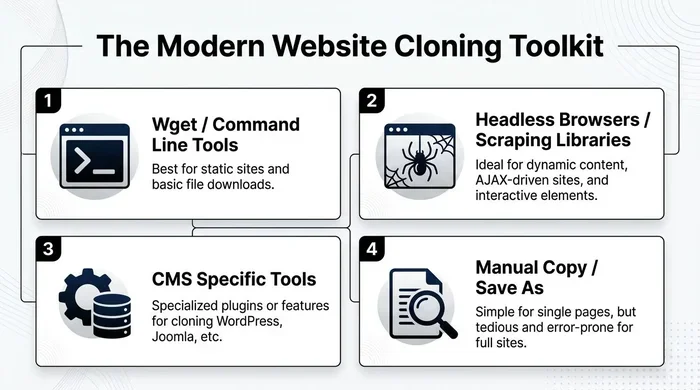
Several tools make website cloning easier, ranging from simple browser extensions to powerful desktop software. Here are some of the most popular options:
- HTTrack: A free, open-source tool that downloads entire websites to your local computer. It works on Windows, Linux, and macOS.
- SiteSucker: A macOS and iOS app that downloads websites for offline viewing and cloning purposes.
- Wget: A command-line tool that is powerful and flexible for downloading site content.
- Browser Save Features: Most modern browsers let you save a full web page, including images and styles, with just a few clicks.
- Website Builders with Import Features: Some platforms allow you to import designs or templates that mimic existing sites.
These tools vary in complexity and capability. Simple tools let you save a single page. Advanced tools can crawl an entire site with hundreds of pages. Choose the tool that matches your needs and technical skill level.
Is Website Cloning Legal?
This is the question that keeps people up at night. The short answer is: it depends. Website cloning is not inherently illegal, but how you use it can put you on the wrong side of the law.
When Cloning Is Legal
Cloning is generally legal when you have permission from the original site owner. It is also legal when you clone your own website for backup or testing purposes. Additionally, cloning a site for educational or research purposes is often acceptable, as long as you do not publish or distribute the cloned content.
When Cloning Is Illegal
Cloning becomes illegal when you copy a site without permission and use it for your own benefit. This includes:
- Copying copyrighted content: Text, images, videos, and code are all protected by copyright law.
- Trademark infringement: Using a competitor’s logo, brand name, or distinctive design elements can violate trademark law.
- Plagiarism: Presenting someone else’s work as your own is unethical and can lead to legal action.
- Fraud: Cloning a site to trick visitors into thinking it is the original is a serious crime in many jurisdictions.
If you are considering cloning a site, always get written permission first. When in doubt, consult a legal professional. The consequences of unauthorized cloning can include lawsuits, fines, and even criminal charges.
How to Protect Your Website From Being Cloned
If you have a website, you probably want to protect it from unauthorized cloning. Here are some practical steps you can take:
Use Copyright Notices
Display a clear copyright notice on your site. This reminds visitors that your content is protected and owned by you. While it does not stop determined copiers, it does make your intentions clear.
Monitor the Web Regularly
Use tools like Google Alerts or reverse image search to check if your content or images appear on other sites. Catching cloning early gives you a better chance of taking action.
Add Watermarks to Images
Watermarks make it harder for someone to steal your images and use them on a cloned site. They also help people identify the original source if your images are shared elsewhere.
Implement Technical Protections
Some technical measures can discourage cloning. These include disabling right-click on your site, using robots.txt to block crawlers, and setting up DMCA takedown procedures with your hosting provider.
Keep Your Content Fresh
Regularly updating your site with unique, original content makes it harder for someone to clone you effectively. Search engines also reward fresh content, so this is a win-win strategy.
Ethical Considerations in Website Cloning
Beyond the legal aspects, there are important ethical considerations to keep in mind. Even if cloning a site might not be strictly illegal in a specific situation, it can still be wrong.
For starters, cloning someone else’s work without credit undermines the original creator’s efforts. It devalues their hard work and can hurt their business. In the web development community, originality and creativity are highly valued. Copying instead of creating sends the wrong message.
There is also the issue of user trust. If a cloned site looks identical to a trusted site, visitors might be misled. This can damage the reputation of both the original site and the cloner. In the worst cases, cloned sites are used for phishing attacks, where criminals steal personal information from unsuspecting visitors.
The best approach is to use cloning as a learning tool or a starting point. Take inspiration from sites you admire, but always add your own unique touch. Build something original that reflects your own brand and values. This approach is not only more ethical but also more sustainable in the long run.
Website Cloning vs. Website Backup
It is important to distinguish between website cloning and website backup. While they involve similar processes, their purposes are very different.
A website backup is a copy of your own site that you create for safety. You use it to restore your site if something goes wrong, like a server crash or a hack. Backups are a normal part of website maintenance and are always legal when you own the site.
Website cloning, on the other hand, often involves copying someone else’s site or creating a near-identical version of a site for a different purpose. The intent matters. If you are cloning your own site for testing or development, that is similar to a backup. If you are cloning another person’s site to use as your own, that is a completely different story.
Understanding this distinction helps you stay on the right side of both the law and ethics. Always be clear about why you are cloning a site and who owns the original content.
Common Mistakes People Make When Cloning Websites
Even well-intentioned people make mistakes when cloning websites. Here are some of the most common pitfalls to avoid:
- Ignoring copyright law: Just because content is on the internet does not mean it is free to use. Always check the rights before copying.
- Forgetting to update the clone: A cloned site that is never updated becomes outdated quickly. Plan for ongoing maintenance.
- Using the same domain structure: This can confuse search engines and lead to duplicate content penalties.
- Skipping the testing phase: A clone that does not work properly reflects poorly on you and frustrates visitors.
- Not giving credit: Even when you have permission, failing to credit the original creator is poor form.
Avoiding these mistakes saves you time, money, and potential legal headaches. Take the extra steps to do things right from the start.
The Future of Website Cloning
As technology evolves, website cloning is becoming both easier and more sophisticated. AI-powered tools can now analyze a site’s design and generate code that replicates its look and feel. This raises new questions about ownership, originality, and the boundaries of fair use.
In the coming years, we can expect to see tighter regulations around website cloning and digital content ownership. The rise of saaS environment platforms also changes the landscape, as these platforms often include built-in cloning and template features that blur the line between inspiration and duplication.
For now, the best approach remains the same: be transparent, get permission when needed, and always strive to create original work. Technology should be used to enhance creativity, not replace it.
Final Thoughts
Website cloning is a powerful tool that can be used for good or ill. When done ethically and legally, it helps developers learn, businesses test, and teams build faster. When done without permission, it violates copyright, breaks trust, and can lead to serious consequences.
The key is to understand the difference between inspiration and duplication. Use cloning as a learning aid, a backup strategy, or a prototyping tool. Always respect the work of others and create your own unique content. The web thrives on originality, and the best websites are the ones that bring something new to the table.
Whether you are a beginner just starting out or an experienced developer looking to streamline your workflow, website cloning has a place in your toolkit. Just use it wisely, and you will get the most out of it without crossing any lines.
Frequently Asked Questions
What is website cloning in simple terms?
Website cloning means creating a copy of an existing website. This includes the design, content, layout, and sometimes the functionality. It can be done for legitimate reasons like backups or learning, or it can be done without permission, which is illegal.
Is it legal to clone a website?
It depends on the situation. Cloning your own website is always legal. Cloning a site with the owner’s permission is also generally fine. But copying a site without permission, especially for commercial gain, can violate copyright and trademark laws.
What tools are used to clone websites?
Popular tools include HTTrack, SiteSucker, Wget, and browser save features. Some website builders also offer import or template features that allow you to replicate a site’s design. The right tool depends on your skill level and what you want to achieve.
How can I tell if my website has been cloned?
Signs of cloning include finding identical content on another site, seeing your images used without permission, or noticing a site with a very similar design and layout. You can use Google Alerts and reverse image search to monitor for unauthorized copies.
Can website cloning hurt my SEO?
Yes, if a cloned site publishes duplicate content, search engines may penalize both sites. Duplicate content confuses search engines about which version is the original, which can lower rankings for both. Always ensure your content is unique and original.
What is the difference between cloning and backing up a website?
Backing up your own site is about creating a safety copy for recovery purposes. Cloning often involves copying someone else’s site or creating a near-identical version for a different purpose. The intent and ownership determine whether the activity is appropriate and legal.
=== CONCLUSION ===
Website cloning is a topic that touches on technology, creativity, law, and ethics. It offers real benefits when used responsibly, from speeding up development to helping beginners learn the ropes of web design. But it also carries significant risks when used carelessly or without permission.
The best approach is to always seek permission, respect copyright, and use cloning as a stepping stone toward your own original work. The web is a better place when creators build on each other’s ideas without stealing them. So go ahead, explore the world of clone website techniques, but do it the right way. Your reputation and your legal standing will thank you for it.