What to Do If an Energizer Battery Charger Is Not Working
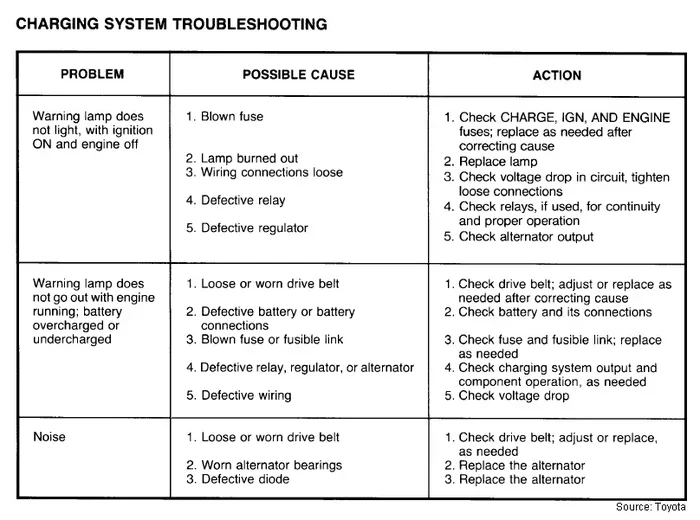
When your Energizer battery charger is not working, it can be frustrating, especially when you need fresh batteries. This guide walks you through simple Energizer charger troubleshooting steps to diagnose and fix the problem fast. You’ll learn how to check the power source, inspect cables, reset the charger, and know when it’s time for a replacement.
Nothing beats the convenience of a fully charged set of batteries. But when you go to use your Energizer battery charger and it just won’t cooperate, the frustration can mount quickly. Whether the lights stay dark, blink erratically, or the batteries simply won’t power up, a non‑working charger can derail your day. The good news is that most issues are simple to fix without any technical background. In this guide, we’ll walk you through every step of Energizer charger troubleshooting so you can get back to using your devices.
Before you call customer support or toss the unit in the trash, take a deep breath. Many battery charger problems stem from the same handful of causes: a dead power source, a loose cable, or a simple reset that the manual never mentions. We’ll cover each scenario in plain language. You’ll learn how to check your wall outlet, what those blinking lights mean, and how to tell if the charger itself has given up the ghost. By the end, you’ll have a clear plan to bring your rechargeable battery charger back to life.
Key Takeaways
- Check the power source first: A dead outlet or faulty USB port is the most common cause.
- Watch the indicator lights: Blinking or no light tells you exactly what’s wrong.
- Reset the charger: A simple reset often fixes unresponsive units.
- Verify battery compatibility: Using the wrong batteries or old rechargeables can stop charging.
- Avoid common mistakes: Overheating, damaged cables, and dirty contacts are easy to fix.
- Know when to replace: If the charger still fails after all steps, it may be time for a new one.
📑 Table of Contents
Check the Power Source and Cables
The very first thing to do when your Energizer battery charger is not working is to check the power source. A tripped breaker or a dead outlet is the most common culprit. Unplug the charger and try plugging in a different device—like a phone or a lamp—to confirm the outlet is live. If you’re using a USB port on a computer or a wall adapter, test that port with another device. Sometimes a USB port stops delivering power, and the same issue that makes your mouse refuse to connect can keep a charger dark.
Verify the Wall Outlet or USB Port
Don’t assume the outlet is working just because other devices seem fine. Try the charger in a completely different room or building. If you’re using a USB hub, connect the charger directly to the computer or to a wall USB adapter. A weak hub can’t supply enough current for a battery charger. For USB‑powered Energizer rechargers, try a different USB cable and a different port. A simple cable replacement often solves the mystery of a charger not turning on.
Inspect the Power Cable and Adapter
Look closely at the cable that runs from the wall to the charger. Frayed wires, bent connectors, or a damaged wall adapter can cut power without any visible signs. If the cable feels loose in the charger or the wall plug, try a different cable that fits the same connector type. For USB battery charger models, swap the USB cable and try a different port. A damaged wall adapter is a sneaky cause of a battery charger power issue. Always use the adapter that came with the charger, and if you’ve lost it, match the exact voltage (V) and amperage (A) listed on the charger label.
Inspect the Battery Charger Indicator Lights
Most Energizer AA battery charger models have small LED lights that tell you the charging status. If the lights are off, the charger isn’t receiving power. If they blink rapidly, the charger has detected an error—often a battery that’s inserted incorrectly or a defective cell. A solid light that never changes usually means the charger is waiting for a battery to be recognized. Understanding these signals is the first step in Energizer charger troubleshooting.
No Lights at All
If you see zero lights, the problem is almost certainly the power supply. Check the wall adapter first, then the cable. Some battery charger models have a fuse inside the unit that can blow if there’s a power surge. If you’re comfortable opening the charger, you can check the fuse, but most users should simply try a different wall outlet or adapter. If the lights still don’t appear, the internal power board may be damaged. At that point, the charger not detected issue is likely a hardware failure.
Blinking Lights or Error Patterns
A pattern of blinks can point to a specific issue. For example, three blinks might mean the battery temperature is too high, while continuous blinking often signals a poor battery connection. Remove the batteries, clean the contacts with a dry cloth, and reinsert them firmly. If the blinking stops and the light turns solid, the rechargeable batteries are now charging. If the pattern continues, the batteries themselves may be too old or damaged. You can also consult the Energizer charger manual for the exact blink code meaning for your model.
Reset the Energizer Battery Charger
Just like following the steps after installing a new GPU, a simple reset can clear hidden errors in your charger. The reset process drains any residual charge in the circuitry and forces the unit to restart its self‑diagnostic. This fix works surprisingly often for chargers that won’t start or that freeze mid‑cycle.
Why a Reset Works
Electronic devices can get stuck in a fault state without any obvious reason. A reset clears the temporary memory and brings the charger back to a known good state. It’s the fastest way to address a battery charger not charging situation that seems to have no clear cause. Think of it like restarting a computer—simple, but often effective.
How to Perform a Hard Reset
Unplug the charger from the wall and remove all batteries from the slots. Let the unit sit unplugged for at least 30 seconds. This gives the internal capacitors time to discharge. After 30 seconds, plug the charger back in without any batteries. If the indicator light comes on and stays solid, the reset was successful. Now insert your batteries and start a new charge cycle. If the light still doesn’t come on, the reset didn’t resolve the deeper issue.
The Factory Reset Option
Some Energizer recharger models have a small reset button on the back or near the power jack. Use a paperclip to press it gently while the charger is unplugged. This performs a factory reset that clears any error codes stored in memory. After pressing the button, plug the charger back in and check the lights. This step is a powerful tool for Energizer battery charger troubleshooting when the unit seems completely unresponsive.
Test the Batteries and Charger Compatibility
Not all rechargeable batteries work with every charger. Energizer chargers are designed for specific battery sizes—AA, AAA, C, D, and 9‑volt. Putting a non‑rechargeable battery in a charger slot will prevent the unit from recognizing the battery. Even rechargeable batteries from other brands may not have the correct voltage or internal resistance for your Energizer battery charger. Always use NiMH (Nickel‑Metal Hydride) rechargeable batteries that match the charger’s specifications.
Check the Battery Condition
Old rechargeable batteries lose their ability to hold a charge. If a battery has been sitting in a drawer for years, it may be completely dead. Try the batteries in a different device to see if they still power it. If they don’t, the problem isn’t the charger—it’s the batteries. Similarly, batteries that have been overcharged in the past can develop a memory effect that prevents them from charging again. In these cases, replace the batteries rather than blaming the charger.
Verify Physical Compatibility
Make sure the batteries are inserted correctly, matching the positive and negative markings. A battery that’s inserted upside down will not make contact, and the charger will show no activity. This is similar to checking RAM compatibility before upgrading—fit matters. Clean the battery contacts inside the charger with a cotton swab lightly dampened with isopropyl alcohol. Dirty contacts are a sneaky cause of charger not detecting batteries. A quick wipe can restore proper electrical connection.
Common Mistakes That Prevent Charging
Even with the right equipment, small habits can stop a charger from working. Here are the most common mistakes users make and how to avoid them.
Overheating the Charger
Leaving a charger plugged in for days or charging batteries that are already full can cause the unit to overheat. Most modern Energizer battery chargers have thermal protection that shuts them down automatically. If the charger feels hot to the touch, unplug it and let it cool for at least an hour. Once it’s back to room temperature, try again with a smaller batch of batteries. Overheating is a sign that the charger is working hard, but repeated overheating can damage the internal circuitry and shorten its lifespan.
Using the Wrong Power Adapter
The wall adapter that comes with your charger is matched to its power needs. Using a different adapter—even one with the same connector size—can deliver too much or too little voltage. This is a common reason for a battery charger not powering on. Always use the adapter that came in the box. If you’ve lost it, check the label on the charger for the required voltage (V) and amperage (A) and replace it with an exact match. A mismatched adapter can permanently damage the charger.
Ignoring Firmware or Software Updates
Some advanced Energizer recharger models with LCD screens or digital displays have internal software. A firmware glitch can cause the charger to freeze or refuse to start. While most basic chargers don’t have updateable firmware, newer models might. Check the Energizer website or the instruction manual for any available updates. A simple reset usually fixes these issues, but a firmware update can address deeper software bugs that cause the charger to appear dead.
When to Replace Your Energizer Charger
If you’ve tried every troubleshooting step and the Energizer battery charger is still not working, it may be time for a replacement. Signs that the unit is dead include a burning smell, visible damage to the casing, or a complete lack of response even with a known‑good power source and fresh batteries. A charger that trips a breaker or blows a fuse repeatedly is also unsafe to continue using.
Signs the Charger Is Beyond Repair
Physical damage like cracks, scorch marks, or a swollen case means the internal components have failed. These are safety hazards. Even if the charger still somehow powers on, it should be retired immediately. For a battery charger not powering on with no visible damage, the internal fuse or power regulation circuit may have failed. In most cases, replacing the unit is safer and more cost‑effective than attempting a repair.
Choosing a New Charger
When shopping for a replacement, consider how many batteries you need to charge at once. Single‑slot chargers are great for emergencies, while multi‑slot units save time for families or hobbyists. Look for models with a refresh or reconditioning mode, which can revive older rechargeable batteries. Energizer offers a range of chargers with built‑in safety features like over‑charge protection and temperature monitoring. Investing in a quality charger prevents the same headaches from happening again.
Preventive Maintenance Tips
To keep your new charger working for years, unplug it when not in use, store it in a cool dry place, and clean the battery contacts every few months. Avoid charging damaged or leaking batteries, as they can harm the charger’s internal components. A little regular care goes a long way toward avoiding Energizer charger troubleshooting in the future. A well‑maintained charger will keep your Energizer battery charger running reliably for a long time.
Conclusion
Dealing with a battery charger not working doesn’t have to be a headache. By following these steps—checking the power source, inspecting the lights, resetting the unit, verifying battery compatibility, and avoiding common mistakes—you can solve most problems in just a few minutes. If the charger still fails after all these efforts, it’s time to retire it and get a new one. With the right Energizer battery charger, your devices will stay powered and ready whenever you need them.
Frequently Asked Questions
Why won’t my Energizer battery charger turn on?
The most common reason is a dead power source. Try a different wall outlet, a known‑working USB cable, or a different wall adapter. If the charger still shows no lights, the internal fuse or power board may have failed. A simple reset can sometimes clear a stuck fault, so unplug the charger for 30 seconds before trying again.
What do the blinking lights on my Energizer charger mean?
Blinking lights indicate an error condition. The pattern tells you what’s wrong—for example, rapid blinking often means a battery is inserted incorrectly or the contacts are dirty. Check the manual for your specific model’s blink code. Cleaning the battery contacts with a dry cloth usually fixes the issue.
Can I use any rechargeable batteries with my Energizer charger?
No, always use batteries that match the charger’s specifications. Energizer chargers are designed for AA, AAA, C, D, and 9‑volt NiMH rechargeable batteries. Using non‑rechargeable or mismatched batteries can prevent the charger from recognizing them and may damage the unit.
How do I reset my Energizer battery charger?
Unplug the charger, remove all batteries, and let it sit for 30 seconds. Plug it back in without batteries and check if the light comes on. Some models have a small reset button on the back—press it gently with a paperclip while the charger is unplugged. This clears error codes and often fixes a frozen charger.
Is it safe to leave my Energizer charger plugged in overnight?
Most modern Energizer chargers have over‑charge protection and will stop charging when the batteries are full. However, it’s still best to unplug the charger when you’re not home or when the charge cycle is complete. Leaving it plugged in for days can cause overheating and reduce the lifespan of both the charger and the batteries.
When should I stop troubleshooting and buy a new charger?
If you’ve tried every step—different outlets, cables, reset, and compatible batteries—and the charger still doesn’t work, it’s time for a replacement. Also replace the charger if you notice a burning smell, visible damage, or if it trips a breaker. A new charger is a safe and affordable solution when repairs aren’t practical.