What to Look for in a Gaming Laptop

Choosing the right gaming laptop means balancing performance, portability, and price. You need a powerful GPU, a fast processor, and enough RAM to handle modern games without lag. This guide breaks down every feature you should evaluate before spending your money.
Shopping for a gaming laptop can feel overwhelming. There are so many brands, models, and specs to compare. It is easy to get lost in all the numbers and buzzwords. But here is the good news. Once you understand what really matters, the decision becomes much simpler.
A gaming laptop is not just a regular laptop with a fancy sticker. It is a carefully engineered machine designed to handle demanding games, heavy multitasking, and creative workloads. Every component plays a role in delivering a smooth and enjoyable experience. From the graphics card to the keyboard, each part contributes to overall performance.
In this guide, we walk you through everything you need to look for. We will cover the GPU, the processor, RAM, display, cooling, and much more. By the end, you will know exactly what to prioritize and what to skip. Let us dive in.
Key Takeaways
- GPU and CPU are the heart of any gaming laptop – prioritize these two components above all else.
- At least 16 GB of RAM is the sweet spot for most modern games and multitasking.
- A high refresh rate display (120Hz or higher) makes fast-paced games feel much smoother.
- Cooling matters just as much as raw power – a laptop that overheats will throttle performance.
- Build quality and portability should match your lifestyle – gaming laptops vary widely in weight and durability.
- Storage speed counts – always choose an SSD over a traditional hard drive.
- Set a budget first, then narrow your options – the best laptop is the one that fits your needs and wallet.
📑 Table of Contents
- 1. Graphics Card (GPU) – The Most Important Component
- 2. Processor (CPU) – The Brain of Your Laptop
- 3. RAM – How Much Memory Do You Really Need?
- 4. Display – Size, Resolution, and Refresh Rate
- 5. Cooling and Thermal Design
- 6. Storage – Speed and Capacity
- 7. Build Quality, Portability, and Battery Life
- 8. Budget and Value Considerations
- Conclusion
1. Graphics Card (GPU) – The Most Important Component
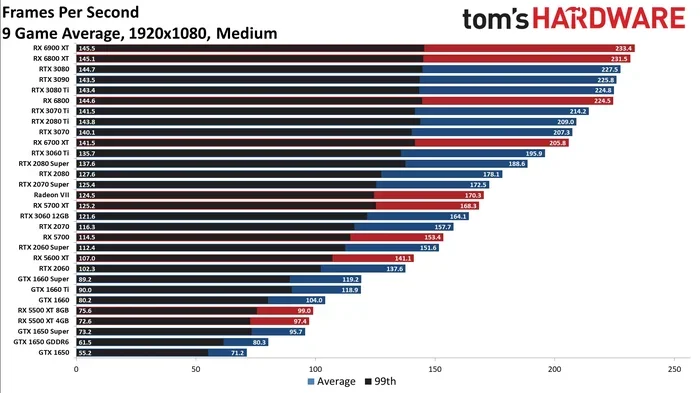
The GPU is the single most important part of any gaming laptop. It handles rendering images, textures, and effects in real time. A weak GPU means low frame rates, stuttering, and poor visual quality. A strong GPU delivers smooth gameplay even at high settings.
When shopping, look for the latest generation GPUs from NVIDIA or AMD. NVIDIA’s RTX series and AMD’s Radeon RX series are the current leaders. Here is a simple breakdown of what to look for:
- Entry-level gaming: NVIDIA RTX 3050 or AMD Radeon RX 6600
- Mid-range gaming: NVIDIA RTX 4060 or AMD Radeon RX 7600
- High-end gaming: NVIDIA RTX 4070 or higher
- Ultra gaming: NVIDIA RTX 4080 or RTX 4090
Also check the VRAM. Video RAM affects how well the GPU handles high-resolution textures and ultra settings. For most gamers, 8 GB of VRAM is the minimum. 12 GB or more is ideal for future-proofing.
Why GPU Matters More Than You Think
Many beginners focus only on the processor. That is a mistake. The GPU has a much bigger impact on gaming performance. A powerful GPU with a mid-range processor will still deliver great frame rates. The reverse is not always true.
Consider your typical gaming habits. Do you play competitive esports titles like Valorant or Fortnite? A mid-range GPU is enough. Do you play AAA titles like Cyberpunk or Alan Wake 2 at max settings? You need a top-tier GPU.
2. Processor (CPU) – The Brain of Your Laptop
The processor handles game logic, physics calculations, and background tasks. A fast CPU prevents bottlenecks and keeps everything running smoothly. For gaming laptop builds, Intel and AMD are the two main players.
Here are the current recommended processors for gaming:
- Budget friendly: Intel Core i5 or AMD Ryzen 5
- Mid-range sweet spot: Intel Core i7 or AMD Ryzen 7
- High-end performance: Intel Core i9 or AMD Ryzen 9
Clock speed and core count both matter. Look for a base clock of at least 2.5 GHz and a boost clock above 4.5 GHz. More cores help with multitasking and streaming while gaming.
CPU and GPU Balance
The best gaming laptop has a balanced CPU and GPU pairing. A top-tier GPU paired with a weak CPU creates a bottleneck. The GPU will sit idle while waiting for the processor. Always aim for components that complement each other.
3. RAM – How Much Memory Do You Really Need?
RAM affects how many programs your laptop can run at once. It also impacts loading times and overall system responsiveness. For gaming, RAM is just as important as the GPU and CPU.
Here is what the current market recommends:
- 8 GB: Minimum for casual gaming. You may run into issues with newer titles.
- 16 GB: The sweet spot for most gamers. It handles modern games and multitasking well.
- 32 GB: Ideal for heavy multitaskers, streamers, and those who want future-proofing.
If you are on a budget, 8 GB can work for less demanding games. But for a serious gaming laptop, 16 GB should be the starting point. If you are wondering how much RAM for a gaming laptop is ideal, 16 GB hits the perfect balance between performance and cost.
Also check whether the RAM is upgradeable. Some slim gaming laptops have soldered RAM. If you want room to grow later, choose a model with accessible RAM slots. For those who want maximum performance now, a 16 GB RAM for a gaming laptop setup gives you excellent headroom for modern titles.
Can You Get By With Less RAM?
Some buyers wonder if they can save money with 8 GB. The honest answer is: it depends. If you play older or less demanding games, 8 GB may suffice. But if you want to play the latest releases at good settings, 16 GB is the safe choice. Is 8GB of RAM enough for a laptop in a gaming context? Only for very light gaming and older titles.
4. Display – Size, Resolution, and Refresh Rate
The display is what you look at every second of gameplay. A great GPU means nothing if the screen cannot show it off properly. When evaluating a gaming laptop display, pay attention to three things: size, resolution, and refresh rate.
Size: Most gaming laptops come in 15.6-inch or 17.3-inch sizes. A 15.6-inch screen offers a good balance of portability and immersion. A 17.3-inch screen delivers a more cinematic experience but adds weight.
Resolution: Full HD (1920 x 1080) is the standard for gaming laptops. It provides sharp visuals without putting too much strain on the GPU. QHD (2560 x 1440) and 4K (3840 x 2160) offer more detail but require a much stronger GPU to run smoothly.
Refresh Rate: This is where gaming laptops truly shine. A standard laptop has a 60Hz display. Gaming laptops often offer 120Hz, 144Hz, 240Hz, or even 360Hz. A higher refresh rate means smoother motion and faster response times. For competitive gaming, 144Hz or higher is strongly recommended.
Panel Types Explained
Gaming laptop displays come in three main panel types:
- IPS: Great color accuracy and wide viewing angles. Best for most gamers.
- TN: Fast response times but poor color reproduction and narrow viewing angles.
- OLED: Stunning contrast and colors, but more expensive and can suffer from burn-in.
For the best overall experience, go with an IPS panel. It offers the best balance of color, speed, and viewing angles.
5. Cooling and Thermal Design
Gaming laptops pack powerful hardware into a small space. That creates a lot of heat. Without proper cooling, your laptop will thermal throttle. This means the GPU and CPU slow down to prevent damage. The result? Lower frame rates and frustrating performance drops.
Here is what to look for in a gaming laptop cooling system:
- Multiple heat pipes: More pipes mean better heat dissipation from the CPU and GPU.
- Large fans with high RPM: Bigger fans move more air with less noise.
- Vent placement: Look for vents on the sides and bottom for unobstructed airflow.
- Cooling software: Many laptops include software to manage fan speeds and thermal profiles.
Before buying, read reviews that test thermal performance. Look for surface temperatures under heavy load. A good gaming laptop should keep its keyboard deck below 40°C during intense gaming sessions.
Quick Tips for Better Cooling
- Always use your laptop on a hard, flat surface. Beds and couches block vents.
- Consider a laptop cooling pad for extra airflow.
- Clean the fans and vents every few months to prevent dust buildup.
- Use a stand to elevate the back of the laptop for better air circulation.
6. Storage – Speed and Capacity
Storage affects how fast your games load and how much you can install. Modern gaming laptop models almost exclusively use SSDs (Solid State Drives). An SSD loads games in seconds compared to the minutes a traditional hard drive needs.
Here is what to look for:
- Capacity: 512 GB is the minimum. 1 TB is the sweet spot for most gamers. 2 TB or more is ideal if you install many large titles.
- Type: NVMe SSDs are the fastest available. They connect directly to the motherboard for maximum speed.
- Upgradeability: Check if the laptop has a second storage slot. This lets you add more storage later.
Some laptops include both an SSD and a hard drive. This setup gives you speed for your operating system and games, plus extra space for files and media. However, a single large NVMe SSD is the cleaner and faster option.
Storage Speed Matters for Gaming
Fast storage reduces loading screens dramatically. Games like Cyberpunk 2077 and Hogwarts Legacy benefit hugely from NVMe speeds. If you want instant load times and smooth open-world exploration, prioritize SSD storage over everything else.
7. Build Quality, Portability, and Battery Life
A gaming laptop is not just about performance. You also need to consider how you will use it day to day. Build quality affects durability, portability affects convenience, and battery life affects mobility.
Build Quality: Look for laptops with aluminum or magnesium alloy chassis. Plastic bodies feel cheap and flex under pressure. A sturdy build protects your investment and lasts longer.
Portability: Gaming laptops are generally heavier than standard laptops. Ultraportable gaming models weigh around 2 kg. Traditional gaming laptops range from 2.5 kg to 3.5 kg. If you carry your laptop daily, aim for something under 2.5 kg.
Battery Life: Gaming is not a battery-friendly activity. Expect 2 to 4 hours of gaming on a single charge. For everyday tasks like browsing and studying, a good gaming laptop can last 5 to 8 hours. If battery life is important to you, look for models with large battery capacities (80 Wh or more).
Common Mistakes Buyers Make
- Ignoring battery life: A powerful laptop that dies in two hours limits where you can game.
- Overlooking keyboard quality: You will spend hours typing and clicking. A good keyboard with per-key RGB and tactile feedback makes a big difference.
- Skipping warranty and support: Gaming laptops are expensive. A solid warranty gives you peace of mind.
- Buying based on brand alone: A well-known brand does not always mean the best specs for your money.
8. Budget and Value Considerations
Gaming laptops range from around $700 to over $3,000. Setting a realistic budget before you shop keeps you focused and prevents overspending. Here is how to think about price ranges:
| Budget Range | What You Get | Best For |
|---|---|---|
| $700 – $1,000 | Entry-level GPU, 8 GB RAM, FHD 60Hz display | Casual gaming, esports titles |
| $1,000 – $1,500 | Mid-range GPU, 16 GB RAM, 120Hz+ display | 1080p gaming at high settings |
| $1,500 – $2,500 | High-end GPU, 16-32 GB RAM, 144Hz+ display | 1440p gaming, streaming |
| $2,500+ | Flagship GPU, 32 GB RAM, 240Hz+ display | 4K gaming, max settings, future-proofing |
The best value usually falls in the $1,000 to $1,500 range. You get a capable machine that handles modern games at high settings without breaking the bank.
Expert Insight: Where to Save and Where to Splurge
Save money on things that do not directly affect gaming performance. A fancy exterior or excessive RGB lighting adds cost without improving gameplay. Splurge on the GPU, CPU, and RAM. These three components determine your actual gaming experience. Also invest in a good cooling pad and a comfortable mouse. These small additions extend your laptop’s lifespan and improve your setup.
Conclusion
Finding the right gaming laptop comes down to knowing what matters most to you. The GPU and CPU form the foundation of performance. RAM, storage, and display quality round out the experience. Cooling, build quality, and battery life ensure your laptop lasts and performs consistently.
Set your budget first. Then prioritize the components that match your gaming style. Whether you play casually or competitively, there is a perfect gaming laptop out there for you. Use this guide to make an informed decision and enjoy every gaming session to the fullest.
Take your time, compare models, and read reviews before you buy. The right laptop will deliver hours of immersive, lag-free gaming. Happy hunting!
Frequently Asked Questions
What is the most important thing to look for in a gaming laptop?
The GPU is the most important component. It directly determines your frame rates and visual quality in games. Pair it with a strong CPU and at least 16 GB of RAM for the best experience. These three parts work together to deliver smooth gameplay.
Is 8 GB RAM enough for a gaming laptop in 2024?
8 GB is the absolute minimum, but it is not ideal for modern gaming. Most new titles recommend 16 GB for optimal performance. If you can afford it, go with 16 GB or even 32 GB. This gives you room to multitask and future-proof your setup.
How much should I spend on a gaming laptop?
The sweet spot for most gamers is between $1,000 and $1,500. At this price, you get a capable GPU, 16 GB of RAM, and a high refresh rate display. Spending more than $2,500 only makes sense if you need flagship performance or 4K gaming capability.
Do I need a gaming laptop with a 144Hz display?
A 144Hz display makes a noticeable difference in fast-paced games. It reduces motion blur and makes animations smoother. If you play competitive shooters or racing games, 144Hz or higher is highly recommended. For slower-paced games, 60Hz may still be acceptable.
Can I upgrade the RAM and storage in a gaming laptop later?
Many gaming laptops allow RAM and storage upgrades. However, some slim models have soldered components. Always check the specifications before buying. Choosing a model with upgradeable parts gives you more flexibility as your needs grow.
How important is battery life in a gaming laptop?
Battery life matters if you game on the go or away from outlets. Most gaming laptops last 2 to 4 hours during intense gaming. For everyday tasks, expect 5 to 8 hours. If portability is important, look for models with large batteries and power-efficient components.