16 Channel Nvr Camera System
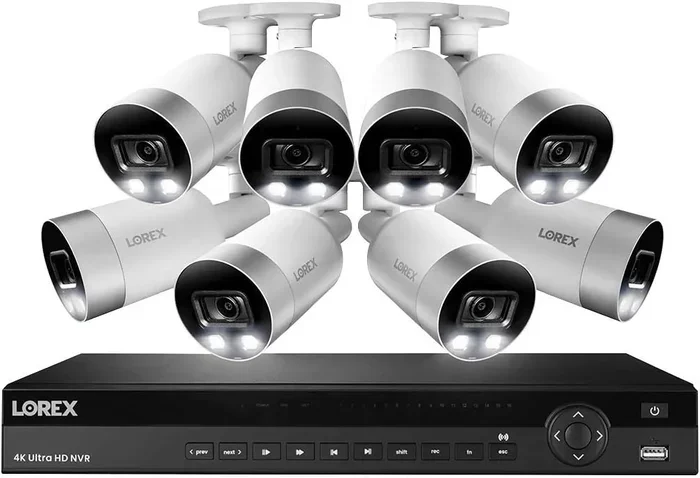
A 16 channel NVR camera system gives you powerful surveillance for homes and businesses. You get high-resolution video, easy remote viewing, and long-term storage in one neat package. This guide breaks down everything you need to choose, install, and maintain your setup with confidence.
Security matters. Whether you want to protect your home, monitor a shop, or keep an eye on a parking lot, a reliable video setup makes a real difference. A 16 channel NVR camera system gives you the capacity to watch many areas at once without juggling multiple devices. It keeps everything in one place and makes daily monitoring simple.
You might be wondering if this size is right for you. The short answer is yes if you have several entry points, outdoor zones, or indoor rooms to cover. You do not need to overcomplicate your setup. With the right plan, you can install cameras, connect them to the recorder, and start viewing footage in no time.
Key Takeaways
- Maximum coverage: A 16 channel NVR camera system supports up to sixteen cameras, perfect for large properties.
- Clear footage: Many models deliver 4K resolution for sharp details and better identification.
- Flexible storage: You can expand hard drive space to keep more days of recorded video.
- Remote access: View live feeds and playback from your phone or computer anywhere.
- Simple setup: Modern systems often include plug-and-play wiring and user-friendly apps.
- Smart alerts: Motion detection and AI features help you spot events faster.
- Future-ready: You can start small and add cameras as your needs grow.
📑 Table of Contents
- Why Choose a 16 Channel NVR Camera System
- Understanding NVR Recording and Storage
- Camera Placement and Coverage Tips
- Remote Viewing and Smart Alerts
- Installation Basics and Setup Checklist
- Comparing System Sizes and Feature Options
- Maintenance, Reliability, and Long-Term Use
- Final Thoughts on Choosing the Right System
Why Choose a 16 Channel NVR Camera System
A 16 channel NVR camera system is a smart middle ground between small setups and massive enterprise systems. It gives you enough room to cover a large house, a small business, or a multi-zone property. You get one recorder, one app, and one place to review everything.
Here is why many people pick this size:
- Broad coverage: You can place cameras at doors, driveways, alleys, hallways, and storage areas.
- Centralized management: One recorder keeps your video, alerts, and settings organized.
- Room to grow: You can begin with a few cameras and add more later.
- Clean setup: A single unit reduces clutter compared with many small recorders.
If you are comparing options, you may also want to look at smaller setups for tighter spaces. For example, a four camera wireless security system can work well for compact homes. But when you need wider coverage, a sixteen-channel recorder gives you much more flexibility.
Best Uses for Sixteen Cameras
This size is useful when one or two cameras simply are not enough. You might cover:
- Front and back entrances
- Garage and parking areas
- Side gates and fences
- Retail shelves or service counters
- Back corridors and storage rooms
A 16 channel NVR camera system also helps when you want different camera types in one network. You can mix indoor dome cameras with outdoor bullet cameras, as long as they work with the same recorder. That makes it easier to tailor each zone without buying separate systems.
Understanding NVR Recording and Storage
NVR stands for network video recorder. It receives video from your cameras and saves it for later review. With a 16 channel NVR camera system, the recorder manages up to sixteen video streams at once. That means you can view live feeds and play back recorded clips from one place.
Storage matters a lot. The hard drive inside the recorder determines how long you can keep footage. If you want more recorded history, you can often add a bigger drive or use a recorder with extra bays.
How Storage Affects Recording Time
Several factors change how much video you can keep:
- Camera resolution: Higher resolution files take up more space.
- Frame rate: Smoother video uses more storage than lower frame rates.
- Recording mode: Continuous recording uses more space than motion-based recording.
- Compression: Efficient video compression can help reduce file size.
If you want a clearer picture of your options, you can compare setups like a 16 channel security camera system or a higher-resolution 16 camera security system 4K. The best choice depends on how much detail you want and how much storage you are ready to manage.
Quick Tips for Storage Planning
- Pick a drive size that matches your recording habits.
- Use motion-triggered recording if you do not need constant footage.
- Check whether the recorder supports larger drives for future expansion.
- Back up important clips if your system offers cloud or USB export.
Camera Placement and Coverage Tips
Good placement makes a huge difference. A 16 channel NVR camera system can only help if the cameras see the right spots. Start by walking your property and listing the areas you want to monitor. Then match each zone to a camera position.
Think about the main goals first. Do you want to spot people approaching the door? Do you need a wide view of a parking space? Do you want to record a narrow hallway? Each goal may need a different camera angle.
Where to Put Cameras for Best Results
- Entry points: Cover doors and gates where people come and go.
- Driveways and parking areas: Watch vehicles and visitors.
- Blind corners: Reduce hidden spots around the property.
- Indoor choke points: Place cameras in hallways or main paths.
- High-traffic zones: Focus on areas where activity happens often.
Keep the view clean. Trim branches, move obstacles, and avoid pointing cameras straight into bright light. If the lens gets dirty or blocked, the image quality drops fast. You can also read practical maintenance advice in this guide on how to keep backup camera clean, which shares useful habits for keeping lenses clear.
Common Mistakes to Avoid
- Mounting too high: Extremely high angles can lose useful facial or vehicle detail.
- Ignoring glare: Sunlight or reflections can wash out the image.
- Overlapping too much: Too much overlap can waste camera coverage.
- Missing power or network paths: Plan wiring before you mount everything.
Remote Viewing and Smart Alerts
One of the best parts of a 16 channel NVR camera system is remote access. You can check live video from your phone, tablet, or computer. That means you can see what is happening while you are at work, on vacation, or simply in another room.
Smart alerts make monitoring easier. Instead of staring at sixteen feeds all day, you can let the system notify you when something needs attention. Motion detection is the most common example. Some systems also offer smarter filtering so you get fewer false alarms.
Making Alerts More Useful
To keep alerts practical, tune them carefully:
- Set activity zones: Focus alerts on the areas that matter.
- Adjust sensitivity: Lower sensitivity can reduce unnecessary notifications.
- Use schedules: Turn on alerts only during certain hours if needed.
- Check lighting changes: Shadows and headlights can trigger alerts if settings are too loose.
If you want a system that can work even when your network is unstable, you may be interested in an AI camera offline alert system. It is a helpful concept when you want extra awareness without losing track of events.
Installation Basics and Setup Checklist
A 16 channel NVR camera system is usually easier to install when you plan ahead. You do not need to guess where each cable goes or where the recorder will sit. A little preparation saves time and keeps the setup neat.
Start by choosing a stable location for the recorder. It should stay cool, dry, and protected from tampering. Then map your camera positions and measure cable routes. If your cameras are wired, make sure each connection reaches the recorder without tight bends or strain.
Simple Setup Checklist
- Pick a safe spot for the recorder and power supply.
- Decide camera locations before mounting anything.
- Run cables with enough slack for adjustments.
- Label each camera cable if possible.
- Power up the system and check each feed.
- Set the time, date, and recording mode.
- Test remote access on your phone or computer.
If you ever need to remove a camera or replace a unit, it helps to know how the mount and cable connection work. For vehicle-related camera removal examples, you can see guides like how to remove Silverado tailgate with camera and how to remove GMC tailgate with backup camera. Those articles show how hardware removal can vary by setup, which is a useful reminder to follow the right steps for your own equipment.
Expert Insights for Smoother Installation
Take your time with the first camera. If the first one works well, the rest usually go faster. Test the view before you tighten every mount. A small angle change can improve the image a lot. Also, save your login details and recorder settings in a safe place so you do not lose access later.
Comparing System Sizes and Feature Options
Not every property needs the same number of cameras. A 16 channel NVR camera system is a strong choice when you want broad coverage, but it is still smart to compare it with other sizes. Smaller systems are simpler and cheaper. Larger systems can handle more complex sites.
Here is a simple comparison to help you think through the options:
| System Size | Best For | Main Advantage | Possible Limitation |
|---|---|---|---|
| 4 cameras | Small homes, basic entry monitoring | Simple setup, lower cost | Limited coverage |
| 8 cameras | Medium homes, small shops | Balanced coverage and price | May not cover every zone |
| 16 cameras | Large homes, offices, parking areas | Wide coverage, room to expand | More planning and wiring |
| 24+ cameras | Larger commercial sites | Extensive surveillance | Higher cost and complexity |
If you want maximum detail, you may also want to compare resolution options. A higher-resolution setup can make faces, license plates, and distant objects easier to see. That is one reason people look closely at a 16 camera security system 4K when image quality matters most.
Key Takeaways for Choosing the Right Size
- Match the system size to your real coverage needs.
- Think about future additions before you buy.
- Balance image quality with storage space.
- Choose a setup that fits your wiring and network comfort level.
Maintenance, Reliability, and Long-Term Use
A 16 channel NVR camera system works best when you care for it over time. That does not mean constant work. It just means checking a few things now and then so the system stays reliable.
Start with the lenses. Dust, spider webs, rain spots, and dirt can blur the image. Next, check the recorder. Make sure it still has enough storage, the fans are working, and the system has not run out of space. If your cameras use memory cards, you may also want to review instructions like how to remove memory card from camera so you can handle card maintenance safely when needed.
Simple Maintenance Habits
- Wipe lenses gently when they get dirty.
- Check recordings to confirm each camera is working.
- Review storage space and delete old clips if needed.
- Update software or firmware when the maker recommends it.
- Inspect mounts, cables, and power connections periodically.
Reliability also depends on your environment. Outdoor cameras need protection from weather and vandalism. Indoor cameras need clear sight lines and stable power. If one camera stops working, it helps to understand the issue quickly instead of waiting for the next incident.
Final Thoughts on Choosing the Right System
A 16 channel NVR camera system gives you a strong mix of coverage, control, and convenience. You can watch many areas at once, save the footage you need, and check everything remotely. It is a practical choice for homeowners and business owners who want a fuller view of their property.
The best system is the one that fits your space, your budget, and your comfort level. Plan your camera positions carefully. Choose storage that matches your recording habits. Keep the lenses clean and the settings tuned. With those basics in place, your surveillance setup can do its job without making your life complicated.
If you are ready to move forward, think about the zones you care about most. Start with a clear map, choose reliable equipment, and build step by step. That way, your 16 channel NVR camera system becomes a useful part of your daily security instead of just another device on the shelf.
Frequently Asked Questions
What is a 16 channel NVR camera system used for?
A 16 channel NVR camera system is used to monitor multiple areas at once, such as doors, driveways, hallways, and parking spaces. It records video from up to sixteen cameras and stores it in one central unit for easy review.
Can I start with fewer cameras and add more later?
Yes, many people begin with a few cameras and expand over time. A 16 channel NVR camera system often gives you room to add more later, as long as the recorder and cameras are compatible.
Does a 16 channel NVR camera system support 4K video?
Some models support higher-resolution video, including 4K on compatible cameras. If sharp detail matters to you, compare options like a 16 camera security system 4K to see what level of clarity fits your needs.
How much storage do I need?
Storage needs depend on resolution, frame rate, and recording mode. Continuous recording uses more space than motion-based recording, so your habits matter. If you want longer history, choose a larger hard drive or expandable storage.
Can I view the cameras remotely on my phone?
Yes, most modern systems let you view live feeds and playback from a phone or computer. Remote access makes it easier to check your property when you are away from home or work.
What should I check before installing the system?
Before installing, plan your camera locations, cable routes, and recorder placement. It also helps to test each feed, set the correct time and date, and confirm remote access works. Good planning makes the setup much smoother.