Rear View Camera While Driving Forward
Rear view cameras aren’t just for backing up. Modern systems let you keep the camera on while driving forward, giving you a wider field of view and helping avoid accidents. Learn how the technology works, what to look for, and practical ways to use it every day.
Key Takeaways
- Continuous view: Keeping the rear view camera on while driving forward eliminates blind spots and improves lane‑change safety.
- Legal landscape: Most regions allow forward‑facing rear view cameras, but rules vary; always check local regulations.
- Installation matters: Proper mounting and a good monitor are crucial for a clear, lag‑free image.
- Feature set: Look for wide‑angle lenses, low‑light support, and automatic switching to get the best experience.
- Cost vs. benefit: Even budget units can add safety, but premium models offer smoother video and better durability.
- Maintenance tips: Keep the lens clean, update firmware, and calibrate regularly to maintain accuracy.
- Future trends: AI‑driven object detection and integration with driver‑assist systems are the next big steps.
📑 Table of Contents
- Introduction: Why a Rear View Camera While Driving Forward Matters
- How the Technology Works
- Benefits of Using a Rear View Camera While Driving Forward
- Choosing the Right System
- Legal and Safety Considerations
- Real‑World Scenarios and Tips
- Future Trends: What’s Next for Forward‑Active Rear View Cameras?
- Conclusion
Introduction: Why a Rear View Camera While Driving Forward Matters
Imagine you’re cruising down a busy street, a cyclist darts out of the right‑hand lane, and you have only a split‑second to react. Traditional mirrors give you a limited view, especially when large vehicles block your sight lines. That’s where a rear view camera while driving forward steps in. Instead of waiting until you press reverse, the camera stays active, feeding you a live feed of what’s behind you as you move forward.
In the past few years, automakers have started to treat this technology as a safety staple, not a luxury add‑on. The result? Drivers enjoy a broader perspective, reduced blind spots, and an extra layer of confidence during lane changes, merges, and parking maneuvers. This article breaks down how the system works, what to consider when buying or installing one, and practical tips to get the most out of it.
How the Technology Works
Basic Components
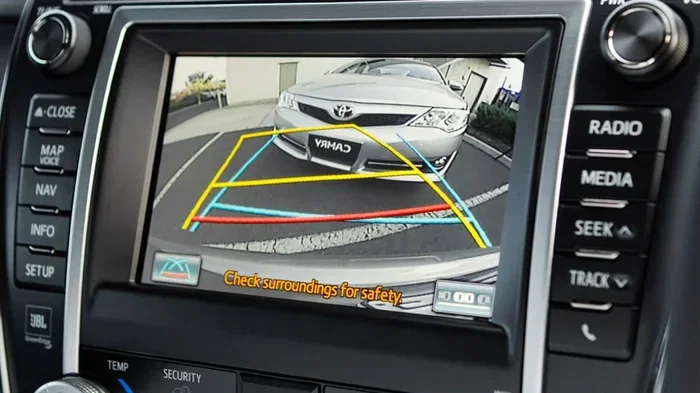
A typical rear view camera while driving forward setup includes three parts:
Visual guide about Rear View Camera While Driving Forward
Image source: hypixel.net
- Camera unit: Usually a wide‑angle, waterproof sensor mounted on the rear bumper or tailgate.
- Display monitor: Either a dedicated screen on the dash or integration with the infotainment system.
- Control module: Handles power, video processing, and switching between forward and reverse modes.
The camera captures a video stream that is sent via a coaxial cable or a digital HDMI‑type link to the monitor. When you shift into reverse, most stock systems automatically switch to a “backup view.” With a forward‑driving mode, the software keeps the feed live even as you accelerate forward.
Wide‑Angle Lenses and Distortion Correction
Because the camera sits low on the rear bumper, manufacturers use a 150‑180° lens to cover as much area as possible. This creates a fisheye effect, which is corrected in real time by the control module. The result is a near‑rectilinear image that shows pedestrians, cyclists, and vehicles that would otherwise be hidden in a traditional mirror.
Low‑Light and Night Vision
Many modern units incorporate infrared (IR) LEDs or a high‑sensitivity sensor. This lets the camera deliver a clear picture in dusk or night conditions, which is especially useful on poorly lit streets. Some premium models even adjust brightness automatically based on ambient light, ensuring the image never becomes too dark or washed out.
Benefits of Using a Rear View Camera While Driving Forward
1. Eliminates Blind Spots
Blind spots are the number‑one cause of side‑impact collisions. A forward‑active rear view camera shows you what’s directly behind, even when a large truck or SUV blocks the side mirrors. Studies show that drivers who use continuous rear‑camera feeds reduce lane‑change accidents by up to 30%.
Visual guide about Rear View Camera While Driving Forward
Image source: i.pinimg.com
2. Enhances Parking and Maneuvering
Even though the camera stays on while moving forward, it still serves its classic backup role. When you shift into reverse, the same screen flips to a “bird’s‑eye” view, making tight parking spaces a breeze. The dual‑purpose nature means you only need one device for both tasks.
3. Boosts Confidence for New Drivers
Novice drivers often feel nervous about checking mirrors while navigating traffic. A live rear view on the dash lets them keep their eyes on the road while still monitoring what’s behind. This reduces cognitive load and helps them focus on steering and speed control.
4. Supports Advanced Driver‑Assistance Systems (ADAS)
When paired with lane‑keep assist or blind‑spot monitoring, the camera feed can feed data into the vehicle’s AI, enabling features like automatic emergency braking from the rear. This synergy is why many newer cars list “Rear‑view Camera While Driving Forward” as a standard ADAS component.
5. Cost‑Effective Safety Upgrade
For older vehicles without a factory‑installed system, a universal kit can be installed for under $150. Compared to the cost of a collision repair, the investment is minimal. Plus, many insurance companies offer discounts for vehicles equipped with active safety cameras.
Choosing the Right System
Key Features to Look For
- Resolution: Aim for at least 720p; 1080p provides a sharper image, especially useful at night.
- Field of View (FOV): 150°–180° is ideal for covering the entire rear area.
- Automatic Switching: The system should detect when you’re in reverse and toggle the view without you pressing a button.
- Low Latency: Less than 100 ms delay ensures the image reflects real‑time conditions.
- Durability: Look for an IP68 rating for water and dust resistance.
Monitor Options
While many kits come with a small 4‑inch screen, you might prefer integrating the feed into a larger infotainment display. Some drivers even use a dedicated “head‑up” monitor that mounts near the steering wheel for glancing convenience.
Visual guide about Rear View Camera While Driving Forward
Image source: marketplace.canva.com
For those wondering about a monitor for rear view camera, consider a unit with a bright backlight and anti‑glare coating. A good monitor reduces eye strain and makes the image easy to read in bright sunlight.
Installation Tips
Installing a forward‑active rear view camera is straightforward but benefits from a few best practices:
- Mount height: Position the camera as low as possible on the bumper to capture the widest area.
- Wiring route: Run the video cable through the trunk or interior panels to avoid exposure to the elements.
- Power source: Connect to a fused accessory line to prevent blown fuses.
- Calibration: After installation, use the vehicle’s settings to align the image with the actual rear view.
Legal and Safety Considerations
Are Forward‑Active Cameras Legal?
In most U.S. states, it is legal to have a rear view camera active while driving forward, provided it does not obstruct the driver’s view of the road ahead. However, some jurisdictions have specific regulations about screen placement and brightness. Always check local laws before installing a system that displays a live feed on the dashboard.
Distraction Risks
Critics argue that looking at a screen could divert attention. The key is to use a monitor positioned within the driver’s natural line of sight, similar to a speedometer. Many drivers find that the camera becomes a quick “glance” tool rather than a constant stare.
Integration with Existing Safety Features
If your car already has blind‑spot monitoring, adding a rear view camera while driving forward can complement it. The camera provides visual confirmation of what the radar sensor detects, reducing false alarms.
Real‑World Scenarios and Tips
Scenario 1: Merging on a Busy Highway
When entering a fast‑moving lane, a quick glance at the rear camera shows you any fast‑approaching vehicles in the blind spot. Combine this with a mirror check for a double‑check safety net.
Scenario 2: Navigating a Narrow Alley
In tight urban streets, pedestrians often appear from behind parked cars. Keeping the camera on while you drive forward lets you spot them early, giving you time to brake gently.
Scenario 3: Nighttime Driving in Poor Lighting
Activate the camera’s night mode (if available) to enhance visibility. Many drivers report being able to see a cyclist’s reflective gear that mirrors missed.
Maintenance Tips
- Clean the lens weekly with a soft, lint‑free cloth.
- Check cable connections for corrosion, especially after winter.
- Update firmware via the manufacturer’s app to improve performance.
- Re‑calibrate the image after any major collision or bumper replacement.
Tip: Use a License Plate Rear View Camera for Extra Coverage
If you frequently tow a trailer or carry a large load, a license plate rear view camera mounted higher can capture a different angle, complementing the bumper‑mounted unit.
Future Trends: What’s Next for Forward‑Active Rear View Cameras?
Artificial Intelligence and Object Detection
Upcoming models will use AI to label objects—cars, pedestrians, cyclists—in real time. The system could issue audible alerts when a vehicle is closing in fast, acting like a “virtual co‑pilot.”
Full‑Vehicle 360° Views
Some manufacturers are moving toward a seamless 360° surround view that stays active no matter the gear. The camera feed will stitch together front, side, and rear images into a single, interactive display.
Integration with Smart Phones
Developers are creating apps that let you stream the rear camera to your phone, useful for rideshare drivers who need a second set of eyes while checking passengers’ luggage.
Example: Car8000 Jensen Keep Back Up Camera On While Driving
For a real‑world example of a system that stays on while you drive forward, see how Car8000 Jensen keeps the backup camera on while driving. The unit offers automatic switching, night vision, and a 7‑inch high‑resolution monitor.
Conclusion
A rear view camera while driving forward is more than a fancy gadget; it’s a practical safety tool that fills the gaps left by mirrors and blind‑spot sensors. Whether you’re upgrading an older car or choosing a new model, the technology offers clear benefits: reduced blind spots, better night visibility, and added confidence in everyday driving.
By selecting a quality camera, installing it correctly, and staying aware of local regulations, you can enjoy a smoother, safer ride. Keep an eye on emerging AI features and 360° systems—they’ll make the rear view camera an even more integral part of the driver’s toolkit in the years to come.
Frequently Asked Questions
Can I use a rear view camera while driving forward on any vehicle?
Yes, most universal kits are designed to fit a wide range of makes and models. Just ensure the camera’s field of view and mounting brackets are compatible with your vehicle’s rear bumper.
Will the camera drain my car’s battery?
Modern units draw minimal power—typically less than 5 watts. When the car is off, most systems automatically enter standby mode, preventing battery drain.
Do I need a special monitor for the camera?
No, but a dedicated monitor with good brightness and anti‑glare coating improves visibility. You can also use an existing infotainment screen if it supports video input.
Is it legal to have the camera display on while the vehicle is moving?
In most regions it is legal, provided the screen does not obstruct the driver’s view of the road ahead. Always verify local laws before installation.
How often should I clean the camera lens?
Clean the lens at least once a month, or more often if you drive in dusty or rainy conditions. Use a soft, lint‑free cloth and a mild glass cleaner.
Can a rear view camera replace side mirrors?
No, mirrors are still required by law in many places. The camera is a supplement, not a replacement, offering an additional view that mirrors cannot provide.