4k Security Camera with Optical Zoom
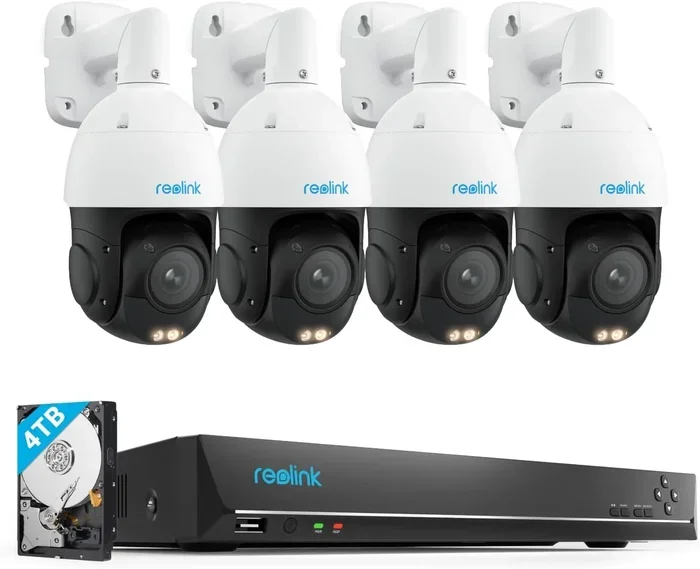
A 4k security camera with optical zoom gives you crystal-clear video and the power to see faraway details without losing quality. Unlike digital zoom, optical zoom uses real glass lenses to keep every face, license plate, and package sharp. In this guide, you will learn how zoom works, what features matter most, and how to pick the right camera for your space. We will also cover mounting tips, power needs, and common mistakes to avoid.
This is a comprehensive guide about 4k security camera with optical zoom.
Key Takeaways
- Optical zoom keeps details sharp: Real glass lenses maintain full 4K quality when you zoom in on distant subjects.
- Look for high zoom ratios: A 4x to 10x optical zoom works well for most homes and small businesses.
- Match the camera to your space: Wide-angle views suit yards, while long zoom lenses protect gates and parking areas.
- Check power and weather needs: Outdoor cameras need solid power options and strong weather protection.
- Use proper mounting height: Placing the camera too high can reduce facial details and make zoom less useful.
- Review local rules first: Always check privacy laws and HOA rules before installing visible cameras.
[FEATURED_IMAGE_PLACEHOLDER]
Why a 4k Security Camera with Optical Zoom Matters
Security cameras have come a long way. Today, many people want clear video that shows real details. A 4k security camera with optical zoom gives you both. You get a sharp image and the ability to focus on distant objects without blur.
This matters because many security problems happen far from the lens. A person may walk near a gate. A car may pass by a driveway. A package may sit close to a side door. If your camera only shows a wide view, those details can look small and unclear. Zoom helps you see more without moving the camera.
Optical zoom is different from digital zoom. Digital zoom simply enlarges part of the image. That can make the picture look soft or blocky. Optical zoom uses the lens itself to bring distant objects closer. The result is a cleaner image with better detail. If you want to identify faces, read plates, or check a far corner of your property, optical zoom is a smart choice.
Another benefit is flexibility. A zoom lens can cover more than one area. You can watch a broad view during the day. Then you can zoom in when something looks suspicious. This saves time and helps you react faster. It also reduces the need for extra cameras in some cases.
Of course, zoom is only one part of the picture. You also want good low-light performance, stable streaming, and easy setup. A strong 4k security camera with optical zoom should balance all of these features. In the sections below, we will break down what to look for and how to choose the right model for your needs.
Understanding Optical Zoom vs Digital Zoom
Not all zoom is the same. Before you buy, it helps to know the difference between optical zoom and digital zoom. This choice affects image quality, distance coverage, and overall usefulness.
How Optical Zoom Works
Optical zoom changes the physical focus of the lens. The glass moves to bring distant objects closer. Because the camera captures more detail from the start, the image stays sharp when you zoom in. This is why a 4k security camera with optical zoom is often better for long-distance viewing.
How Digital Zoom Works
Digital zoom crops and enlarges part of the recorded image. It does not add new detail. If the original image is already soft, digital zoom will make it look worse. It can still be useful for quick checks, but it is not ideal for identification.
Which One Should You Choose
If you want to monitor a nearby yard, a wide view may be enough. If you need to watch a street, driveway, or entrance from a distance, optical zoom is usually the better option. Many people also prefer a camera that offers both, so they can switch between a broad view and a close-up when needed.
Here is a simple comparison:
- Optical zoom: Better detail, better for distance, uses real lens movement
- Digital zoom: Easier to offer in cheap models, less detail, best for close views
- Combined use: Wide monitoring plus targeted inspection
When reading product details, look for the optical zoom number first. That tells you how much true lens zoom the camera offers. A higher optical zoom usually means more flexibility for outdoor monitoring.
What to Look for in a 4k Security Camera with Optical Zoom
Buying a camera is easier when you know which features matter. A 4k security camera with optical zoom can look great on paper, but the real question is whether it fits your space and your daily routine. Here are the key things to check.
Image Quality and Sensor Strength
4K resolution gives you more detail than older standards. That helps when you zoom in or review footage later. Still, resolution alone does not guarantee a good image. The sensor, lens quality, and image processing also matter. A strong camera should produce clear footage in normal daylight and decent visibility at night.
Zoom Range and Field of View
Zoom range tells you how far the lens can reach. Field of view tells you how wide the scene appears. These two features work together. A wide field of view is useful for general monitoring. A stronger zoom is useful for focusing on a gate, driveway, or far corner. Think about the distance between your camera mount and the area you want to watch.
Low-Light and Night Vision
Many security events happen after dark. Look for strong night vision, infrared support, or other low-light tools. Some cameras also use smart lighting or enhanced sensors for darker conditions. If your property has dim areas, this feature deserves extra attention.
Weather Resistance and Build Quality
Outdoor cameras face sun, rain, dust, and temperature changes. A sturdy housing helps the camera last longer. Check the weather rating and make sure the design suits your climate. If the camera will sit in direct sun or exposed rain, durability matters even more.
Power and Connection Options
A reliable camera needs steady power and a stable connection. Some systems use wired power, while others rely on batteries or hybrid setups. Wired setups often work well for constant monitoring. Battery-powered options can be easier to install in some spots, but they may need more maintenance. Also check whether the camera supports your preferred network setup.
Smart Features and Alerts
Modern cameras often include motion detection, person detection, and mobile alerts. These tools help you notice important events faster. Some models also offer two-way audio, cloud storage, or local storage. Choose the features that match your needs without making the setup too complicated.
Best Use Cases for Zoom Security Cameras
A 4k security camera with optical zoom can work in many places, but it shines in certain situations. The best use case depends on distance, layout, and what you want to monitor.
Driveways and Parking Areas
Driveways can be long, and parking areas may stretch out across a property. A zoom camera can help you watch vehicles, visitors, and activity from a distance. It can also help you check a specific spot without needing a camera right next to it.
Gates and Entry Points
Gates, side doors, and backyard entrances often benefit from a closer view. With optical zoom, you can monitor who approaches and see details more clearly. This is especially helpful if the entrance is far from your main building or mounted in a high spot.
Large Yards and Outdoor Spaces
Big yards can be hard to cover with one fixed wide-angle camera. A zoom lens gives you more control. You can watch a broad area first, then focus on a specific zone when needed. This can be useful for checking fences, sheds, or outdoor equipment.
Small Business and Storefronts
Some businesses need a view of the front area, loading zone, or parking lot. A zoom camera can help monitor activity without covering every angle with extra devices. It can also help review incidents with better detail than a basic wide camera.
Remote or Hard-to-Reach Spots
If a location is difficult to access, a zoom camera can reduce the need to move equipment around. You can mount it once and adjust the view as needed. That makes it a practical choice for areas where frequent adjustments would be inconvenient.
Installation Tips for the Best Zoom Results
Even a great camera can underperform if it is installed poorly. Good placement helps you get the most out of optical zoom. Here are some simple tips to improve your results.
Choose the Right Height
Mounting a camera too high can make faces and details harder to see. A very steep angle may reduce the usefulness of zoom. For many properties, a moderate height works best. You want a clear view, but not so high that the camera loses important details.
Point the Camera at Key Areas
Before you finish mounting, think about where activity happens. Aim the lens toward walkways, driveways, gates, or other important zones. If the camera supports zoom, test the view before locking everything in place. Small adjustments can make a big difference.
Mind Glare and Obstructions
Direct sunlight, reflections, and physical barriers can reduce image quality. Trees, signs, and walls may block part of the view. Try to place the camera where the lens stays clear. If glare is a problem, adjust the angle or use a spot with less direct light.
Check Power and Cable Routing
If your camera uses wired power, plan the cable path carefully. Keep cables protected and out of easy reach when possible. Good routing helps the system look cleaner and last longer. If you use a wireless or hybrid setup, make sure the signal stays strong in that location.
Test the View Before Finalizing
Do not assume the first angle is perfect. Check the live view during the day and at night if possible. Zoom in and out to see how the lens performs. Make sure important areas stay visible and that the image stays clear at different distances.
Maintenance, Storage, and Privacy Considerations
After installation, a little maintenance goes a long way. A 4k security camera with optical zoom can give you better coverage, but only if it stays clean, connected, and properly configured.
Keep the Lens Clean
Dust, dirt, spider webs, and rain spots can blur the image. Clean the lens gently with a soft cloth when needed. If the camera sits under trees or near dusty areas, check it more often. A clean lens makes zoom much more useful.
Review Storage Options
Think about where your footage will live. Some people prefer local storage, while others use cloud storage. Each option has pros and cons. Local storage may feel simple and direct. Cloud storage can offer remote access and backup convenience. Choose the setup that matches your comfort level and budget.
Update Firmware and Check Settings
Camera software updates can improve performance and fix issues. Check for updates from time to time. Also review motion settings, alert preferences, and recording schedules. Too many false alerts can become annoying, so fine-tune the system after installation.
Think About Privacy
Security cameras should protect your property without creating privacy problems for neighbors or visitors. Aim cameras at your own space and avoid pointing them where they may capture private areas. If you live in a shared community, it is smart to review local rules or guidance before placing cameras in visible spots.
Watch for Weather and Wear
Outdoor cameras can take a beating over time. Inspect mounts, cables, and housings occasionally. Make sure nothing is loose or damaged. If the camera starts giving weak video or frequent dropouts, the issue may be physical wear, signal trouble, or a power problem.
Common Mistakes to Avoid
A few simple mistakes can reduce the value of a zoom camera. Avoiding them will help you get better footage and fewer headaches.
- Mounting too high: This can make faces and close details harder to identify.
- Ignoring night performance: A sharp daytime image does not always mean good nighttime video.
- Choosing zoom without checking field of view: You may end up with too narrow a scene for general monitoring.
- Skipping the test phase: Always check the live view before finalizing the mount.
- Overlooking power and signal needs: A great camera still needs a stable setup.
- Forgetting basic cleaning: A dirty lens can ruin the benefit of high resolution and zoom.
Expert Insights and Final Thoughts
When experts compare security cameras, they usually look beyond resolution alone. They ask how well the camera handles distance, light, weather, and everyday use. A 4k security camera with optical zoom can be a strong choice because it gives you more control over what you see. Instead of relying on one fixed view, you can watch a wider scene and then focus on the important part.
That flexibility is especially useful for properties with long driveways, multiple entrances, or distant activity zones. It can also help reduce guesswork when you review footage later. Clear details matter when you are trying to understand an event or spot a problem early.
At the same time, zoom is not a magic fix. A camera still needs good placement, proper power, and regular maintenance. The best setup is the one that fits your space and stays reliable over time. If you choose carefully and install thoughtfully, a zoom camera can give you peace of mind and better visibility.
If you are comparing options, start with your main goal. Do you want to watch a gate, monitor a driveway, or keep an eye on a large yard? Once you know that, it becomes much easier to pick the right zoom range, lens style, and feature set. A well-chosen camera should feel simple to use and helpful every day.
Question?
What makes a 4k security camera with optical zoom better than a standard camera?
It gives you sharper detail and the ability to bring distant objects closer without losing as much quality. That makes it easier to see faces, vehicles, and other important details from farther away.
Question?
How much optical zoom do I really need?
It depends on the distance you want to cover. For closer yards and entry points, a modest zoom may be enough. For driveways, gates, or longer distances, a stronger optical zoom is usually more helpful.
Question?
Can optical zoom replace multiple cameras?
Sometimes it can reduce the number of cameras you need, but it usually works best as part of a larger setup. A zoom camera is great for targeted viewing, while other cameras may still help cover wider areas.
Question?
Do 4K zoom cameras work well at night?
Many do, but night performance varies by model. Look for strong low-light support, infrared features, or other night vision tools if you expect activity after dark.
Question?
Is a wired or wireless 4k security camera with optical zoom better?
Wired setups often offer more consistent power and reliability for constant monitoring. Wireless or hybrid options can be easier to install in some places, but they may need more attention over time.
Question?
What should I check before installing the camera outdoors?
Check the weather rating, power source, signal strength, and mounting height. Also make sure the lens will not face constant glare, blockage, or privacy issues.
Frequently Asked Questions
What is 4k security camera with optical zoom?
4k security camera with optical zoom is an important topic with many practical applications.