4 Gb Ram for Laptop
A 4 Gb Ram for laptop works well for basic tasks like web browsing, email, and document editing. It keeps your computer running smoothly for everyday needs without breaking the bank. However, heavy multitasking, gaming, or creative work will push this memory to its limits. This guide covers everything you need to know about 4GB RAM laptops, from real-world use cases to upgrade options.
A 4 Gb Ram for laptop is one of the most common memory configurations you will find in budget and entry-level machines. If you are shopping for a used laptop or a low-cost new one, there is a good chance it comes with 4GB of memory. But the real question is whether this amount of memory is enough for what you do every day.
4GB of laptop memory has been the standard for basic computing for many years. It works well for simple tasks like checking email, watching videos, and writing documents. But as software grows more demanding, 4GB is starting to show its limits. In this guide, we will walk through everything you need to know about 4GB RAM in a laptop. We will cover what it can do, where it falls short, and how to decide if it is right for you.
## What Is 4 Gb Ram for Laptop and How Does It Work?
Ram, or random access memory, is the short-term memory your laptop uses to run programs and process data. When you open an app or a browser tab, it loads into RAM. When you close it, that space frees up. Think of RAM like a desk. A bigger desk lets you spread out more papers at once. A 4GB RAM laptop gives you a smaller desk, so you can only handle a few things at a time.
### How Much Memory Do You Actually Get?
When you buy a laptop with 4GB of memory, you do not get the full 4GB for your use. The operating system and background processes use a portion of it. On Windows 10 or Windows 11, the system itself uses about 2GB to 2.5GB of RAM just to run. That leaves you with roughly 1.5GB to 2GB of usable memory for your apps and tasks.
This is an important thing to understand. Many people buy a 4GB RAM laptop expecting to have 4GB of free space. They quickly notice slowdowns and wonder what went wrong. The truth is that your operating system takes a big share of that memory from the start.
### DDR3 vs DDR4 RAM in 4GB Laptops
Not all RAM is the same. Older 4GB laptops often use DDR3 memory. Newer budget laptops may come with DDR4 RAM. DDR4 is faster and more efficient than DDR3. If you are looking at a used laptop, check which type of memory it has. A DDR4 4GB laptop will feel snappier than a DDR3 4GB laptop, even though both have the same amount of memory.
## What Can You Do With 4 Gb Ram for Laptop?
A 4GB RAM laptop handles certain tasks very well. Let us look at what works and what does not.
### Tasks That Run Smoothly on 4GB RAM
If you use your laptop for basic activities, 4GB memory is more than enough. Here are things a 4GB laptop handles without issues:
- Web browsing: Open a few tabs with news sites, email, and social media. Light browsing works great.
- Word processing: Write documents, letters, or reports in Microsoft Word or Google Docs.
- Email: Check and reply to emails with Outlook, Gmail, or other email clients.
- Streaming video: Watch YouTube, Netflix, or other streaming services in standard or HD quality.
- Basic photo viewing: Browse photos and do light editing in simple apps.
- Online learning: Take courses, watch lectures, and submit assignments through a browser.
For these tasks, a 4GB RAM laptop feels responsive and fast. You will not experience frustrating delays or freezes.
### Tasks That Struggle on 4GB RAM
Now let us look at what 4GB memory cannot handle well. If any of these tasks are part of your daily routine, you will likely feel the bottleneck.
- Heavy multitasking: Having many browser tabs open alongside other apps eats up memory fast.
- Gaming: Most modern games need at least 8GB of RAM to run properly.
- Video editing: Even basic video editing in software like Premiere Pro or DaVinci Resolve needs more memory.
- Graphic design: Working with Photoshop or Illustrator files uses a lot of memory.
- Programming: Running development environments, virtual machines, or multiple code editors at once is tough.
- Running Windows 11: Microsoft recommends 8GB minimum for a smooth Windows 11 experience.
If you try to do these things on a 4GB system, your laptop will slow down. You may see the hard drive working overtime, apps crashing, or long wait times.
## Who Should Choose 4 Gb Ram for Laptop?
A 4GB RAM laptop is not for everyone. But for certain users, it is a perfectly fine choice.
### Best Use Cases for 4GB RAM Laptops
4GB memory makes sense for these users:
- Students on a budget: A student who mainly writes papers, browses the web, and watches lectures does not need 16GB of memory.
- Senior users: Older adults who use email, video calls, and light browsing will find 4GB more than enough.
- Children and teens: For schoolwork and casual entertainment, 4GB handles the load well.
- Backup or secondary laptops: If you need a spare machine for travel or quick tasks, 4GB works fine.
- Users in developing regions: Budget is often the top priority, and 4GB laptops offer the lowest entry price.
If you fall into one of these groups, a 4GB RAM laptop can serve you well for years. The key is understanding what you will use it for and not expecting it to do heavy lifting.
### Who Should Avoid 4GB RAM?
If your work involves creative tasks, gaming, or professional software, you should look at 8GB or more. A 4GB laptop will frustrate power users. The constant swapping to disk memory slows everything down and wears out your storage faster.
## Limitations of 4 Gb Ram for Laptop
Every piece of technology has limits, and 4GB RAM is no exception. Understanding these limitations helps you set realistic expectations.
### The Multitasking Problem
One of the biggest issues with 4GB memory is multitasking. Modern web browsers like Chrome use a lot of RAM on their own. Each tab you open eats into your available memory. Add a music app, a word processor, and a video call, and your laptop starts struggling.
The system begins using your storage drive as temporary memory, a process called paging or swapping. This is much slower than real RAM. You will notice your laptop becoming sluggish, especially if you have a traditional hard drive instead of an SSD.
### Software Is Getting Heavier
Every year, software applications require more memory. Browsers, office suites, and even simple apps are getting heavier. What worked fine on 4GB RAM five years ago may feel painfully slow today. This trend means 4GB laptops age faster than machines with 8GB or more memory.
### Is 4Gb Ram Enough for Laptop in 2024?
This is a common question, and the honest answer is: it depends. For basic tasks, yes. For anything more demanding, no. If you want your laptop to feel fast and capable in 2024 and beyond, 8GB of RAM is becoming the new minimum standard. A 4GB laptop can still work, but it will feel dated sooner.
## How to Maximize Performance With 4 Gb Ram for Laptop
If you already own a laptop with 4GB of memory, you are not stuck with a slow experience. There are several things you can do to get the most out of your system.
### Quick Tips to Boost 4GB RAM Performance
Here are practical steps you can take right now:
- Close unused apps and tabs: Keep only what you need open at any time. This frees up precious memory.
- Use lightweight browsers: Try browsers like Firefox or Edge with fewer extensions. They use less memory than Chrome.
- Disable startup programs: Many apps launch in the background without you knowing. Turn them off in your task manager.
- Add an SSD: If your laptop has a traditional hard drive, upgrading to a solid-state drive makes a huge difference.
- Use lightweight apps: Choose simpler alternatives to heavy software. For example, use a lightweight text editor instead of Microsoft Word for simple notes.
- Restart regularly: A fresh restart clears out memory and helps your laptop run smoother.
- Adjust virtual memory: Windows lets you set a page file size. Increasing it slightly can help when RAM runs low.
### Expert Insight: The SSD Advantage
One of the best upgrades you can make to a 4GB RAM laptop is adding an SSD. Even with limited memory, an SSD dramatically improves how your laptop feels. Programs launch faster, the system boots quickly, and the lag from memory swapping is reduced. If your laptop has a hard drive, swapping it for an SSD is the single most impactful upgrade you can make.
## When Should You Upgrade From 4 Gb Ram?
Knowing when to move beyond 4GB of memory is important for planning your next purchase or upgrade.
### Signs You Need More RAM
Watch for these warning signs that your 4GB laptop is holding you back:
- Your laptop freezes or hangs when you open multiple apps.
- You hear the hard drive working constantly, even during simple tasks.
- Your browser crashes frequently with more than a few tabs open.
- You notice long loading times for apps that used to open quickly.
- You cannot run the software you need for work or school.
If you experience several of these issues regularly, it is time to consider upgrading your memory or getting a new laptop with more RAM.
### Upgrade Options for 4GB Laptops
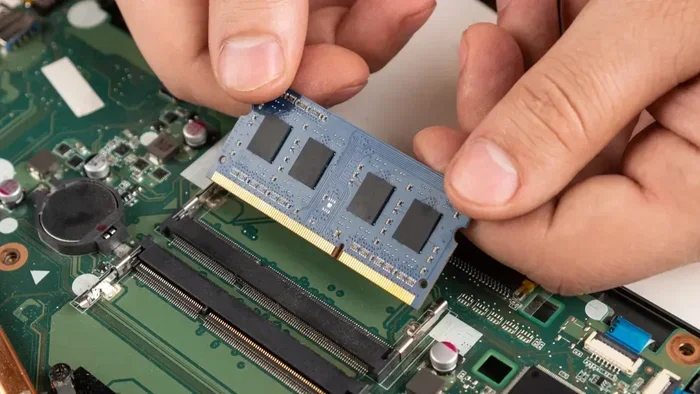
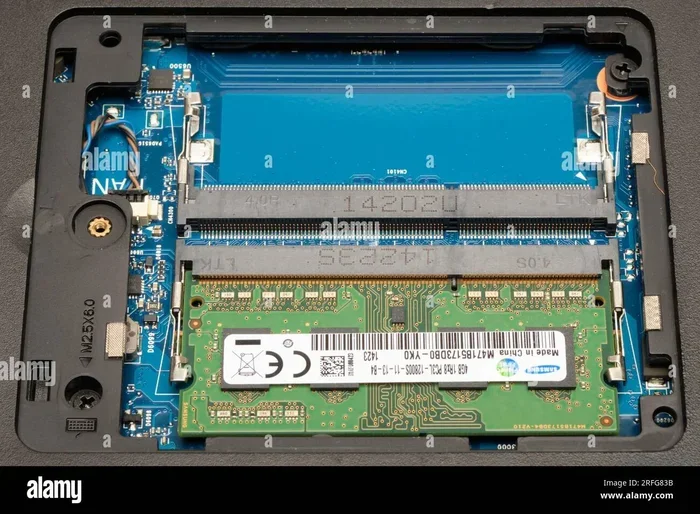
Many laptops allow you to add more memory. Check if your laptop has a free memory slot. If it does, you can often add a second 4GB or 8GB stick for a total of 8GB or 12GB. This is usually much cheaper than buying a whole new laptop.
Before you buy any memory, find out what type your laptop supports. Check your laptop manual or use a system information tool. You need to know the RAM type, maximum supported capacity, and the number of available slots.
### What Is a Good Ram Size for a Laptop?
For most users in 2024, 8GB of RAM is the sweet spot. It handles multitasking, light creative work, and modern software without breaking a sweat. If you are a casual user, 4GB still works. But if you want a laptop that stays fast and relevant for several years, 8GB should be your target. For power users, gamers, and professionals, 16GB or more makes sense.
### How Much Does Extra RAM Cost?
Upgrading RAM is one of the cheapest ways to breathe life into an older laptop. A new 8GB DDR4 RAM stick costs around $20 to $40 depending on the brand and type. Compare that to the cost of a new laptop, and the upgrade is a no-brainer for many users.
## Conclusion
A 4 Gb Ram for laptop serves a clear purpose. It is a budget-friendly option for basic computing tasks like browsing the web, writing documents, and watching videos. For students, casual users, and anyone who needs a simple machine, 4GB of memory gets the job done. However, it has clear limitations when it comes to multitasking, gaming, and professional workloads.
The key is matching your RAM to your actual needs. If you use your laptop lightly, 4GB is perfectly fine. If you push your machine harder, consider upgrading to 8GB or more. And remember, adding an SSD and keeping your system clean can make a big difference even with limited memory.
4GB RAM is not bad, but it is a starting point. Know what you need, plan ahead, and you will always have the right machine for the job.
Key Takeaways
- 4GB RAM handles basic tasks: Web browsing, word processing, and light email work run fine on 4GB memory.
- It struggles with heavy workloads: Gaming, video editing, and multitasking with many apps will slow things down.
- Upgrade is often possible: Many laptops allow you to add more memory later for better performance.
- DDR3 and DDR4 are common: Knowing your laptop’s RAM type helps when buying upgrades.
- Windows 10 and 11 use more memory: These operating systems need more RAM than older versions.
- 4GB can still be a good starting point: Budget laptops with 4GB RAM serve casual users well.
- Check your needs first: Match your RAM to how you actually use your laptop every day.
Frequently Asked Questions
Is 4gb ram enough for a laptop in 2024?
For basic tasks like web browsing, email, and document editing, 4GB RAM is still enough in 2024. However, for multitasking, gaming, or running modern software, 8GB has become the recommended minimum. A 4GB laptop works best for users with light computing needs.
Can I upgrade from 4gb to 8gb ram in my laptop?
Yes, most laptops allow RAM upgrades if they have a free memory slot. Check your laptop’s specifications to confirm the type of RAM it supports and how many slots are available. Adding an 8GB stick is usually affordable and makes a noticeable difference in performance.
What happens when 4gb ram is full?
When your 4GB RAM is full, your laptop starts using your storage drive as temporary memory, a process called paging. This makes everything slower because storage drives are much slower than RAM. You may experience lag, app crashes, or long loading times.
Is 4gb of ram good for a laptop for students?
Yes, 4GB RAM is good for students who mainly write papers, browse the web, and use basic apps. It handles these tasks smoothly and keeps costs low. Students who need to run specialized software or multitask heavily may want to consider 8GB instead.
Does 4gb ram laptop support Windows 11?
Windows 11 technically supports 4GB RAM, but the experience is not ideal. Microsoft recommends at least 8GB for smooth performance. A 4GB laptop running Windows 11 may feel slow, especially when running multiple apps at once.
What is ram good for in a laptop?
RAM helps your laptop run multiple programs at the same time without slowing down. It stores temporary data that your processor needs quick access to. More RAM means smoother multitasking, faster app switching, and better overall performance for demanding tasks.