Ddr3 2 Gb Ram Laptop
A ddr3 2 gb ram laptop provides enough memory for basic tasks like browsing, word processing, and light multitasking. While not ideal for heavy workloads, it remains a solid choice for users on a tight budget or those maintaining older machines. This guide covers everything you need to know about choosing and using a ddr3 2 gb ram laptop.
A ddr3 2 gb ram laptop might sound old-school, but it still has a place in today’s tech world. Many people rely on these machines for daily tasks without spending a fortune. Whether you are a student, a senior, or someone who just needs a simple computer, this type of laptop can get the job done.
DDR3 memory has been around for years, and 2 GB of RAM was once the standard. Today, most new laptops come with 8 GB, 16 GB, or even 32 GB of memory. But that does not mean a ddr3 2 gb ram laptop is useless. It simply serves a different purpose. In this guide, we will walk you through everything you need to know about these laptops, from what they can do to how you can upgrade them.
Key Takeaways
- DDR3 2 GB RAM suits basic tasks: Web browsing, email, and document editing work well with this memory configuration.
- It is budget-friendly: DDR3 laptops are often cheaper than DDR4 or DDR5 models, making them accessible for price-conscious buyers.
- Upgrade options exist: Many DDR3 laptops allow you to add more RAM for better performance.
- Not ideal for gaming or video editing: 2 GB is too limited for demanding applications and modern software.
- Compatibility matters: Always check your laptop model before buying DDR3 RAM modules.
- Older laptops benefit most: DDR3 2 GB is common in legacy machines that still serve everyday needs.
📑 Table of Contents
What Is DDR3 RAM in a Laptop?
DDR3 stands for Double Data Rate 3. It is a type of laptop memory that transfers data at high speeds. DDR3 RAM came out in 2007 and quickly became the go-to choice for laptop manufacturers. It replaced the older DDR2 standard and offered better memory speed and lower power consumption.
A ddr3 2 gb ram laptop uses DDR3 memory modules with a capacity of 2 gigabytes. This was a common setup in budget laptops and entry-level notebooks from around 2010 to 2015. The 2 GB capacity was enough for the software available at that time. Today, it feels limited, but it still works for light computing.
DDR3 RAM comes in different speeds, usually measured in MHz. Common DDR3 speeds include 1066 MHz, 1333 MHz, and 1600 MHz. The speed affects how fast your laptop can access and move data. However, a ddr3 2 gb ram laptop will still feel slow if the software demands more memory than 2 GB can provide.
How DDR3 Compares to Newer RAM Types
DDR4 and DDR5 are the current standards. They offer faster speeds and better efficiency. DDR4 started replacing DDR3 around 2014, and DDR5 is now entering the mainstream. But DDR3 is not obsolete. Many laptops still use it, and replacement modules are widely available.
Here is a simple comparison:
- DDR3: Speeds of 1066 to 1600 MHz. Common in older laptops. 2 GB is a typical capacity.
- DDR4: Speeds of 2133 to 3200 MHz. Found in most modern laptops today.
- DDR5: Speeds of 4800 MHz and above. The newest standard for high-performance laptops.
If you own a ddr3 2 gb ram laptop, you are working with older but still functional memory modules. The key is knowing what to expect and how to get the most out of it.
What Can You Do With a DDR3 2 GB RAM Laptop?
A ddr3 2 gb ram laptop can handle a surprising number of everyday tasks. The trick is managing your expectations and knowing the limits. Here is what this type of laptop does well.
Web Browsing and Email
Checking email and browsing the web are the most common laptop activities. A ddr3 2 gb ram laptop can run browsers like Chrome, Firefox, and Edge for light use. If you keep a few tabs open and avoid heavy media sites, you will have a smooth experience.
However, opening too many tabs will slow things down. 2 GB of memory fills up quickly when multiple programs run at the same time. Try to limit yourself to 3 or 4 tabs for the best performance.
Word Processing and Office Work
Microsoft Word, Google Docs, and similar tools run fine on a ddr3 2 gb ram laptop. You can write documents, create spreadsheets, and prepare presentations without issues. These tasks use very little memory, so 2 GB is more than enough.
Just avoid running multiple office programs at once. Having Word, Excel, and a browser open simultaneously will push the limits of 2 GB.
Media Consumption
Watching videos on YouTube or Netflix works on a ddr3 2 gb ram laptop. Streaming standard-definition videos is no problem. High-definition content might stutter a bit, but it will usually play fine.
Listening to music, podcasts, and audio files also works well. These activities use minimal memory and will not strain your laptop.
Limitations of a DDR3 2 GB RAM Laptop
Every technology has its limits, and a ddr3 2 gb ram laptop is no exception. Understanding these limitations helps you decide if this is the right machine for your needs.
Not Suitable for Modern Gaming
Modern games require a lot of memory. Most games today need at least 8 GB of RAM to run smoothly. A ddr3 2 gb ram laptop simply cannot handle current gaming demands. Even older games from a few years ago may struggle with only 2 GB of memory.
If gaming is your goal, you need a laptop with at least 8 GB or 16 GB of RAM. A ddr3 2 gb ram laptop is not a gaming machine, and trying to force it into one will lead to frustration.
Video Editing and Creative Work
Video editing, photo retouching, and graphic design all demand significant memory. Programs like Adobe Premiere Pro or Photoshop use 4 GB or more just to open. A ddr3 2 gb ram laptop will crash or freeze when you try these tasks.
If creative work is part of your routine, you need more RAM. Consider upgrading or switching to a laptop with at least 16 GB of memory.
Multitasking Challenges
Multitasking is where 2 GB falls short. Opening a browser, a word processor, and a media player at the same time will use up all your memory. Your laptop will start swapping data to the hard drive, which slows everything down.
This is called the “memory bottleneck.” When RAM fills up, your laptop has to work harder to keep up. The result is lag, freezing, and slow response times.
Should You Buy a DDR3 2 GB RAM Laptop?
The answer depends on your needs and budget. A ddr3 2 gb ram laptop is not for everyone, but it can be a great fit for certain users.
Who Should Buy One
A ddr3 2 gb ram laptop works well for:
- Students on a budget: Basic research, writing papers, and online classes.
- Senior users: Email, video calls, and light web browsing.
- Backup or travel computers: A second machine for simple tasks on the go.
- Linux enthusiasts: Lightweight Linux distributions run well on 2 GB of RAM.
These users will find that a ddr3 2 gb ram laptop meets their needs without overspending. The low cost makes it an attractive option for those who do not need powerful hardware.
Who Should Avoid One
You should skip a ddr3 2 gb ram laptop if you:
- Need to run modern software or applications.
- Do any kind of gaming or creative work.
- Rely on heavy multitasking throughout the day.
- Plan to use the laptop for more than 2 to 3 years.
For these users, investing in a laptop with more RAM will save time and frustration. Even a used laptop with 8 GB of RAM offers a much better experience than a new 2 GB machine.
How to Upgrade Your DDR3 Laptop RAM
One of the best things about many ddr3 2 gb ram laptop models is that they allow RAM upgrades. Adding more memory can transform an old laptop into a usable machine again. Here is how to approach it.
Check Your Laptop’s Maximum RAM
Not all laptops can accept more RAM. Some have a 4 GB limit, while others can handle 8 GB or even 16 GB. Check your laptop’s manual or the manufacturer’s website to find the maximum supported memory.
You can also use tools to check your current setup. Learning how to check RAM on your laptop is a simple process that takes just a few minutes. This knowledge helps you plan your upgrade correctly.
Buy Compatible DDR3 RAM
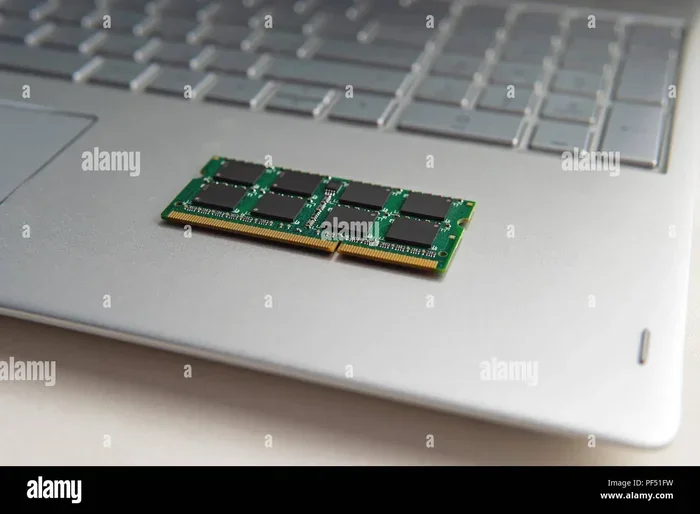
DDR3 RAM comes in different form factors. Most laptops use SO-DIMM modules, which are smaller than desktop RAM. Make sure you buy the right type. Also, check the speed and voltage specifications to match your existing memory.
Buying matching RAM modules helps avoid compatibility issues. If your current 2 GB stick runs at 1333 MHz, try to get another 1333 MHz module. This ensures stable performance and avoids potential errors.
Install the New RAM
Upgrading laptop RAM is easier than you might think. Most laptops have a small access panel on the bottom. You open it, locate the RAM slot, and insert the new module at an angle. Press it down until it clicks into place.
If you are not comfortable doing this yourself, a local repair shop can help. The cost is usually very low, and the process takes only a few minutes.
Maximize Performance After Upgrading
Once you upgrade, you should notice a big improvement. Your laptop will run faster, handle more tabs, and multitask more smoothly. A ddr3 2 gb ram laptop with 4 GB or 8 GB of RAM becomes a much more capable machine.
After upgrading, restart your laptop and check that the new memory is recognized. You can do this by going to your system settings or using built-in tools to check your RAM. This confirms the upgrade was successful.
Common Mistakes to Avoid
When dealing with a ddr3 2 gb ram laptop, there are a few mistakes you should watch out for:
- Buying the wrong RAM type: DDR3 is not the same as DDR4 or DDR5. Always double-check compatibility before purchasing.
- Ignoring the RAM speed: Mixing different speeds can cause problems. Try to match your existing modules.
- Overloading with too many programs: Even with an upgrade, 2 GB or 4 GB has limits. Close unused programs to free up memory.
- Skipping regular maintenance: Clearing temporary files and managing startup programs helps your laptop run smoother, especially with limited RAM.
Avoiding these mistakes will help you get the most from your ddr3 2 gb ram laptop. Small steps make a big difference in day-to-day performance.
The Bottom Line
A ddr3 2 gb ram laptop is a practical choice for basic computing on a budget. It handles web browsing, document work, and media consumption with ease. It struggles with gaming, creative tasks, and heavy multitasking, but that is to be expected from 2 GB of memory.
If you already own one, consider upgrading the RAM. It is one of the easiest and most affordable ways to breathe new life into an older laptop. And if you are thinking about buying one, make sure it fits your needs and expectations.
The world of laptops has moved on to faster memory standards, but that does not make DDR3 obsolete. A ddr3 2 gb ram laptop still has value, and with the right use and care, it can serve you well for years to come.
Remember, the best laptop is the one that meets your specific needs. Do not overspend on features you do not need, but also do not settle for less than what your work requires. A ddr3 2 gb ram laptop hits a sweet spot for budget-conscious users who need a reliable machine for everyday tasks.
Frequently Asked Questions
Can I upgrade the RAM in my ddr3 2 gb ram laptop?
Yes, most laptops with DDR3 RAM allow upgrades. Check your laptop model to find the maximum supported memory and the type of RAM slots it uses. Buying a compatible DDR3 SO-DIMM module is usually straightforward and affordable.
Is a ddr3 2 gb ram laptop good for students?
It can be, if the student mainly writes papers, browses the web, and attends online classes. For more demanding tasks like coding or running virtual machines, a laptop with more RAM would be a better choice.
How much does a ddr3 2 gb RAM module cost?
DDR3 RAM modules are very affordable. You can often find 2 GB or 4 GB DDR3 SO-DIMM sticks for under $20. Prices vary by brand and speed, but they remain one of the cheapest memory upgrades available.
What is the difference between DDR3 and DDR4 RAM?
DDR4 RAM is faster and more power-efficient than DDR3. It also has higher capacity options. DDR3 operates at lower speeds and uses more voltage, but it is still perfectly functional for basic computing tasks.
Can I run Windows 10 on a ddr3 2 gb ram laptop?
Yes, Windows 10 can run on 2 GB of RAM, but performance will be limited. The system will feel slow when running multiple programs. For a better experience, consider upgrading to at least 4 GB or 8 GB of memory.
Are there any laptops that use ddr3 2 gb ram and are still worth buying?
Some budget and refurbished laptops still come with DDR3 and 2 GB of RAM. They are worth considering if you need a simple machine for light tasks. However, spending a little more on a laptop with 8 GB of RAM will give you a much better long-term experience.