Laptop with Lots of Ram
A laptop with lots of ram makes everything faster, smoother, and more enjoyable. Whether you game, edit video, or run heavy software, extra memory helps your machine keep up. In this guide, you will learn how much RAM you really need, which laptops deliver the most memory, and how to upgrade your current device.
Have you ever tried opening ten browser tabs, a video call, and a heavy app all at the same time? If your laptop freezes or slows to a crawl, you probably need more RAM. A laptop with lots of ram changes everything. Your apps launch faster, your system stays responsive, and you can do more without waiting.
In this guide, we break down everything you need to know about high-memory laptops. We cover how much RAM you actually need, which laptops come with the most memory, and whether upgrading your current machine makes sense. Whether you are a gamer, a creator, or just someone who keeps a hundred tabs open, this guide has you covered.
Key Takeaways
- More RAM means smoother multitasking: A laptop with lots of ram lets you run many apps at once without slowing down.
- 32GB is the sweet spot for most users: It handles gaming, video editing, and heavy workloads with ease.
- You can upgrade your RAM yourself: Learning how to increase RAM on your laptop saves money and boosts performance.
- DDR5 RAM is the latest standard: It offers faster speeds and better efficiency than older DDR4 modules.
- Check your current RAM first: Knowing what you have helps you decide if an upgrade is worth it.
📑 Table of Contents
Why Does RAM Matter So Much?
RAM stands for Random Access Memory. Think of it as your laptop’s short-term workspace. When you open an app or a file, your laptop pulls it from storage and places it in RAM. This lets the processor access the data almost instantly. The more RAM you have, the more apps and files your laptop can hold in that workspace at the same time.
Without enough RAM, your laptop has to constantly swap data between storage and memory. This causes lag, stuttering, and frustrating delays. A laptop with lots of ram avoids this problem entirely. Everything runs smoothly, even when you are juggling heavy tasks.
RAM and Everyday Performance
For basic tasks like browsing the web, watching videos, and typing documents, 8GB of RAM works fine. But the moment you start doing more, you feel the squeeze. Video editing, running virtual machines, or playing modern games all demand more memory. A system with high RAM capacity handles these tasks without breaking a sweat.
How Much RAM Do You Really Need?
The answer depends on what you do with your laptop. Different tasks require different amounts of memory. Here is a simple breakdown to help you decide.
Light Use (4GB to 8GB)
Web browsing, email, and word processing fit comfortably in 4GB to 8GB. A laptop with 8gb ram i5 processor handles these tasks well and often costs less. If you only use your laptop for simple stuff, you probably do not need more than 8GB.
Medium Use (16GB)
16GB is the current sweet spot for most people. It handles multitasking, light photo editing, and casual gaming. A laptop with 16gb ram and i7 processor delivers great performance for everyday power users. Many professionals find this amount more than enough for their work.
Heavy Use (32GB and Above)
Video editors, 3D animators, and serious gamers need 32GB or more. A laptop with 32gb of ram can handle massive files, complex software, and demanding games without flinching. If you run professional-grade tools like Adobe Premiere or Blender, 32GB should be your minimum target.
Extreme Use (64GB and Beyond)
Some users need even more. Engineers running simulations, data scientists working with huge datasets, and hardcore gamers pushing the limits of gaming laptop with 64gb ram setups fall into this category. For most people, 64GB is overkill, but for specific professional workloads, it is essential.
Best Laptops with Lots of RAM
If you are shopping for a laptop with lots of ram, you have many great options. Here are some popular choices across different price ranges and use cases.
Budget-Friendly Options
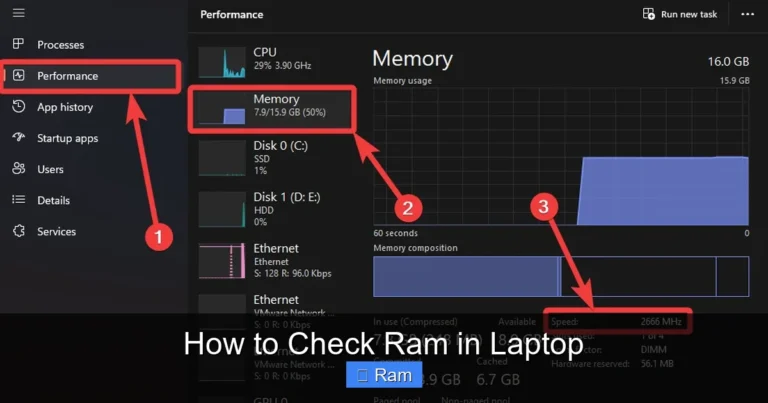
You do not need to spend a fortune to get a laptop with solid memory. Many brands offer laptops with 16GB of RAM at reasonable prices. Look for models with upgradeable memory so you can add more later if needed. Checking how to check the ram of a laptop before buying helps you confirm what you are getting.
Mid-Range Powerhouses
Laptops in the mid-range often come with 32GB of RAM and powerful processors. A laptop with 32gb ram and i7 processor delivers excellent performance for both work and play. These machines handle multitasking like a champ and are perfect for creators and professionals.
Top-Tier Flagships
Premium laptops push the limits with 64GB or more of RAM. These machines are built for the most demanding tasks. They come with the latest DDR5 memory, fast processors, and high-end graphics. If budget is no concern, a laptop with 64gb ram gives you future-proof performance for years to come.
| RAM Amount | Best For | Price Range |
|---|---|---|
| 8GB | Basic tasks, students | $400 – $700 |
| 16GB | Multitasking, light creative work | $700 – $1,200 |
| 32GB | Video editing, gaming, professionals | $1,200 – $2,000 |
| 64GB+ | 3D rendering, data science, extreme gaming | $2,000+ |
Can You Upgrade Your Laptop’s RAM?
One of the best things about many laptops is that you can upgrade the RAM yourself. This saves you money and lets you customize your machine to your needs. But not all laptops allow upgrades. Some have soldered memory that cannot be changed.
Steps to Upgrade Your RAM
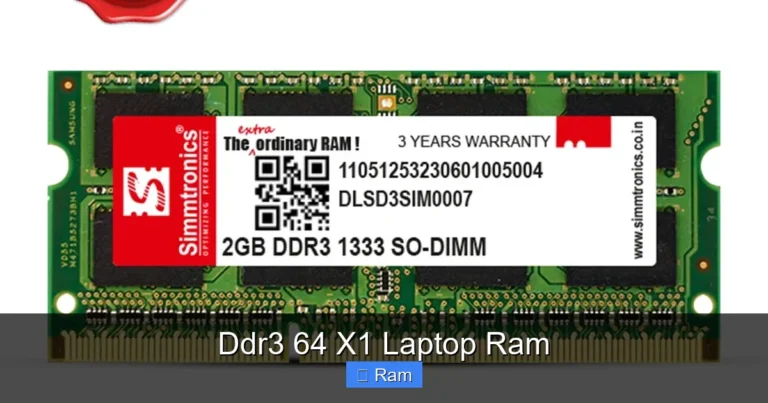
If your laptop supports upgrades, the process is straightforward. First, check your current memory by learning how to check the ram of a laptop. Then, find out what type of RAM your laptop uses (DDR4 or DDR5) and how many slots are available. Buy compatible RAM sticks, open the back panel, and gently insert the new modules. Always ground yourself to avoid static damage.
When to Upgrade vs. Buy New
If your laptop has upgradeable RAM and you need more memory, an upgrade is usually cheaper than buying a new machine. A laptop with 32gb ram that you upgrade yourself can cost significantly less than buying one pre-built with that amount of memory. However, if your laptop has soldered RAM or other outdated components, a new purchase makes more sense.
Before you decide, learn how to increase ram of a laptop properly. Watch tutorials, read your laptop’s manual, and make sure you buy the right type of memory. A wrong purchase can waste money and cause compatibility issues.
Quick Tips for Getting the Most Out of Your RAM
Having a laptop with lots of ram is great, but you also need to use it wisely. Here are some quick tips to keep your memory running efficiently.
- Close unused apps and tabs: Even with lots of memory, keeping too many things open slows your system down.
- Restart regularly: A simple restart clears out temporary data and frees up memory for fresh use.
- Check for memory-hungry programs: Some apps use way more RAM than they should. Use your task manager to spot them.
- Keep your system updated: Software updates often include memory optimizations that improve performance.
- Use an SSD: Pairing lots of RAM with a fast SSD gives you the best overall performance boost.
Common Mistakes People Make with RAM
Many people make mistakes when thinking about laptop memory. Avoid these common pitfalls to get the best experience from your laptop with lots of ram.
- Buying more RAM than you need: If you only browse the web and check email, 64GB is overkill. Save your money for something you actually need.
- Ignoring RAM speed: Not all RAM is equal. Faster RAM (higher MHz) can improve performance, especially for gaming and creative work.
- Mixing RAM sticks carelessly: Always try to use matching sticks. Different sizes, speeds, or brands can cause compatibility problems.
- Forgetting to check compatibility: Not every RAM stick works with every laptop. Check your laptop’s specifications before purchasing new memory.
- Assuming more RAM fixes everything: A slow processor or outdated graphics card can cause problems that extra RAM cannot solve.
Expert Insights on Laptop RAM
We spoke with tech experts about what they look for in a laptop with lots of ram. Their advice highlights a few key points that many buyers overlook.
First, experts emphasize that RAM is only one part of the equation. A fast processor and a solid-state drive matter just as much. Second, they recommend planning for the future. Buying a laptop with upgradeable RAM gives you flexibility as your needs grow. Third, they stress checking what good RAM on a laptop looks like for your specific use case. What works for a gamer may not be ideal for a data scientist.
The consensus among professionals is clear: 32GB of RAM is becoming the new standard for serious work. As software grows more demanding, having extra memory ensures your laptop stays useful for years. Investing in a laptop with lots of ram today protects your productivity tomorrow.
Final Thoughts
A laptop with lots of ram is one of the best investments you can make for your computing experience. Whether you choose 16GB, 32GB, or 64GB, the right amount of memory transforms how you work and play. Everything runs faster, smoother, and with fewer frustrations.
Take time to assess your needs. If you are unsure about your current setup, learn how to check ram of laptop and evaluate whether an upgrade or a new purchase makes more sense. The right laptop with plenty of memory will serve you well for years to come. Do your research, make a smart choice, and enjoy a faster, more responsive computing experience every single day.
Frequently Asked Questions
What is considered a laptop with lots of ram?
A laptop with 32GB of RAM or more is generally considered to have lots of ram. For most users, 32GB provides plenty of headroom for gaming, video editing, and multitasking. However, professionals who work with large datasets or 3D rendering may prefer 64GB or more.
Can I add more RAM to my laptop if it already has 16GB?
It depends on your laptop’s design. Many laptops have empty RAM slots that let you add more memory. Check how to check the ram of a laptop to see if you have available slots. If your RAM is soldered, you will need to buy a new laptop with more memory.
Is 32GB of RAM overkill for gaming?
For most games, 16GB is enough. But 32GB gives you room to run background apps, stream, and multitask while gaming. A gaming laptop with 64gb ram setup shows that enthusiasts value extra memory for future-proofing and smoother performance.
How do I know if my laptop needs more RAM?
If your laptop slows down when you open multiple apps, freezes during heavy tasks, or uses swap memory frequently, you likely need more RAM. Learning how to check the ram of a laptop helps you monitor your current usage and decide if an upgrade is needed.
Does RAM speed matter as much as RAM size?
RAM size matters more for most users because it determines how many tasks you can run at once. However, RAM speed (measured in MHz) does affect performance in gaming and certain creative workloads. For a balanced setup, prioritize capacity first, then speed.
What is the best laptop with lots of ram for video editing?
Video editors benefit greatly from a laptop with 32gb ram and i7 processor or better. The combination of ample memory and a powerful processor handles rendering and timeline scrubbing smoothly. For 4K or higher editing, consider 64GB for the best experience.