M 2 Nvme 2242 Ssd
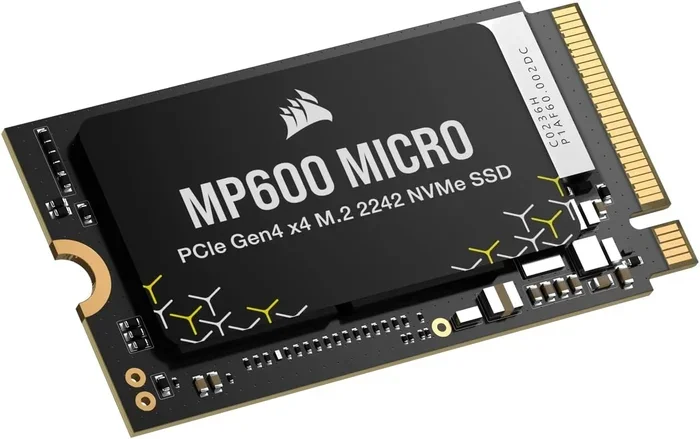
The M 2 Nvme 2242 Ssd is a compact solid state drive built on the M.2 form factor, measuring just 22mm wide by 42mm long. It uses the NVMe protocol over PCIe lanes to deliver blazing fast speeds in a tiny package perfect for ultrabooks, tablets, and mini PCs. This guide covers everything you need to know about the 2242 SSD, from dimensions and speeds to compatibility and upgrade tips.
The M 2 Nvme 2242 Ssd is one of the smallest and fastest storage options available for modern portable devices. If you own an ultrabook, a mini PC, or a tablet, there is a good chance this tiny drive is what keeps your system running smoothly. In this guide, we will break down everything you need to know about the 2242 form factor, why it matters, and how to pick the right one for your setup.
Storage technology has come a long way in the last few years. The days of bulky hard drives are long gone. Today, the M.2 NVMe SSD has become the go-to choice for anyone who wants speed and compact size in one package. The 2242 variant takes this even further by shrinking the drive down to a size that fits the thinnest laptops and smallest devices on the market.
Key Takeaways
- The M 2 Nvme 2242 Ssd is a super small form factor measuring 22mm x 42mm, ideal for compact devices.
- It uses the NVMe protocol over PCIe lanes, making it significantly faster than older SATA drives.
- The 2242 size is shorter than the more common 2280, so compatibility depends on your device’s M.2 slot.
- You can find 2242 SSDs in capacities ranging from 128GB to 1TB for different storage needs.
- Always check your device’s manual or BIOS to confirm it supports the 2242 length before buying.
- An NVMe M.2 enclosure can turn your 2242 SSD into an external portable drive easily.
📑 Table of Contents
What Is an M 2 Nvme 2242 Ssd?
Let us start with the basics. The term M 2 Nvme 2242 Ssd tells you three important things at once. First, M.2 refers to the form factor, which is a small rectangular card that plugs directly into your motherboard. Second, NVMe stands for Non-Volatile Memory Express, a fast protocol that lets the drive communicate with your system over PCIe lanes. Third, 2242 is the physical size: 22 millimeters wide and 42 millimeters long.
This is much smaller than the standard 2280 M.2 drive, which measures 22mm by 80mm. The shorter length of the 2242 makes it perfect for devices where every millimeter counts. You will find these drives in ultra-thin laptops, 2-in-1 convertibles, mini PCs, and even some gaming handhelds.
The NVMe protocol is what gives these drives their speed advantage. Unlike older SATA SSDs, which max out around 550MB/s, a PCIe-based NVMe drive can reach speeds of 3,500MB/s or more. This means boot times, file transfers, and application loading are dramatically faster.
How the 2242 Form Factor Came to Be
Device manufacturers kept pushing for thinner and lighter designs. As laptops got slimmer, there was less room inside for storage. The standard 2280 M.2 drive was too long for many of these compact systems. That is where the 2242 comes in. It offers the same NVMe performance in a shorter package, allowing OEMs to build thinner devices without sacrificing storage speed.
Intel played a big role in popularizing the 2242 size. Many of their ultrabook designs used this form factor, and the trend has continued across the industry. Today, you can find the 2242 in devices from brands like Dell, Lenovo, HP, and ASUS.
M 2 Nvme 2242 Ssd Dimensions and Form Factor
Understanding the physical dimensions of the 2242 SSD is crucial before making a purchase. The name itself tells you the size: 22mm wide, 42mm long, and typically just 1.3mm to 2.5mm thick. It weighs only a few grams, making it virtually weightless in your device.
The M.2 connector on the drive plugs into a slot on your motherboard. The slot has a keying notch that ensures you insert the drive the correct way. Most 2242 NVMe drives use the B-key or M-key slot, depending on the PCIe lanes they support.
Common M.2 Form Factor Sizes
There are several M.2 lengths available on the market. Here is a quick comparison to help you understand where the 2242 fits:
- 2242: 22mm x 42mm — used in ultrabooks and mini PCs
- 2260: 22mm x 60mm — used in some tablets and thin laptops
- 2280: 22mm x 80mm — the most common size for desktops and standard laptops
- 22110: 22mm x 110mm — used in enterprise and server applications
The 2242 is the second shortest M.2 size you will commonly encounter. Because of its compact length, you need to make sure your device actually has a slot that supports this size. Some motherboards and laptops only accept 2280 drives, so always double-check before you buy.
Key Benefits of the M 2 Nvme 2242 Ssd
The M 2 Nvme 2242 Ssd offers several compelling advantages that make it a popular choice for compact computing. Let us look at the biggest benefits.
Blazing Fast Speeds
The NVMe protocol over PCIe lanes delivers read speeds that can exceed 3,000MB/s on Gen3 drives and up to 7,000MB/s on Gen4 drives. Write speeds are also impressive, often ranging from 1,500MB/s to 5,000MB/s depending on the model. This is a massive upgrade over any traditional hard drive or even a SATA SSD.
In real-world use, this translates to near-instant boot times, applications launching in a fraction of a second, and large files copying in seconds instead of minutes.
Extremely Compact Size
At just 42mm long, the 2242 drive takes up very little space inside your device. This is critical for manufacturers building slim laptops and mini PCs where every cubic millimeter matters. The small size also means less heat generation, which helps keep your device cool and quiet.
Low Power Consumption
NVMe SSDs in the 2242 form factor are designed to be energy efficient. They consume less power than traditional hard drives, which helps extend battery life on laptops and tablets. If you are a frequent traveler or someone who works on the go, this efficiency is a big plus.
Reliability and Durability
Since there are no moving parts in a solid state drive, the 2242 NVMe SSD is far more durable than a mechanical hard drive. It can handle drops, vibrations, and shocks much better. This makes it ideal for portable devices that are constantly on the move.
M 2 Nvme 2242 Ssd vs 2280: What Is the Difference?
One of the most common questions people ask is how the 2242 compares to the more popular 2280 M.2 drive. The short answer is size and compatibility. Both drives use the same NVMe protocol and PCIe interface, so the performance is essentially the same.
The only real difference is the length. The 2242 is 42mm long while the 2280 is 80mm long. This means the 2242 has fewer NAND flash chips packed onto the board, which sometimes results in slightly lower capacity options. However, the speed and performance remain identical for the same generation of NVMe technology.
If you are upgrading a device, the most important thing to check is whether your system supports the 2242 length. Some laptops have M.2 slots that can physically accept both 2242 and 2280 drives, but others are designed specifically for one length only.
Performance Comparison
In terms of raw performance, a 2242 NVMe drive performs just as well as a 2280 NVMe drive of the same generation. The bottleneck is not the length of the drive but the PCIe generation and the NVMe controller chip on the board. Both sizes benefit equally from PCIe Gen4 and Gen5 technologies.
Here is a quick comparison table to summarize the differences:
- 2242: 22mm x 42mm — compact, ideal for ultrabooks and mini PCs
- 2280: 22mm x 80mm — standard size, most widely available
- Performance: Identical when using the same NVMe generation
- Capacity: 2242 typically maxes out at 1TB, while 2280 can reach 4TB or more
- Compatibility: Always check your device manual for the supported length
How to Choose the Right M 2 Nvme 2242 Ssd
Shopping for the right M 2 Nvme 2242 Ssd can feel overwhelming with so many options on the market. Here are the key factors you should consider before making a decision.
Check Your Device Compatibility
Before anything else, confirm that your device supports the 2242 length. Check your laptop or mini PC manual, or look up the specifications online. Some devices have M.2 slots that only accept 2280 drives, while others are flexible and support multiple lengths. The last thing you want is to buy a drive that does not fit.
Consider the PCIe Generation
The PCIe generation of your drive matters for speed. PCIe Gen3 NVMe drives offer excellent performance for everyday tasks. PCIe Gen4 drives are faster and are great for heavy workloads like video editing or large file transfers. If your device supports Gen4, it is worth investing in a faster drive.
Capacity Needs
The 2242 form factor is most commonly available in 128GB, 256GB, 512GB, and 1TB capacities. For most users, a 512GB or 1TB drive provides plenty of space for an operating system, applications, and a reasonable collection of files. If you need more storage, consider pairing a 2242 drive with external storage or cloud solutions.
You can also look at a 1TB NVMe M.2 SSD if you need a bit more room without going for a larger form factor. These compact drives offer generous capacity in the same tiny 2242 package.
Brand and Reliability
Stick with reputable brands when choosing your drive. Look for drives that include a warranty and have good user reviews. Brands like Samsung, WD, Crucial, and Kingston offer reliable 2242 options that have been tested extensively. A trustworthy drive will last longer and give you peace of mind.
Budget Considerations
2242 NVMe SSDs are available at a wide range of price points. You can find budget-friendly 256GB options for under $40, while a 1TB model might cost between $60 and $100. Set a budget based on your storage needs and stick with it. You do not need to overspend for a reliable drive.
Common Uses and Upgrade Tips for the M 2 Nvme 2242 Ssd
The M 2 Nvme 2242 Ssd is used in a variety of compact devices. Understanding where it fits best can help you make the most of your investment.
Ultrabooks and Thin Laptops
Many ultrabooks from Dell XPS, Lenovo ThinkPad, and ASUS ZenBook use 2242 NVMe drives. These laptops prioritize thinness and light weight, and the compact 2242 drive is a perfect match. If your ultrabook feels slow, upgrading to a faster 2242 NVMe SSD can breathe new life into it.
Mini PCs and NUCs
Intel NUCs and similar mini PCs rely heavily on the 2242 form factor due to their tiny chassis. These drives provide fast storage in a space where a standard 2280 drive simply would not fit. Mini PC enthusiasts often build their systems around 2242 NVMe drives for this reason.
Tablets and 2-in-1 Devices
Some high-end tablets and 2-in-1 convertibles use 2242 SSDs for internal storage. The compact size allows the device to remain thin while still offering fast storage performance. If you use a tablet for work or creative tasks, a 2242 upgrade can significantly improve responsiveness.
External Enclosure Use
One creative way to use a 2242 NVMe SSD is by placing it inside an NVMe M.2 enclosure. These small enclosures connect to your computer via USB and turn your internal drive into a fast external portable drive. This is great for backing up files or transferring large amounts of data between devices.
Upgrade Tips
If you are planning to upgrade your device with a 2242 NVMe SSD, here are some practical tips to follow:
- Back up all your data before starting the upgrade process.
- Use cloning software to transfer your operating system and files to the new drive.
- Make sure your device BIOS is updated to the latest version for best compatibility.
- Check if your system supports the PCIe generation of your new drive.
- Handle the drive by the edges to avoid touching the circuitry.
- Secure the drive with the M.2 screw to prevent it from coming loose.
Upgrading to a 2242 NVMe SSD is one of the most effective ways to speed up an older laptop or mini PC. The process is straightforward, and the performance gains are immediately noticeable. Whether you are a student, a professional, or a casual user, this small drive can make a big difference in your daily computing experience.
Conclusion
The M 2 Nvme 2242 Ssd is a remarkable piece of technology that proves you do not need to sacrifice speed for size. Its compact 2242 dimensions make it ideal for the thinnest laptops, mini PCs, and tablets, while the NVMe protocol ensures you get top-tier performance in a tiny package. Whether you are building a new compact system or upgrading an existing one, the 2242 form factor offers a perfect blend of speed, portability, and reliability.
By understanding the dimensions, checking your device compatibility, and choosing the right capacity and PCIe generation, you can get the most out of your M.2 2242 NVMe SSD. The upgrade process is simple, and the results speak for themselves. Faster boot times, quicker application launches, and smoother multitasking are all within your reach with this compact powerhouse of a drive.
Take the time to research your options, pick a trusted brand, and enjoy the speed that only a solid state drive can deliver. Your device will thank you for it.
Frequently Asked Questions
What devices use the M 2 Nvme 2242 Ssd?
The 2242 form factor is commonly found in ultrabooks, thin laptops, mini PCs, tablets, and 2-in-1 convertibles. Brands like Dell, Lenovo, HP, and ASUS use these drives in their compact device lines. Always check your device manual to confirm the supported M.2 length before purchasing.
Can I use a 2280 M.2 drive in a slot that supports 2242?
No, a 2280 drive is 80mm long and will not fit properly in a 2242 slot designed for 42mm drives. The drive will extend beyond the slot and may not be recognized or could cause physical damage. Always match the drive length to your device’s supported M.2 size.
How fast is the M 2 Nvme 2242 Ssd compared to a SATA SSD?
An NVMe 2242 SSD is significantly faster than a SATA SSD. While SATA drives max out around 550MB/s, NVMe drives can reach speeds of 3,000MB/s or more on PCIe Gen3 and over 7,000MB/s on PCIe Gen4. The difference is noticeable in boot times, file transfers, and application loading.
What is the maximum capacity available for a 2242 NVMe SSD?
Most 2242 NVMe SSDs are available in capacities up to 1TB. Some manufacturers offer 512GB and 256GB options as well. The 2242 form factor is less common at higher capacities compared to the 2280, but 1TB is usually sufficient for most users.
Do I need special software to install a 2242 NVMe SSD?
You do not need special software, but cloning tools like Macrium Reflect or Samsung Data Migration can help you transfer your existing operating system and files to the new drive. You will also need the M.2 screw that comes with your motherboard or laptop to secure the drive in place.
Is the M 2 Nvme 2242 Ssd good for gaming?
Yes, the 2242 NVMe SSD is excellent for gaming, especially in compact gaming laptops and mini PCs. The fast read and write speeds reduce game load times significantly. Just make sure your device supports the 2242 length and has enough capacity for your game library.