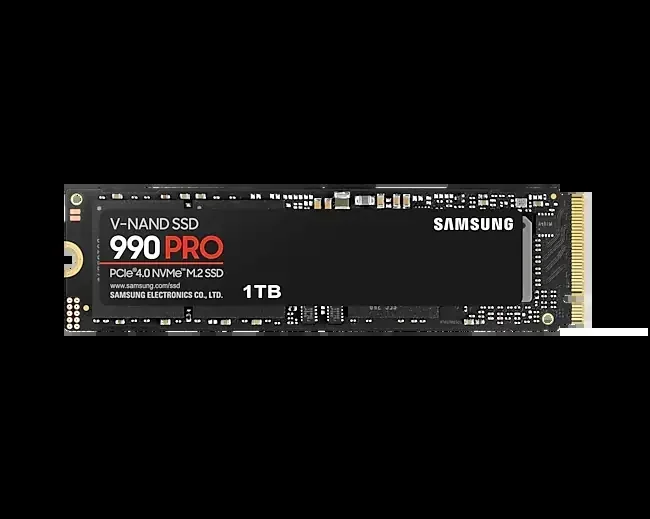
M 2 Nvme 2280 Ssd
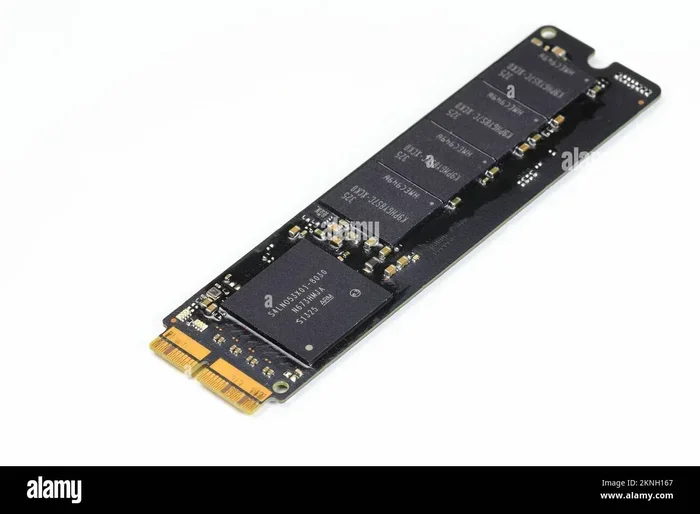
An M 2 NVMe 2280 SSD is a compact, ultra-fast solid state drive that fits directly into your motherboard. It uses the NVMe protocol over PCIe to deliver blazing read and write speeds far beyond traditional SATA drives. Whether you are upgrading a laptop or building a new PC, understanding the M 2 NVMe 2280 form factor is essential for choosing the right storage.
Key Takeaways
- Compact Size: The 2280 designation means the drive is 22mm wide and 80mm long, making it perfect for laptops and desktops alike.
- Blazing Speeds: M 2 NVMe 2280 SSDs use the PCIe interface and NVMe protocol, offering speeds up to 7,000 MB/s or more on Gen4 drives.
- Easy Installation: These drives slot directly into an M.2 connector on your motherboard with no cables needed.
- Great Value: Prices have dropped significantly, making high capacity M 2 NVMe 2280 SSDs affordable for everyone.
- Wide Compatibility: Most modern motherboards and laptops support the M.2 2280 form factor.
- Multiple Options: You can find M 2 NVMe 2280 SSDs from brands like Kingston, Crucial, Samsung, and more.
📑 Table of Contents
- What Is an M 2 NVMe 2280 SSD?
- How Does an M 2 NVMe 2280 SSD Work?
- Benefits of Using an M 2 NVMe 2280 SSD
- M 2 NVMe 2280 SSD vs Other SSD Form Factors
- How to Choose the Right M 2 NVMe 2280 SSD
- Top M 2 NVMe 2280 SSDs Worth Looking At
- Common Mistakes to Avoid When Buying an M 2 NVMe 2280 SSD
- Quick Tips for Installing Your M 2 NVMe 2280 SSD
- Frequently Asked Questions
- Conclusion
What Is an M 2 NVMe 2280 SSD?
If you have been shopping for a new solid state drive, you have probably seen the term M 2 NVMe 2280 SSD everywhere. But what does it actually mean? Let us break it down in simple terms.
The “M 2” refers to the form factor. It is a small, rectangular-shaped drive that plugs directly into a slot on your motherboard. Think of it like a stick of RAM, but for storage. The “NVMe” part stands for Non-Volatile Memory Express. This is the communication protocol the drive uses to talk to your computer. And “2280” tells you the physical size: 22 millimeters wide and 80 millimeters long.
Together, these three parts describe a small, ultra-fast storage device that has become the standard for modern PCs and laptops. Unlike older hard drives with spinning disks, an NVMe SSD has no moving parts. This means it is faster, more reliable, and uses less power.
Many people confuse M.2 drives with SATA drives. While both can come in the M.2 form factor, an NVMe drive is significantly faster. If you want the best performance, you want the NVMe protocol paired with the PCIe interface. That is exactly what an M 2 NVMe 2280 SSD delivers.
The popularity of this form factor has exploded in recent years. Almost every new motherboard comes with at least one M.2 slot. Many laptops now ship with a 2280 NVMe drive already installed. It is the go-to choice for anyone building or upgrading a modern system.
How Does an M 2 NVMe 2280 SSD Work?
Understanding how this drive works helps you appreciate why it is so fast. Let us look at the key components.
The M.2 Connector
The M.2 connector on your motherboard is a small slot that the drive slides into. It locks in place with a tiny screw. There are different key types, like B-key and M-key, which determine which protocols the drive supports. Most NVMe 2280 SSDs use the M-key slot, which supports PCIe connections.
The NVMe Protocol
Traditional SATA SSDs use the AHCI protocol. This protocol was designed for slow spinning hard drives from decades ago. NVMe was built from the ground up for flash storage. It allows the drive to send and receive data in parallel, which dramatically increases speed.
With NVMe, your M 2 NVMe 2280 SSD can handle thousands of command queues at once. SATA drives, by comparison, handle just one queue with a depth of 32 commands. This difference is huge when you are transferring large files or running demanding applications.
The PCIe Interface
PCIe stands for Peripheral Component Interconnect Express. It is the same high-speed connection used by graphics cards. NVMe SSDs plug directly into the PCIe lanes on your motherboard. This bypasses the slower SATA controller entirely.
Most consumer M 2 NVMe 2280 SSDs use PCIe Gen3 or Gen4. Gen4 drives offer roughly double the bandwidth of Gen3. The newest Gen5 drives are also entering the market, but they are still pricey. For most users, a Gen3 or Gen4 NVMe drive provides more than enough speed.
Benefits of Using an M 2 NVMe 2280 SSD
Switching to an M 2 NVMe 2280 SSD brings several real-world advantages. Here is why so many people are making the switch.
Incredible Speed
The most obvious benefit is speed. A typical SATA SSD tops out around 550 MB/s. A Gen4 NVMe 2280 SSD can reach speeds of 7,000 MB/s or more. That is more than ten times faster. You will notice this instantly when booting your operating system, launching games, or copying large files.
Even a Gen3 NVMe drive, which maxes out around 3,500 MB/s, is still significantly faster than any SATA option. The difference is especially noticeable when working with video editing, 3D rendering, or large datasets.
Compact and Space-Saving
The 2280 size is tiny compared to a traditional 2.5-inch SSD or hard drive. This makes it ideal for ultrabooks, small form factor PCs, and mini-ITX builds. You save valuable space inside your case, and there are no cables to manage.
No Cables Required
Traditional SSDs need a SATA data cable and a power cable. M.2 drives eliminate both of these. You simply insert the drive into the slot, screw it in, and you are done. This makes installation incredibly simple, even for beginners.
Lower Power Consumption
NVMe SSDs use less power than traditional hard drives or even SATA SSDs. This is especially important for laptops, where battery life matters. An M 2 NVMe 2280 SSD can help extend your laptop’s runtime during everyday tasks.
Quiet and Cool
Because there are no moving parts, NVMe drives run silently. Many models also run cool enough without a heatsink, though adding one can help with sustained performance under heavy loads.
M 2 NVMe 2280 SSD vs Other SSD Form Factors
Not all SSDs are created equal. Here is how the M 2 NVMe 2280 compares to other common types.
M 2 NVMe 2280 vs SATA M.2 SSD
Both drives share the same M.2 2280 size. The difference is the protocol. A SATA M.2 SSD uses the AHCI protocol and is limited by SATA III speeds (about 550 MB/s). An NVMe M.2 2280 SSD uses PCIe and the NVMe protocol, making it much faster. If your motherboard supports NVMe, always choose the NVMe version for better performance.
M 2 NVMe 2280 vs 2.5-Inch SSD
A 2.5-inch SSD is the traditional form factor. It is larger and requires cables. An M 2 NVMe 2280 SSD is smaller, faster, and easier to install. For most modern builds, the 2280 form factor is the clear winner.
M 2 NVMe 2280 vs Traditional Hard Drive
This comparison is not even close. A traditional hard drive with spinning platters might reach speeds of 100 to 200 MB/s. An NVMe 2280 SSD is orders of magnitude faster. The jump from a hard drive to an NVMe SSD is the single biggest upgrade you can make for your system’s responsiveness.
| Feature | M 2 NVMe 2280 | SATA M.2 | 2.5″ SSD | HDD |
|---|---|---|---|---|
| Max Read Speed | 7,000 MB/s | 550 MB/s | 550 MB/s | 200 MB/s |
| Form Factor | 22mm x 80mm | 22mm x 80mm | 2.5 inch | 3.5 inch |
| Interface | PCIe (NVMe) | SATA | SATA | SATA |
| Cables Needed | None | None | Yes | Yes |
| Power Use | Low | Low | Medium | High |
How to Choose the Right M 2 NVMe 2280 SSD
With so many options available, picking the right drive can feel overwhelming. Here are the key factors to consider.
Check Your Motherboard Compatibility
Before buying, confirm your motherboard has an M.2 slot that supports NVMe. Some older boards only support SATA M.2 drives. Check your motherboard manual or look up the model online. Most modern boards from the last few years support NVMe 2280 SSDs without any issues.
Consider the PCIe Generation
PCIe Gen3 and Gen4 are the most common options today. A Gen4 drive is faster, but it requires a compatible motherboard and CPU. If your system supports Gen4, you will get the full benefit. If not, a Gen3 drive will still work perfectly and offer excellent performance for most users.
Pick the Right Capacity
M 2 NVMe 2280 SSDs come in various sizes, from 250GB to 4TB and beyond. For most users, a 1TB drive hits the sweet spot between price and capacity. If you store large media libraries or work with huge files, consider a 2TB or even a 4TB model.
You can find a great 1TB option in the Kingston NV2 1TB M.2 NVMe SSD, which offers solid performance at an affordable price. Another excellent choice is the Crucial P310 1TB PCIe Gen4 NVMe SSD, which delivers strong read and write speeds at a competitive cost.
Look at Endurance and Warranty
Drive endurance is measured in TBW (Terabytes Written). A higher TBW means the drive can handle more data over its lifetime. Most quality M 2 NVMe 2280 SSDs come with a 3- to 5-year warranty. Always check these specs before purchasing.
Brand Reputation and Reviews
Stick with trusted brands like Kingston, Crucial, Samsung, and WD. These companies have established track records and solid customer support. Reading user reviews can also give you real-world insights into performance and reliability.
Top M 2 NVMe 2280 SSDs Worth Looking At
Here are some popular drives in the M 2 NVMe 2280 category that are worth your attention.
The Samsung 970 EVO Plus remains a favorite among enthusiasts. It offers excellent sustained performance and a reliable warranty. For budget-conscious buyers, the Crucial P3 Plus NVMe SSD provides great value with PCIe Gen4 speeds at a very attractive price point.
If you are looking for a reliable everyday drive, the Kingston NV2 series is hard to beat for the price. The Crucial P310 is another strong contender, especially if you want Gen4 speeds without spending a premium. Both of these options make excellent boot drives and storage solutions for casual users and gamers alike.
Common Mistakes to Avoid When Buying an M 2 NVMe 2280 SSD
Here are a few pitfalls to watch out for.
- Buying a SATA M.2 drive by mistake: Always check if the drive uses NVMe or AHCI. The packaging usually states this clearly.
- Ignoring motherboard compatibility: Some older motherboards do not support NVMe. Verify your slot supports PCIe before purchasing.
- Overlooking heatsinks: High-performance NVMe drives can run hot. If your motherboard does not have a built-in heatsink, consider buying one separately.
- Choosing too little storage: 500GB fills up fast with modern games and applications. A 1TB or 2TB drive gives you more breathing room.
Quick Tips for Installing Your M 2 NVMe 2280 SSD
- Turn off your PC and unplug it from the wall.
- Locate the M.2 slot on your motherboard. Refer to your manual if needed.
- Insert the drive at a 30-degree angle into the slot.
- Press the drive down firmly and secure it with the small screw.
- Boot into your BIOS and confirm the drive is detected.
- Initialize and format the drive through your operating system.
Installation is quick and straightforward. Most people complete the process in under ten minutes. If you are upgrading from a slower drive, clone your existing system or do a fresh install of your operating system for the best results.
Frequently Asked Questions
Is an M 2 NVMe 2280 SSD the same as a regular M.2 SSD?
Not exactly. Both share the same physical size, but the key difference is the protocol. A regular M.2 SSD may use the SATA protocol, while an NVMe 2280 SSD uses the faster PCIe and NVMe protocol. Always check which protocol a drive uses before buying.
Can I use an M 2 NVMe 2280 SSD in a laptop?
Yes, most modern laptops support the M.2 2280 form factor. However, you should verify your laptop’s specifications to confirm it has an M.2 slot that supports NVMe. Some budget laptops only support SATA M.2 drives.
Do I need a heatsink for my M 2 NVMe 2280 SSD?
It depends on your workload. For everyday tasks like browsing and office work, most drives run cool without a heatsink. If you do heavy gaming, video editing, or sustained file transfers, a heatsink can help maintain peak performance and prevent thermal throttling.
What is the lifespan of an M 2 NVMe 2280 SSD?
Most quality NVMe SSDs are rated for several hundred terabytes written. Under normal use, they can last 5 to 10 years or more. The warranty period from the manufacturer is a good indicator of expected lifespan.
Can I upgrade my existing PC with an M 2 NVMe 2280 SSD?
In most cases, yes. As long as your motherboard has an M.2 slot that supports NVMe, you can add one. This is one of the easiest and most impactful upgrades you can make to an older PC.
How fast is an M 2 NVMe 2280 SSD compared to a hard drive?
An NVMe 2280 SSD is typically 20 to 50 times faster than a traditional hard drive for sequential reads. The difference is most noticeable in boot times, application loading, and file transfers. Switching from an HDD to an NVMe SSD transforms the entire user experience.
Conclusion
The M 2 NVMe 2280 SSD has become the gold standard for modern storage. It combines a tiny form factor with incredible speed, making it the perfect choice for gamers, creators, and everyday users. Whether you are building a new PC or upgrading an existing one, this type of drive delivers a noticeable improvement in performance.
With prices continuing to drop and capacities increasing, there has never been a better time to make the switch. Pick a drive that matches your budget and needs, install it in minutes, and enjoy the speed difference from day one. Your system will thank you.