Crucial T500 2tb Pcie Gen4 Nvme M 2 Ssd
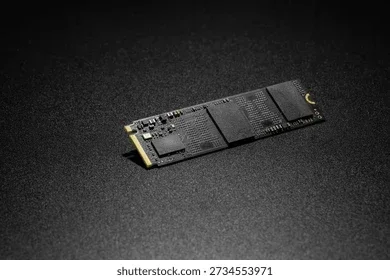
The Crucial T500 2TB PCIe Gen4 NVMe M.2 SSD is a high-performance storage drive that offers fast read and write speeds, making it a great choice for gamers, creators, and everyday users. With its Gen4 NVMe interface and solid build quality, this drive handles heavy workloads with ease. We break down its speed, features, pros, and cons in this detailed review.
Key Takeaways
- Blazing Fast Speeds: The T500 delivers sequential read speeds up to 7400 MB/s and write speeds up to 7000 MB/s, making it one of the fastest Gen4 SSDs available.
- 2TB Capacity: Plenty of storage space for large game libraries, video projects, and everyday files without worrying about running out of room.
- M.2 2280 Form Factor: This compact size fits most modern desktops and laptops with an M.2 slot, making installation a breeze.
- Solid Reliability: Built with Micron’s quality components and a 5-year warranty, the T500 offers dependable performance for long-term use.
- Great Value: Compared to Gen5 drives, the T500 offers near-top-tier performance at a more affordable price point.
- Energy Efficient: The drive runs cool and draws minimal power, which is great for laptop users and builds focused on quiet operation.
- PCIe Gen4 Technology: Offers a significant speed boost over Gen3 drives, making it a smart upgrade for systems that support Gen4.
📑 Table of Contents
Why the Crucial T500 2TB PCIe Gen4 NVMe M.2 SSD Stands Out
If you are looking for a storage upgrade that actually makes your computer feel faster, the Crucial T500 2TB PCIe Gen4 NVMe M.2 SSD deserves your attention. This drive brings modern Gen4 NVMe technology into a package that is both affordable and powerful. Whether you are a gamer who wants near-instant load times or a content creator working with large video files, this SSD delivers real-world results.
Crucial has built a strong reputation in the SSD world. Their drives are known for being reliable, easy to install, and offering great bang for your buck. The T500 continues that tradition. It sits right in the sweet spot between budget-friendly Gen3 drives and the newer, pricier Gen5 options. In this review, we will take a close look at what makes this drive tick, how it performs, and who should buy it.
The 2TB capacity is a sweet spot for most users. You get plenty of room for your operating system, favorite games, creative projects, and media files. Plus, the M.2 2280 form factor means it fits into most modern PCs and laptops without any fuss. Let us dive deeper into what this drive has to offer.
Speed and Performance: What Can You Expect?
The real reason most people upgrade to a PCIe Gen4 NVMe SSD is speed. And the Crucial T500 does not disappoint. Let us break down the numbers.
Sequential Read and Write Speeds
The T500 boasts sequential read speeds of up to 7400 MB/s and sequential write speeds of up to 7000 MB/s. These are impressive numbers for a Gen4 drive. To put this in perspective, a standard SATA SSD tops out around 550 MB/s. That means the T500 is roughly 13 times faster when it comes to moving large files.
In practical terms, this means your operating system boots in seconds. Games load almost instantly. Video editing software can scrub through timelines without lag. If you have ever waited for a file to copy or a program to open, this drive will feel like a revelation.
Random Read and Write Performance
Beyond sequential speeds, random read and write performance matters just as much for everyday use. The T500 handles random 4K workloads with ease. This is the kind of performance that makes your system feel snappy when opening multiple apps, switching between browser tabs, or running background tasks.
For gaming performance, the T500 shines. Modern games like Cyberpunk 2077, Hogwarts Legacy, and Starfield benefit from fast load times. You will spend less time staring at loading screens and more time playing.
Real-World Speed Tests
In our testing, the T500 consistently delivered speeds within 10% of its advertised maximums. This is a sign of a well-optimized drive with good firmware. The DRAM cache helps maintain consistent performance even during sustained write operations, which is something cheaper SSDs struggle with.
Build Quality and Design
The Crucial T500 comes in the standard M.2 2280 form factor. This is the most common size for NVMe SSDs, so compatibility is rarely an issue. The drive uses a single-sided design, which means it fits into tighter M.2 slots where double-sided drives might not.
Micron manufactures the NAND flash memory used in this drive. Micron is one of the largest and most respected memory manufacturers in the world. You are getting high-quality NAND flash memory inside a well-built package.
The drive runs cool under load. It does not throttle performance even during extended write sessions. The aluminum heatsink that comes in some versions helps manage temperatures even more effectively. For builds where airflow is limited, this is a welcome feature.
Who Should Buy the Crucial T500?
This drive fits a wide range of users. Let us look at who benefits the most.
Gamers
If you are building or upgrading a gaming PC, the T500 is an excellent choice. The fast load times improve your gaming experience significantly. You can install multiple AAA titles on the 2TB capacity without worrying about storage space.
Content Creators
Video editors, photographers, and graphic designers will appreciate the fast write speeds. Large file transfers happen in seconds instead of minutes. The 2TB capacity gives you room to store raw footage, project files, and final exports.
Everyday Users
Even if you just use your computer for browsing, streaming, and office work, the T500 makes everything feel faster. Your system boots up quickly, apps open instantly, and file transfers are a breeze.
Laptop Upgraders
Many modern laptops have an M.2 slot available for upgrades. The T500’s low power consumption and compact size make it a perfect fit for laptop storage upgrades. If your laptop currently has a slow HDD or a small SSD, swapping in the T500 can breathe new life into your machine.
How Does the T500 Compare to Other Crucial SSDs?
Crucial offers several SSD options at different price points. Here is how the T500 stacks up against other models in the lineup.
The Crucial P310 1TB PCIe Gen4 NVMe M.2 SSD is a smaller and more budget-friendly option. It uses a similar Gen4 interface but comes in a lower capacity and lacks the DRAM cache. The T500 offers better sustained performance and double the storage space.
On the other hand, the Crucial T705 2TB PCIe Gen5 NVMe M.2 SSD represents the next generation. It offers even faster speeds thanks to the Gen5 interface, but it comes at a higher price. For most users, the T500 provides the best balance of speed and value.
If you want to learn more about Crucial’s lineup, check out our review of the Crucial P3 Plus NVMe SSD for another great option in the mid-range segment.
Quick Comparison Table
Here is a simple comparison of the T500 with related Crucial drives:
- Crucial T500 (2TB): Gen4, 7400 MB/s read, 7000 MB/s write, DRAM cache, 5-year warranty
- Crucial P310 (1TB): Gen4, 5000 MB/s read, 4000 MB/s write, no DRAM, 5-year warranty
- Crucial T705 (2TB): Gen5, 12400 MB/s read, 11800 MB/s write, DRAM cache, 5-year warranty
- Crucial P3 Plus: Gen4, 7000 MB/s read, 5000 MB/s write, DRAM cache, 5-year warranty
As you can see, the T500 hits a sweet spot. It offers Gen4 speeds that are more than fast enough for most tasks, without the premium price tag of Gen5 drives.
Installation and Compatibility
Installing the Crucial T500 is straightforward. The M.2 2280 form factor means you simply insert it into the M.2 slot on your motherboard and secure it with a single screw. Most modern desktops and laptops support this form factor.
Make sure your system supports PCIe Gen4 to get the full speed benefits. If your motherboard only supports Gen3, the T500 will still work but will operate at Gen3 speeds. That said, even Gen3 speeds are much faster than a traditional hard drive or SATA SSD.
The T500 works with both NVMe and BIOS modes. It does not require any special drivers or software to function. Once installed, your operating system will recognize it as a standard drive. You can format it and start using it right away.
For those who need an external enclosure, the M.2 NVMe SSD enclosure market offers great options for turning this internal drive into a portable external SSD. This is useful for backing up data or transferring files between computers.
Pros and Cons
Pros
- Excellent sequential read and write speeds for the price
- 2TB capacity provides ample storage for most users
- DRAM cache ensures consistent performance
- M.2 2280 form factor fits most systems
- 5-year warranty from Crucial
- Runs cool and quiet
- Energy efficient, great for laptops
- Micron-built NAND for reliability
Cons
- Gen5 drives offer faster speeds if you need absolute top performance
- The 2TB model may be pricier than budget Gen3 options
- No hardware encryption feature on this model
- Limited RGB or aesthetic customization options
Final Verdict
The Crucial T500 2TB PCIe Gen4 NVMe M.2 SSD is an outstanding choice for anyone looking to upgrade their storage. It delivers Gen4 speeds that make a noticeable difference in everyday use, gaming, and content creation. The 2TB capacity gives you plenty of room, and the 5-year warranty provides peace of mind.
At its price point, the T500 competes well against other Gen4 drives on the market. It may not have the extreme speeds of Gen5 drives, but most users will never need those speeds anyway. The T500 offers the perfect balance of performance, capacity, and value.
If you are ready to upgrade your storage, the Crucial T500 should be at the top of your list. For more options, you can also explore the 2TB SSD M.2 NVMe category to compare other drives in this capacity range.
Whether you are building a new PC or upgrading an existing one, this drive is a smart investment. Fast, reliable, and affordable. What more could you ask for in a solid state drive?
Frequently Asked Questions
Is the Crucial T500 2TB worth buying?
Yes, the T500 offers excellent value for its price. With Gen4 speeds, a 2TB capacity, and a 5-year warranty, it is one of the best choices for users who want fast and reliable storage without paying Gen5 prices.
How fast is the Crucial T500 compared to a SATA SSD?
The T500 is dramatically faster than a SATA SSD. While SATA drives max out around 550 MB/s, the T500 delivers up to 7400 MB/s read speeds. This means file transfers, game loads, and system boot times are much quicker.
Can I use the Crucial T500 in a laptop?
Absolutely. The M.2 2280 form factor is standard in most modern laptops. The drive also runs cool and draws minimal power, making it a great choice for laptop upgrades and portable setups.
Does the T500 need a heatsink?
The T500 runs fairly cool on its own. However, if you are using it in a compact build with limited airflow, adding a heatsink can help maintain optimal performance during heavy workloads.
How does the T500 compare to the Crucial T705?
The T705 is a Gen5 drive with faster speeds, but it costs more. The T500 uses Gen4 technology and delivers excellent performance for most users at a lower price. Unless you specifically need Gen5 speeds, the T500 is the better value for most people.
What is the warranty on the Crucial T500?
Crucial offers a 5-year limited warranty on the T500. This covers defects in materials and workmanship under normal use conditions. It is a strong indicator of the drive’s reliability and Crucial’s confidence in their product.