Is It Okay to Use Usb to Lightning Cable
Using a USB to Lightning cable is generally safe and works perfectly for charging and syncing Apple devices. The key is choosing a certified cable and understanding your device needs. This guide covers everything you need to know about USB to Lightning cable safety, compatibility, and best practices.
Key Takeaways
- USB to Lightning cables are safe: When you use certified cables, they work reliably with all Apple devices.
- MFi certification matters: Always look for MFi certified cables to avoid damage and ensure safety.
- USB-A and USB-C are different: Know which connector type your device and charger support.
- Third-party cables can work: But only if they meet Apple quality standards and safety certifications.
- Cable quality affects charging speed: Cheap cables may slow down fast charging or fail over time.
- Regular inspection helps: Check your cables for wear and replace them when needed.
📑 Table of Contents
- What Is a USB to Lightning Cable
- Is It Safe to Use a USB to Lightning Cable
- USB to Lightning Cable Compatibility
- Benefits of Using a USB to Lightning Cable
- Common Mistakes People Make With USB to Lightning Cables
- Expert Tips for Choosing the Right USB to Lightning Cable
- Frequently Asked Questions
- Conclusion
What Is a USB to Lightning Cable
A USB to Lightning cable is a charging and data cable made by Apple. It connects the USB end to a power source or computer and the Lightning end to your iPhone, iPad, or iPod. This cable has been the standard for Apple mobile devices for many years.
The Lightning connector is small and reversible. You can plug it in either direction, which makes it very convenient. On the other side, you get a standard USB connector that fits into wall chargers, laptops, or car ports. Many people use this cable every day without thinking twice about it.
The USB to Lightning cable supports both charging and data transfer. You can sync your photos, music, and apps between your device and a computer. You can also use it to update your iOS or restore your device through iTunes. It is a simple tool that does a lot of heavy lifting.
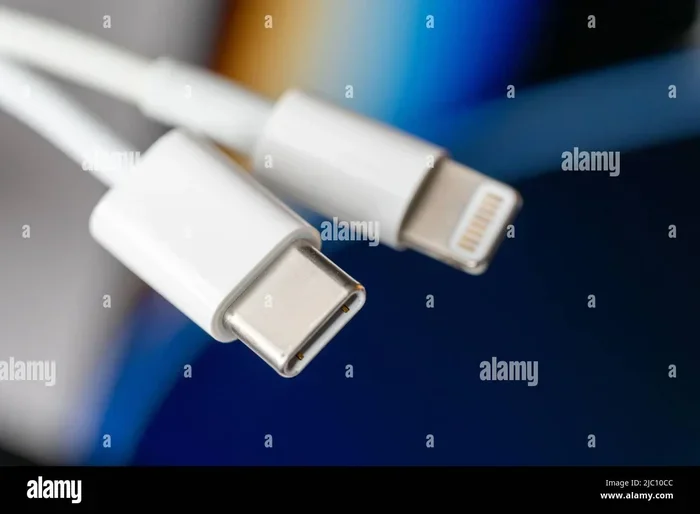
There are two main types of USB to Lightning cables you will see. One has a USB-A connector on the end, which is the flat rectangular plug. The other has a USB-C connector, which is smaller and oval-shaped. Both work with Lightning devices, but they connect to different chargers and ports.
Is It Safe to Use a USB to Lightning Cable
The short answer is yes. Using a USB to Lightning cable is safe for your Apple devices. Apple designs these cables to meet strict safety standards. They handle power delivery, heat management, and data transfer in a controlled way.
However, safety depends on the cable you choose. Not all cables on the market are created equal. A cheap, uncertified cable can cause real problems. It might overheat, charge slowly, or even damage your device’s battery over time.
Certified vs Non Certified Cables
Apple has a program called MFi, which stands for Made for iPhone. When a cable carries the MFi certification, it means Apple has tested it for safety and performance. USB to Lightning cable options that are MFi certified give you peace of mind.
Non certified cables skip these tests. They may use lower quality wires and components. Over time, these cables can cause connection issues, slow charging, or even pose a fire risk. Always check for the MFi badge before you buy.
Safety Concerns to Watch For
Here are some safety signs you should never ignore. If your cable gets unusually hot while charging, unplug it right away. If you see fraying or exposed wires near the connector, replace the cable. A damaged USB to Lightning cable is not worth the risk.
Also watch for unexpected behavior. If your device takes much longer to charge than usual, the cable might be failing. If your device disconnects and reconnects while syncing, that is another red flag. Trust your instincts and replace cables that act strange.
USB to Lightning Cable Compatibility
Compatibility is one of the most important things to consider. Not every USB to Lightning cable works with every device or charger. Understanding what works with what helps you avoid frustration.
The USB to Lightning cable works with a wide range of Apple devices. iPhones from the 5 model onward use Lightning. iPads like the iPad Air, iPad mini, and many Pro models also use Lightning. Some iPod models use it too. If your device has a Lightning port, this cable will work.
USB-A to Lightning vs USB-C to Lightning
Understanding the difference between USB-A and USB-C matters. A USB-A to Lightning cable connects to older chargers and desktop computers. These are the standard rectangular ports you see on many wall adapters and desktop towers.
A USB-C to Lightning cable connects to newer chargers and modern laptops. USB-C is smaller and reversible, just like Lightning. Many Android phones, newer laptops, and fast chargers use USB-C. If you want fast charging on your iPhone, a USB-C to Lightning cable paired with a USB-C power adapter is the way to go.
For example, Apple’s 20W USB-C power adapter works great with a USB-C to Lightning cable. This combo gives you fast charging speeds that a USB-A cable simply cannot match. It is a simple upgrade that makes a big difference.
You might also run into situations where you need an adapter. Some people use a USB hub or a special adapter to connect their cable. For instance, if you need to connect multiple USB devices, you might look into a M.2 NVMe SSD to USB 3.1 Adapter for broader connectivity options. Similarly, if you need a different type of USB adapter for storage, a NVMe SSD to USB Adapter can help bridge the gap between different connection types.
Benefits of Using a USB to Lightning Cable
There are many good reasons to keep a USB to Lightning cable in your bag or at your desk. Let us look at the main benefits.
Fast Charging Capabilities
With the right setup, a USB to Lightning cable can charge your iPhone quickly. Using a USB-C to Lightning cable with an 18W or higher power adapter, you can charge your iPhone up to 50 percent in about 30 minutes. This is a huge time saver when you are in a hurry.
Standard USB-A cables charge more slowly. They typically deliver around 5 watts of power. That is fine for overnight charging, but it will not help you much during the day. If speed matters to you, invest in a USB-C to Lightning cable and a compatible fast charger.
Data Transfer Speeds
Data transfer is another area where the right cable makes a difference. A good USB to Lightning cable lets you sync photos, videos, and files quickly between your device and a computer. USB 3.0 and newer ports transfer data much faster than older USB 2.0 ports.
If you regularly back up your iPhone or transfer large files, the cable quality really shows. A high quality USB to Lightning cable will save you time and reduce frustration during transfers.
Versatility and Convenience
The Lightning connector is compact and fits easily into tight spaces. You can charge your device in the car, at a desk, or on the go. Many car chargers use USB ports, so a USB to Lightning cable works perfectly for road trips. If you have ever dealt with a car camera cable USB port situation, you know how important it is to have a reliable USB connection in your vehicle.
You can also use the same cable to sync with your laptop while traveling. This means fewer cables to carry and less clutter in your bag. One cable handles charging and syncing for all your Lightning devices.
Common Mistakes People Make With USB to Lightning Cables
Even though USB to Lightning cables are simple tools, people make mistakes with them all the time. Here are the most common ones.
Using Cheap or Counterfeit Cables
This is the biggest mistake. Cheap cables from unknown brands often fail quickly. They might not charge properly, and they could damage your device. The savings are not worth the risk. Always buy from reputable sellers and look for MFi certification.
Ignoring Cable Wear and Tear
Cables take a beating over time. Bending, pulling, and coiling them too tightly causes internal damage. When the outer layer wears thin, the wires inside become exposed. This leads to intermittent charging and potential safety hazards. Replace your cables when you see visible damage.
Forcing the Connector
The Lightning connector is designed to be gentle. If you feel resistance when plugging it in, do not force it. Check for debris in the port first. A dirty Lightning port can cause connection problems. Use a soft brush or compressed air to clean it out gently.
Using the Wrong Power Adapter
Not all power adapters are the same. A low wattage adapter will charge your device slowly. A high quality adapter paired with the right cable gives you the best results. Check the wattage rating on your adapter and match it to your device needs.
Expert Tips for Choosing the Right USB to Lightning Cable
Choosing the right cable does not have to be confusing. Follow these tips and you will get the best results.
What to Look For in a Quality Cable
- MFi certification: This is the gold standard. Always choose MFi certified cables.
- Braided construction: Braided cables last longer than rubber ones. They resist fraying and tangling.
- Right length: Pick a length that fits your needs. Six feet is great for bedside charging. Three feet works well for desk use.
- USB-C vs USB-A: Choose USB-C for fast charging and modern compatibility. USB-A works for older setups.
- Brand reputation: Stick with known brands or Apple itself for the best reliability.
Quick Tips for Longer Cable Life
Your cables last longer when you take care of them. Here are some simple habits that help.
- Avoid wrapping the cable too tightly. Use a loose coil instead.
- Do not bend the cable at sharp angles near the connectors.
- Store cables in a bag or case when traveling.
- Unplug by gripping the connector, not by pulling the cable.
- Keep cables away from heat sources and direct sunlight.
These small habits add up over time. A well cared for USB to Lightning cable can last for years.
Frequently Asked Questions
Here are answers to the most common questions people ask about USB to Lightning cables.
Can I Use Any USB to Lightning Cable With My iPhone
Most USB to Lightning cables will charge your iPhone, but not all are created equal. For the best safety and performance, choose an MFi certified cable. Non certified cables may charge slowly or cause issues over time. Apple recommends using certified accessories to protect your device.
Is a USB to Lightning Cable the Same as a USB-C to Lightning Cable
No, they are different. A standard USB to Lightning cable has a USB-A connector on one end. A USB-C to Lightning cable has a smaller, oval-shaped USB-C connector. The USB-C version supports faster charging and is more compatible with modern chargers and laptops.
Can I Use a USB to Lightning Cable to Transfer Data
Yes, USB to Lightning cables transfer data as well as charge your device. When you connect your iPhone or iPad to a computer, you can sync files, photos, and backups. For the fastest transfer speeds, use a cable that supports USB 3.0 or newer and connect it to a USB 3.0 port on your computer.
How Long Does a USB to Lightning Cable Last
A good quality cable lasts about one to two years with regular use. Cheaper cables may fail sooner. Factors like how often you use it, how you store it, and the build quality all affect lifespan. Look for braided cables and MFi certification for the longest lasting option.
Will a USB to Lightning Cable Work With iPad Pro
Yes, most iPad Pro models with a Lightning port work perfectly with a USB to Lightning cable. However, newer iPad Pro models use USB-C instead of Lightning. Check your specific model to confirm which port it has before buying a cable.
Can I Fast Charge My iPhone With a USB to Lightning Cable
You can fast charge your iPhone with a USB-C to Lightning cable and a USB-C power adapter that supports 18W or higher. A standard USB-A to Lightning cable will not deliver fast charging speeds. If fast charging matters to you, make sure you have the right cable and adapter combo.
Conclusion
Using a USB to Lightning cable is perfectly okay and very common. Millions of people rely on these cables every day to charge and sync their Apple devices. The key is to choose a quality cable, use it properly, and replace it when it shows signs of wear.
Always look for MFi certification and avoid cheap knockoffs. Know the difference between USB-A and USB-C connectors. And take care of your cables so they last longer. With the right approach, your USB to Lightning cable will serve you well for years to come.
Remember, your device is an investment. Using the right cable protects that investment. A little attention to cable quality and care goes a long way toward keeping your Apple devices running smoothly and safely.