Are Usb Extenders Good
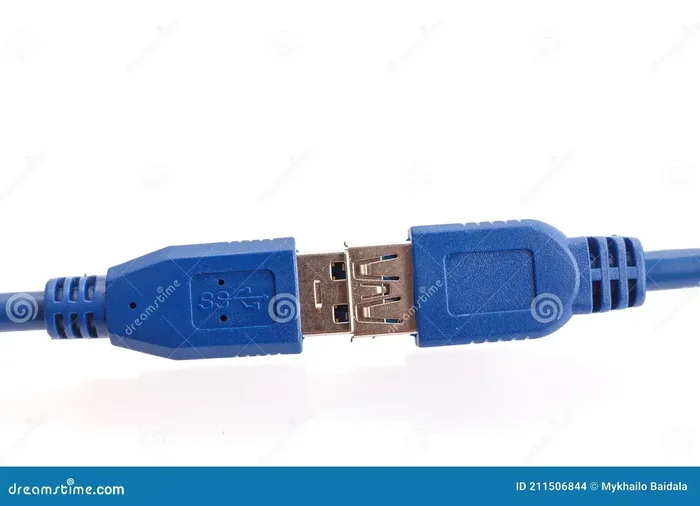
USB extenders are devices that boost your USB signal over longer distances, helping you connect peripherals that are far from your computer. They come in different types, from simple cable extenders to active repeaters that keep your data transfer speed strong. If you have connectivity issues or need more reach for your devices, a USB extender can be a simple and affordable fix.
Key Takeaways
- USB extenders solve distance problems: They let you place your USB devices far from your computer without losing signal quality.
- Active extenders are better for long runs: Passive extenders work for short distances, but active repeaters boost the signal for longer cable runs.
- Data transfer speed matters: Good USB extenders maintain fast speeds, so your peripherals work just like they would with a direct connection.
- They are affordable and easy to use: Most USB extenders plug and play, requiring no extra software or setup.
- Choose the right type for your needs: USB 3.0, USB 3.1, and USB-C extenders each offer different speed and compatibility levels.
- Signal loss is the main concern: Without an extender, long USB cables can cause weak signals, slower transfers, and dropped connections.
📑 Table of Contents
Are USB Extenders Good? Here Is Everything You Need to Know
Have you ever tried plugging in a USB device only to find the cable is too short? Maybe your printer sits on the other side of the room, or your external hard drive is tucked away in a desk drawer. This is a common problem, and it is where USB extenders come in handy.
USB extenders are simple devices that let you stretch your USB connection beyond the normal cable length. They boost the signal so your devices keep working, even from far away. But do they really work well? Let us dive deep into this topic and find out.
If you have ever dealt with connectivity issues or slow data transfer because of a short cable, you are not alone. Many people face this problem every day. The good news is that USB extenders offer a practical and affordable solution. In this guide, we will cover how they work, the different types available, and whether they are worth your money.
What Are USB Extenders?
A USB extender is a device or cable that increases the reach of a standard USB connection. Normal USB cables have a length limit, usually around 3 to 5 meters. Beyond that, the signal starts to weaken. This is called signal loss, and it can cause slow speeds, dropped connections, and devices that stop working altogether.
USB extenders solve this problem by amplifying or repeating the signal along the way. Think of them like a relay team passing a baton. Each runner keeps the baton moving forward without dropping it. In the same way, an extender keeps your USB signal strong over longer distances.
There are two main types of USB extenders: passive and active. Passive extenders are simple cables that are a bit longer than standard ones. Active extenders use built-in electronics to boost the signal. For most users, active extenders are the better choice because they keep your data transfer speed high even over long cable runs.
How Do USB Extenders Work?
USB extenders work by taking the signal from your computer and regenerating it at the other end. This process is called repeating. The extender receives the weakened signal, cleans it up, and sends a fresh, strong signal down the next segment of cable.
Here is how the process works step by step:
- Signal input: The extender receives the USB signal from your computer or host device.
- Signal regeneration: Built-in electronics clean up the signal and remove any noise or interference.
- Signal output: The extender sends a fresh, strong signal to your peripheral device.
- Continuous boosting: If you chain multiple extenders together, each one boosts the signal again.
Some USB extenders also help with power delivery. Longer cables can lose power along the way, which means your device might not charge properly. Active extenders make sure your device gets enough power, even from far away. This is especially important for things like external hard drives and USB hubs that need steady power to work.
Passive vs. Active USB Extenders
Understanding the difference between passive and active extenders is important. Passive extenders are just longer cables. They do not boost the signal. They work fine for short distances, usually under 3 meters. Beyond that, you will start to see signal loss and slower speeds.
Active extenders, on the other hand, have built-in chips that boost the signal. They can stretch your USB connection to 10 meters or more without losing quality. If you need a long cable run, an active extender is the way to go. They are a bit more expensive, but the performance difference is huge.
| Feature | Passive Extender | Active Extender |
|---|---|---|
| Signal Boosting | No | Yes |
| Max Distance | Up to 3 meters | Up to 15+ meters |
| Data Transfer Speed | May slow down | Maintains full speed |
| Power Delivery | Weakens over distance | Keeps power steady |
| Price | Low | Moderate to high |
| Setup | Plug and play | Plug and play |
Types of USB Extenders Available
Not all USB extenders are the same. Different types serve different needs, and choosing the right one depends on what you want to do. Here are the most common types you will find on the market.
USB 3.0 Extenders
USB 3.0 extenders are the most popular type. They support speeds up to 5 Gbps, which is fast enough for most everyday tasks. Whether you are connecting a printer, keyboard, or external drive, a USB 3.0 extender handles it well. They are also backward compatible with older USB 2.0 devices, so you do not have to worry about compatibility.
USB 3.1 Extenders
USB 3.1 extenders take things a step further. They support speeds up to 10 Gbps, which is double the speed of USB 3.0. These are great for professionals who need fast data transfer speed for large files, video editing, or backups. If you use an M.2 NVMe SSD to USB 3.1 adapter, you will appreciate the extra speed that USB 3.1 extenders provide.
USB-C Extenders
USB-C extenders are the newest type on the market. They use the reversible USB-C connector, which is becoming the standard on modern laptops and devices. USB-C extenders support fast data transfer and quick charging. They are compact, versatile, and perfect for users with newer devices. If you use an M.2 NVMe to USB C SSD enclosure, a USB-C extender can help you place it farther from your desk.
Network-Based USB Extenders
Some USB extenders use your home network to extend the connection. These are called network-based or Ethernet-based extenders. They send USB signals over your existing network cable, which can stretch the connection to 50 meters or more. These are great for office setups or home theaters where you need to place USB devices in another room.
Benefits of Using USB Extenders
USB extenders offer many benefits that make them a smart addition to any setup. Here are the top reasons why people use them.
1. Longer Cable Reach
The most obvious benefit is the extra length. With a USB extender, you can place your devices wherever you want, even if they are far from your computer. This is perfect for home offices, studios, and workspaces where cable management matters.
2. Better Signal Quality
Active USB extenders boost the signal, which means fewer dropped connections and more reliable performance. You will notice fewer errors when transferring files, and your peripherals will stay connected without interruption.
3. Faster Data Transfer Speeds
Good USB extenders maintain the full speed of your USB connection. You do not have to sacrifice speed just because your device is farther away. This is especially important for external drives, webcams, and audio interfaces that need fast and steady data flow.
4. Easy Setup
Most USB extenders are plug and play. You do not need to install drivers or software. Just plug one end into your computer and the other end into your device, and you are good to go. This makes them very user-friendly, even for people who are not tech-savvy.
5. Affordable Solution
Compared to other solutions like moving your computer or buying longer cables, USB extenders are very affordable. You can get a quality active extender for a reasonable price, and it will last for years. They are a cost-effective way to solve distance and connectivity problems.
Common Uses for USB Extenders
USB extenders are useful in many different situations. Here are some of the most common ways people use them in everyday life.
Home Office Setups
In a home office, you might have your computer on one desk and your printer on another. A USB extender lets you connect the printer without stretching across the room. This keeps your workspace clean and organized.
Gaming Setups
Gamers often need to place their rig far from their desk or monitor. USB extenders help connect gaming peripherals like controllers, headsets, and external drives without losing performance. They also help with latency issues that can come from long cable runs.
Creative Workstations
If you do video editing, music production, or graphic design, you know how important reliable connections are. USB extenders let you place expensive audio interfaces, drawing tablets, and external storage far from your workstation while keeping the connection stable and fast.
Home Theater and Entertainment
In a home theater setup, you might want to place USB devices like streaming boxes or storage drives in a different room. A network-based USB extender can stretch the connection over your home network, giving you flexibility in where you place your equipment.
Industrial and Commercial Use
USB extenders are also popular in offices, schools, and retail environments. They help connect USB devices that are mounted on walls, ceilings, or in other hard-to-reach places. This makes them a versatile tool for many professional settings.
Are USB Extenders Worth Buying?
The short answer is yes. USB extenders are a simple, affordable, and effective way to extend your USB connections. They solve real problems like short cables, weak signals, and slow data transfer. Whether you are setting up a home office, a gaming station, or a creative workspace, they can make your setup much more flexible.
However, not all USB extenders are created equal. Here are some tips to make sure you get the right one:
- Check the speed rating: Make sure the extender supports the USB version you need, whether it is USB 3.0, USB 3.1, or USB-C.
- Go for active over passive: For distances over 3 meters, an active extender will give you much better performance.
- Consider your power needs: If your device needs a lot of power, choose an extender that supports USB power delivery.
- Read reviews: Look for extenders with good reviews and reliable build quality. Cheap, poorly made extenders can cause more problems than they solve.
- Think about future needs: Choose an extender that is compatible with newer USB standards so it stays useful as your devices upgrade.
If you have ever struggled with a short USB cable or weak signal, a USB extender is a simple fix that can save you a lot of frustration. They are small, affordable, and they do a big job. Whether you need to connect a printer across the room or set up an external drive in another part of your home, USB extenders are a smart investment.
One thing to keep in mind is that while USB extenders are great for extending connections, they are not a replacement for proper cable management. Keep your cables organized and avoid running them near sources of interference like power cables or microwaves. This will help you get the best performance from your extender.
Overall, USB extenders are a practical and worthwhile tool for anyone who uses USB devices regularly. They are easy to set up, they keep your signal strong, and they give you the freedom to place your devices wherever you need them. If you have been dealing with short cables and connectivity issues, it is time to give USB extenders a try.
Conclusion
USB extenders are a simple yet powerful tool that solves one of the most common problems in modern computing: cable length. They boost your signal, maintain fast data transfer speeds, and give you the freedom to place your devices wherever you want. Whether you need a short extension for your desk or a long-distance extender for a home theater setup, there is a USB extender that fits your needs.
The key is to choose the right type. Active extenders are best for longer runs, and choosing the right USB version ensures compatibility and speed. With the right USB extender, you will never have to worry about short cables or weak signals again.
Frequently Asked Questions
Do USB extenders slow down data transfer speed?
Not if you choose a good quality active extender. Cheap passive extenders can slow down your connection, but active USB extenders are designed to maintain full speed. Look for extenders that match your USB version, like USB 3.0 or USB 3.1, for the best results.
Can I chain multiple USB extenders together?
Yes, you can chain multiple extenders to stretch your connection even further. However, each extender adds a small amount of latency. For most users, chaining two or three extenders works fine without any noticeable drop in performance.
Are USB extenders compatible with all devices?
Most USB extenders are compatible with a wide range of devices, including printers, external drives, keyboards, and cameras. Just make sure the extender matches your USB type, whether it is USB-A, USB-C, or micro USB, for a proper fit.
Do USB extenders need power to work?
Passive extenders do not need any power. Active extenders usually draw power from the USB connection itself, but some higher-powered devices may need a separate power source. Always check the specifications before you buy to make sure it meets your needs.
What is the maximum distance a USB extender can reach?
A standard active USB extender can reach up to 15 meters or more. Network-based extenders can stretch even further, up to 50 meters or more over Ethernet cable. The exact distance depends on the type and quality of the extender you choose.
Can I use a USB extender for charging devices?
Yes, many USB extenders support charging as well as data transfer. However, longer cable runs can reduce the power that reaches your device. If you need to charge a power-hungry device like a tablet or external hard drive, choose an extender that supports strong USB power delivery to ensure it charges properly.