Is Fiber Optic Hdmi Better Than Copper Hdmi
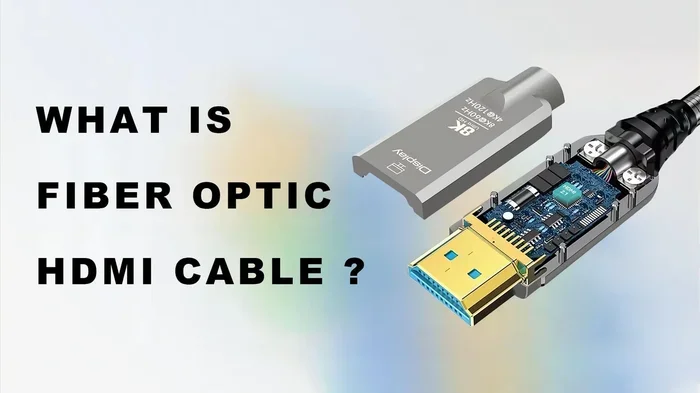
Fiber optic HDMI cables offer faster signal speeds and longer run distances than copper HDMI, making them ideal for demanding setups. However, copper HDMI cables are more affordable, durable, and easier to handle. The right choice depends on your resolution needs, cable length, and budget. This guide breaks down every major difference so you can decide with confidence.
When you are setting up a home theater, a gaming rig, or a professional display system, the cable you choose matters a lot. The HDMI cable is the bridge between your source device and your screen. And not all HDMI cables are created equal. The debate between fiber optic HDMI and copper HDMI has been growing louder as 4K and even 8K content becomes the standard. So, is fiber optic HDMI better than copper HDMI? The short answer is: it depends on what you need. Let us dive deep into this comparison and find out which cable deserves a spot in your setup.
HDMI cables carry both audio and video signals from one device to another. Whether you are connecting a Blu-ray player to a TV or a gaming PC to a monitor, the cable matters. Copper HDMI has been the standard for years. It uses electrical signals to transmit data through copper wires. Fiber optic HDMI, on the other hand, uses light pulses through glass or plastic fibers. Both deliver digital signals, but the way they do it is very different. Understanding these differences helps you make a smarter buying decision.
Key Takeaways
- Fiber optic HDMI wins for long distances: It can run 100 feet or more without signal loss, while copper struggles past 50 feet.
- Copper HDMI is more affordable: You get solid performance for most home setups at a fraction of the cost.
- Fiber optic supports higher bandwidth: This makes it the go-to choice for 4K and 8K ultra HD content.
- Durability differs: Copper cables are sturdier and easier to route, while fiber optic cables are thinner but more fragile.
- Gaming and home theater benefit from fiber: Lower latency and better signal integrity make a real difference in demanding setups.
- Copper HDMI is future-proof enough for most users: HDMI 2.1 copper cables handle 4K at 120Hz with ease.
📑 Table of Contents
- What Is Copper HDMI?
- What Is Fiber Optic HDMI?
- Fiber Optic HDMI vs Copper HDMI: Head to Head
- When Should You Choose Fiber Optic HDMI?
- When Should You Choose Copper HDMI?
- Common Mistakes People Make With HDMI Cables
- Expert Tips for Choosing the Right HDMI Cable
- Final Verdict: Which HDMI Cable Is Right for You?
What Is Copper HDMI?
Copper HDMI is the traditional cable type most people are familiar with. It uses copper conductors to carry electrical signals. These cables have been around since the early days of HDMI and have evolved over time. Today, copper HDMI cables support HDMI 2.0 and HDMI 2.1 standards. They handle everything from 1080p full HD to 4K ultra HD at high refresh rates. Most average users have copper HDMI cables in their homes right now. They work great for short to medium distances, typically under 50 feet. The signal travels through the copper wire as an electrical impulse. This is reliable and fast for most everyday uses. But there are limits. As the cable gets longer, the electrical signal can weaken. This is called signal degradation. For short runs in a living room or office, copper HDMI performs beautifully.
How Copper HDMI Transmits Data
Copper HDMI sends data through electrical pulses along copper wire cores. The HDMI standard defines how many pins carry what type of signal. There are 19 pins in a standard HDMI connector. These pins handle video data, audio data, clock signals, and ground connections. The copper conductor carries all of this information as electrical energy. The speed of this transmission depends on the cable quality and the HDMI version. A high speed HDMI copper cable can push a lot of data very quickly. But over long distances, the electrical resistance starts to hurt the signal. This is why most copper HDMI cables max out around 50 feet for reliable 4K performance. Beyond that, you may notice flickering, artifacts, or a dropped signal entirely.
What Is Fiber Optic HDMI?
Fiber optic HDMI cables use light to transmit data. Inside the cable, there are thin glass or plastic fibers. A light source sends pulses of light through these fibers. The light carries the audio and video data from one end to the other. This technology is not new. It has been used in telecommunications for decades. But it has only recently become common in consumer HDMI cables. Fiber optic HDMI cables can carry signals over much longer distances than copper. They also offer higher bandwidth potential. This makes them attractive for serious home theater enthusiasts and professional setups. If you want to run a cable 100 feet or more, fiber optic HDMI is the clear winner. The light signal does not degrade the way an electrical signal does over long runs. This means a clean, crisp picture at any distance.
How Fiber Optic HDMI Transmits Data
The core of a fiber optic HDMI cable is a bundle of tiny glass or plastic fibers. Each fiber carries a portion of the data signal. A laser or LED source converts the electrical HDMI signal into light pulses. These light pulses travel through the fiber at incredibly high speeds. At the other end, a converter turns the light back into an electrical signal. This process happens almost instantly. The result is a signal that stays strong even over very long cable runs. Fiber optic cables are also immune to electromagnetic interference. This means nearby power cords or electronic devices will not degrade your HDMI signal. For users who run cables through walls or across large rooms, this is a huge advantage. The signal arrives clean and untouched, no matter the distance.
Fiber Optic HDMI vs Copper HDMI: Head to Head
Let us compare these two cable types side by side. This makes it easier to see which one fits your needs.
Signal Quality and Bandwidth
Fiber optic HDMI cables have a clear edge in bandwidth. They can handle the massive data requirements of 8K ultra HD and even higher resolutions. Copper HDMI cables can also handle 4K and even 8K, but only at shorter distances. For a typical living room setup, copper HDMI 2.1 cables deliver excellent bandwidth. But if you need to push 4K at 120Hz or 8K at 60Hz over a long run, fiber optic is the better choice. The light-based transmission maintains full bandwidth over distance. Copper cables lose bandwidth potential as length increases.
Cable Length and Distance
This is where fiber optic HDMI truly shines. A copper HDMI cable works well up to about 15 to 50 feet. After that, you may need a signal booster or an active cable. A fiber optic HDMI cable can easily reach 100 feet or more without any signal loss. Some premium fiber optic cables can run 150 feet or even longer. If you are setting up a large home theater or a conference room, fiber optic makes a lot of sense. The ability to run long cables without signal degradation is a game changer. For most gamers and casual users, copper HDMI is still the practical choice.
Durability and Build Quality
Copper HDMI cables tend to be more durable in everyday use. They are thicker, sturdier, and easier to bend and route. You can coil them, tuck them behind furniture, and they will hold up well over time. Fiber optic HDMI cables are thinner and more flexible in some ways. But the glass fibers inside are delicate. Bending a fiber optic cable too sharply can break the internal fibers. This ruins the cable. If you need a cable that can handle frequent plugging and unplugging or rough handling, copper is the safer bet. Fiber optic cables need more careful handling.
Pricing and Value
Copper HDMI cables are much more affordable. A good quality copper HDMI 2.1 cable costs between 10 and 30 dollars. You can find them almost anywhere. Fiber optic HDMI cables cost significantly more. A quality fiber optic HDMI cable can run 50 to 150 dollars or more. The price difference is real and it matters for most buyers. If you do not need long cable runs or extreme bandwidth, spending extra on fiber optic may not be worth it. Save your money and go with a solid copper HDMI cable. But if distance and performance are critical, fiber optic is worth the investment.
Latency and Gaming Performance
For gamers, latency is a big deal. Fiber optic HDMI cables have slightly lower latency than copper HDMI cables. This is because light travels faster than electrical signals through copper. The difference is tiny and most people will not notice it. But in competitive gaming, every millisecond counts. If you are a professional gamer or a serious enthusiast, fiber optic HDMI gives you a slight edge. For casual gaming, copper HDMI is perfectly fine. Both cable types support HDMI 2.1 features like variable refresh rate and auto low latency mode. The cable type does not block these features. Your device and TV need to support them first.
Compatibility and Ease of Use
Copper HDMI cables are universal. They work with virtually every HDMI device ever made. You plug them in and they work. Fiber optic HDMI cables are also compatible with standard HDMI ports. But they sometimes require external power. Some fiber optic cables have a USB cable for power. This adds a small step to setup. Also, fiber optic cables have a specific direction. You need to plug the source end into the source device and the display end into the TV. Reversing them will not work. Copper HDMI cables do not have this issue. They work either way. For simplicity and ease of use, copper HDMI wins.
| Feature | Copper HDMI | Fiber Optic HDMI |
|---|---|---|
| Max Reliable Distance | 15 to 50 feet | 100+ feet |
| Bandwidth | High (up to 48 Gbps for HDMI 2.1) | Very High (supports 8K and beyond) |
| Signal Degradation | Yes, over long distances | Minimal, even at long distances |
| Price Range | $10 to $30 | $50 to $150+ |
| Durability | High | Moderate (fragile fibers) |
| Latency | Very Low | Slightly Lower |
| Interference Immunity | Low (susceptible to EMI) | High (immune to EMI) |
| Ease of Use | Very Easy | Easy (needs proper orientation) |
When Should You Choose Fiber Optic HDMI?
There are clear situations where fiber optic HDMI is the better choice. If you need to run a cable more than 50 feet, go fiber optic. If you are building a large home theater with a projector mounted far from the source, fiber optic handles the distance with ease. For 8K content or future-proofing your setup, fiber optic gives you the bandwidth headroom you need. Professional AV setups, conference rooms, and stadium displays all rely on fiber optic HDMI for a reason. The signal stays clean and strong no matter the length. If you are also exploring audio setups, understanding are 4 or 8 ohm speakers better can help you pair the right speakers with your HDMI setup for the best sound quality.
When Should You Choose Copper HDMI?
For most home users, copper HDMI is more than enough. If your devices are within 15 to 30 feet of each other, a copper HDMI cable will deliver excellent picture and sound quality. It is affordable, easy to find, and simple to use. Gamers who want a reliable connection for their console or PC will do great with a good copper HDMI 2.1 cable. If you are curious about pushing your display settings further, check out whether overclocking your monitor is worth it to get the most from your copper HDMI connection. Copper HDMI is also the better choice if you plug and unplug cables frequently. The durability and flexibility make it a practical everyday option. For the vast majority of people, copper HDMI is the smart and cost effective choice.
Common Mistakes People Make With HDMI Cables
One of the biggest mistakes is buying the most expensive cable when you do not need it. A 150 dollar fiber optic HDMI cable will not improve your picture if you are watching 1080p content on a 30 foot run. A 15 dollar copper HDMI cable will do the same job. Another mistake is ignoring cable direction with fiber optic HDMI. These cables have a source end and a display end. Plugging them in backwards will not work. People also overlook the need for external power on some fiber optic cables. If your cable has a USB power cable, make sure you plug it in. Without power, the signal will not transmit. Finally, some people assume all HDMI cables are the same. They are not. The HDMI standard, cable quality, and construction type all matter. Take the time to choose the right cable for your specific needs.
Expert Tips for Choosing the Right HDMI Cable
- Measure your distance first. Know exactly how far you need the cable to run before you buy. Add a few feet of slack for routing.
- Check your device capabilities. A fiber optic HDMI cable will not give you 8K if your source device or TV only supports 4K.
- Buy from reputable brands. Cheap no-name cables may not meet the HDMI standard they claim. Stick with trusted manufacturers.
- Consider future needs. If you plan to upgrade to 8K soon, investing in a fiber optic HDMI cable now makes sense.
- Test your setup. After installing, play a high resolution video to confirm the cable delivers the expected quality.
- For audio video setups, proper cable management matters. Learning about techniques like what is bi wiring speakers can help you optimize your entire audio video chain, not just the HDMI connection.
Final Verdict: Which HDMI Cable Is Right for You?
The answer to whether fiber optic HDMI is better than copper HDMI comes down to your specific situation. For long cable runs, 8K content, and professional setups, fiber optic HDMI is the clear winner. The signal integrity over distance is unmatched. For everyday home use, gaming consoles, and budget conscious setups, copper HDMI delivers outstanding performance at a great price. Neither cable is objectively better. They are both tools designed for different jobs. Assess your needs, measure your distances, and choose accordingly. The best HDMI cable is the one that fits your setup and your budget.
If you are still deciding, start with copper HDMI. It is affordable and reliable. If you outgrow it or need more distance, upgrading to fiber optic HDMI is always an option. Both types will serve you well. The key is matching the cable to your requirements. With the right HDMI cable in hand, you will enjoy stunning picture quality and immersive sound for years to come.
Frequently Asked Questions
Can I use a fiber optic HDMI cable for gaming?
Yes, fiber optic HDMI cables work great for gaming. They offer slightly lower latency than copper cables, which can benefit competitive gamers. They also support high refresh rates and resolutions like 4K at 120Hz and 8K. Make sure your gaming console or PC supports these features for the best experience.
Do fiber optic HDMI cables need power?
Some fiber optic HDMI cables require external power through a USB cable. This powers the internal signal conversion electronics. Not all fiber optic HDMI cables need power, but many do. Check the product specifications before you buy to make sure your setup can accommodate this.
Is copper HDMI good enough for 4K?
Absolutely. A copper HDMI 2.1 cable handles 4K at 120Hz with ease. For most home setups under 50 feet, copper HDMI delivers excellent 4K performance. You only need fiber optic if you are running cables longer than 50 feet or pushing 8K resolution.
How long do fiber optic HDMI cables last?
Fiber optic HDMI cables can last many years with proper care. However, the glass fibers inside are more fragile than copper wires. Avoid sharp bends, excessive pulling, and tight routing. Handle them gently and they will serve you well for a long time.
Are expensive HDMI cables worth the money?
For most users, a mid range copper HDMI cable is perfectly sufficient. Expensive cables often offer better build quality and shielding, but the picture and sound quality difference is minimal for short runs. Spend more only if you need long cable lengths or extreme bandwidth that only fiber optic can provide.
Can I run a fiber optic HDMI cable behind walls?
Yes, fiber optic HDMI cables are a great choice for in-wall installations. They are thinner and more flexible than copper cables, making them easier to route through walls. They are also immune to electromagnetic interference from electrical wiring, which ensures a clean signal even behind walls.
=== CONCLUSION ===
So, is fiber optic HDMI better than copper HDMI? The honest answer is that both cables have their place. Fiber optic HDMI dominates when distance and bandwidth are the top priorities. Copper HDMI wins on price, durability, and everyday convenience. Most users will be perfectly happy with a quality copper HDMI cable. But if you are pushing the limits of your display or running cables across a large room, fiber optic HDMI is worth every penny. Choose the cable that matches your setup, and you will enjoy a fantastic audio video experience either way.